MotionMuse AI keeps things simple: upload a still photo, pick a motion style or type a short prompt, and download a four-to-six-second clip a few seconds later. No install, no timeline, all in the browser on credits. For a gentle parallax loop or a little drift on a landscape, that’s the whole appeal.
Simple has a ceiling, though. Clips capped at a few seconds, soft output next to rival tools, generic motion on anything complex, credits that vanish fast, fuzzy licensing for client work. The seven tools below each fix one of those limits. A few are nearly as easy to use, a couple ask more of you for far better results.
One caveat up front: AI video moves fast, and prices, credit costs, and model versions change monthly. Everything here is mid-2026 and flagged where sources differ. Check each tool’s own pricing page before you pay.
How I compared them
• Same core job. Image-to-video first, text-to-video as a bonus.
• A real on-ramp. A usable free tier or low entry price, so you can test before committing.
• Output and motion. Does movement look natural, or warp, melt, and flicker?
• Length, resolution, control. How long, how sharp, and how much fine-tuning is possible.
• Cost and commercial clarity. What you really pay, and whether output is licensed for client work.
• Reputation. What paying users actually report, covered honestly in its own section below.
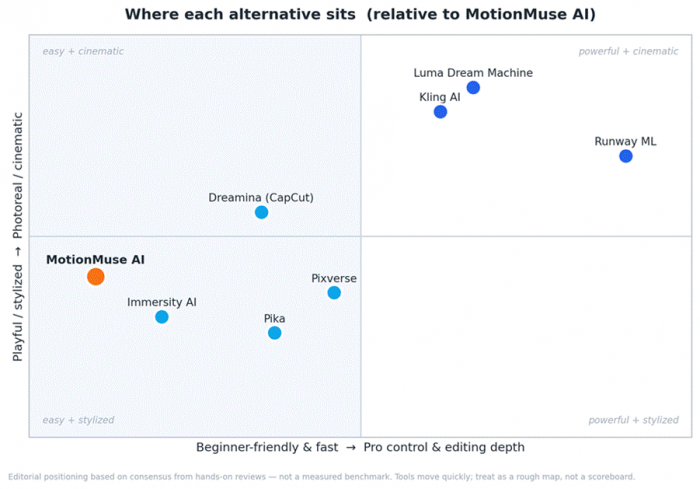
A rough map of where each tool sits relative to MotionMuse AI. Editorial positioning from hands-on review consensus, not a measured benchmark.
The shortlist at a glance
| Tool | Best for | Free tier | From / mo | Standout strength |
|---|---|---|---|---|
| Kling AI | Realistic motion on a budget | Yes (watermarked) | ~$6.99 | Smoothest human motion at its price |
| Runway ML | Pro control & editing | Trial only | ~$12–$15 | Deep editing + many models, one plan |
| Pika | Fun, stylized social clips | Yes (daily refresh) | ~$8 | Playful creative effects |
| Luma Dream Machine | Cinematic, lifelike motion | Trial only | ~$30 | Physically plausible motion |
| Pixverse | Fast, anime / stylized short-form | Yes (small) | ~$9.99 | Speed + stylized aesthetics |
| Dreamina (CapCut) | Free-first, TikTok pipeline | Yes (daily) | Free-first* | Generate → edit → post flow |
| Immersity AI | Depth / parallax photo motion | Yes (watermarked) | ~$4.99 | Best 2D-to-3D depth animation |
*Dreamina is free-first; paid pricing varies by region. Entry prices are the cheapest paid tier; what you get differs sharply. Figures approximate, mid-2026.
Pricing at a glance
Entry prices cluster low, but “cheap to start” and “cheap to use” differ. Credits get spent per generation, and one usable clip can take several tries, so the real gap is how far credits stretch, not the sticker price. Each tool’s tiers are broken out in its section below.
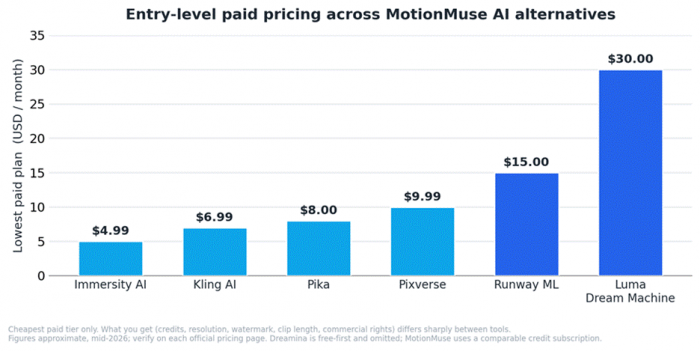
Cheapest paid tier only. Dreamina is free-first and omitted. Figures approximate, mid-2026; verify on each provider’s page.
A reality check on review scores
Sort these tools by public Trustpilot score and the picture looks alarming: most sit between 1 and 3 stars. Before you panic, read what the reviews are about. The large majority are billing complaints: credits eaten by failed generations with no refund, subscriptions that are hard to cancel, and charges that continue after cancelling. Those are real and worth taking seriously, but they mostly measure the credit-subscription experience, not whether the tool makes good video.
For contrast, image generators on the same platform that don’t burn credits per attempt (Leonardo, for one) sit near 4.6 stars. The video tools’ actual output, judged in hands-on tests and on Product Hunt, rates far higher than their Trustpilot stars suggest. There’s also a clone-site problem: each popular tool has copycat domains with their own tiny review pages, so the figures below are from the official listings only, as of mid-2026, and they move.
| Tool | Trustpilot | G2 / Capterra | What reviewers consistently say |
|---|---|---|---|
| Kling AI | 1.3 ★ · ~250 | Not meaningfully listed | Praised for realism; hammered on credit burn and silent support |
| Runway ML | 1.2 ★ · ~200 | Sparse, inconsistent | Loved for control and quality; slated for wasted credits and refunds |
| Pika | 1.8 ★ · ~60 | Not meaningfully listed | Liked for fun and ease; dinged on billing and weak realism |
| Luma Dream Machine | 2.3 ★ · ~50 | Not meaningfully listed | Praised for cinematic motion; dinged on non-rolling credits |
| Pixverse | 2.8 ★ · ~95 | Not meaningfully listed | Liked for speed and anime; dinged on credit delivery and billing |
| Dreamina (CapCut) | No own listing* | Not meaningfully listed | Liked for free access and TikTok flow; polarizing on quality/region |
| Immersity AI | Too few to rate | Not meaningfully listed | Liked for the depth effect and low price; little feedback overall |
*Dreamina has no dedicated Trustpilot page; its sibling app CapCut sits near 1.2 ★ across 880+ reviews. Scores are volatile and skew toward billing experience, not output quality.
How to read these
• Test the free tier first. Judge real output, not the marketing reel.
• Save every usable clip immediately. Failed generations rarely earn a credit refund.
• Start monthly, not annual. Annual plans draw the most cancellation complaints; commit once you’re sure.
• Don’t lean on G2 or Capterra here. These are consumer tools, so B2B review sites carry thin, sometimes mis-categorised listings.
• If billing breaks and support goes silent, a card-provider chargeback is the lever users report actually works.
The seven alternatives
Kling AI: the best all-round upgrade for most people

If you want a single recommendation, this is usually it. Kling, built by Kuaishou (the company behind the Kwai app), is what reviewers reach for when they want motion that doesn’t fall apart. Its image-to-video mode is its strongest feature: the 3D face and body reconstruction under the hood keeps limbs and faces from melting the way they do in lighter tools.
You also get range MotionMuse lacks: much longer clips, native 4K on the newest model, a Motion Control feature that transfers movement from a reference clip onto a new subject, and audio generated alongside the video in one pass. The catch is the credit burn, a watermarked free tier, famously thin support, and Chinese-jurisdiction data, worth pausing on before you upload anything sensitive.
| Plan | Price / mo | What you get |
|---|---|---|
| Free | $0 | ~66 daily credits, watermarked, ~5s clips, slower queue |
| Standard | ~$6.99 | Watermark-free, commercial use, higher-quality models |
| Pro | ~$25.99 | More monthly credits, Pro/Master models, longer clips, priority queue |
| Premier / Ultra | ~$65 / $128 | Large credit pools and top-priority processing for heavy output |
What’s great
• Among the most realistic motion at any consumer price
• Dependable image-to-video with noticeably less warping
• Long clips, native 4K on the newest model, plus motion transfer and native audio
• Commercial rights from a cheap entry tier
Trade-offs to know
• Credits disappear quickly; heavy users feel it
• Free tier watermarks output; queues slow at peak
• Minimal support and Chinese-jurisdiction data
• More features than a pure “animate my photo” user needs
Best for: A clear quality jump from MotionMuse without pro prices, especially for realistic motion.
Runway ML: the professional ceiling

Runway is the closest thing here to an industry standard, used on real film and ad work and backed by serious investors. Where MotionMuse gives you sliders, Runway gives you a studio: image- and text-to-video through its Gen-4 family, an in-video editor (Aleph) that edits when you describe the change, performance capture (Act-Two), a Motion Brush for painting movement, and Workflows for chaining steps.
It’s also a multi-model marketplace now: one subscription reaches Runway’s own models plus Google’s Veo, Kling, and others, which helps when different shots need different engines. The cost of that power is complexity: the trickiest credit math on this list, a free tier that’s a one-time sample, and far more tool than you need just to nudge a photo into motion.
| Plan | Price / mo | What you get |
|---|---|---|
| Free | $0 | 125 one-time credits (no Gen-4 video), watermark, 5GB storage |
| Standard | ~$12–$15 | 625 credits/mo, watermark removed, Gen-4.5 and multi-model access |
| Pro | ~$35 | 2,250 credits/mo, faster generation, 4K upscaling, priority queue |
| Unlimited | ~$95 | Unlimited slow-lane “Explore” generations + 2,250 fast credits |
What’s great
• Best-in-class control, editing, and consistency
• In-video editing, motion brush, performance capture, workflows
• One subscription, many models (Runway + Veo + Kling and more)
• Used in real production pipelines; up to 4K
Trade-offs to know
• Credit pricing is complex and easy to misjudge
• Free plan is a one-time sample, not a recurring allowance
• Overkill for casual photo animation, with a matching learning curve
• Heavy billing and refund complaints from paying users
Best for: Creators and teams who want maximum control and editing depth, and will use it.
Pika: the most fun, and the friendliest free tier
Pika is what you reach for when you want to play. It animates images and prompts into short, lively clips, but its personality is in the effects: Pikaffects, Pikadditions (drop in objects), Pikaswaps (swap things out), Pikatwists (motion flourishes), and frame-to-frame tools. It leans stylized and imaginative rather than photoreal, a natural fit for memes, social clips, and quick concept exploration.
Its free tier is unusually generous, with daily-refreshing credits that allow real experimentation rather than a token taste, which makes Pika one of the easiest places to land straight from MotionMuse. Just don’t expect cinematic realism; stylization is partly how it hides its imperfections.
| Plan | Price / mo | What you get |
|---|---|---|
| Free | $0 | Daily-refreshing credits, watermarked, non-commercial, up to 720p |
| Basic | ~$8 | Monthly credits, full creative effects, image-to-video |
| Standard | ~$28 | 700 credits/mo, no watermark, all resolutions and effects |
| Pro | ~$76 | 2,300 credits/mo, faster generation for high-output work |
What’s great
• Genuinely fun, fast, and beginner-friendly
• Standout creative effects: add, swap, twist objects, transitions
• One of the most usable free tiers, with daily refresh
• Quick iteration, great for ideation and social content
Trade-offs to know
• Not the tool for photoreal or cinematic output
• Short clips and lower max resolution than premium rivals
• Watermark and no commercial use on the free plan
• Less precise control than Runway
Best for: Social creators and tinkerers who value speed, playfulness, and a free tier that works.
Luma Dream Machine: cinematic motion with real-world physics
Luma comes at video from an unusual angle: the company made its name in 3D capture, and that expertise shows up as some of the smoothest, most physically believable motion you can get. Its Ray3-generation models produce cinematic clips that hold up against Runway and Kling, and helper tools (Keyframes, Loop, Extend, and a Modify feature) cut down the prompt-roulette common to AI video.
The trade-off is that it’s priced for working creators. There’s a limited free trial rather than a generous tier, credits drain quickly on high-resolution clips, single generations cap around ten seconds, and there’s no built-in audio, so you’ll add sound in post. Reviewers also flag that monthly credits don’t roll over.
| Plan | Price / mo | What you get |
|---|---|---|
| Free | $0 | Small daily credit pool, draft mode, watermark, non-commercial, ~5s |
| Plus | ~$30 | ~10,000 credits/mo, commercial use, no watermark, up to ~10s |
| Pro | ~$90 | Roughly 4× Plus usage for weekly output |
| Ultra | ~$300 | Roughly 15× Plus usage; top priority for heavy production |
What’s great
• Exceptionally smooth, physically plausible motion
• Cinematic quality competitive with the best
• Helpful iteration tools (Keyframes, Loop, Extend, Modify)
• Fast drafts that make rapid concepting easy
Trade-offs to know
• No generous free tier, trial only
• Credits burn fast on high-resolution clips, and don’t roll over
• ~10-second per-generation ceiling and no native audio
• Pricing aimed at professionals
Best for: Creators who want cinematic, lifelike motion and will pay for quality.
Pixverse: fast, social-first, and great with stylized looks
Pixverse is built for the TikTok and Reels tempo. It turns prompts or images into short clips in well under a minute, ships a deep library of effect templates, and is especially strong with anime and stylized 2D, styles where small motion errors hide naturally. Its newest model adds start-and-end-frame control and native 4K at the top end.
Push it toward photoreal humans, though, and motion can get uncanny; quality and consistency dip on longer or more complex shots; and cheaper tiers cap resolution and length. Treat it as a strong second pick rather than a do-everything platform, and watch the billing, which draws the same credit complaints as its rivals.
| Plan | Price / mo | What you get |
|---|---|---|
| Free | $0 | ~50 credits/mo (~10 clips), watermarked, short clips |
| Standard | ~$9.99 | ~500 credits/mo, higher quality, longer clips |
| Premium | ~$60 | Large credit pool, faster generation, 4K on top output |
| Ultra | ~$149–$199 | Highest volume and off-peak generation perks (annual discounts) |
What’s great
• Very fast generation, ideal for high-volume short-form
• Excellent with anime and stylized aesthetics
• Effect templates plus start- and end-frame control
• Affordable entry with a small free tier
Trade-offs to know
• Realistic human motion can look uncanny
• Consistency drops on longer or complex clips
• Resolution and length gated on lower tiers
• Credit-delivery and billing complaints in user reviews
Best for: Social creators and anime / stylized content where speed and volume beat photoreal polish.
Dreamina (CapCut): the best free-first option, wired into TikTok
Dreamina is ByteDance’s creative platform (CapCut’s sibling), and its superpower is the pipeline: Dreamina generates, CapCut edits, TikTok distributes. No rival matches that path from idea to posted short, and for social-first creators the integration alone can decide it. It bundles text-to-image, image-to-video, audio, and avatars, runs on free daily credits, and ships a stack of photo-animation templates close to MotionMuse’s core use case, with a far bigger ecosystem behind them.
It’s also divisive: reviews swing between “best of 2026” and “scam.” The most capable model and full feature set roll out unevenly by region, free output is watermarked, real-face generation is restricted, and (like Kling) data sits under Chinese jurisdiction. What you can access may depend on where you are.
| Plan | Price / mo | What you get |
|---|---|---|
| Free | $0 | Free daily credits, watermarked, image- and text-to-video, templates |
| Subscription | Region-dependent | More credits, priority processing, and watermark removal |
| Via CapCut | Bundled | Same Seedance models inside CapCut’s editor and Video Studio |
What’s great
• Free daily credits and a low barrier to entry
• Seamless generate-edit-publish flow with CapCut and TikTok
• Strong motion and lip-sync, plus many photo-animation templates
• An all-in-one creative suite, not just a video generator
Trade-offs to know
• Feature and model availability varies sharply by region
• Watermarks on free output; real-face generation restricted
• Polarizing reputation, so calibrate your expectations
• Data handled under Chinese jurisdiction
Best for: Social-first creators already in the CapCut / TikTok world who want a free place to start.
Immersity AI (formerly LeiaPix): the closest like-for-like for depth motion
If what you love about MotionMuse is the subtle 3D drift (a still photo gaining depth and a gentle parallax sweep), Immersity AI is the most direct match here. Built by Leia Inc., a 3D-display company, its Neural Depth Engine turns a single 2D image into a convincing depth animation, with about a dozen movement styles (pan, zoom, dolly, perspective, orbit) and manual depth-map editing for when the AI guesses wrong. It also exports for XR headsets like Vision Pro and Quest.
Keep its scope in mind: this is a specialist, not a general video generator. It adds camera-style depth motion to a photo; it won’t animate a character’s face or invent new motion the way Kling or Runway will. It was beloved when it was free as LeiaPix, and not everyone followed it into paid tiers, which still start very cheap.
| Plan | Price / mo | What you get |
|---|---|---|
| Free | $0 | Watermarked depth animations, ~dozen motion styles, browser-based |
| Paid (entry) | ~$4.99 | Watermark-free, commercial use, higher-quality exports |
| Higher tiers | Scales up | More credits, 4K and XR exports, video-to-3D conversion |
What’s great
• The cleanest, most convincing 2D-to-3D depth animation around
• About a dozen motion styles plus manual depth-map control
• Very cheap entry and a useful XR / 3D export niche
• Dead simple, browser-based, no learning curve
Trade-offs to know
• Specialist tool: depth and parallax only, not general motion
• Won’t animate faces or generate brand-new movement
• Free tier watermarks output; some friction since the move to paid
• Thin community and documentation
Best for: Anyone who specifically wants MotionMuse-style depth and parallax, done especially well.
How to choose, by what you’re making
• “MotionMuse, but better and ideally free.” Start with Dreamina or Kling’s free tier. For the depth look specifically, go to Immersity AI.
• “The most realistic motion.” Kling AI first, Luma Dream Machine close behind.
• “Professional control and editing.” Runway ML: nothing else matches its editing depth and model range.
• “Fun, stylized social content, fast.” Pika for playful effects; Pixverse for anime and high-volume short-form.
• “A photo that gains depth and gently moves.” Immersity AI, full stop.
• “Chromebook or locked-down browser.” All seven are browser-based and need no install, part of why MotionMuse users feel at home.
A money-saving habit: run the same image through two or three free tiers before paying. The best tool is the one that nails your kind of footage, and you only learn that by testing.
Which MotionMuse alternative should you pick?
| If you want… | Best pick | Why it wins | Free tier | From / mo |
|---|---|---|---|---|
| The best all-round upgrade — realistic motion without pro prices | Kling AI | 3D face/body reconstruction keeps limbs and faces from melting; adds long clips, native 4K, motion transfer, and native audio. | Yes · watermarked | ~$6.99 |
| Maximum professional control and editing | Runway ML | Studio-grade: in-video editing (Aleph), Motion Brush, performance capture, Workflows — and one plan reaches Runway + Veo + Kling. | Trial only | ~$12–15 |
| Fun, playful, stylized social clips | Pika | Standout creative effects (add / swap / twist objects, transitions) and the most usable free tier, with daily-refreshing credits. | Yes · daily refresh | ~$8 |
| Cinematic, lifelike motion, and you'll pay for quality | Luma Dream Machine | Exceptionally smooth, physically plausible motion; Keyframes / Loop / Extend / Modify cut the prompt-roulette. | Trial only | ~$30 |
| Fast, high-volume anime / stylized short-form | Pixverse | Sub-minute generation, deep effect-template library, strong with anime / 2D; start- and end-frame control plus 4K up top. | Yes · small | ~$9.99 |
| A free-first, TikTok-ready pipeline | Dreamina (CapCut) | Generate → edit in CapCut → post to TikTok in one flow; free daily credits and photo-animation templates close to MotionMuse's core use. | Free-first* | Free* |
| MotionMuse-style depth and parallax, done best | Immersity AI | Cleanest 2D-to-3D depth animation; ~dozen motion styles, manual depth-map editing, plus XR export (Vision Pro, Quest). | Yes · watermarked | ~$4.99 |
What none of these do well (yet)
• Hard cases still break. Hands, on-screen text, and fast or complex motion trip up every model. Expect retries.
• Garbage in, garbage out. A low-resolution or cluttered source produces a worse animation everywhere. Feed them sharp images.
• Credit anxiety is real. Budget credits for several attempts per usable clip.
• Commercial rights vary by plan. Free tiers are usually watermarked and non-commercial. Read the fine print.
• Data and privacy differ. Kling and Dreamina sit under Chinese jurisdiction; for sensitive images, weigh that or choose another provider.
The bottom line
MotionMuse AI is a frictionless way to put motion into a still image, and for casual clips it’s hard to fault. The moment you need more (longer, sharper, more realistic, more controllable, or safely licensed), these seven cover every direction you might grow in.
Want one starting point? Try Kling AI, the cleanest all-round upgrade. Reach for Runway for production control, Pika or Pixverse for fast social content, Luma for cinematic motion, Dreamina for a free TikTok-ready pipeline, and Immersity AI for that depth-and-parallax magic. Whatever you pick, test the free tier and watch the billing terms before you commit.
Post Comment
Be the first to post comment!





