How this review came together
It is 11pm, the deck is due at 9, and slide four still reads “Title here.” If that particular dread feels familiar, you are the reason this whole category exists, and also the reason I refused to review it lazily. Rather than run a single prompt, grab a lucky screenshot, and call it journalism, I put these tools through the kind of work that shows up on an ordinary Tuesday. Here is exactly how.
A lucky screenshot is a magic trick. A repeatable result is a review.
The rule: same brief, no favorites
Every tool received the identical brief, so nothing got a home-field advantage. Three real prompts went through each one:
- → A seed-round pitch, ten slides, for a fictional software startup
- → A quarterly review, six slides, padded with placeholder charts
- → A product launch, twelve slides, for a brand-new gadget
Same words, same order, every single time. Easy prompts flatter everything, so I reached for the messy, deadline-shaped kind on purpose.
What I graded
Each result was scored on the six things that decide whether a tool earns a permanent browser tab or a quiet uninstall:
- → First-draft quality. How usable the very first output is, before you touch it
- → Design coherence. Whether the slides look like they belong to one family
- → Editing experience. How it feels to take over once the AI steps back
- → Speed. Raw time from prompt to a preview you can look at
- → Export fidelity. Whether the deck survives being turned into a real PowerPoint file
- → Price. What all of it costs for what you get back
How I kept it honest
My taste is only one data point, so I refused to lean on it alone. Every finding was pressure-tested three ways:
- → Cross-checked the crowd. Public ratings on G2, Capterra, and Trustpilot, read across hundreds of reviews
- → Compared to a benchmark. A documented three-week test that ran twelve tools through identical prompts
- → Paid real money. The plans that mattered got bought, so nothing was judged on a crippled free tier
Where my gut agreed with thousands of reviewers, I trusted it. Where it clashed, I looked closer. What follows is the unhyped version: what AI PPT really is, what the numbers say, and which tools deserve a spot on the scorecard.
What is AI PPT?
AI PPT is shorthand for an AI presentation maker, sometimes called an AI PowerPoint generator. Instead of opening a blank slide and fighting with fonts, spacing, and layout for an hour, you hand the tool a starting point and it drafts the whole deck for you. You can type a topic, paste a wall of rough notes, upload a document, or even drop in a link, and the AI writes the outline, fills in the slide copy, chooses a layout, picks or generates the images, and returns a deck you can edit and export.
The category splits into two families, and knowing which you want saves a lot of frustration. The first lives inside PowerPoint itself, most notably Microsoft Copilot, so everything happens in the app your workplace already uses. The second is a wave of standalone web tools such as Gamma, Beautiful.ai, and Slidesgo that generate slides in the browser and then let you export or share them. The web tools tend to feel faster and more modern. The in-app option tends to hand back a cleaner PowerPoint file. That tension runs through this entire review.
How Does It Work?
1. Give it a starting point. A topic sentence, pasted notes, a Word doc, a PDF, or a URL. The more context you feed it, the less generic the result.
2. It drafts the structure. The AI proposes an outline, then writes slide-by-slide copy, deciding what belongs on each slide and in what order.
3. It designs each slide. Layout, type, color, and images get applied automatically, often with pictures generated on the fly to match the topic.
4. You edit and export. Refine the wording, swap visuals, then download as a PPTX or PDF, or share a live link. This last step is where tools diverge most.
The Data
This stopped being a toy category
A few figures make it obvious why nearly every presentation app now has an AI button.
$2B estimated size of the AI presentation-maker market in 2025, on track toward roughly $10B by 2033 | ~25% compound annual growth pinned to that slice, above the wider software average | 70M+ users reported by Gamma alone, alongside $100M revenue and a $2.1B valuation | $9.6B size of the broader presentation-software market in 2026, forecast past $16B by 2030 |
Figures drawn from Coherent Market Insights, SNS Insider, The Business Research Company, and reporting on Gamma's 2026 metrics.
Estimates vary by analyst, but every source points the same direction: sharp, sustained growth. Independent firms put the wider presentation-software market somewhere between $8B and $9.6B entering 2026, with forecasts stretching to $16B, $21B, or more by the early 2030s. Zoom out and worldwide AI spending is projected near $2.5 trillion in 2026. Slide tools are a small slice of that, but they are one of the most visible places ordinary people meet generative AI at work.
The takeaway is not the dollar figures. It is that competition is fierce, features ship weekly, and last year's best tool may not be this year's. That churn is why testing beats loyalty here.
The four tools, up close
Four tools cover the range most people need: the fastest web generator, the cleanest designer, the native Microsoft option, and the template-first pick. Here is the honest read on each, with a snapshot of strengths, weaknesses, and what you get for your money.
Gamma
Speed champ · web-native
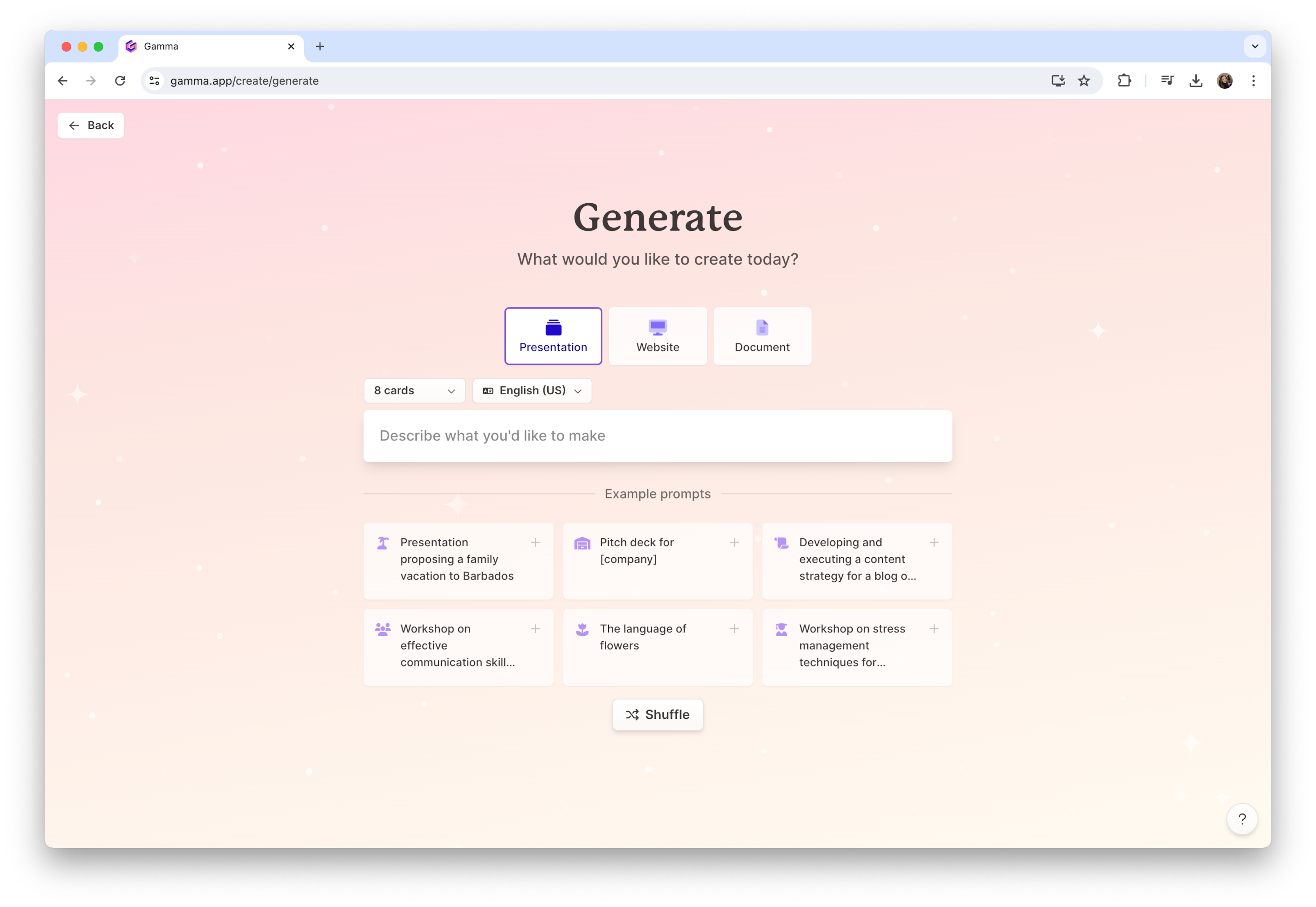
Gamma is the web-native speed champion. Since launching in 2020 it has grown past 70 million users, and it turns a prompt, pasted notes, or an imported file into a full deck in under a minute using a card-based, scrollable format. Its Gamma Agent can research the web and restyle an entire deck from your brand guidelines through plain conversation. Gamma shines when you share the result as a live link. It stumbles when the deliverable must be a clean PowerPoint, because those cards do not map onto fixed slides.
| PROS | CONS |
|---|---|
+ Fastest prompt-to-draft tested, roughly 30 to 95 seconds + Gamma Agent restyles a full deck from your brand guidelines + Real free tier so you can try before paying | – PowerPoint export frequently breaks, the top complaint – Card format reads more like a web doc than a slide – Free credits are one-time, roughly ten decks |
| FEATURE | DETAILS |
|---|---|
| Starting input | Prompt, pasted text, or imported doc, URL, or PPTX |
| Output formats | Live web link, PDF, PPTX, PNG, Google Slides |
| Free tier | 400 one-time credits, roughly 10 decks |
| Paid entry | Plus around $8 to $12 per month on annual billing |
| Standout feature | Gamma Agent: web research and restyle by chat |
| Best for | Fast drafts shared as a live link |
Beautiful.ai
Design automation · G2 4.7
Beautiful.ai is design automation done right. Its Smart Slide engine adjusts spacing, alignment, and typography as you add content, so slides look composed by default and stay on brand across a whole deck. It carries the highest G2 score in this group, around 4.7, and the most reliable PowerPoint export here, which is why consultants and sales teams lean on it. The trade-off is rigidity: pixel-level control is limited, the template library grows slowly, and Trustpilot reviews flag billing and cancellation friction.

| PROS | CONS |
|---|---|
+ Most reliable PowerPoint export in this group + Polished, on-brand Smart Slides with almost no effort + Highest G2 score here, around 4.7 out of 5 | – Rigid layouts limit pixel-level control – Template library has been slow to expand – Trustpilot flags billing and cancellation friction |
| FEATURE | DETAILS |
|---|---|
| Starting input | Prompt, outline, or manual build with Smart Slides |
| Output formats | High-fidelity PPTX, PDF, share link |
| Free tier | Free trial only, no permanent free plan |
| Paid entry | Pro from around $12 per month |
| Standout feature | Smart Slide auto-layout engine and brand kit |
| Best for | Polished, on-brand business decks |
Copilot in PowerPoint
Native Microsoft · zero export pain
Microsoft Copilot puts AI generation directly inside PowerPoint, so there is no separate app and no export step. It drafts a deck from a prompt or turns an existing Word document into structured slides, applies your organization's template, and writes speaker notes, all as native .pptx from the first click. That removes the export headaches that plague web tools and keeps everything inside your Microsoft 365 data governance. The catch is cost and polish: it needs a paid Copilot add-on on top of Microsoft 365, and the output is outline-heavy, more solid draft than finished deck.

| PROS | CONS |
|---|---|
+ Native .pptx from the first click, so exports never break + Turns an existing Word document into a deck cleanly + Runs inside your Microsoft 365 data governance | – Needs a paid Copilot add-on on top of Microsoft 365 – Output is outline-heavy, light on visual polish – Inherits your template quality, dated in, dated out |
| FEATURE | DETAILS |
|---|---|
| Starting input | Prompt or existing Word document, inside PowerPoint |
| Output formats | Native .pptx, no conversion step |
| Free tier | None, requires Microsoft 365 plus Copilot |
| Paid entry | Copilot add-on around $21 per user per month (Business) |
| Standout feature | Generates natively in PowerPoint, plus speaker notes |
| Best for | Teams already standardized on Microsoft 365 |
Slidesgo
Template-first · by Freepik
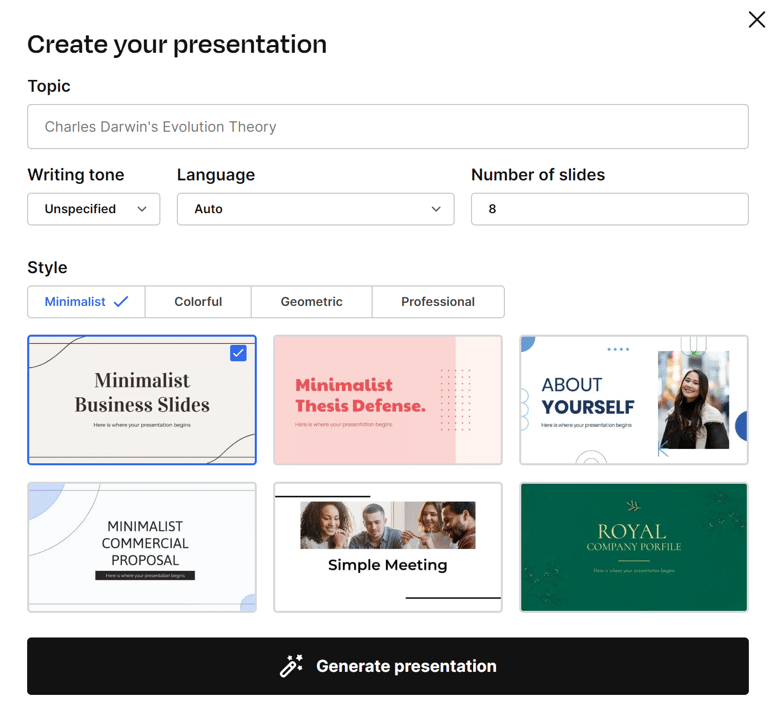
Slidesgo, from the Freepik team, takes the template-first route. You pick a topic and a theme, and it fills one of more than 800 polished layouts, then hands back a fully editable PPTX that opens cleanly in PowerPoint, Google Slides, or even Figma, sidestepping the export problems that trip up card-based tools. The library leans toward students and educators, and the topic-plus-theme flow is about as beginner-friendly as it gets. The limits: a free plan capped at three presentations a month, the best templates behind Premium, and AI that fills a good template more than it writes a fresh narrative.
| PROS | CONS |
|---|---|
+ Native, editable PPTX that opens without a fight + More than 800 templates, strong for education + Very beginner-friendly topic-plus-theme flow | – Free plan capped at three presentations a month – Best templates and features sit behind Premium – AI fills a template more than it writes a narrative |
| FEATURE | DETAILS |
|---|---|
| Starting input | Topic plus theme selection, or your own text |
| Output formats | Editable PPTX for PowerPoint, Google Slides, Figma |
| Free tier | 3 presentations per month |
| Paid entry | Premium subscription, verify current pricing |
| Standout feature | 800+ templates with clean, editable export |
| Best for | Students, teachers, and quick editable decks |
What users keep saying
The same themes surface again and again across the platforms. These paraphrase the recurring feedback, grouped by the point each one makes.
★★★★★
“The blank page stops being scary. I drop in rough notes and get an organized deck back in minutes.”
Educator and content creator · via G2
★★★★★
“It saved me days of formatting. The automation handles the design so I can focus on the actual message.”
Marketing agency owner · via G2
★★★★★
“Lovely to look at, but the PowerPoint export shifted my text and I ended up rebuilding half the slides.”
Consultant · via Capterra and Trustpilot
★★★★★
“The free credits vanish fast. One or two decks in and I already hit the wall.”
Free-tier user · via Trustpilot
★★★★★
“Copilot lives inside PowerPoint, so there is no messy export. The draft is plain, but it is a real starting point.”
Microsoft 365 administrator · via a comparison roundup
★★★★★
“The design sometimes prioritizes looks over readability, which created real accessibility problems for us.”
Accessibility-minded reviewer · via Capterra
Paraphrased summaries of verified feedback published on G2, Capterra, and Trustpilot, grouped to show the patterns rather than to quote any single reviewer verbatim.
How the four compare
Same four tools, three lenses: what they cost, what they can do, and who each one is for.
PLANS AND PRICING
| TOOL | FREE TIER | PAID ENTRY | KEY LIMIT |
|---|---|---|---|
| Gamma | 400 one-time credits (~10 decks) | $8 to $12/mo Plus | Credits do not refresh monthly |
| Beautiful.ai | Free trial only | ~$12/mo Pro | No permanent free plan |
| Copilot | None | ~$21/user/mo add-on | Requires Microsoft 365 underneath |
| Slidesgo | 3 presentations per month | Premium (verify) | Best templates behind paywall |
CAPABILITIES AT A GLANCE
| CAPABILITY | GAMMA | BEAUTIFUL.AI | COPILOT | SLIDESGO |
|---|---|---|---|---|
| Clean PowerPoint export | Weak | Strong | Native | Strong |
| AI content depth | Good | Moderate | Moderate | Template-fill |
| Template variety | Moderate | Limited | Uses yours | 800+ |
| Share as live link | Yes | Yes | No | No |
| Runs inside PowerPoint | No | No | Yes | Exports to it |
| Beginner-friendly | High | High | Moderate | Very high |
RATINGS AND BEST FIT
| TOOL | PUBLIC RATING | BEST FOR | WEAK SPOT |
|---|---|---|---|
| Gamma | G2 4.3 / 5 | Fast web-shared drafts | .pptx export breaks |
| Beautiful.ai | G2 4.7 / 5 | Polished on-brand decks | Layout rigidity |
| Copilot | Native .pptx, ratings vary | Microsoft 365 teams | Cost and light polish |
| Slidesgo | Freepik-backed, well-liked | Students and quick decks | Free plan caps |
Pricing and ratings are snapshots from 2026 and shift often. Confirm current numbers on each tool's own site before buying.
The verdict: what shined, what still needs a human
WHAT EARNED ITS KEEP
+ Speed is not a lie. The best tools carried an idea to a viewable draft in under a minute, and it held across every prompt, not just the demo.
+ The blank page finally loses. Reaching a rough structure you can argue with is the slowest part of any deck, and AI deletes it.
+ Beautiful.ai looked composed by default, and its slides reached PowerPoint without falling apart.
+ Copilot skipped the export problem completely. For Microsoft teams, working inside the file you already own erases the biggest headache.
+ Slidesgo handed back clean, editable PPTX that opened without a fight, which is rarer than it should be.
WHERE IT STILL NEEDS YOU
– Export fidelity is the recurring wound. Web-first tools that dazzle as a link can shatter the moment you need a real .pptx file.
– The writing is competent and forgettable. First-draft copy trends generic and needs a human pass before it earns a room.
– Credit meters create friction. Free tiers empty fast, and regular users meet the paywall sooner than the marketing implies.
– The pictures miss. Auto-chosen images sometimes had nothing to do with what the slide was trying to say.
The Finishing Line
Pick by your finish line, not by the flashiest demo. If you present as a shareable link and want raw speed, Gamma is still the one to beat. If the file has to land as a clean PowerPoint, Beautiful.ai and Slidesgo export without drama, and Copilot skips the export step entirely by living inside the app you already pay for. But hold on to the one truth underneath all of it: none of these does your thinking for you. They demolish the hour you used to lose nudging text boxes, and nothing more. Treat the output as a confident first draft rather than a finished argument, and the good ones are worth every minute they hand back. Then test again before you renew, because in this market last month's winner is already yesterday's news.
Post Comment
Be the first to post comment!