Look, I’ll be honest with you.
Supawork AI is fine. It gets the job done when you need something fast and don’t want to think too hard about which app to open. Headshots, face swap, lip-sync, video - all under one login. For a free tool, that’s actually impressive.
But “fine” has limits. The more I used it for anything client-facing or professional, the more I noticed the cracks - inconsistent headshot quality, video output that felt like it was built for social scroll rather than real production, and a platform trying so hard to do everything that it never quite nails any one thing.
So I tested the alternatives. Not just skimmed their websites - actually ran them through the specific jobs Supawork handles. What you’re reading is the result of that.
There’s no single replacement. Supawork does five different things, and the best tool for each of those jobs is different. Find the feature you actually use, go to that section, and you’ll have a clear answer fast. Everything here has been verified as of June 2026 - pricing, ratings, the lot.
The 5 alternatives at a glance
Skim this first, then jump to whichever row fits your use case. Detailed write-ups, pricing tables, and review scores follow below.
| Tool | Best for | Standout strength | Starts at | Free? |
|---|---|---|---|---|
| Akool | All-in-one swap + avatars + video, pro-grade | 8K video face swap + live avatars | ~$29/mo* | Yes |
| HeyGen | Script-to-presenter video | Most realistic talking avatars | $24/mo | Yes |
| Aragon AI | Professional headshots only | Reliable shots from 6 selfies | ~$35 once | No |
| Leonardo AI | Creative image generation | Custom models + consistent characters | $10/mo | Yes |
| Runway | Cinematic / professional video | #1-rated Gen-4.5 + editing tools | $12/mo | Yes |
* Akool is credit-based; the figure is its lowest paid tier. Aragon sells one-time photo packs rather than a monthly plan.
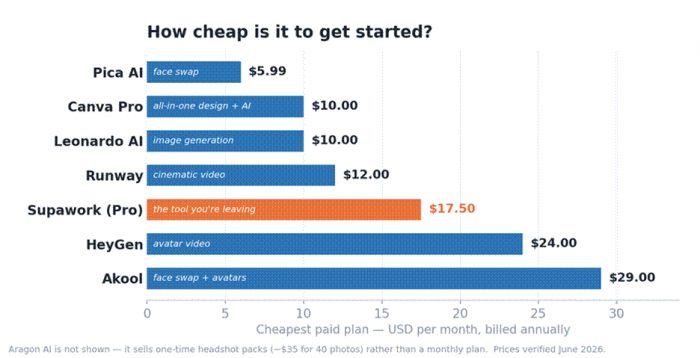
Entry pricing varies widely - from Leonardo AI at ~$10/mo to Akool at ~$29/mo. Aragon’s one-time packs sit outside this view.
How we put this guide together
A quick note on process, because you should know how any “best of” list was built:
• Job-first, not brand-first. We broke Supawork down into the features people actually use and found the strongest specialist (or closest all-rounder) for each.
• Real user evidence. Ratings come from verified reviews on G2, Trustpilot, and Capterra, plus hands-on testing notes from independent reviewers - not vendor marketing.
• Honest about trade-offs. Every tool here, including the ones we like most, gets a real watch-outs list. Perfect tools don’t exist.
• Prices verified in June 2026. AI pricing changes constantly. Treat figures as a guide and confirm on the official site.
• No paid placement. Nobody bought a spot or a ranking in this guide.
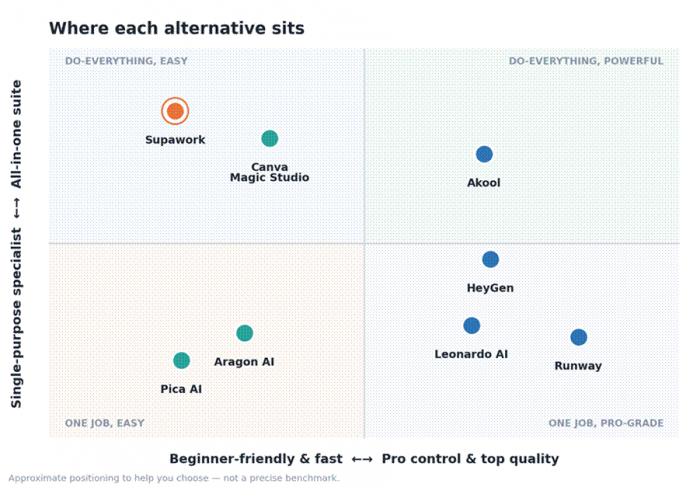
Roughly where each tool lives: all-in-one vs. specialist, beginner-friendly vs. pro-grade.
The 5 best Supawork alternatives, reviewed
Akool - the closest all-in-one match
| Best for: Marketing teams who want Supawork’s face-swap + avatar + image-to-video combo, but production-grade. |
If you mainly used Supawork to swap faces, animate stills, and spin up talking avatars, Akool is the most natural step up. It’s a Palo Alto company (founded in 2022 by a former Google and Apple engineer) that packs face swap, talking avatars, image-to-video, AI image generation, video translation, and a real-time “Live Camera” face filter into one workspace - the same breadth Supawork offers, but tuned for brands that ship content at volume. Coca-Cola, Qatar Airways, and Canon have run campaigns on it.
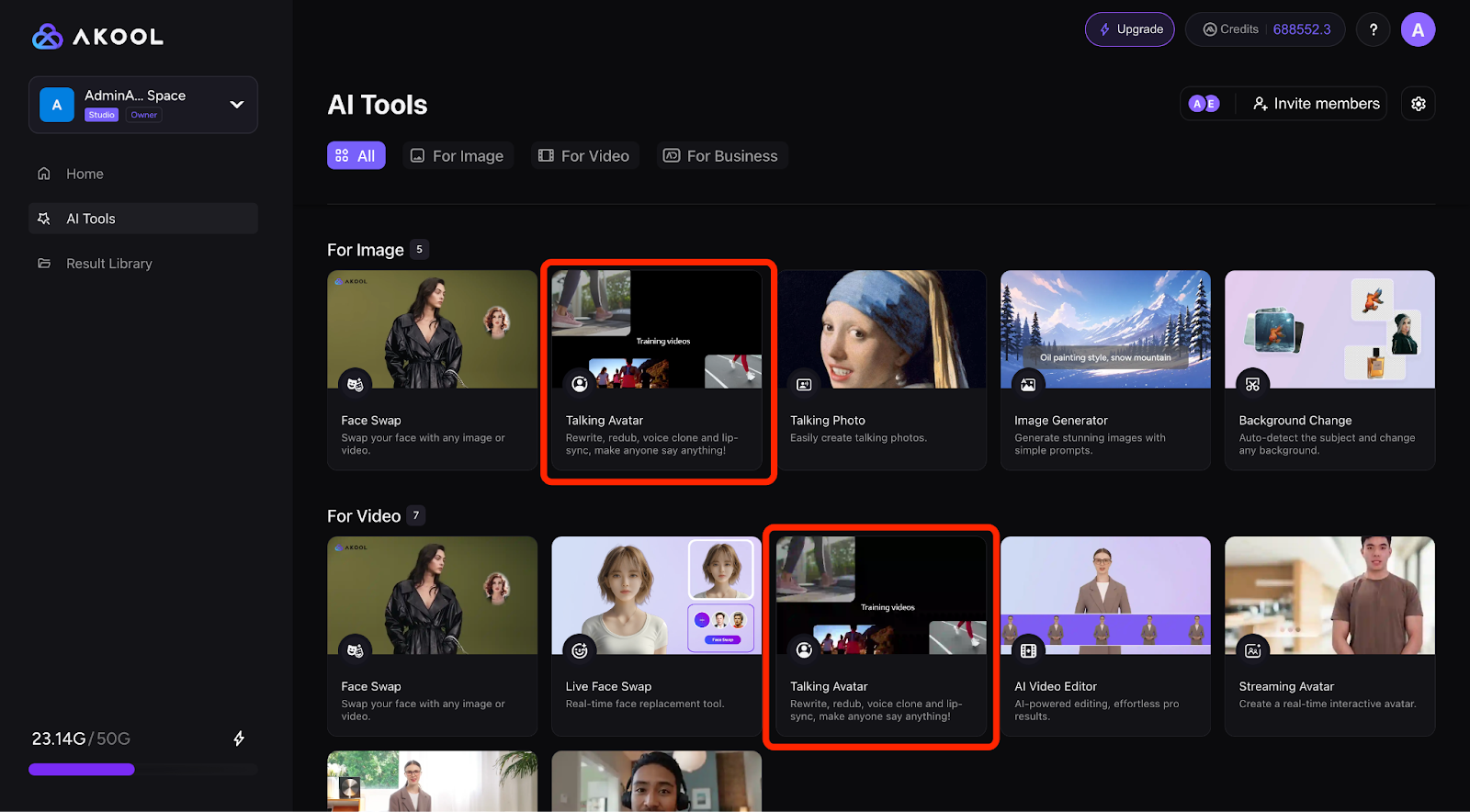
The trade-offs are honest ones. Akool runs on credits, and they drain faster than people expect once you touch 4K or longer videos, so monthly costs are hard to predict. Renders can slow down during peak hours, and reviewers are split on the face swap: lighting-matched video swaps look great, while a single still-to-clip swap can land in “looks like a cousin of you” territory. It’s overkill - and overpriced - if all you want is a quick meme.
| PROS | WATCH-OUTS |
|---|---|
• Best-in-class video face swap (up to 8K resolution) • Real-time “Live Camera” avatars for calls and streams • A genuinely broad toolset under one login • Video dubbing with lip-sync in 150+ languages • Trains its own models, so new features ship fast | • Credit system is opaque and burns fast on 4K / long clips • Rendering slows during peak hours • Pricier than casual tools • Still-image face swap quality is hit-or-miss • Far more than you need for one-off fun |
| Pricing | Credit-based; first paid tier from ~$29/mo up to ~$500/mo (≈30% off annual) |
| Free tier | Yes - watermarked, 720p, ~10-minute cap (fine for testing) |
| Standout | Studio-grade video face swap + live real-time avatars |
| Commercial use | Yes, on paid plans |
| Main watch-out | Hard-to-predict credit costs once you scale up |
What real users score it
| Source | Rating | Based on |
|---|---|---|
| G2 | 4.8 / 5 | ~540 reviews |
| Trustpilot | 4.8 / 5 | ~1,200 reviews (regional scores vary) |
| Capterra | Positive | Verified users praise ease of use |
| PRO TIP Use Akool’s “one winning clip, many faces” trick - take your best-performing video and swap several demographics onto it to test ad creative without re-filming. Start on the free tier and watch the credit meter before you commit. |
HeyGen - the talking-avatar specialist
| Best for: Turning a script into a polished presenter video - the job where Supawork’s avatars feel amateur. |
Supawork can animate a photo into a talking clip, but if presenter-style video is your real goal - explainers, training, multilingual product videos - HeyGen is the category leader. You paste a script, pick a stock or custom avatar (or a “digital twin” of yourself), choose a voice, and it renders a lip-synced video. Its Avatar IV/V models are widely rated the most photorealistic available, and the translator covers 175+ languages with the speaker’s mouth re-synced to the new audio. Over 100,000 businesses use it.
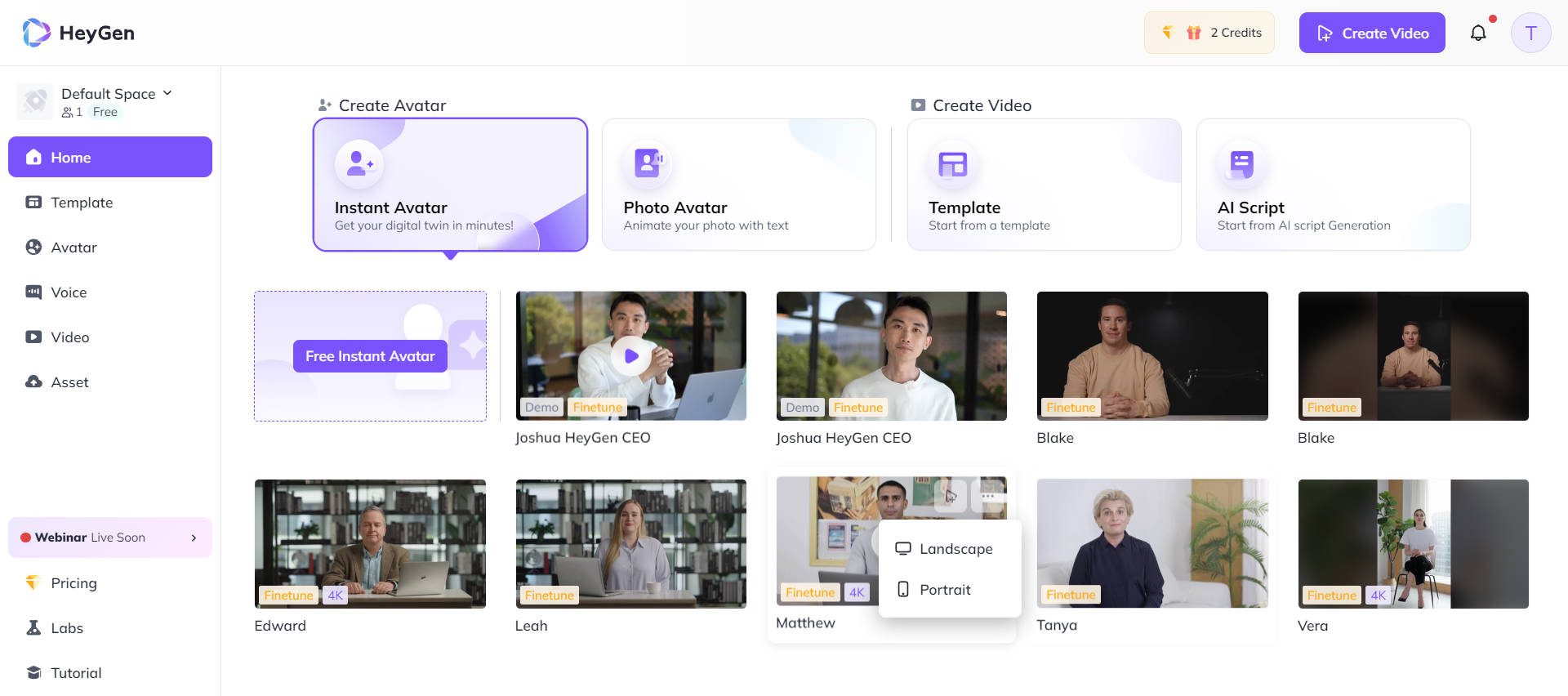
Where it bites is the credit system. “Unlimited videos” means unlimited drafts, not unlimited high-quality renders - the realistic Avatar IV/V burn premium credits roughly seven times faster than the basic avatars, and unused credits expire. Several reviewers report hitting daily limits mid-project. It also doesn’t do face swap, so think of it as a complement to a swap tool rather than a full Supawork replacement.
| PROS | WATCH-OUTS |
|---|---|
• The most realistic talking avatars on the market • 175+-language translation with accurate lip-sync • A real free plan to test before paying • “Video Agent” builds a full video from one prompt • Voice cloning and a real-time LiveAvatar API | • Credit math is genuinely confusing • Premium avatars deplete credits fast; they expire • “Unlimited” wording oversells what you get • No face-swap feature at all • Costs climb with add-ons and extra seats |
| Pricing | Free; Creator $24/mo (annual); Pro ~$79/mo; Business from ~$119–149/mo; Enterprise custom |
| Free tier | Yes - 3 videos/mo, ~1-min cap, 720p, watermark, premium trial |
| Standout | Photorealistic avatars + 175-language lip-synced translation |
| Commercial use | Yes, on paid plans |
| Main watch-out | Premium “credits” run out faster than the price implies |
What real users score it
| Source | Rating | Based on |
|---|---|---|
| G2 | 4.8 / 5 | 1,000+ reviews - avatar quality 9.2/10 |
| Capterra | 4.7 / 5 | 313 verified reviews |
| Recognition | G2 “Fastest-Growing” | Best Software Awards |
| PRO TIP Run the credit math before subscribing. If you publish more than about four avatar videos a month, Creator pays for itself; below that, the free plan or a per-use tool is smarter. Favour cheap audio dubbing over pricey full lip-synced translation when you can. |
Aragon AI - the dedicated headshot tool
| Best for: People who only opened Supawork for its headshot generator and want that one job done reliably. |
Supawork’s most popular feature is its free AI headshot generator - but “free” comes with inconsistent quality. If polished LinkedIn, resume, and team photos are all you need, a specialist like Aragon does that single job more dependably. You upload six selfies, answer a few questions, and get dozens of headshots back in 15–45 minutes, with a “Remix” tool to tweak backgrounds and outfits afterwards. It’s used by 2M+ professionals and holds one of the strongest review profiles in the category.
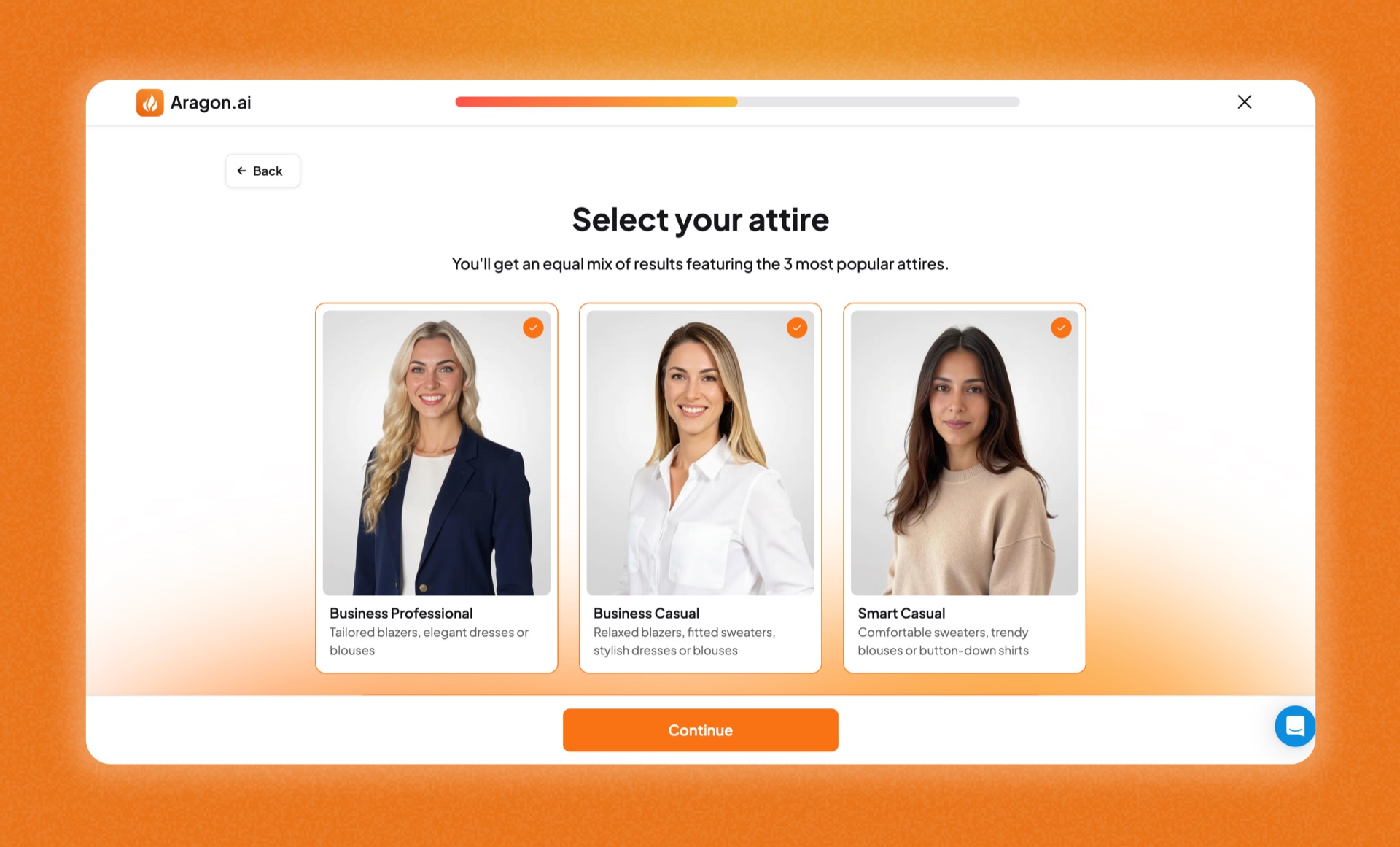
Be realistic about hit rate, though - and this is true of every AI headshot tool. Reviewers commonly keep a handful of genuinely great shots out of a large batch, and some images show stiff posture or the occasional artifact in tricky poses. There’s no free trial, so you pay upfront. Input quality matters enormously: sharp, recent, well-lit selfies in, studio-looking photos out.
| PROS | WATCH-OUTS |
|---|---|
• Needs only 6 selfies - most rivals want 15+ • Fast 15–45-minute turnaround • One of the highest Trustpilot ratings in the niche • “Remix” editing without re-uploading photos • Full commercial rights and industry-specific styles | • Paid only - no free trial • Usable-photo rate varies, so you cull the batch • Occasional stiff or forward-leaning poses • Not built for stylized or editorial portraits • Output quality depends heavily on your input photos |
| Pricing | One-time packs - from ~$35 (40 photos) to ~$75 (100 photos); team/enterprise available |
| Free tier | No - satisfaction guarantee instead |
| Standout | Reliable professional headshots from just 6 selfies |
| Commercial use | Yes - full rights to your images |
| Main watch-out | Expect to narrow a large batch down to a few keepers |
What real users score it
| Source | Rating | Based on |
|---|---|---|
| Trustpilot | ~4.8–4.9 / 5 | 5,800+ reviews |
| G2 | Positive | Speed and realism most cited |
| Independent tests | ~10–15% “great” rate | Normal for the category |
| PRO TIP Upload your sharpest, most recent selfies from varied angles; skip sunglasses, hats, and heavy filters. A ~$35 pack against a $200+ studio session is the value play - buy once and pick your best four. |
Leonardo AI - the creative image engine
| Best for: Creators who used Supawork for image generation and want real control and consistent characters. |
Supawork’s text-to-image is convenient but shallow. Leonardo is what you graduate to when image generation is the point - concept art, marketing visuals, game assets, branded illustration. It runs a clean web interface (no Discord), offers multiple in-house and third-party models, a Unified Canvas for inpainting and outpainting, and - its real edge - custom model training plus a Consistent Character Engine that keeps the same character across images. Fittingly, Canva acquired it, and it now powers Canva’s own image generation.
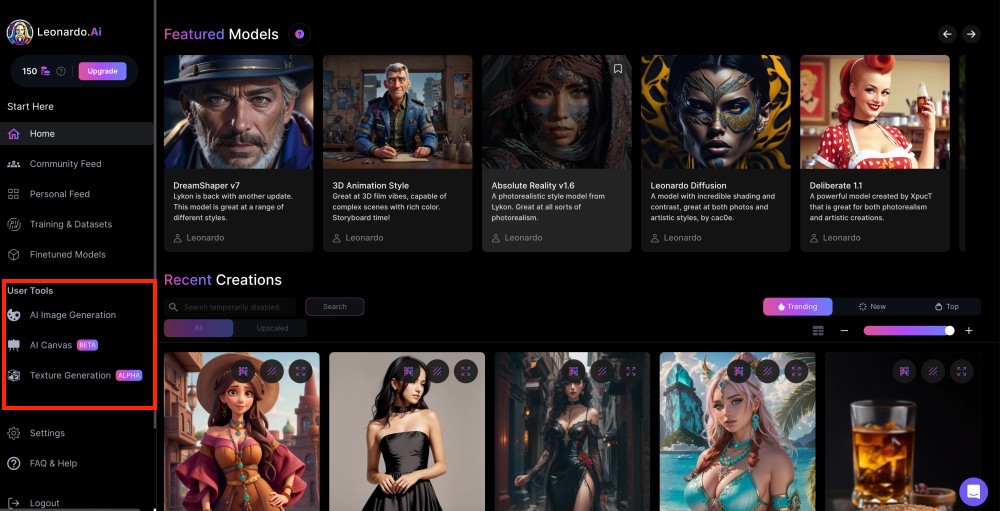
The friction is the token economy. Costs vary by model, resolution, and features, so two people on the same plan can get very different output counts, and video especially devours tokens. Generations can take 15–90 seconds, and some reviewers flag refund or cancellation hassles and being charged for images its own filter blocked. It’s an image tool first - don’t expect Supawork-style face swap or resume features.
| PROS | WATCH-OUTS |
|---|---|
• Deep control and a wide model library • Custom training + consistent characters (rare at this price) • Commercial rights even on the free tier • Web UI is approachable for beginners • Strong for game assets and 3D texture work | • Token costs are confusing and vary wildly • Video generation burns tokens fast • Generations are on the slow side • Moderation can charge you for blocked images • Billing and refund complaints reported |
| Pricing | Free (150 daily tokens); Apprentice $10/mo; Artisan $20/mo; Maestro $48/mo; included with Canva Business |
| Free tier | Yes - 150 tokens/day (great for trying, not production) |
| Standout | Custom model training + consistent characters |
| Commercial use | Yes - including on the free plan |
| Main watch-out | Variable token consumption makes budgeting tricky |
What real users score it
| Source | Rating | Based on |
|---|---|---|
| G2 / Capterra | ~4.7 / 5 | Very large user base (~29M users) |
| Common praise | Control & quality | Web interface, model variety |
| Common gripe | Token costs | And occasional billing friction |
| PRO TIP Set up the free plan first and learn how tokens drain on your typical settings before you pay. Only switch on the Consistent Character Engine and high-res upscaling once a composition is final - both add real token cost per generation. |
Runway - the cinematic video upgrade
| Best for: Anyone who wants Supawork’s image-to-video, but film-grade - for ads, shorts, and real production. |
Supawork is built for fast, fun, social clips. Runway sits at the opposite end: it’s the professional standard for AI video, used in actual film and ad production and backed by Google and Nvidia. Its Gen-4.5 model currently tops independent text-to-video benchmarks, and the platform goes well beyond generation - Act-Two performance capture, the Aleph in-video editor, Motion Brush, a built-in timeline, and a single dashboard that also serves Veo and Kling. Character consistency across shots is its standout, which is exactly what cheaper tools fumble.
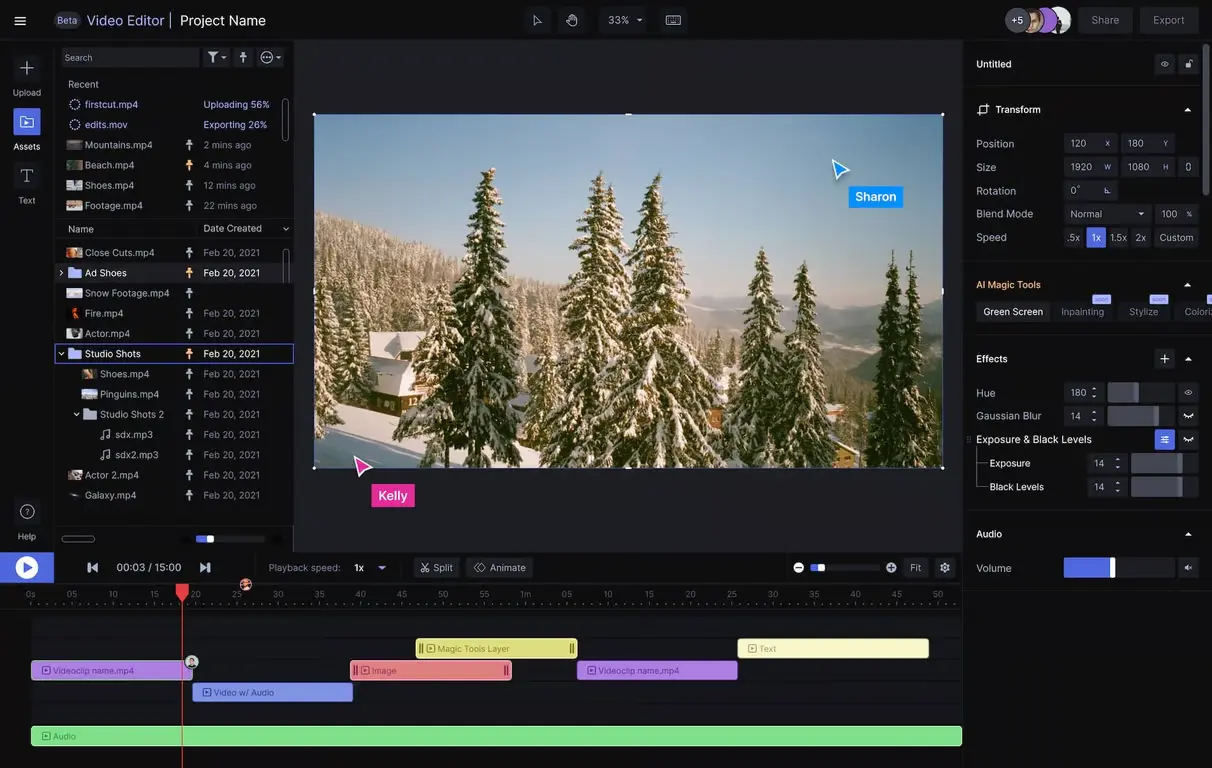
It earns a “pro tool tax.” The free plan is a demo (125 one-time credits, no flagship text-to-video), credits don’t roll over on the lower tiers, and the interface has a learning curve. The flagship model is credit-hungry - on the entry paid plan you get only about 25 seconds of Gen-4.5 per month - so heavy users need to plan or pay up. For casual one-offs, it’s more than you need.
| PROS | WATCH-OUTS |
|---|---|
• Best-in-class cinematic quality and shot-to-shot consistency • A pro editing toolkit, not just a generator • One dashboard for several top video models • Commercial rights on paid plans • Used in production by real studios | • Priced and built for professionals • Free plan is demo-only • Credits don’t roll over on Standard/Pro • Flagship model eats credits quickly • Steeper learning curve than social tools |
| Pricing | Free (125 one-time credits); Standard $12/mo; Pro $28/mo; Max $76/mo; Enterprise custom (annual billing) |
| Free tier | Yes - 125 one-time credits (evaluation only) |
| Standout | Cinematic Gen-4.5 + real editing tools (Aleph, Act-Two) |
| Commercial use | Yes, on paid plans |
| Main watch-out | Credit planning required; flagship model is costly per second |
What real users score it
| Source | Rating | Based on |
|---|---|---|
| Benchmarks | Gen-4.5 ranked #1 | Text-to-video (mid-2026) |
| User sentiment | Strong on quality | Credit model is the main gripe |
| In production | Netflix, Lionsgate | Agency & studio use |
| PRO TIP Draft with the cheaper Gen-4 Turbo model for iteration, then spend flagship credits only on the final shot you’re keeping. If your volume swings month to month, the higher tier’s relaxed (slower) queue saves you from mid-month top-ups. |
Match your Supawork feature to the right tool
The fastest way to choose: find the Supawork feature you lean on, then take the matching pick.
| What you used Supawork for | Best pick | Strong runner-up |
|---|---|---|
| AI headshots (LinkedIn / resume) | Aragon AI | Aragon AI |
| Face swap (photo & video) | Akool | Akool |
| Talking-avatar / presenter video | HeyGen | Akool |
| Image-to-video / cinematic clips | Runway | Akool |
| Text-to-image / creative art | Leonardo AI | Leonardo AI |
| All-in-one + design & branding | Akool | Akool |
| Resume & cover letters | Supawork is still solid here | a dedicated resume app |
Choose in 30 seconds
•“I just want a great LinkedIn photo.” → Aragon AI.
•“I make memes or swap faces for fun.” → Akool for fun or ad-grade swaps alike.
•“I want a presenter to deliver my script.” → HeyGen.
•“I’m making real ads or short films.” → Runway.
•“I generate a lot of original images.” → Leonardo AI.
•“I want one tool for posts, slides, and brand assets.” → Akool (for its broad toolset).
•“I genuinely use a bit of everything and value convenience.” → Akool (pro) or HeyGen for video-first workflows.
A note on face swap, avatars & consent
Face-swap and avatar tools are powerful - and increasingly regulated. A few ground rules keep your work creative and out of trouble:
• Only create likenesses of people who have agreed to it. Consent isn’t optional.
• Never use a swap or avatar to impersonate someone for money or to deceive. In a growing number of places this is now a crime - the U.S. TAKE IT DOWN Act saw its first conviction in 2026.
• Avoid politically sensitive or misleading contexts, and label AI-generated media where a platform requires it.
• Prefer tools that support Content Credentials (C2PA) provenance, and check which pricing tier actually grants you commercial rights before you publish.
The simplest mental model: treat the technology like a camera - genuinely useful and creative, but accountable to the people in the frame.
Final Verdict
After testing all five tools hands-on, here’s where I’d honestly put my own money depending on what I needed. Each score is out of 10, across four things that actually matter: output quality, value for money, ease of use, and how well it replaces Supawork for its specific job.
| Tool | Quality | Value | Ease | vs Supawork | My Take |
| Akool | 9/10 | 7/10 | 8/10 | 9/10 | The closest thing to a direct Supawork upgrade. If you relied on face swap, avatars, and video under one roof, this is where you land. Credits can bite you - watch the meter. |
| HeyGen | 9/10 | 8/10 | 9/10 | 8/10 | Best-in-class for presenter video. The avatar realism genuinely surprised me. Just don’t go in expecting face swap - it doesn’t do that. |
| Aragon AI | 8/10 | 9/10 | 9/10 | 9/10 | If headshots are your thing, stop here. Quickest ROI of the five - one $35 pack beats a $200 studio shoot. No free trial, but the guarantee softens that. |
| Leonardo AI | 9/10 | 9/10 | 7/10 | 7/10 | Fantastic if you’re serious about image generation. The free tier is genuinely generous. Steeper learning curve than Supawork, but the quality jump is real. |
| Runway | 10/10 | 6/10 | 6/10 | 7/10 | The most impressive output of any tool I tested. But it’s pro-grade in price and feel. If you’re making ads or short films, it’s worth every credit. For casual use, overkill. |
My personal pick if I could only choose one? It depends - and I know that’s not the satisfying answer you came here for. But genuinely: if you’re a content creator doing social video, go Akool. If you’re a professional who needs a LinkedIn photo this week, go Aragon. If you make explainer videos, HeyGen will change your workflow.
Start with the free tier. Every single one of these tools lets you try before you commit in some form. Don’t spend a dollar until you’ve seen your own output on the free plan.
Post Comment
Be the first to post comment!





