On This Page
- Why look for an Unwatermark alternative?
- How we sized up each tool
- At a glance: all five vs. Unwatermark
- How AI watermark removal actually works
- Vheer: the free, no-sign-up all-rounder
- Hotpot.ai: object removal inside a full creative suite
- Dewatermark.ai: the most complete dedicated remover
- WatermarkRemover.io: fully automatic, built for scale
- Cleanup.pictures: precision brushing and the cleanest fills
- What about video and PDF watermarks?
- How to choose, in one table
- The honest bottom line
Why look for an Unwatermark alternative?
Unwatermark.ai earned its popularity for good reasons: it removes watermarks, logos, text, and unwanted objects from images, video, and PDFs, it works in the browser with no sign-up, and it gives you a free daily quota before you ever touch a credit. For a quick one-off cleanup, it's hard to beat.
But "good enough for a quick fix" isn't the same as "right for your workflow." People go looking for an alternative for a handful of very practical reasons:
• They want stronger results on tricky marks: semi-transparent overlays, dense tiled watermarks, or text sitting on busy backgrounds, which trip up every tool to some degree.
• They'd rather brush precisely than rely on auto-detection (or vice-versa).
• They need higher resolution, true batch processing, or commercial licensing the free tier doesn't cover.
• They're building something and want a clean API or command-line tool to automate removal at scale.
• They want one tool that also does the next ten jobs: background removal, upscaling, restoring, even generating images.
This guide covers five strong alternatives across those needs. None of them is "the best" in the abstract; the right pick depends entirely on what you're doing. So instead of crowning a winner, we'll be specific about who each one is for.
Before anything else: use these tools responsibly A watermark is usually there on purpose; it signals that an image is owned and copyright-protected. Removing one doesn't grant you the right to use the picture. These tools have plenty of legitimate uses: cleaning up photos you took, removing your own old watermark, erasing distracting objects from images you've licensed, or tidying assets you have permission to edit. Cleanup.pictures puts it plainly on its own site: only remove watermarks from images you have an explicit license to use. Stripping someone else's watermark to reuse their work without permission is a different thing entirely, and in most places it's illegal. When in doubt, ask the owner or grab a properly licensed or royalty-free asset instead. Everything below assumes you're working with content you're allowed to edit. |
How we sized up each tool
To keep the comparison honest and useful, every tool is judged on the things that actually decide whether it fits your work, not on marketing claims:
• Removal approach. Automatic detection, manual brushing, or prompt-based ("type what to remove"); each suits different jobs.
• Inpainting quality. How natural the reconstructed area looks, especially on detailed backgrounds.
• Formats & scope. Images only, or video and PDF too?
• Batch & resolution. Can it process many files, and how large can outputs be on the free tier?
• Automation. Is there an API, CLI, or self-hosting option for developers?
• Cost & licensing. Free-tier limits, paid pricing, and whether free output is allowed for commercial use.
One thing we deliberately did not do is invent "accuracy scores." Real-world quality swings wildly depending on your specific image, so a single number would be misleading. Where a detail is the vendor's own claim rather than something independently measured, we say so.
At a glance: all five vs. Unwatermark
Here's the quick scan. Treat it as a starting point, then read the section on whichever tool catches your eye; the nuances matter.
| Tool | Removal approach | Batch | Video | API | Free tier | |
|---|---|---|---|---|---|---|
| Unwatermark (baseline) | Auto + manual brush | Up to 10 | Yes | Yes | Yes | Daily free quota, no sign-up |
| Vheer | Prompt: "type to remove" | BG only | No | No | No | Unlimited, 1080p, ads |
| Hotpot.ai | Manual brush (mark area) | Bulk (paid) | No | No | Yes | Low-res, non-commercial |
| Dewatermark.ai | Auto + manual brush | Yes (paid) | Yes | Yes | Yes | Free tier, quality caps |
| WatermarkRemover.io | Fully automatic | Yes | n/a | n/a | Yes +CLI | Free, reduced resolution |
| Cleanup.pictures | Manual brush (inpaint) | No | No | No | Yes | Unlimited, 720p, no sign-up |
"BG only": Vheer batches background removal (up to 20 images), but its watermark/object removal works one image at a time. "n/a": not a focus of the tool; WatermarkRemover.io's vendor lists some video/PDF support, but it's best known for images. Limits and licensing change often; confirm on each official site.
How AI watermark removal actually works
Every tool here, no matter how it's marketed, runs the same basic play. Understanding it in sixty seconds will save you frustration and help you pick the right tool for a given image.
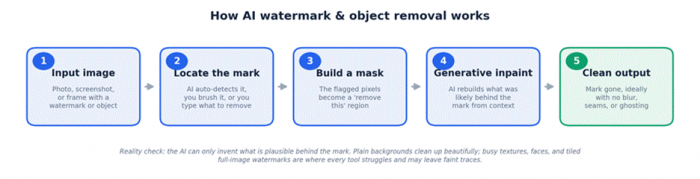
The key takeaway is in stage four: the AI is guessing what belongs behind the mark. On a clear sky or a plain wall, that guess is nearly perfect. On a face, fine text, or a repeating pattern that covers the whole frame, it's working with far less to go on, which is exactly where you'll see faint smudges or ghosting. That limitation is real for all five tools, so match the tool to the difficulty of the image, and keep your expectations grounded.
Vheer: the free, no-sign-up all-rounder

Best for Anyone who wants instant, free cleanup with zero friction, plus a surprisingly deep bonus toolkit (background removal, image and video generation) in the same place. |
Vheer is a free, browser-based AI studio that has quietly become one of the most generous tools in this space. Its AI Object Remover takes a refreshingly different approach: instead of brushing over the watermark, you describe it. Type "remove the text watermark" or "remove the logo on the shirt," hit generate, and its Flux-based model figures out what you mean and fills the gap with context-aware detail.
What pushes Vheer onto this list is the price-to-capability ratio. There's no account to create, downloads aren't watermarked, and the free tier is genuinely unlimited at up to 1080p; you just put up with ads. For students, hobbyists, bloggers, and social creators, that's a lot of value for nothing.
Where it shines
• Prompt-based removal means no fiddly manual selection, great for quick, intent-driven edits.
• Truly free and unlimited generations with watermark-free downloads and no sign-up.
• Comes bundled with batch background removal (up to 20 images), background swapping, and full image/video generation.
• Context-aware fill blends lighting and texture well on straightforward backgrounds.
Where it struggles
• Prompt-based editing gives you less pixel-level control than a brush when a mark sits on a fussy, detailed area.
• Output quality is inconsistent on complex scenes; it's an experimentation-first tool, not a precision retoucher.
• No dedicated video or PDF watermark removal, and no public API to build on.
• Free tier shows ads; verify licensing terms before using results in large-scale commercial work.
| Made by | Vheer (vheer.com) |
| Removal method | AI Object Remover: describe the watermark/logo/text in a prompt; a Flux-Kontext model erases it and fills the gap. Brush-free. |
| Inputs | JPG, PNG, WEBP |
| Video / PDF | No dedicated video or PDF watermark removal |
| Batch | Background remover up to 20 images; watermark/object removal is one image at a time |
| Max resolution (free) | Up to 1080p |
| Free tier | Unlimited generations, watermark-free downloads, ads, no sign-up |
| Paid plans (approx.) | Premium ~$9.99/mo (600 pro credits, no ads, faster, higher res); Advanced ~$19.99/mo (1,500 credits, bulk) |
| API / automation | No public removal API |
| Sign-up | Not required |
Hotpot.ai: object removal inside a full creative suite
Best for People who want to remove objects and watermarks but also need headshots, upscaling, photo restoration, and art generation, plus developers who'd like an API or self-hosted option. |
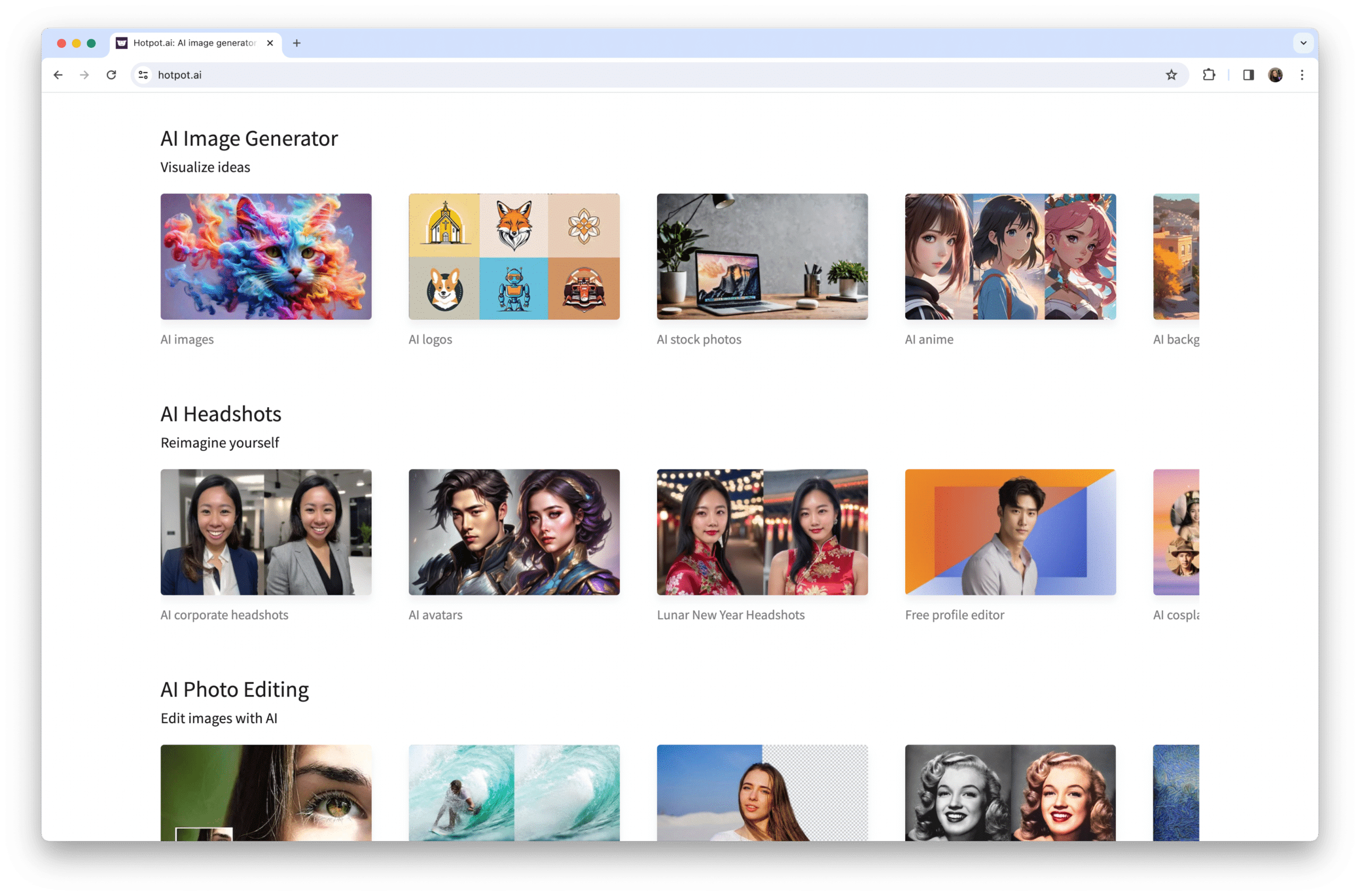
Hotpot.ai isn't a watermark specialist; it's a sprawling toolkit of 20-plus AI utilities, and removal is one tile on that grid. Its AI Object Remover works the classic way: you mark the area you want gone, and the AI reconstructs the background, sometimes over a couple of passes for cleaner edges. A separate Background Remover handles cut-outs.
The reason to choose Hotpot over a single-purpose tool is consolidation. If you're already using it to generate marketing images, build app icons, restore old photos, or write copy, doing your object removal in the same place is convenient. It also stands out for developers: there's a REST API and even self-hosted containers for teams that want removal baked into their own pipeline.
The catch is the free tier's fine print. Free outputs are lower-resolution, licensed CC BY-NC (non-commercial), and the platform notes it may embed an invisible watermark to identify Hotpot creations. For anything commercial or full-resolution, you'll buy credits.
Where it shines
• Object and background removal sit alongside 20+ other tools: one subscription, many jobs.
• Developer-friendly: REST API plus self-hosted containers and no-code bulk options.
• Strong adjacent features (upscaler, restorer, colorizer, headshots) for a complete edit, not just a clean-up.
Where it struggles
• Free output is resolution-limited, non-commercial, and may carry an invisible watermark.
• Object removal can need several passes and isn't tuned specifically for stubborn watermarks.
• No video or PDF watermark removal; commercial use requires paid credits.
| Made by | Hotpot.ai |
| Removal method | AI Object Remover (mark the area; may need a few passes) plus a Background Remover, within a 20+ tool suite |
| Inputs | Common image formats |
| Video / PDF | No |
| Batch | No-code bulk available (contact); also via API |
| Max resolution (free) | Reduced on free requests |
| Free tier | Lower-res output, CC BY-NC (non-commercial) license, possible invisible watermark; buy credits for commercial use and full resolution |
| Paid plans (approx.) | Credit-based; roughly $10–30/mo for higher volume (third-party estimate) |
| API / automation | Yes: REST API and self-hosted containers (paid; contact for pricing) |
| Sign-up | Required for credits and saved work |
Dewatermark.ai: the most complete dedicated remover
Best for The closest like-for-like upgrade from Unwatermark: tough logo and text marks across images, PDFs, and video, with an automatic-plus-manual workflow and an API for teams. |
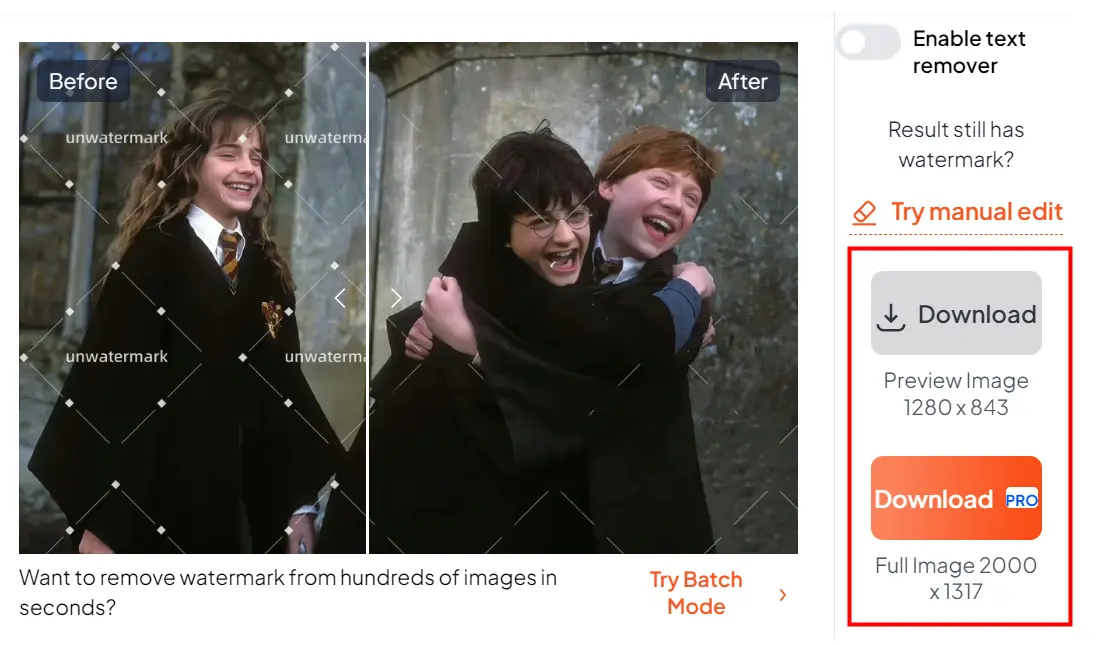
If you like what Unwatermark does but want it done better, Dewatermark.ai is the natural step up. It pairs automatic AI detection with a manual brush for touch-ups, so when the auto pass leaves a trace, you clean it yourself rather than starting over. Under the hood it uses deep-learning reconstruction that tends to handle logo-style and text watermarks more convincingly than lighter tools.
Crucially for an Unwatermark replacement, it keeps the same broad scope: images, PDFs, and video all in one place. Independent comparisons frequently rate it the best all-around option for exactly that combination: strong output, format flexibility, and batch processing for people doing this at volume. Expect roughly 5–10 seconds per image, with video and PDFs taking longer.
Where it shines
• Automatic detection with a manual brush fallback: the best of both worlds for awkward marks.
• Handles images, PDFs, and video, so it covers Unwatermark's full range.
• A preview-before-you-pay flow and a REST API for integrating into a workflow.
• Reliable on logo and text watermarks where simpler auto tools leave artifacts.
Where it struggles
• Batch processing sits behind the paid tier, and the free tier has quality caps.
• Very dense, tiled, full-image watermarks still resist clean removal, as they do everywhere.
• Some results need a manual cleanup pass to look truly seamless.
| Made by | Dewatermark.ai |
| Removal method | Automatic AI detection plus a manual brush for touch-ups; deep-learning background reconstruction |
| Inputs | Images; also PDF and video |
| Video / PDF | Yes, both |
| Batch | Yes (paid / Pro) |
| Max resolution (free) | Quality caps apply on the free tier |
| Free tier | Yes (limited usage and quality), with preview before paying |
| Paid plans (approx.) | Pro subscription for higher quality, speed, and batch; check the site for current pricing |
| API / automation | Yes: REST API |
| Sign-up | Free use available; account needed for Pro and API |
WatermarkRemover.io: fully automatic, built for scale
Best for Hands-off, high-volume removal and developers who want a clean REST API, a command-line tool, and plugins, plus high-resolution image output. |
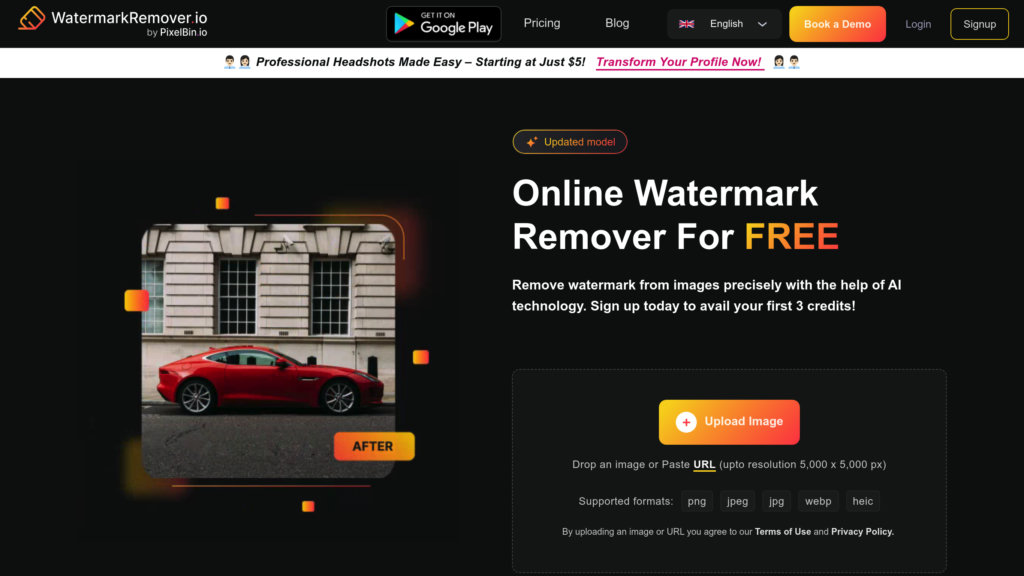
Made by PixelBin, WatermarkRemover.io is the "upload and walk away" option. There's no brushing and no prompting: the AI detects the watermark, reconstructs the area, and shows you a split-screen of original versus result so you can check quality before downloading. It handles images up to 5000×5000 pixels, which covers most professional photography needs.
Its real edge is automation. Beyond the web app, it offers a RESTful API, a command-line interface, and plugin integrations, the kind of tooling that lets you wire watermark removal into a content pipeline or process thousands of assets without clicking anything. (Its sibling site Pixelbin.io runs the same engine, so quality is identical there.)
Because it's fully automatic, the trade-off is control: if the AI misses part of a mark, there's no manual brush to finish the job. The free tier also tends to reduce resolution or compress output, nudging serious users toward a paid plan.
Where it shines
• One-click, no-skill removal with a side-by-side preview before download.
• Genuinely developer-grade automation: REST API, CLI, and plugins.
• High-resolution support (up to 5000×5000) suits product and photography work.
• Reliable on logo-style, semi-transparent, and repetitive-pattern watermarks.
Where it struggles
• No manual control: fully automatic, so you live with whatever the AI produces.
• Free version commonly reduces resolution or compresses the output.
• Best treated as an image tool; broader video/PDF support is vendor-listed rather than its core strength.
| Made by | PixelBin |
| Removal method | Fully automatic, one-click AI (no manual marking); split-screen before/after preview |
| Inputs | Common image formats (vendor also lists video and PDF support) |
| Video / PDF | Vendor-listed; best known as an image tool |
| Batch | Yes (free tier may limit) |
| Max resolution | Up to 5000×5000; free version may compress or reduce quality |
| Free tier | Yes (basic; reduced resolution) |
| Paid plans (approx.) | From ~$9.99/mo for higher resolution and batch |
| API / automation | Yes: RESTful API, command-line, and plugins (shares its engine with Pixelbin.io) |
| Sign-up | Not required for quick web use; account for API and higher tiers |
Cleanup.pictures: precision brushing and the cleanest fills
Best for Pixel-precise control and the most natural inpainting (removing objects, people, and text as well as watermarks), and developers who want a documented inpainting API with full mask control. |
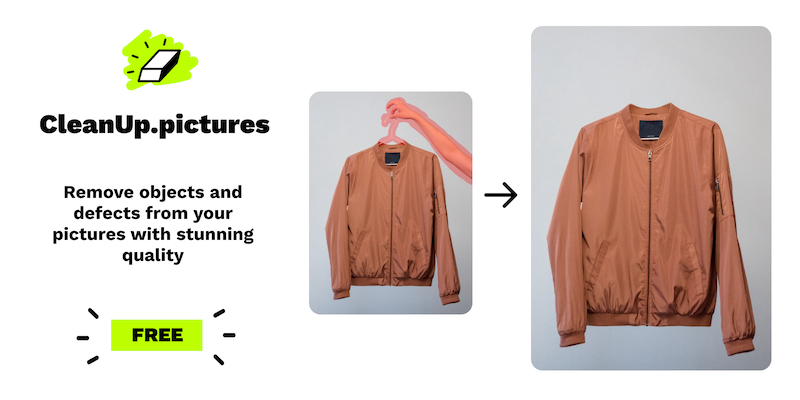
Cleanup.pictures (from Init ML, part of the ClipDrop family) takes the opposite philosophy to WatermarkRemover.io. There's no auto-detect; you brush over exactly what you want gone (a watermark, a stray person, a power line, some text), and its AI reconstructs the area behind it. Unlike an old clone-stamp tool, it genuinely infers what was hidden, so results look clean rather than smeared. A small pro tip from the makers: paint a little past the edges of the mark for the best result.
That manual control is the whole point. When a watermark sits on a delicate background, brushing precisely beats hoping an auto-detector gets it right. The free tier is unusually usable (unlimited edits, no sign-up), but it caps exports at 720p, which is fine for web and social, less so for print.
For developers, this is also one of the most pleasant APIs in the category. ClipDrop's Cleanup endpoint takes your image plus a black-and-white mask and returns the reconstructed result, with a fast-versus-quality mode toggle, and works from Node, Swift, Kotlin, and more.
Where it shines
• Brush-precise control delivers the cleanest, most natural fills on tricky areas.
• Removes any unwanted element (people, objects, text), not just watermarks.
• Free, unlimited, no-sign-up editing (at 720p), plus very affordable Pro pricing.
• A well-documented inpainting API with mask control and a speed/quality toggle.
Where it struggles
• Free exports are capped at 720p; full resolution needs Pro.
• Brush-only: no automatic detection, so larger jobs are more hands-on.
• Images only: no video or PDF, and no real batch mode in the web app.
| Made by | Init ML / ClipDrop |
| Removal method | Brush-based generative inpainting: paint over the mark/object/text/person and the AI rebuilds the background (overflow the brush slightly for best results) |
| Inputs | JPG, PNG (API: up to 16 MP, 30 MB) |
| Video / PDF | No |
| Batch | No (single-image brushing) |
| Max resolution (free) | 720p export cap on the free tier |
| Free tier | Unlimited edits at 720p, no sign-up |
| Paid plans (approx.) | Cleanup Pro ~$3–5/mo (unlimited resolution, better refiner); ClipDrop Pro ~$7–9.99/mo (full suite, high-res) |
| API / automation | Yes: ClipDrop Cleanup API (POST image + black/white mask, mode = fast or quality); pay-as-you-go credits |
| Sign-up | Not required for free web use; account for Pro and API |
What about video and PDF watermarks?
It's worth being clear-eyed here, because it's a common reason people leave Unwatermark and then get stuck. Among the five alternatives, Dewatermark.ai is the only one built for images, PDFs, and video together. Vheer, Hotpot, and Cleanup.pictures are image-first; WatermarkRemover.io is best treated as an image tool even though its vendor lists broader support.
So if video and PDF removal are core to your work, your realistic shortlist is Dewatermark.ai, or simply staying with Unwatermark, which already covers all three. There are also purpose-built video erasers worth a look (tools like Media.io's AniEraser and Vmake market dedicated video watermark removal), but evaluate them separately; video removal is a harder problem, and results vary a lot with motion and watermark opacity.
Developer corner: automating removal
If you're integrating watermark or object removal into a product or batch pipeline, four of these tools expose an API. Quick orientation: WatermarkRemover.io (PixelBin) for fully automatic removal with a REST/CLI workflow; ClipDrop's Cleanup API when you want mask-controlled inpainting; Dewatermark.ai when you need images, PDFs, and video; and Hotpot when you want object removal inside a broader suite, including self-hosted containers.
ClipDrop's Cleanup endpoint is a good model for how mask-based removal works. You send the original image and a black-and-white mask (white = remove), and optionally choose speed versus quality. Illustrative only; check the current docs and use your own key:
curl https://clipdrop-api.co/cleanup/v1 \ -H 'x-api-key: YOUR_API_KEY' \ -F 'image_file=@photo.jpg' \ -F 'mask_file=@mask.png' \ -F 'mode=quality' \ -o cleaned.png mask.png is the same size as the image, black where you keep pixels and white where you remove them. mode defaults to fast; use quality to reduce artifacts. Max 16 MP and 30 MB per image. |
Practical tips that save real headaches
• Generate masks programmatically. Drive masks from detected logo bounding boxes or a saved overlay so removal is repeatable across a whole batch.
• Pick fast vs. quality per job. Use the speed mode for previews and the quality mode for final renders, rather than one setting for everything.
• Treat every call as fallible. Add retries with exponential backoff, validate the returned image (right dimensions, non-empty), and always keep the original.
• Watch cost per image. Inpainting and cleanup calls usually cost more credits than plain background removal, so budget accordingly.
• Cache by input hash. Never pay twice to process the same asset.
• Keep a manual-review fallback. No auto-detector is perfect on busy backgrounds; route high-value images to a human or a brush tool.
• Respect limits and terms. Honor rate limits, and only process content you own or are licensed to edit.
How to choose, in one table
Skip the agonizing: match your situation to a starting point and try it. Most of these have a free tier, so testing on your own image costs nothing but a few minutes.
| If you… | Start with |
|---|---|
| Want free, instant, no account, plus a bonus toolkit | Vheer |
| Need removal alongside headshots, upscaling, restoring, and art | Hotpot.ai |
| Want the strongest results on tough logo/text marks, or need video + PDF | Dewatermark.ai |
| Want fully automatic removal at volume, or a clean API/CLI to build on | WatermarkRemover.io |
| Need pixel-precise control and the cleanest inpainting (objects, people, text) | Cleanup.pictures |
| Just need quick one-offs and already like Unwatermark | Keep Unwatermark; it still covers images, video, and PDF |
Getting better results from any tool
The tool matters less than how you feed it. These habits noticeably improve output no matter which option you choose:
• Start from the highest-resolution original you have; upscaling later can't add back detail the removal step never saw.
• When you can, brush or select slightly past the edges of the mark; leftover halo pixels are what create ghosting.
• Run a couple of gentle passes on stubborn marks instead of one aggressive pass.
• Remember that plain backgrounds (sky, walls, paper) reconstruct almost perfectly, while faces, fine text, and busy textures are the hard cases.
• Switch to a manual brush tool for fussy areas where an automatic remover leaves smudges.
• Always keep the untouched original; you may want to redo it later with a better tool or a higher tier.
The honest bottom line
There's no single "best Unwatermark alternative," only the best one for your situation. If you want free and frictionless, start with Vheer. If you want one app for removal and a dozen other image jobs, Hotpot.ai earns its keep. If you're replacing Unwatermark feature-for-feature and want better results across images, PDFs, and video, Dewatermark.ai is the natural upgrade. If you're automating at scale, WatermarkRemover.io's API and CLI are hard to beat. And when you need surgical precision and the cleanest possible fills, Cleanup.pictures is the retoucher's choice.
Whatever you pick, lead with the same principle we opened on: clean up the images you're allowed to clean up, and you'll get years of genuine use out of any of these tools.
Post Comment
Be the first to post comment!





