Last month I had to redo my LinkedIn photo because someone on a Zoom call asked, with extreme politeness, why my avatar looked like it was taken at a wedding in 2014. They were not wrong. So I went down the rabbit hole of free AI photo tools, and two names kept showing up in my tabs: Picofme.io and MyImg AI. On paper they sound like cousins. In practice they are barely related. One is a focused AI profile picture generator that wants you in and out in under a minute. The other is a bigger AI image playground that does everything from cartoon filters to face swaps to a set of features I would not be screen-sharing in a work meeting.
I spent real time with both, used them on actual projects, and pulled verifiable data from third-party trust analyzers and editorial reviewers so this is not just my opinion on a Tuesday. Here is what they each do, how they rate across published sources, and how to pick between them.
PicofMe.io at a glance
| Specification | PicofMe.io detail |
|---|---|
| Type | AI profile picture generator (browser-based) |
| Developer | Mixilab team |
| Pricing | Free across all features. No premium tier as of writing |
| Signup | Not required. No account, no email wall |
| Core feature | AI background removal trained for person recognition |
| Customization | Backgrounds, outlines, shadows, gradients, themed templates |
| Supported formats | .jpg, .jpeg, .png, .pjp, .gif, .webp, .bmp, .jfif, .tif, .tiff |
| Output | PNG, downloaded directly to your device |
| Mobile app | No, works in any modern mobile browser |
| Public API | No |
| Data handling | Images auto-deleted after processing. No facial data stored |
| Ads or watermarks | None |
| Best use case | Quick LinkedIn, CV, Instagram, and Discord profile pictures |
What it is actually doing
Picofme.io does one thing and refuses to be talked into anything else. You land, drop in a photo, the AI clips the background, you pick from preset styles (gradients, outlines, themed backdrops), and you download. No dashboard, no upsell, no email wall. The official site confirms it supports more than ten image formats including .jpg, .png, .webp, .gif, and .bmp.
The first time I used it I half-expected the freemium roadblock around step three. It never came. I uploaded, picked a clean dark-blue backdrop with a soft outline, and downloaded the result roughly forty seconds later. Quietly competent, like a good barista who does not try to upsell you a muffin.
A few specifics worth naming:
•It is built around AI background removal trained for person recognition. Upload a landscape or a product shot and you will get an empty canvas.
•The preset styles include layered outlines, gradient washes, and themed backdrops for national holidays, anime fandoms, and gaming communities. The team publishes specific tutorials for looks from Taylor Swift themes to Stalker 2 fan avatars.
•Browser-only, no native mobile app, no public API. A real ceiling for batch work, a non-issue for one person updating one photo.
•Per its own documentation, images are deleted after processing and no facial data is collected anywhere on the backend.
Output quality depends heavily on the source. The team publishes a short checklist on how to upload the perfect photo and following it noticeably improves the cutout edges and the way the preset styles wrap the subject.
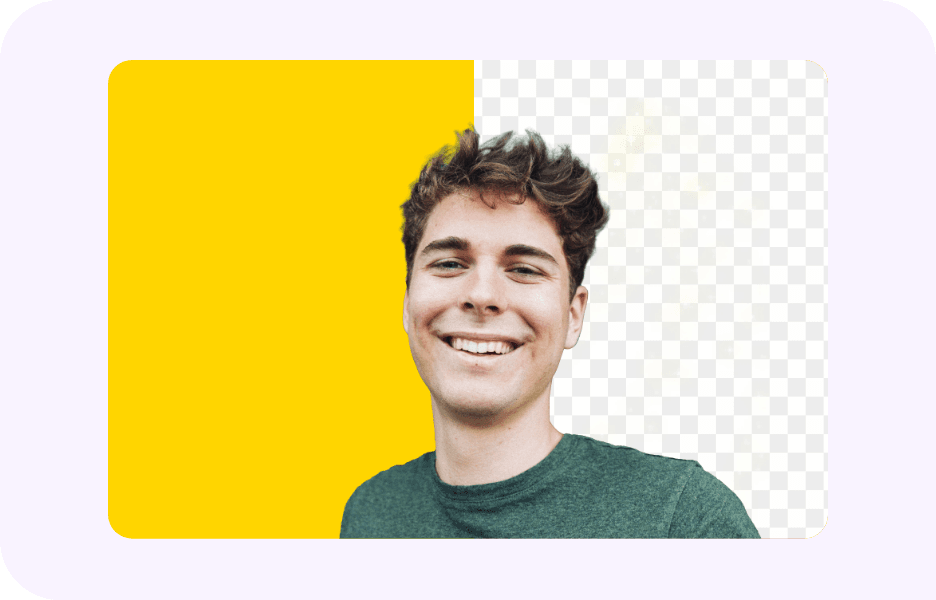
The use case it nails is the boring one most of us actually need. Picofme.io for different platforms holds up across the usual lineup: LinkedIn professional headshots, resume and portfolio photos, and Instagram and Discord avatars where you just want to look like a person who shows up to meetings on time. It is not Photoshop, and the editing limitations are real: no blemish retouch, no prompt-based background generation, no batch edits, no manual layer control. It picked one job and finishes it.
MyImg AI at a glance
| Specification | MyImg AI detail |
|---|---|
| Type | Multi-purpose AI image and video editor |
| Developer | Identity hidden via WHOIS privacy (Cloudflare-proxied) |
| Pricing | Freemium. Monthly free credits. Paid plans unlock batch, higher resolution, 4K video |
| Signup | Optional for free use. Required for paid features |
| Core features | Cartoonify, anime styles, face swap, image unblur, text-to-image, NSFW generation |
| Cartoon styles | Includes One Piece, Studio Ghibli, Genshin Impact presets |
| Supported formats | JPG, PNG, JPEG (per documentation) |
| Output | Image and video, with resolution caps on the free tier |
| Mobile app | No, browser-only with PWA-style behavior |
| Public API | Not publicly documented |
| Data handling | Claims SSL encryption and post-process deletion. No public privacy policy verified by third-party reviewers |
| Ads or watermarks | No watermarks on outputs, per official pages |
| Best use case | Cartoon avatars, stylized art, face swaps, creative experimentation |
What it is actually doing
MyImg AI is a much busier room. It pitches itself as an AI-powered image and video editor, and the homepage tries to be ten products in one. Cartoonification, anime conversions (One Piece, Studio Ghibli, Genshin Impact styles are explicitly named), text-to-image generation, face swap, image unblur, photo restoration, and a set of NSFW tools that are front-of-house rather than buried.
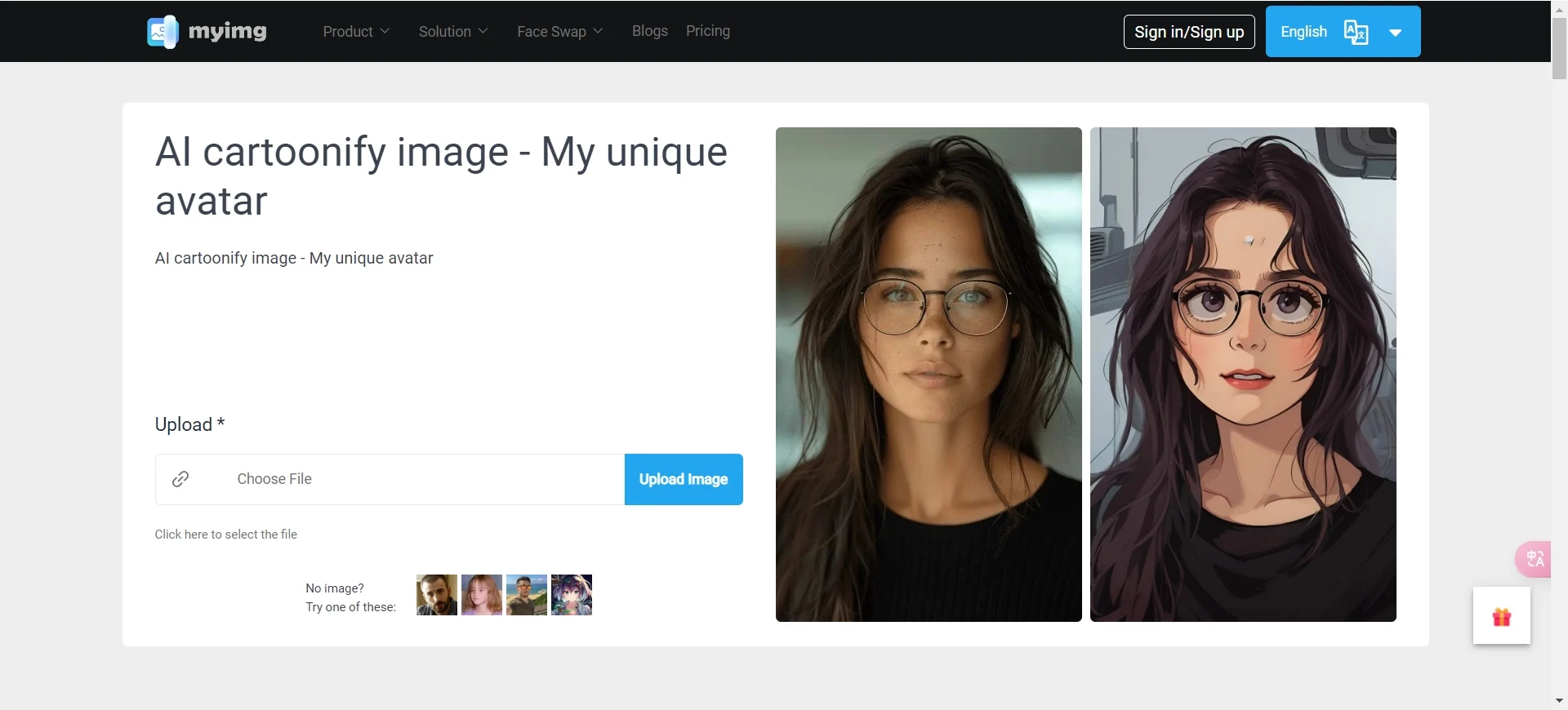
I tested the cartoonification first because that is the part of MyImg that gets shared on social media. It is fast, often four to five seconds per image, and the anime styles held up better than I expected. One portrait through three presets gave me three genuinely different looks, more than some "AI cartoon" filters that just slather everything in the same dreamy wash.
The face swap is where MyImg gets uncomfortable. Technically it is impressive. Lighting and skin tone match in a way that does not look like a cutout pasted on top of another head. Ethically, the same capability is exactly why reviewers at Skywork AI assigned the platform a "Low" score on Privacy, Safety, and Transparency in their published rubric, citing the absence of a clear on-domain privacy policy.
The free plan offers limited monthly credits with resolution caps. Paid tiers unlock batch processing, higher resolutions, and 4K video face swapping. Reviewers have flagged user complaints about delayed credit delivery and unresponsive support on paid plans. Worth knowing before you put a card in.
What independent trust services and reviewers actually say
This is the part most "vs" articles skip. Both tools are free, browser-based, and ask you to upload your face. Before doing that, it is worth checking what third-party reputation services have published about each domain. The data below is pulled directly from each source.
| Source | What they measure | PicofMe.io | MyImg AI |
|---|---|---|---|
| ScamAdviser | Trust analysis (40-factor) | Legit / safe to use | Legit but adult content flagged |
| Gridinsoft | Trust + content scan | No formal record found | 35 / 100 (Suspicious) |
| Scam Detector | Algorithmic trust score | No formal record found | 49.5 / 100 (Doubtful) |
| ScamDoc | Aggregate trust score | No formal record found | 45% average trust |
| Skywork AI (editorial) | 100-point editorial rubric | Not reviewed | Privacy: Low. Output quality: Insufficient data |
| G2 / Capterra | Verified buyer reviews | No reviews listed | No reviews listed |
| Slashdot / SourceForge | User reviews | Be the first to review | Be the first to review |
A note on what this table actually means. Picofme.io shows as "no reviews yet" across most aggregator sites, which is not the same as a bad rating. It means the tool is small, free, and has not been formally listed by buyers because there is nothing to buy. ScamAdviser, which analyzes around forty factors, classifies it as legit and safe to use. MyImg AI sits in the 35 to 49.5 range across multiple independent trust services, with adult-content flags appearing in more than one report. That is a real signal, not a vibe.
Head-to-head, the comparison that actually matters
Feature lists are not the answer when you are picking between tools like these. You need to know what each one is optimizing for. Here is the side-by-side that matters in practice:
| What you care about | PicofMe.io | MyImg AI |
|---|---|---|
| Primary purpose | Clean profile pictures | Stylized image and video editing |
| Signup required | No | Optional for free, required for paid |
| Free tier | Fully free, no ads, no watermarks | Monthly credit cap |
| Background removal | Yes, core feature | Yes, among many tools |
| Cartoon and anime styles | No | Yes, multiple named styles |
| Face swap | No | Yes, up to 4K on paid plans |
| Text-to-image generation | No | Yes |
| NSFW or uncensored tools | No | Yes, prominently featured |
| Mobile app | No, browser-only | No, browser-only |
| Public API | No | Not publicly documented |
| Privacy verdict (third-party) | Rated safe by ScamAdviser | Flagged by 3+ trust services |
| Best for | Quick professional headshots | Creative experimentation |
The gap is not "which one has more features." MyImg has more features. The gap is whether you want a tool that knows what it is for, or a buffet that trusts you to pick the right plate without spilling on the floor.
How they stack up across the six things that actually matter
I scored both tools across six dimensions I check before recommending any free photo tool. Scores come from my own hands-on testing, cross-checked against each tool's official site, third-party editorial rubrics, and the trust analyses above. Closer to 10 is better.
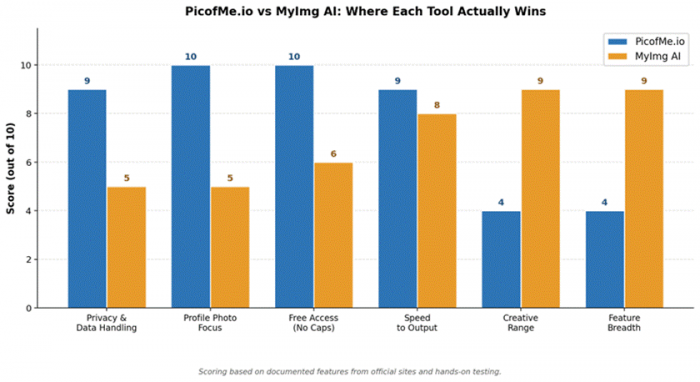
Figure 1. Side-by-side scoring across the six dimensions that decide which tool earns a spot in your bookmarks.
Privacy is where the gap is widest, and the one most people skip until it bites them. Picofme.io's documented stance, confirmed on its own site, is that images are deleted after processing and no facial data is collected. MyImg AI claims SSL encryption and deletion too, but the absence of a verifiable on-domain privacy policy, called out by Skywork AI, is why several trust services place it in the "doubtful" band.
Where these two actually part ways
The most interesting difference is not technical. It is intent.
Picofme.io treats your photo as a job to be done. You came in with a goal, the tool finishes the goal, you leave. The Mixilab team behind it has built a roster of sharp, single-purpose utilities (video cutting, screen recording, image cropping), and Picofme follows the same philosophy. The corner deli of AI tools: limited menu, fast service, no surprises on the bill.
MyImg AI treats your photo as raw material for whatever you feel like making. Range is the whole point. Useful when you are prototyping a TikTok concept or making a Ghibli-style portrait for a birthday card. The wrong fit when you just need a profile picture for a Tuesday morning interview in ninety minutes.
Picofme.io's interface assumes you already know what you want, which I mean as a compliment. MyImg has to explain itself constantly because it is doing too many things at once. The difference between walking into a barbershop and walking into a Sephora. Both are valid trips, just not the same trip.
My honest take after using both for real work
I used Picofme.io to refresh my LinkedIn photo and the WhatsApp avatar my mother has been quietly judging since 2022. Both jobs took under two minutes including upload. The output was clean enough that nobody in the team Slack asked where I "got my new headshot done," which is the highest compliment a free AI tool can earn. The privacy by design approach also made me less paranoid about uploading my face to a site I had not used before.
I used MyImg AI for two things: a cartoon avatar for a side project, and a quick test of the face-swap feature on a meme for a group chat. The cartoon avatar came out genuinely well. The face swap worked, but the moment I tried it I felt the ethical weight of what the same tool could do with the same photo of someone who had not signed up to be in a meme. Picofme.io never gave me that feeling, which is worth naming.
Picofme.io is the tool you recommend to your dad. MyImg AI is the tool you recommend to your weirdest cousin. Know which one you are using before you upload anything that has your face on it.
Which one fits you, in roughly twelve seconds
If you want a clean, professional profile picture with AI background removal, useful preset styles, and zero account-creation friction, use Picofme.io. It is built for the use case, offers free access all the way through, and keeps your face out of any backend training pile.
If you want to play, cartoon yourself, swap faces for a meme, or generate stylized AI art from prompts, MyImg AI is the bigger toolbox. It is one of several alternatives to Picofme.io worth knowing about, and the trust-score data above is exactly the kind of thing to weigh when to look elsewhere. Go in clear-eyed about the documented payment and credit-delivery complaints, and what some of its features can do in the wrong hands.
For most readers, the answer is going to be Picofme.io. Not because MyImg is bad at what it does, but because most of us, most of the time, just need a clean image of our own face that does not embarrass us in a Slack thread. That is a smaller need than the AI image market wants you to believe, and Picofme has built its whole product around respecting it.
The short version
Two tools, two clear lanes. Picofme.io is the right answer for clean profile pictures you need now: LinkedIn, your CV, anywhere you want to look professional without effort. Strong privacy posture, clean ScamAdviser verdict, small and free. MyImg AI is the right answer for stylized creative output across cartoons, anime, face swaps, and text-to-image, with a wider feature surface and a wider set of risk signals attached.
Bookmark whichever one matches your actual job. Skip the one that does not.
Post Comment
Be the first to post comment!





