FaceCheck.ID is a browser-based reverse face search engine designed to help users locate where a face appears across the public web. By uploading a photo, the platform returns visually similar matches, assigns a confidence score, and flags certain high-risk source categories.
The tool is primarily positioned for open-web verification and OSINT-style checks such as detecting stolen profile photos, romance scams, or repeated image use. It is not marketed as a people-search database and does not directly provide names, addresses, or personal dossiers.
Accuracy in one line: FaceCheck.ID can surface useful investigative leads when the subject has meaningful public web presence, but misses and lookalike false positives remain realistic risks.
Risk reminder: Results should be treated as starting points for verification, not proof of identity.
Independent OSINT resources, including Bellingcat and the Global Investigative Journalism Network, list tools in this category while repeatedly stressing the need for human verification and ethical restraint.
What FaceCheck.ID Does (and Does Not Do)
FaceCheck.ID’s core function is straightforward: upload a face and receive links to webpages where similar faces appear. The system ranks matches using a similarity score and may display red-flag indicators tied to certain source types.
The platform is designed primarily for investigative discovery rather than identity confirmation. It helps answer the question, “Where else does this face appear online?” but not the much riskier question, “Who is this person with certainty?”
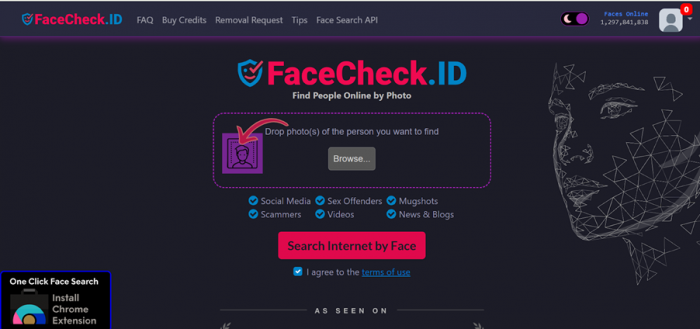
From a technical standpoint, the service sits in the 1:N investigative search category described by NIST, which inherently carries higher false-positive risk than strict identity verification systems.
How FaceCheck.ID Works in Practice
Upload Requirements
According to the platform’s own guidance:
- Supported formats include JPG, PNG, WebP, and BMP
- Maximum file size is 6M
- Recommended image size is roughly 500×500 pixels or higher
- Minimum detectable face size is about 60×60 pixels
- Up to three photos of the same person can be uploaded per search (experimental)
In practical terms, clearer and front-facing images tend to produce more meaningful results.
Matching Pipeline and Scoring
FaceCheck.ID uses proprietary AI to detect facial features and calculate similarity. Results are returned with:
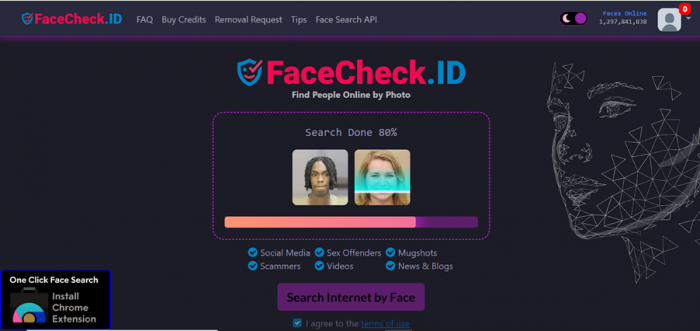
- A 0–100 match scor
- Confidence bands such as Confident or Certai
- Source links
- Optional red-flag indicators
The platform explicitly warns that lookalikes are possible, meaning even high scores require manual verification.

Accuracy and Real-World Performance Signals
No public reverse face search engine should be treated as perfectly accurate. Performance depends heavily on image quality, lighting, head angle, occlusion, and whether the person’s photos exist in the indexed web dataset.
Independent OSINT guidance consistently recommends using reverse face search as one signal among many, not as standalone proof.
| Scenario | Expected Difficulty | Reliability Signal | Practical Takeaway |
| Clear front-facing headshot | Low | Moderate to high lead quality | Best-case performance zone |
| Low-resolution screenshot | High | Low to moderate | Expect misses or weak matches |
| Side angle face | Medium–high | Low to moderate | Geometry mismatch hurts results |
| Occluded face (mask/glasses) | High | Low | Similarity ambiguity increases |
| Minimal online presence | High | Low | Empty results are common |
| Lookalike scenario | High risk | Low certainty | Manual verification critical |
Independent Performance Signal
A peer-reviewed study testing MRI-derived facial reconstructions found FaceCheck.ID correctly identified 2 out of 4 participants (50%) within the top results.
This should not be interpreted as a consumer accuracy percentage. Instead, it shows the tool can produce meaningful leads under favorable conditions while degrading noticeably when similarity signals weaken.
Real-World Usability Observations and Friction Points
While official demos present a smooth experience, practical usage can sometimes differ. During testing, the results interface was generally populated, but some linked social-profile results intermittently returned a server error, preventing direct verification of the source page.
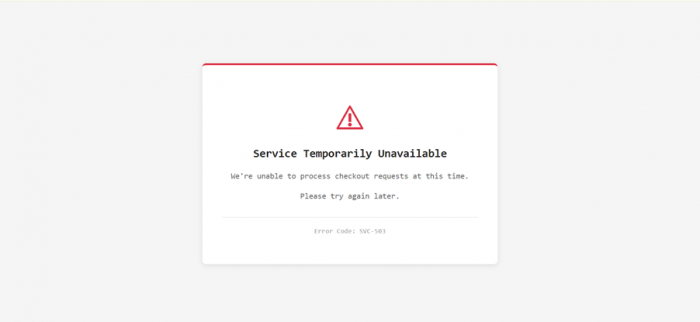
A similar issue appeared in the pricing flow, where the Buy Credits page occasionally returned a server error. Because the platform relies on a credit model with expiry windows, any instability in the purchase path can affect user experience.
Key usability takeaways:
- Platform responsiveness may vary by sessio
- Some result links may require retrying
- Pricing pages may intermittently fail to load
Stability testing is advisable before large credit purchases
Pricing, Credits, and Usage Limits
FaceCheck.ID operates on a credit-based system where one search typically consumes three credits. However, an important transparency note applies here.
Pricing visibility note: During direct platform checks, the pricing page did not consistently load and in some cases returned a server error. The pricing ranges below are therefore compiled from the platform’s published materials and widely cited internet sources rather than a reliably accessible in-session price display. Users should always verify current pricing inside the official site before purchasing.
Payments are currently handled via cryptocurrency, and credit packages come with expiration windows.
Table 2: Pricing Transparency Snapshot
| Plan | Price (reported) | Approx Searches | Credit Expiry | Best For |
| Rookie Sleuth | $19 | ~50 | 14 days | Quick investigations |
| Private Eye | $47 | ~133 | 2 months | Short-term monitoring |
| Deep Investigator | $197 | ~666 | 6 months | Heavy usage |
| The Professional | $597 | ~3333 | 1 year | Frequent investigators |
| Free tier | $0 | Limited | N/A | Initial checks |
Two structural implications stand out. First, the expiry model creates use-it-or-lose-it pressure for casual users. Second, crypto-only payment reduces refund flexibility compared with traditional billing systems.
Privacy, Safety, and Legal Considerations
FaceCheck.ID publishes several privacy claims, including deletion of uploaded photos within roughly 24 hours and statements that user images are not added to the public index. As with most proprietary AI systems, independent verification of internal processing is limited.
The platform restricts use to adults (18+) and states that searching for minors violates its terms. It also prohibits use for employment, credit, insurance, or tenant screening decisions, aligning with common harm-reduction practices in investigative search tools.
Competitive Positioning
| Platform | Best Use Case | Strength | Weakness |
| FaceCheck.ID | OSINT lead generation | Match scoring + risk flags | Credit expiry, crypto payments |
| PimEyes | Self-monitoring | Strong opt-out tools | Subscription cost |
| Social Catfish | Consumer verification | Multi-input search | Match depth varies |
| Clearview AI | Law enforcement context | Large-scale matching | Not public, regulatory scrutiny |
| Google Images | Exact image reuse | Free and broad | Not true face recognition |
Who FaceCheck.ID Is Best For
FaceCheck.ID tends to work best when the goal is photo verification rather than identity confirmation. It fits investigative and safety-oriented workflows more naturally than formal screening use cases.
Typical good-fit scenarios include:
- OSINT-style research
- Scam profile checks
- Image reuse detection
- Low-stakes identity verification
Higher caution is warranted for employment decisions, legal accusations, housing screening, or other high-consequence judgments.
Final Assessment
FaceCheck.ID presents itself as an investigative face search tool, and in many cases it performs exactly in that role. When the input image is clear and the subject has a meaningful public web presence, the system can surface useful leads.
At the same time, expectations should remain grounded. Accuracy is situational, not guaranteed, and lookalike risk remains real. Real-world testing also indicates occasional friction points, including intermittent server errors on some result links and pricing pages.
In practical terms, FaceCheck.ID is best viewed as a capable but imperfect OSINT helper. Useful when handled carefully, limited when over-trusted, and definitely not the magical “identify anyone instantly” button that internet demos sometimes make it look like.
Post Comment
Be the first to post comment!





