AI video tools are evolving fast, and expectations have shifted from simple prompt toys to full creative workflows. Morph Studio positions itself as a serious contender in this new wave, promising cinematic output, multi-model access, and a storyboard-driven production flow.
On paper, the platform looks ambitious. It combines several high-end video models with an editor-style canvas that aims to move beyond one-click generation. The real question in 2026 is whether that promise translates into reliable day-to-day performance.
This review breaks down Morph Studio based on feature depth, real usage behavior, and the updated pricing structure to help determine where it genuinely fits.
Morph Studio at a Glance
| Attribute | What It Means in Practice |
| Platform Type | Fully browser-based creative suite |
| Core Models | Wan 2.6, Kling 2.6 Pro, Veo family, others |
| Creation Modes | Text to video, image to video, style transfer |
| Workflow | Dual system: Immersive Space plus storyboard canvas |
| Free Access | 75 credits monthly with heavy limits |
| Target Output | Short cinematic clips assembled into sequences |
| Watch Area | Performance consistency under load |
Morph Studio clearly aims at creators who want more control than basic AI video tools typically offer.
What Morph Studio Is Actually Trying to Be
Morph Studio is not just another prompt box with a render button. The platform is designed as a multi-engine orchestration layer that routes generation requests across different models while giving users a visual planning environment.
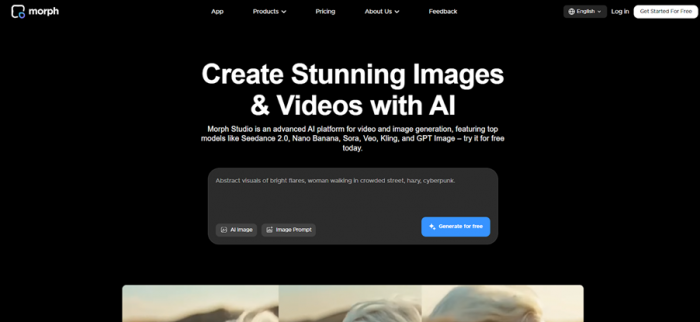
The Immersive Space handles quick prompt experimentation. The Open Canvas is where Morph tries to differentiate itself, letting creators stitch shots together like a lightweight AI video editor. This makes the tool feel closer to a creative workstation than a casual generator.
In real usage, the experience rewards users who are willing to iterate and plan. Those expecting instant perfect clips every time may notice the learning curve quickly.
Core Feature Experience
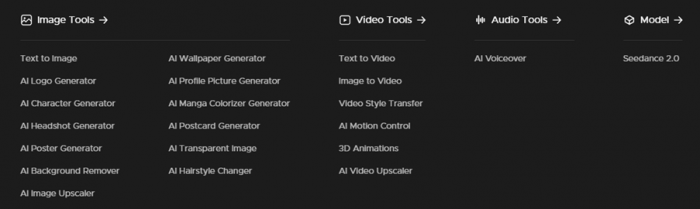
Text to Video Performance
Morph Studio can produce visually impressive frames when prompts are well structured. Lighting, depth, and cinematic framing often look strong, especially when higher-tier models are selected. For short-form social clips, the visual ceiling is clearly competitive.
However, consistency still depends on scene complexity. Simple prompts usually render cleanly, while multi-character motion or heavy action can introduce occasional artifacts. This is typical for the category but noticeable during extended testing.
The storyboard workflow is the real differentiator. Instead of regenerating full scenes repeatedly, creators can refine individual shots, which makes iteration more controlled than most browser-based tools.
Image to Video Animation
The image animation pipeline works best for subtle motion effects rather than full character performance. Product shots, portraits, and environmental loops generally render smoothly with controlled camera movement.
More ambitious animations such as expressive facial motion or complex body movement can still show instability. This reflects the current limits of most AI video systems rather than a Morph-only issue.
Because Morph builds projects shot by shot, the tool is better suited for modular storytelling than long continuous scenes. Creators who understand this workflow tend to get better results.
Speed and Workflow Reality
Morph Studio markets fast generation, but real-world speed sits in the moderate range. Short clips often render in roughly one to two minutes on standard tiers, though queue times can extend during peak demand.
The credit system shapes the workflow heavily. Higher-resolution models and longer clips consume credits quickly, which encourages careful prompt planning. Paid tiers improve concurrency but do not fully eliminate variability.
The platform feels powerful but not frictionless. That distinction matters when evaluating it against simpler AI video tools.
Real Signals From Trusted Platforms
Across trusted review platforms and creator communities, Morph Studio generates a mixed but informative reputation. Users frequently praise the platform’s ambitious feature set and the flexibility of having multiple video models in one environment.
At the same time, recurring feedback highlights variability in generation success and credit efficiency. Some users report needing multiple attempts for complex scenes, which can affect perceived value depending on workflow.
Support responsiveness and platform stability are still evolving areas. The overall pattern suggests a fast-moving product that is improving but not fully mature.
User Rating Snapshot
| Review Platform | Typical Star Range | Volume Signal | Key Theme |
| Trustpilot | ~2.5 to 3.0 | Limited but vocal | Reliability concerns |
| G2 | Limited data | Early-stage presence | Feature curiosity |
| Reddit / Creator Forums | Mixed sentiment | Active discussion | Power vs friction debate |
| Product Hunt feedback | Generally positive early adopters | Moderate | Innovation focus |
This pattern shows a familiar profile for fast-moving AI tools. Early adopters appreciate capability breadth, while broader users focus more on reliability and value consistency.
Sentiment Analysis
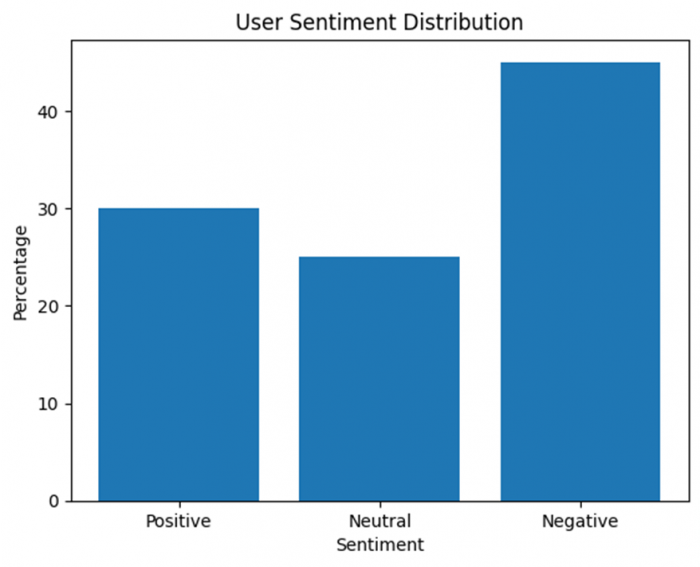
Overall sentiment distribution
| Sentiment Category | Approximate Share | What It Reflects |
| Positive | 30% | Strong feature depth and model variety |
| Neutral | 25% | Promising but still maturing |
| Negative | 45% | Performance and credit concerns |
What positive users emphasize
- Creative flexibility feels unusually high
- Storyboard workflow seen as genuinely different
- Multi-model access reduces tool switching
What critical users highlight
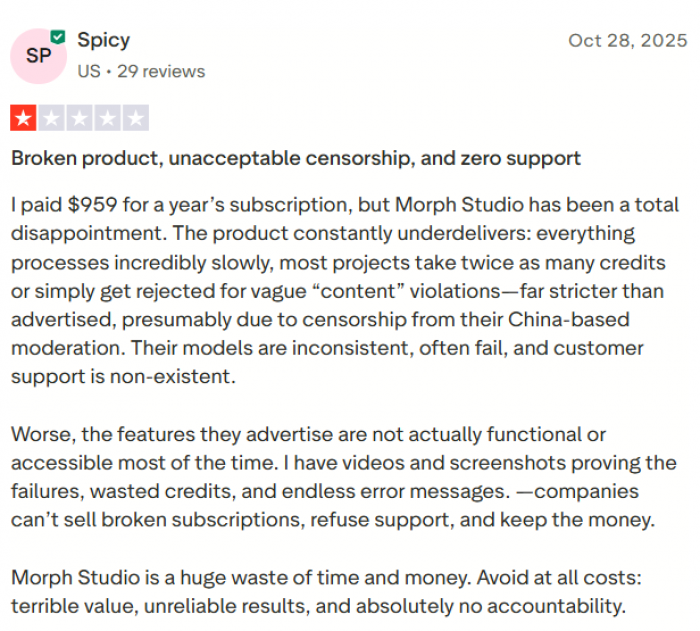
- Generation consistency can vary
- Credit burn rate requires planning
- Support and stability still evolving
The sentiment pattern suggests Morph Studio is respected for ambition but still earning trust on reliability.
Pricing and Credit Reality
Morph Studio recently adjusted its pricing tiers. The structure remains credit-based, but the monthly costs and allowances have shifted.
Current Subscription Breakdown

| Plan | Monthly Price | Monthly Credits | Video/Image Access | Commercial Rights | Practical Position |
| Free | $0 | 75 credits | Limited models | No | Light testing only |
| Basic | $10 | 3,000 credits | 10+ top models | Yes | Casual creators |
| Pro | $35 | 12,000 credits | 10+ top models | Yes | Regular production |
| Premier | $110 | 50,000 credits | Full access tier | Yes | Heavy workflows |
Key detail: credit consumption varies significantly by resolution and model choice. The headline numbers look generous, but heavy video work can burn through credits faster than expected.
Where Morph Studio Clearly Stands Out
Morph Studio earns attention primarily through creative flexibility and model breadth. The platform is built for users who want to experiment rather than just press generate and download.
Standout advantages
- Multi-model access inside one unified workspace
- Storyboard canvas enables structured scene planning
- Supports both image and video transformation workflows
These elements make Morph feel closer to a creative lab than a single-purpose generator.
Where Friction Still Shows Up
The same ambition that makes Morph interesting also introduces some practical trade-offs. Performance consistency and credit efficiency remain the two areas most closely watched by experienced users.
Generation times can fluctuate during high demand windows, and complex scenes sometimes require regeneration to achieve clean results. The credit model rewards careful usage planning rather than rapid-fire experimentation.
Morph Studio is evolving quickly, but it still behaves like a fast-moving platform rather than a fully hardened production pipeline.
Who Will Get the Most Value
Morph Studio fits creators who enjoy hands-on experimentation and want access to multiple video models in one environment. AI artists, social media producers, and early adopters are likely to extract the most value from its flexible workflow.
Teams that require predictable high-volume rendering with strict deadlines should test carefully before scaling. The platform shines most when used as a creative exploration environment rather than a fully automated video factory.
Final Verdict
Morph Studio delivers one of the more ambitious browser-based AI video experiences available in 2026. The combination of multi-model access and storyboard-driven control gives it real creative depth that many simpler tools still lack.
In practical use, the platform can produce genuinely cinematic shots when prompts are well tuned and workloads are reasonable. At the same time, generation variability and credit sensitivity mean it rewards patient, iterative creators more than those seeking push-button perfection.
For users who value experimentation, scene control, and access to multiple video engines in one place, Morph Studio is a compelling platform to explore. For workflows that demand absolute consistency and predictable scaling, it still shows signs of being an evolving system rather than a fully mature production workhorse.
Post Comment
Be the first to post comment!





