Six AI tools dominate UI/UX workflows in 2026: Figma with Figma Make, Uizard, UX Pilot AI, v0 by Vercel, Google Stitch, and Framer. Each occupies a distinct slot in the design-to-deployment chain. This report breaks down architecture, pricing, verified user sentiment, and structural failure modes for each. The depth here matches what a procurement decision actually demands, not what a feature comparison promises.
Market Context
The AI design tools market is sized at $6.74 billion in 2025 and projected at $8.22 billion in 2026 by The Business Research Company, on track to reach $18.16 billion by 2030 at a 21.9 percent CAGR. Stack Overflow's 2025 developer survey logged 84 percent of developers using or planning to use AI tooling. By January 2026, that figure rose to roughly 90 percent of professional developers using at least one AI tool weekly. Adoption among design-adjacent roles tracks the same curve. Lovable hit a $400 million ARR in February 2026 at a $6.6 billion valuation. Vercel reached a $9.3 billion valuation in December 2025. Figma went public in July 2025 at $12.5 billion and crossed $1.1 billion in annualized revenue early in 2026.
| Global AI design tools market size, 2025 to 2030 (USD billions, 21.9% CAGR) | |
| 2025 | $6.74B |
| 2026 | $8.22B |
| 2027 (est.) | $10.03B |
| 2028 (est.) | $12.24B |
| 2029 (est.) | $14.93B |
| 2030 | $18.16B |
Source: The Business Research Company, AI-Powered Design Tools Global Market Report 2026. Forecasts for 2027 to 2029 are interpolated at the published 21.9 percent CAGR; 2025 and 2030 figures are direct from the report.
Choosing the Right AI Design Tool for Your Workflow
Figma and Figma Make
Inside the Incumbent's AI Pivot
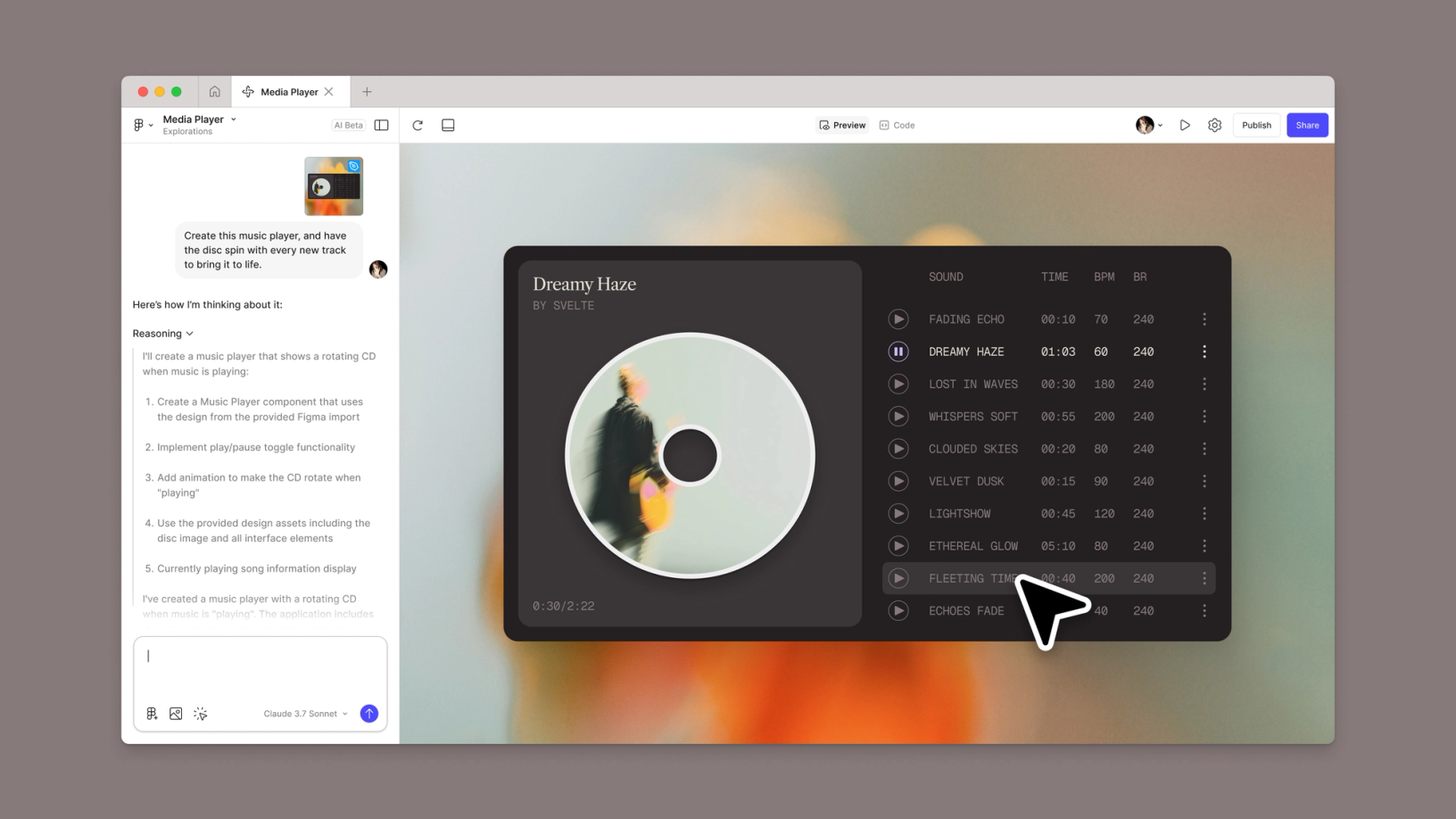
Figma is the only design tool in this report that did not need AI to dominate its category. The AI features were defensive. Adobe's $20 billion acquisition collapsed in December 2023 over UK Competition and Markets Authority and EU antitrust objections, and Adobe paid Figma a $1 billion termination fee. The company used the breathing room to ship Figma Make, a prompt-to-prototype tool that produces interactive output sitting alongside the design canvas, plus a series of in-canvas AI helpers: text-to-wireframe generation, automatic layer renaming, content fill with tone controls, and a Model Context Protocol server that lets coding agents like Cursor and Claude Code read Figma files as structured data rather than screenshots.
The architecture has a critical seam. Figma Make outputs run inside their own runtime, not as native Figma layers, which means the prototype you generate cannot be directly edited with auto layout, components, or variants in the design file. The intended workflow is therefore split: AI for first drafts and rough flows, traditional Figma for the production pass. Figma reports more than 13 million monthly active users as of its IPO disclosures.
Pricing Structure (Verified April 2026)
| Plan | Cost (annual billing) | Editor entitlements | Practical ceiling |
|---|---|---|---|
| Starter (Free) | $0 | 3 design files, 3 FigJam files, unlimited drafts | Solo trials, hobbyists, students |
| Professional | $16 per editor / month ($12 monthly billed annually) | Unlimited files, libraries, 500 AI credits | Teams of 2 to 25 without SSO requirements |
| Organization | $55 per editor / month | SSO, design system analytics, branching, 3,500 AI credits | Companies with 25+ designers, multi-team governance |
| Enterprise | $90 per editor / month | Idle session timeout, localized hosting, SCIM provisioning | Regulated industries, large design organizations |
| Dev seat add-on | $25 per developer / month (annual) | Dev Mode, FigJam, Figma Slides | Engineers consuming designs but not editing |
Mid-cycle additions on annual Professional plans trigger separate monthly billing until manually converted. Organization and Enterprise are annual-only with no monthly option. Vendr negotiation data shows discounts on Organization and above are common at 20+ seats, particularly on multi-year contracts.
Where the Workflow Breaks
Performance is the most cited Figma complaint. G2 sentiment analysis flags slow performance (56 mentions), performance issues (45), slow loading (41), internet dependency (34), and lack of offline access (32) as the leading negatives across over a thousand verified reviews. The AI features have a more specific pattern: Figma Make occasionally regresses a design when asked to apply brand guidelines, and the 3,000 monthly AI credits on Pro burn through faster than the marketing copy implies during heavy iteration. Credit limit enforcement begins March 18, 2026, which will throttle teams that have been generating freely against soft caps.
Comparative Position
| Capability | Figma + Figma Make | Sketch | Adobe XD |
|---|---|---|---|
| Real-time multiplayer editing | Native, low-latency | Cloud Workspace add-on required | Limited co-editing |
| AI prompt-to-prototype | Figma Make (interactive runtime) | Third-party plugins only | Largely deprecated by Adobe in 2024 |
| Code handoff | Dev Mode + MCP server for AI agents | Inspector with CSS/iOS/Android export | CSS export, integration weakening |
| Platform reach | Web, macOS, Windows, Linux via browser | macOS only | Windows and macOS, end-of-life path |
| Entry tier (paid) | $12 per editor (annual) | $10 per editor (annual) | Bundled with Creative Cloud |
Verified Review Sentiment
| Platform | Average rating | Review volume | Recurring sentiment themes |
|---|---|---|---|
| G2 | 4.7 / 5 | 1,000+ verified reviews | Top positives: ease of use (152), team collaboration (100), real-time collaboration (96). Top negatives: slow performance (56), internet dependency (34). |
| Capterra | 4.7 / 5 | 649+ verified reviews | Praise for cross-functional handoff, template ecosystem, plugin breadth. Repeat complaint: lag on heavy projects with many embedded assets. |
| TrustRadius | 8.7 / 10 (trScore) | 300+ ratings | Highest scores on integration breadth and onboarding new contributors. Lowest scores on offline workflow. |
Pros and Cons in Practical Use
| Strengths in production | Frictions you will hit |
|---|---|
| Becomes the de facto source of truth across design, product, and engineering | Per-editor seat economics scale punitively above 30 designers |
| MCP server makes design context machine-readable for coding agents | Figma Make outputs do not become native, fully-editable design layers |
| Auto Layout produces designs that translate cleanly to CSS Flexbox semantics | Annual-only billing on Organization and Enterprise removes pilot flexibility |
| Free viewer seats keep stakeholder review costs at zero | AI credit limit enforcement from March 2026 will throttle heavy users |
Best-Fit Profile
Figma is the right anchor when the team genuinely collaborates across product, design, and engineering, and when design system fidelity matters more than raw generation speed. It is the wrong primary tool for solo non-designers who want a working app from one prompt. They will fight the canvas and bounce off the seat economics.
Uizard (a Miro Company)
The Non-Designer Democratization Play
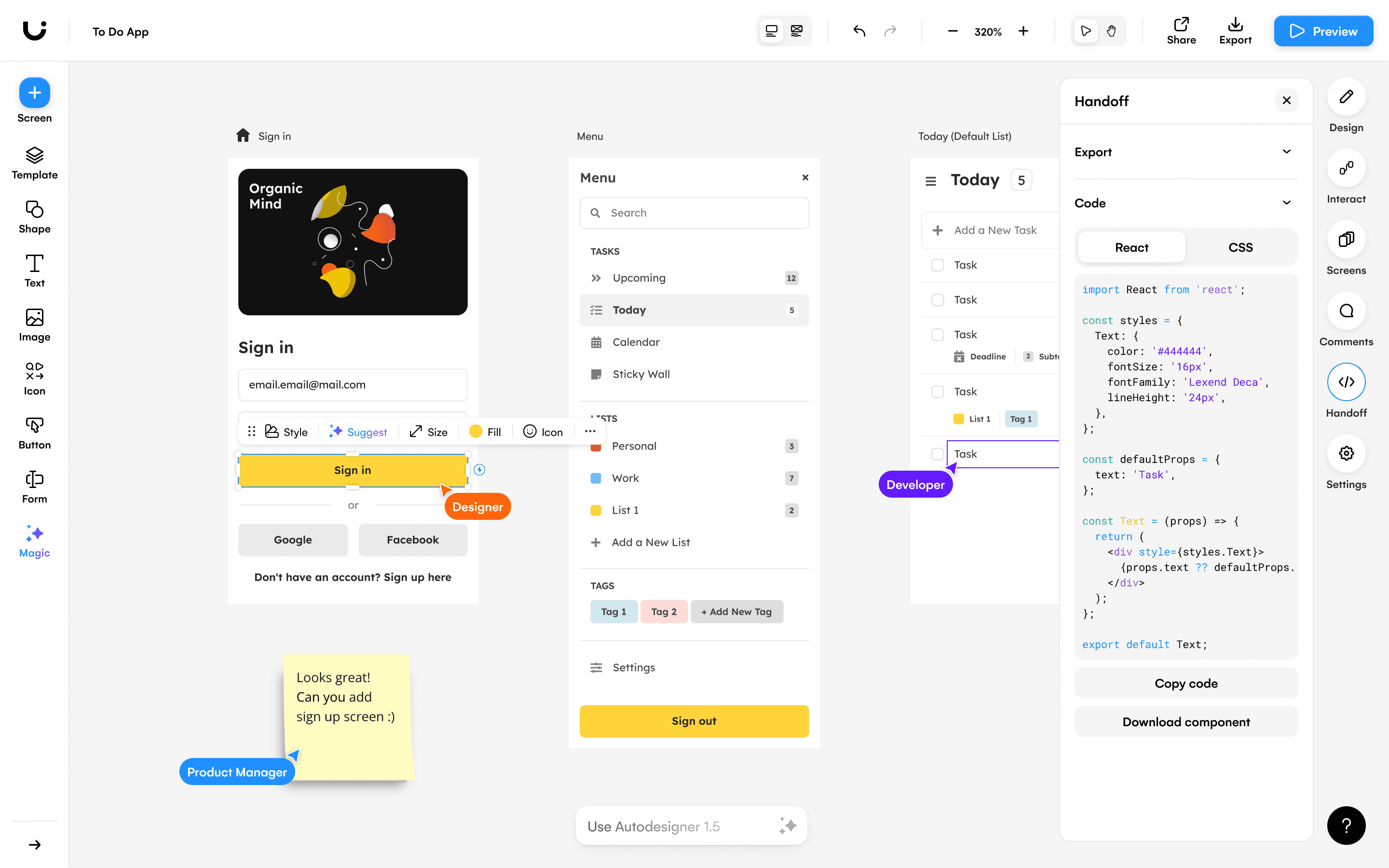
Uizard was acquired by Miro in May 2024 after raising $18.6 million across three rounds. As of April 2026, the integration is still light: Uizard runs as a standalone product at uizard.io with its own pricing and login. Founded in 2018 out of Copenhagen PhD research into GAN-based UI generation, the platform has sustained a focused identity. It is the AI design tool built for people who are not designers. Founders, product managers, and engineers get more usable output from Autodesigner 2.0 than trained UI designers do, which is a feature of the curated component library, not a bug.
How the Autodesigner Engine Operates
Three input modes drive Autodesigner 2.0: a text prompt, a screenshot of an existing screen, and a hand-drawn sketch processed by the Wireframe Scanner. Output is a multi-screen project with a shared theme, components, and brand kit, generated in roughly 30 seconds on paid tiers. The Modify Selection feature lets users re-prompt only a chosen region instead of regenerating an entire screen. The free tier is hard-capped at three monthly generations using the older Autodesigner 1.5 engine, which makes it strictly demo material.
Pricing Tiers (Verified April 2026)
| Plan | Monthly cost | AI generation budget | Project ceiling |
|---|---|---|---|
| Free | $0 | 3 generations / month (Autodesigner 1.5 only) | 2 projects |
| Pro | $12 (annual) / $19 (monthly) | 500 generations / month, Autodesigner 2.0 | 100 projects |
| Business | $39 (annual) | 5,000 generations / month, team collaboration, priority support | Unlimited |
| Enterprise | Custom | Custom volume + SSO | Custom |
Verified Review Sentiment
| Platform | Rating | Review volume | Sentiment summary |
|---|---|---|---|
| Capterra | 4.6 / 5 | 193 verified reviews | Reviewers praise speed of ideation and accessibility for non-designers. Recurrent friction: bugs in canvas interactions, limited shape primitives, missing Figma import. |
| G2 | 4.5 / 5 | 45 verified reviews | Users credit Autodesigner with collapsing concept-to-mockup time. Complaints concentrate on customization depth and Figma export reliability. |
Comparison Against Direct Rivals
| Dimension | Uizard | Visily | UX Pilot |
|---|---|---|---|
| Primary user persona | PMs, founders, engineers | PMs and product owners | UX designers and researchers |
| Output fidelity | Multi-screen mid-fi mockups | Wireframes and themed screens | Wireframes plus high-fidelity UI |
| Sketch-to-design | Yes, mature | Yes | Limited |
| Native Figma integration | Plugin available, intermittent reliability | Yes, smoother | Yes, plugin-based |
| Predictive UX heatmaps | No | No | Yes |
Trade-offs in Real Usage
| Where it earns its keep | Where it misfires |
|---|---|
| Sub-minute generation of clickable multi-screen prototypes from a description | Output components do not extend a real production design system without manual rebuilding |
| Sketch-to-screen conversion that genuinely reduces wireframing overhead | React and CSS export is scaffolding, not deployable code; routing and state are absent |
| Modify Selection enables targeted re-prompting on a specific region | No public API, so scripted generation or CI integration is not supported |
| Founder-friendly pricing at $12 per month annual on Pro | Miro integration remains shallow despite an 18-month-old acquisition |
Adoption Pattern and Best-Fit Profile
Uizard's strongest adoption signal is repeat usage among technical founders building solo. The platform converts a paragraph of intent into a clickable demo fast enough to use during investor calls. It falters on shipped product work for organizations with mature design systems. The component library is closed, design tokens are shallow, and bringing brand discipline into the output usually involves rebuilding the screen in Figma anyway.
UX Pilot AI
The Research-Grounded Validator
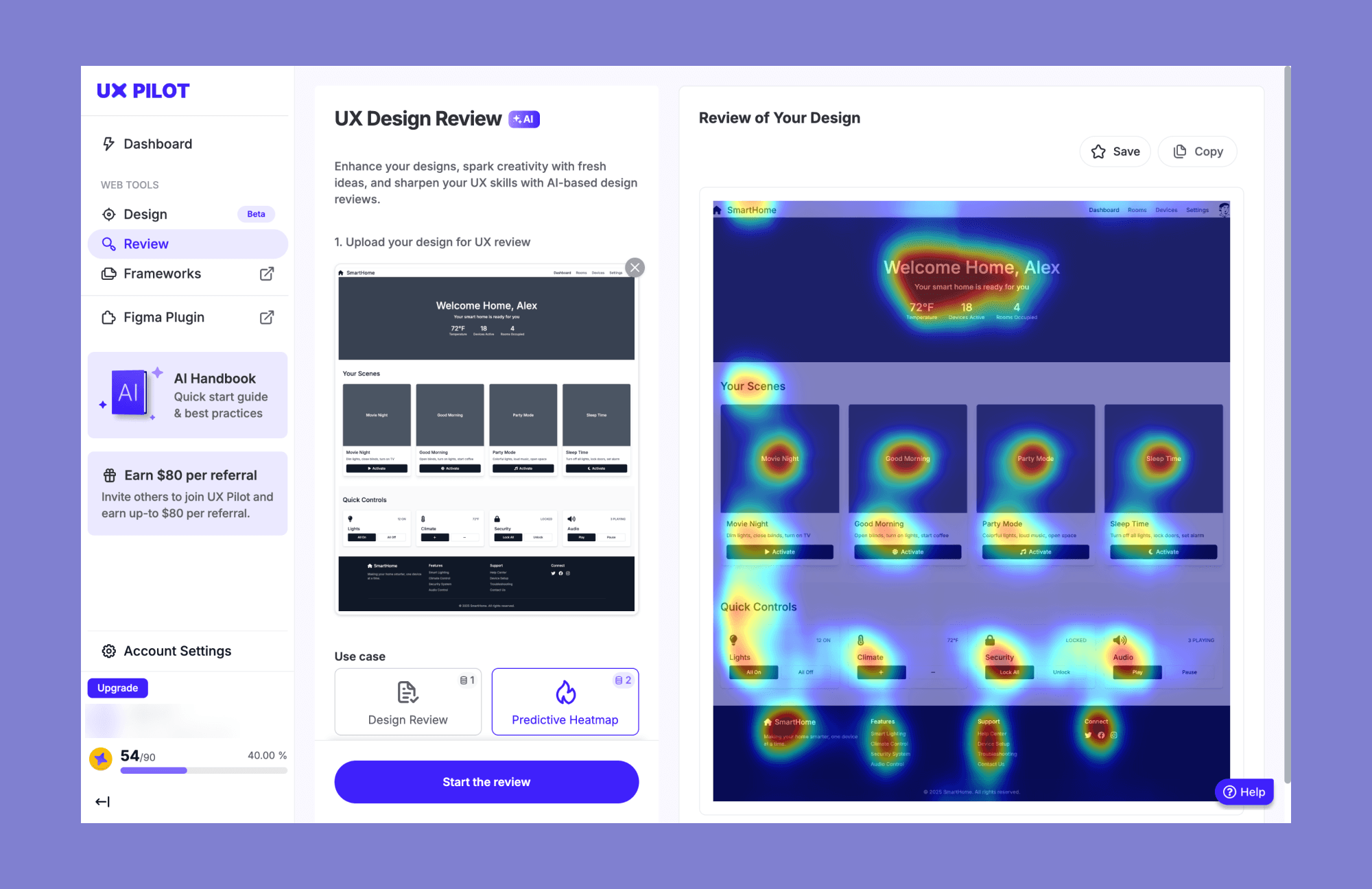
UX Pilot is the only mainstream AI design tool that ships predictive heatmaps as a default feature. Founded by Adam Fard, originally a UX consultancy, the platform sits in a deliberate niche: not the cheapest, not the prettiest, but the most opinionated about UX standards. It generates wireframes from a prompt, scales them to high-fidelity screens, and runs automated heuristic reviews against the output before any human runs a usability test. The toolset answers a specific question that most generators ignore: is this layout actually likely to work.
Architecture and Operational Logic
The product runs both as a browser app and a Figma plugin, with a unified credit balance across both surfaces. A natural-language prompt produces a structured layout following established design patterns. From there, three secondary engines run on demand. The predictive heatmap estimates visual focus based on visual hierarchy and eye-tracking research. The automated heuristic auditor flags low contrast, cramped touch targets, and unlabeled form fields. The screen-flow generator maintains visual consistency across connected screens in onboarding sequences or checkout flows.
Pricing and Credit Economics
| Plan | Cost | Credit allocation | What it unlocks |
|---|---|---|---|
| Free trial | $0 | 90 one-time credits (about 15 screens) | Hi-fi UI, wireframes, design reviews, heatmaps for evaluation |
| Standard | $12 / month (annual) | 420 credits / month (about 70 screens) | Figma export, code export, up to 5-screen flows, commercial rights |
| Pro | $22 / month (annual) | 1,200 credits / month (about 200 screens) | Unlimited screen flows, image-to-design, section-level editing |
| Enterprise | Custom | Custom volume | Custom limits, dedicated support |
Unused credits roll over to the next billing cycle but evaporate on cancellation. Multiple Trustpilot reviewers flag this as the platform's most irritating policy.
Verified Review Sentiment
| Platform | Rating | Volume | Sentiment patterns |
|---|---|---|---|
| G2 | 4.4 / 5 | 46 verified reviews | Top positives: ease of use (46 mentions), time-saving (30), simplicity (28). Top negatives: integration difficulty (8), exporting issues (8), limited free access (7). |
| Capterra | 4.5 / 5 | Verified reviews (smaller sample) | Praise for early-stage exploration and structured wireframe work. Recurring complaints: pushy upgrade prompts and screen limits that miss real project needs. |
| Trustpilot | 4.3 / 5 | 171 reviews | Quality of generated layouts highlighted positively. Bug reports concentrated around credit consumption and occasional lost work after Figma export attempts. |
Pros and Cons in Context
| Where UX Pilot wins | Where it loses ground |
|---|---|
| The only AI design tool at this price tier offering genuine predictive UX validation | Editing precision after generation is weaker than Figma-native workflows |
| Screen-flow generation maintains coherent navigation, branding, and design patterns | Figma export is plugin-only and has documented reliability issues |
| Conversational refinement for selected sections without full regeneration | Manual brand-guideline application is inconsistent on the first pass |
| Sub-screen editing and image-to-design unlock deeper iteration on the Pro plan | Credit policies penalize mid-month cancellation; no pay-as-you-go top-ups |
Comparative Position
| Feature | UX Pilot | Uizard | Google Stitch |
|---|---|---|---|
| Predictive heatmaps | Built-in | Not available | Not available |
| Automated UX audits | Yes (heuristic + accessibility) | Limited | Limited |
| Multi-screen flow consistency | Strong | Strong | Strong (5-screen canvas) |
| Figma integration depth | Bidirectional plugin | Plugin-based | Export to Figma |
| Best for | UX practitioners and PMs validating early flows | Non-designer prototyping | Free first-draft exploration |
Best-Fit Profile
UX Pilot earns its place in product teams that take research-led design seriously and want AI to handle structure-first thinking, not visual polish. Solo founders who want a website builder will find it overengineered. Visual designers chasing creative novelty will find the outputs too pattern-matched. The sweet spot is the product designer or PM who needs to translate a PRD into a wireframe with a defensible UX rationale by end of day.
v0 by Vercel
The Code-First Generator That Treats Design as a Side Effect
v0 inverts the standard AI design workflow. The output is not a wireframe to hand to engineering. The output is React code, written in Next.js idioms with shadcn/ui components and Tailwind CSS, with accessibility attributes and responsive breakpoints applied by default. As of March 2026, Vercel reports more than 6 million developers on the platform. The tool rebranded from v0.dev to v0.app in late 2025, the same period it shifted from fixed credit counts to token-based billing, added GitHub sync, introduced database integrations with Supabase and Snowflake, and shipped a sandbox runtime that builds full applications inside the browser. Vercel's December 2025 Series D valued the company at $9.3 billion.
Why Adoption Skews Toward Engineers, Not Designers
Getting good v0 output requires a mental model closer to a code review than a design critique. Designers without React fluency can use it productively for landing pages and dashboards, but they hit a wall on complex state management, real data integration, and any business logic that does not fit a CRUD pattern. Engineers, by contrast, treat v0 as faster shadcn/ui scaffolding and a way to skip the early visual exploration phase entirely. The G2 reviewer summary captures the asymmetry: "V0's models are the best frontend ones I've used, though the DX is pretty weak."
Pricing and Token Economics
| Plan | Monthly cost | Credit allocation | Notable inclusions |
|---|---|---|---|
| Free | $0 | $5 in token credits / month, ~200 projects | v0-1.5-md model, GitHub sync, Vercel deploy |
| Premium | $20 / user | $20 in credits, all model tiers (Mini, Pro, Max) | Figma imports, API access, unlimited projects |
| Team | $30 / user | $30 shared workspace credits | Shared workspace, multi-seat collaboration |
| Business | $100 / user | $30 in credits per user | Data opt-out from training, expanded compliance |
| Enterprise | Custom | Custom | SOC 2, SAML SSO, audit logs, SLAs, dedicated support |
The token-based system replaced fixed credits in February 2026. A simple component costs cents in credit. A full-stack application generation can burn through a Premium plan's monthly allowance in a single session. Costs are noticeably less predictable than the prior system.
Verified Review Sentiment
| Platform | Rating | Review volume | Sentiment patterns |
|---|---|---|---|
| G2 (Vercel parent listing) | 4.6 / 5 | 117 verified reviews | Top positives: ease of deployment, GitHub integration, frontend code quality. Recurring v0-specific critique: shadcn-heavy aesthetics, unpredictable agent-mode credit consumption. |
| Trustpilot (v0.dev) | Mixed, skewed negative | 27 reviews | Pre-Agent-mode users report strong satisfaction. Post-update reviews concentrate on credit drain, account suspension incidents, and slow customer support response times. |
| Trustpilot (vercel.com) | Mixed | 84+ reviews | Praise for free-tier deployment workflow. Negative themes: pricing surprises during scaling, mid-cycle account access issues. |
Where v0 Falls Short
| Architectural strength | Hard limit |
|---|---|
| Output quality matches what experienced Next.js developers write by hand | Single-player tool with no real-time collaboration or comments |
| One-click deployment to Vercel with edge network and SSL | React and Next.js only; no Vue, Svelte, or Angular support |
| Sandbox runtime can import GitHub repos and build full-stack apps | Token billing makes per-task costs harder to forecast than competitors |
| Generated code follows shadcn/ui conventions, easy to extend | Heavy iteration on a single complex layout can consume 15 to 20 credits per session |
Comparative Position
| Dimension | v0 by Vercel | Lovable | Bolt |
|---|---|---|---|
| Output type | React/Next.js + shadcn/ui | Full-stack with Supabase backend | Full-stack across multiple frameworks |
| Pricing entry | $20 / month (Premium) | $20 / month | $20 / month |
| Best fit | React-fluent developers and product engineers | Non-developers building functional apps | Developers needing framework choice |
| Annual run rate (latest disclosed) | Not separately disclosed | $400M ARR (Feb 2026, per Sacra) | Not publicly disclosed |
Best-Fit Profile
v0 is the right tool when the team has at least one React-fluent engineer, ships on the Vercel stack, and cares more about production-quality code output than visual exploration. It is the wrong tool for non-developers chasing a no-code app builder, teams using non-Vercel deployment targets, or any project where unpredictable monthly costs are unacceptable.
Google Stitch (formerly Galileo AI)

Free Distribution as Strategy
Galileo AI launched in 2022 as one of the first credible prompt-to-UI tools and charged up to $39 per month for roughly 300 design generations and edits. Google acquired the team in May 2025, folded the technology into Google Labs, and rebranded as Stitch. The product is now free during beta. Not free as in trial. Free as in 350 generations per month in Standard mode, 50 in Experimental mode, no credit card requirement, indefinitely. The economic logic is direct: Stitch is Google's most concrete demonstration of the Gemini model family applied to a creative tool, and the distribution it provides Gemini, Firebase, Flutter, and Material is more valuable than subscription revenue in 2026.
From Galileo to Stitch: What Changed in March 2026
The March 19, 2026 update transformed Stitch from a single-screen generator into a workspace. The infinite canvas now generates up to five interconnected starter screens at once. Voice input lets designers describe screens conversationally. The Instant Prototype feature wires generated screens into navigable flows. The DESIGN.md file makes design system tokens portable and is open-sourced for use with other AI prototyping or coding tools. Gemini 3 powers deeper reasoning for high-fidelity output. Gemini 2.5 Flash handles fast iteration. Stitch exports to Figma with editable layers preserved or generates clean HTML, CSS with Tailwind, or React code in seven different frameworks.
Beta Economics
| Capacity dimension | Allowance | Notes |
|---|---|---|
| Daily credits | 400 | Used for new projects (~9 credits each) and edits (2 to 5 credits each) |
| Monthly cap (effective) | Approximately 12,500 credits | Per Google Labs documentation as of March 2026 |
| Standard mode generations | 350 per month | Powered by Gemini 2.5 Flash |
| Experimental mode generations | 50 per month | Powered by Gemini 3 / Gemini 2.5 Pro |
| Subscription cost | $0 | No paid plans available; cannot top up credits |
| Geographic availability | Not yet global | Restricted in parts of the Balkans, Ukraine, UAE; gradual rollout reported |
Reviewer Sentiment from Independent Tests
Stitch has no published G2 or Capterra rating profile because it is a Google Labs experiment, not a commercial product. Independent designer reviews from LogRocket, Moda, Banani, Index.dev, and InfoTech (formerly tracking Galileo AI) provide the closest available sentiment signal.
| Reviewer source | Verdict | Recurring positives and concerns |
|---|---|---|
| LogRocket (UX-focused review) | Useful but not designer-replacing | Praise for free pricing and Figma export. Concern: static, non-responsive output requires manual breakpoint work. |
| Moda (April 2026) | Best free zero-cost gateway | Praise for multi-screen generation and clean exports. Concerns: Labs discontinuation risk, no design-system upload, no paid upgrade path. |
| Banani head-to-head test | Worth trying, not production-ready | Multi-screen capability strong. Limitation: cannot purchase credits when daily allowance runs out. |
| Index.dev hands-on test | Functional starting point | Code export usable as scaffolding. Concern: form interactions and submit logic generated as static stubs. |
| InfoTech / Galileo legacy reviews | Speed up UI/UX, not flexible enough | Strong layout output. Concern: generic feel requiring brand-guideline rework. |
Pros and Cons That Matter
| What works | What doesn't |
|---|---|
| Highest free tier in the category by a wide margin | Beta status means Google could discontinue or paywall without notice |
| Five-screen canvas captures full flows in one generation | Cannot purchase additional credits when daily allowance runs out |
| Open-source DESIGN.md spec is portable across other AI coding tools | Tends to forget liked components and reinterpret them across iterations |
| MCP server connects Stitch designs to Jules and other Gemini coding agents | Truly responsive design output still requires manual breakpoint work |
Comparison Against Direct Substitutes
| Dimension | Google Stitch | Uizard | Banani |
|---|---|---|---|
| Pricing | Free during beta | Free / $12 / $39 monthly | Free + paid top-ups from $12 |
| Multi-screen generation | Up to 5 screens per prompt | Multi-screen via Autodesigner 2.0 | Multi-screen with Gemini-powered output |
| Code export | HTML, CSS (Tailwind), React, Figma | React, CSS for individual components | Figma export, code export limited |
| Credit top-ups | Not available | Plan upgrades only | Top-ups available |
| Production readiness | Beta, no SLA, discontinuation risk | Generally available | Generally available |
Best-Fit Profile
Stitch is the strongest free zero-cost gateway into AI UI generation in 2026, dependable enough for early-stage teams validating ideas and PMs preparing decks. It is not yet a tool to anchor production design workflows against. The discontinuation risk is real: Google has a documented history of sunsetting promising consumer-creative products including Reader, Stadia, Inbox, and Web Designer. An enterprise team standardizing on Stitch is betting that a free Labs experiment will graduate, not get archived.
Framer with Wireframer and Workshop
The Marketing Site Builder That Ate Webflow's Mid-Market
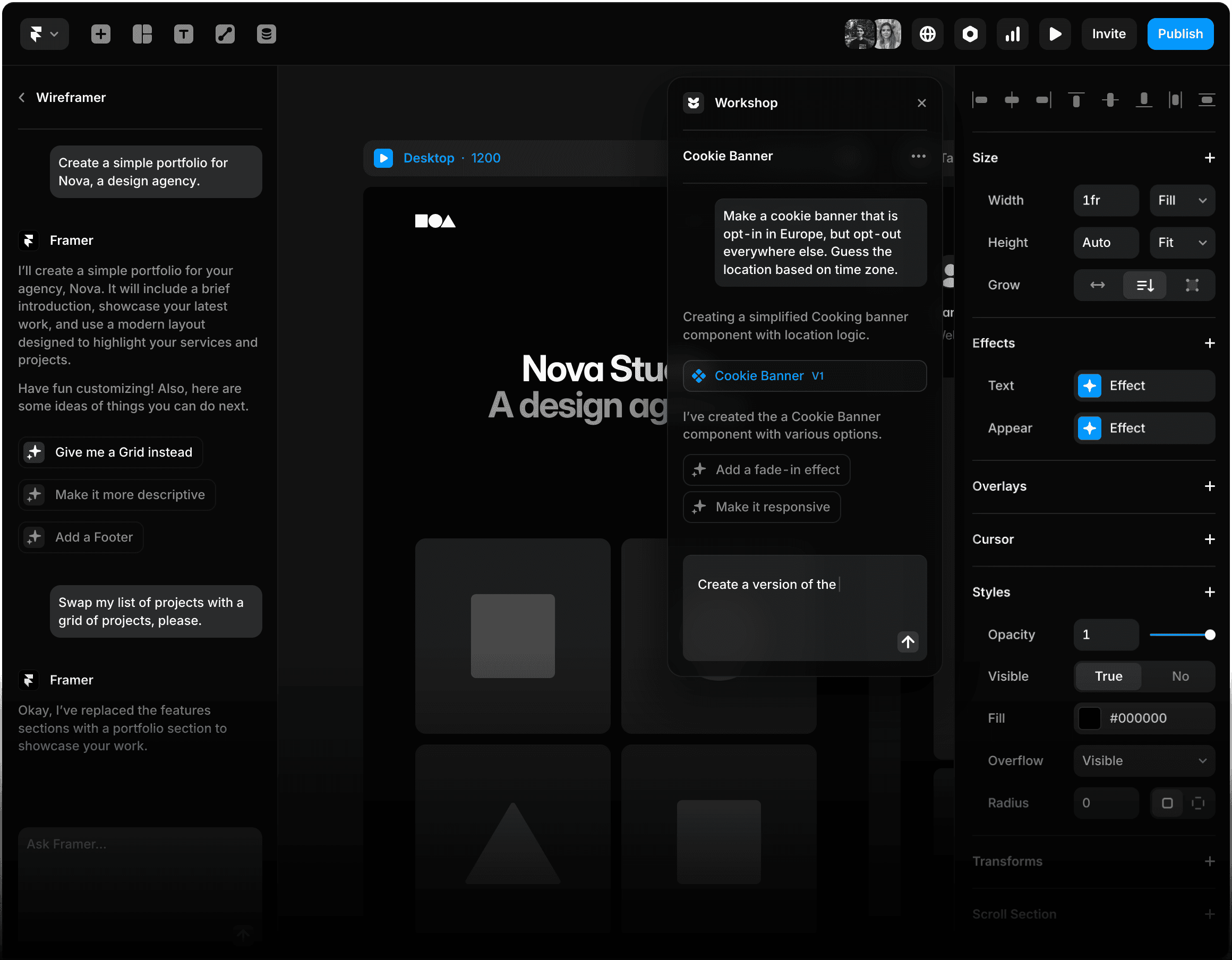
Framer started as a prototyping tool, became a website builder, and in 2026 sits closer to a publishing platform with AI on top than a design tool with hosting attached. The Wireframer AI generates page layouts and advanced components from a prompt. The Workshop coding assistant produces custom React components on demand. Built-in CMS, SEO tooling, A/B testing, and edge-network hosting round out the stack. Framer is a Dutch company founded in 2015. The October 2025 pricing overhaul restructured seven tiers down to five and tightened the lower tiers, in particular dropping Basic from two CMS collections to one, which has pushed many freelancers toward Pro despite the price jump.
Inside the Wireframer and Workshop AI Tools
Wireframer takes a prompt and produces a structured starting point with relevant copy and imagery, generating individual pages rather than entire sites. This avoids the bland-template output that plagues most AI website builders. Workshop is a coding assistant that produces custom React components on demand and integrates with OpenAI, Anthropic, and Gemini for content generation and image creation. Both AI tools are available on every plan, including Free.
Pricing Structure
| Plan | Annual billing | Monthly billing | Practical limits |
|---|---|---|---|
| Free | $0 | $0 | 1,000 pages, 10 CMS collections, framer.website subdomain only |
| Basic | $10 / month | $15 / month | Custom domain, 30 pages, 1 CMS collection, 10 GB bandwidth |
| Pro | $30 / month | $45 / month | 150 pages, 10 CMS collections, 100 GB bandwidth, staging, advanced analytics |
| Scale | $100 / month | Annual only | 500+ pages, 20 CMS collections, 2 TB bandwidth, A/B testing, premium CDN |
| Enterprise | Custom | Custom | Custom limits, advanced security, dedicated support |
Add-on costs often determine total spend more than the plan. Translation locales run $20 per language per month above plan inclusions. A/B testing on Scale costs $50 per 500,000 events. Editor seats are billed separately. A 12-language site on Pro can land at roughly $840 per year all-in.
Verified Review Sentiment
| Platform | Rating | Review volume | Sentiment patterns |
|---|---|---|---|
| G2 | 4.6 / 5 | 140 verified reviews | Top positives: ease of use (39 mentions), features (23), customer support (23), speed (21). Top negatives: missing features (10), expensive (9), pricing issues (8). |
| Capterra | 4.4 / 5 | 32+ verified reviews | Praise for design freedom and AI integration. Recurring critique: steep learning curve coming from Figma; missing carousel and CMS standards. |
| Trustpilot | 3.5 / 5 | 104+ reviews | Mixed sentiment. Designers praise output quality. Negative reviews concentrate on AI-only customer support, GDPR compliance gaps in Germany, and difficulty cancelling subscriptions. |
Strengths and Frictions in Production Use
| What teams ship faster | What slows them down |
|---|---|
| Wireframer turns a prompt into a structured starting point with relevant copy and imagery | AI Workshop output is solid for components but struggles with complex API integrations |
| On-page editing lets non-developers update live pages without dev cycles | Mobile responsiveness still requires manual layout work for tablet and phone breakpoints |
| Built-in CMS, SEO, and analytics consolidate three separate vendors into one | Pricing cliff from Basic to Pro is steep at 200 percent increase for unlocking additional CMS collections |
| Edge network hosting with automatic SSL ships globally without DevOps overhead | Customer support is AI-bot-led with email replies up to 24 hours; no live phone or chat |
How Framer Lines Up
| Capability | Framer | Webflow | v0 by Vercel |
|---|---|---|---|
| AI prompt-to-page | Wireframer (production-grade) | Limited AI Assistant | Native, code-first React output |
| Built-in CMS | Yes, modular with relational fields on Pro | Yes, mature for editorial workflows | External backend required |
| Hosting included | Yes, edge network with auto SSL | Yes, with multi-region CDN | Vercel deployment |
| Best for | Marketing teams shipping campaign sites | Content-heavy editorial and SaaS sites | Developers building React applications |
| Entry paid tier | $10 / month (Basic, annual) | $14 / month (Basic) | $20 / month (Premium) |
Best-Fit Profile and Mismatches
Framer is the right call for design-led startups, agencies, and marketing teams that want to ship a beautiful, performant marketing site without a developer in the loop. It is the wrong tool for content publishers (the CMS gets expensive fast), engineering teams that need full backend control, ecommerce-heavy projects (no native solution), and any project where direct human customer support is a hard requirement.
Cross-Tool Synthesis
Where Each Platform Earns Its Place
The six tools profiled above do not really compete in the same category, despite the marketing positioning that suggests otherwise. They occupy different slots in a designer's workflow, and the procurement decision is rarely one-tool-or-another. It is more often which two or three to combine.
Cost Comparison at Entry-Tier Paid Pricing

Verified Rating Comparison Across Platforms
| Tool | G2 | Capterra | Trustpilot | Total verified reviews (G2 + Capterra) |
|---|---|---|---|---|
| Figma | 4.7 / 5 | 4.7 / 5 (649+) | Mixed, smaller sample | Over 1,649 |
| Framer | 4.6 / 5 (140) | 4.4 / 5 (32+) | 3.5 / 5 (104) | Approximately 172 |
| Uizard | 4.5 / 5 (45) | 4.6 / 5 (193) | Limited sample | Approximately 238 |
| UX Pilot | 4.4 / 5 (46) | 4.5 / 5 (smaller) | 4.3 / 5 (171) | Approximately 50+ |
| v0 by Vercel | Listed under Vercel parent (4.6 / 5, 117) | Not separately listed | Mixed, 27+ on v0.dev | Roughly 117 (parent) |
| Google Stitch | Not listed (Labs experiment) | Not listed | Not listed | Independent reviewer consensus only |
Decision Logic by Role
| Role or scenario | Primary recommendation | Reasoning anchor |
|---|---|---|
| Solo founder validating an idea fast | Google Stitch + Uizard | Free generation budget covers exploration without subscription commitment |
| Product designer at a Series B SaaS company | Figma + UX Pilot | Design system fidelity plus research-grounded validation |
| Frontend engineer building React apps | v0 by Vercel | Code output quality and Vercel deployment loop |
| Marketing team launching campaign sites | Framer | AI plus CMS plus hosting consolidated in one stack |
| PM creating clickable prototypes for stakeholder review | Uizard or UX Pilot | Speed-to-prototype matters more than design system rigor |
| Enterprise UX organization with 50+ designers | Figma Organization or Enterprise | SSO, branching, design system analytics, governance |
| Agency producing client websites | Framer + UX Pilot | Production publishing plus UX validation across diverse client briefs |
Closing Read
The leverage in 2026 belongs to teams that adopt AI design tools surgically, not indiscriminately. Figma anchors collaborative production work. v0 collapses the design-to-code distance for React engineers. UX Pilot validates structure before visual polish. Uizard and Stitch handle first-draft exploration at near-zero cost. Framer compresses marketing site delivery into one stack. The cost of the wrong tool is not the subscription. It is the senior designer hours spent cleaning up output that should never have been generated in the first place.
Three signals will define the rest of 2026: whether Stitch graduates from beta or gets archived, whether Miro produces a unified Uizard-Miro product after two years of separation, and whether Figma's MCP server adoption among coding agents creates structural lock-in. The decision framework above will outlast the specific tools in this report.
Post Comment
Be the first to post comment!





