Quick question: how does anyone turn a half-formed idea into a working website without learning HTML, losing every weekend for a month, or crying softly into a lukewarm cup of coffee?
Two names dominate that conversation, and they have been throwing elbows at each other for over a decade: Wix and Squarespace. Both will help build a website. Both will charge money. Both will, at some point, make a user mutter something unkind at the laptop screen. The real question is which one matches a person’s style, budget, and tolerance for “we appreciate your patience” support emails.
What follows is not the press-release version. It is the honest, occasionally funny breakdown anyone actually choosing between the two deserves.
The First Click: What These Things Are
Both are website builders, which is a polite way of saying they are training wheels for people who refuse to write code. Most people should not be writing code to put a bakery menu online anyway.
Wix launched in 2006 with flexibility as its religion: drag, drop, resize, recolor, treat the canvas like a giant fridge magnet board. Squarespace, born in 2003, took the opposite bet. Its founders looked at the early web and said, “this is ugly, and we are going to fix it.” Polish in exchange for constraint.
| In other words, Wix says, “do whatever you want.” Squarespace says, “do whatever you want, as long as it looks nice.” |
BY THE NUMBERS — 2025
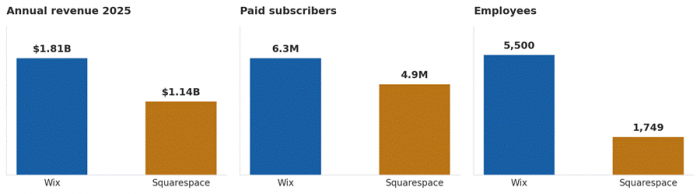
Sources: Wix and Squarespace 2024 / 2025 financial filings; Backlinko subscriber estimates.
Wix is the bigger business. Squarespace runs leaner, pulling in more than half of Wix’s revenue with roughly a third of the headcount. That tighter shape is part of why Squarespace can keep obsessing over design polish without product teams pulling in five different directions.
Templates: The Beauty Pageant Nobody Asked For
Templates are the first thing anyone sees, and they set the emotional tone of the entire build.
Wix offers more than 900 templates across categories like “Beauty and Wellness,” “Online Store,” and the always-entertaining “Personal.” Some look fantastic. Some look like they were designed in 2011 and never got the memo about smartphones. The bigger catch: once a template is picked on Wix, switching to another one means rebuilding the site from scratch. Yes, really. That decision is locked in like a tattoo from spring break.

Squarespace has fewer templates, around 150, but the quality bar is noticeably higher. Every one looks like it belongs in a coffee shop on a street with too many bicycles. Photographers love them. So do restaurants, wedding planners, and anyone who has ever owned a linen shirt unironically.

The trade-off is honest. Wix gives variety and quirkiness. Squarespace gives consistency and a vibe that whispers, “the owner has good taste in candles.”
Drag, Drop, and Occasionally Despair
Wix uses a true drag-and-drop editor, which means a button can be placed exactly where the cursor leaves it, even if “exactly there” is a terrible design decision. This freedom feels powerful for about an hour. Then comes the moment when a perfectly aligned section on desktop looks like a yard sale on mobile, and the great mobile-editing safari begins.
Squarespace uses a grid-based, section-by-section editor. Think of it as building with elegant LEGO bricks. Less freedom, sure, but also less heartbreak. Things tend to line up. Mobile views adapt without making anyone weep. Anyone who has spent three hours nudging a single image on Wix understands that constraint is not always the enemy.
For a first-timer with no design background, Squarespace feels safer. For someone who wants control over every pixel and does not mind a bit of trial and error, Wix feels liberating. Both have learning curves, but those curves bend in opposite directions.
| A useful test: open the editor with a glass of water nearby. If the water is gone before the homepage is done, that builder is probably not the one. |
The Wallet Test: Pricing Without the Marketing Fluff
Money matters. Marketing pages rarely make it easy to find the actual cost, so here is a clean comparison (USD, approximate, billed monthly on annual plans).
| Plan Tier | Wix | Squarespace | Best For |
|---|---|---|---|
| Free | Yes, with Wix branding | None, 14-day trial only | Tire kickers and idea testers |
| Starter | Around $17 / month | Around $16 / month | Simple sites and personal portfolios |
| Mid Tier | Around $29 / month | Around $23 / month | Small businesses and active blogs |
| Commerce | Around $36 / month | Around $28 / month | Stores just getting going |
| Top Tier | Around $159 / month | Around $52+ / month | Larger online stores |
Wix offers a free plan, which is great for testing and terrible for branding (Wix slaps its own ads on the site, which scream “amateur hour” to any visitor). Squarespace skips the free tier and only offers a 14-day trial, the website-building equivalent of “first taste is free.”
At first glance, the gap looks small. Look closer and the picture shifts. Squarespace tends to include more features at every tier, especially around design and analytics. Wix offers more upgrade paths and a sprawling app marketplace, which is helpful, but those apps often charge their own monthly fees. “Death by a thousand subscriptions” applies more to Wix than to its rival.
Selling Stuff Online: The Cash Register Round
E-commerce is where the two builders separate, and not always in the way people expect.
Wix has a generous e-commerce ecosystem. Multiple payment gateways, hundreds of apps for shipping, inventory, and abandoned-cart recovery, plus dropshipping integrations. A small business owner selling candles, custom mugs, and the occasional handmade scrunchie will find everything reasonable here. The downside is that Wix’s app-heavy approach can feel like assembling IKEA furniture without the picture instructions.
Squarespace built its commerce features inside the platform rather than leaning on third-party apps. That makes the experience cleaner, with elegant product pages, built-in subscriptions, gift cards, and a member-area feature that gets surprisingly little credit. Squarespace excels for boutique stores, course creators, and anyone selling digital products.
A practical way to think about it: Wix is the busy bazaar with stalls offering every possible add-on. Squarespace is the curated concept store where everything sits on the same shelf, in the same font, looking like it belongs in a magazine.
Volume-heavy sellers with thousands of SKUs tend to outgrow both eventually and move to Shopify. That is not a failure of either tool. That is just how store growth works.
Words and Search: Blogging and SEO
Squarespace has long been the favorite of bloggers. The editor is clean, typography defaults are pleasant, scheduled posts work without drama, and tagging actually makes sense. The platform respects the writing process in a way that becomes obvious after the first few posts.
Wix has closed the gap dramatically. Author profiles, categories, RSS feeds, comments: all there and working. The aesthetics still feel a half-step behind Squarespace out of the box, but the distance is much shorter than it used to be.
On SEO, both cover the basics: editable title tags, meta descriptions, alt text, custom URLs, sitemaps, and Search Console integration. Wix shouts louder about it and ships a step-by-step setup checklist for new users. Squarespace is quieter but builds clean pages by default.
On raw site speed, older guides still claim Squarespace is faster. That stopped being true after Wix rewrote its infrastructure around server-side rendering in 2020. HTTP Archive measurements now put roughly 73 percent of Wix sites past Google’s Core Web Vitals thresholds, against about 58 percent of Squarespace sites.
The honest takeaway: SEO success on either platform depends far more on content than on the builder. The plumbing is solid on both, with Wix holding a real edge on speed that older comparison guides still miss.
When Things Go Wrong: Customer Support
At some point, something will break. A contact form will stop sending emails. A domain will refuse to verify. A theme update will rearrange a homepage at the worst possible time. The question becomes who picks up the chat, since neither company is exactly eager to give out a phone number.
Wix offers 24/7 support through chat and a callback system. Response times have improved, though anyone who has dealt with first-tier support knows the dance: canned reply, clear-the-cache request, “please confirm you have tried the steps in our help center.”
Squarespace runs email and live chat, no phone option, with chat available weekday business hours in the US. Reviews of Squarespace support tend to come back more positive, partly because the platform is more contained and partly because their reps seem genuinely empowered to fix things.
Neither builder will send a developer to a doorstep at 2 AM. Both have extensive help centers, communities, and YouTube channels that can answer most questions faster than a support ticket can.
Who Should Pick Which: The Honest Answer
WHERE EACH ONE WINS
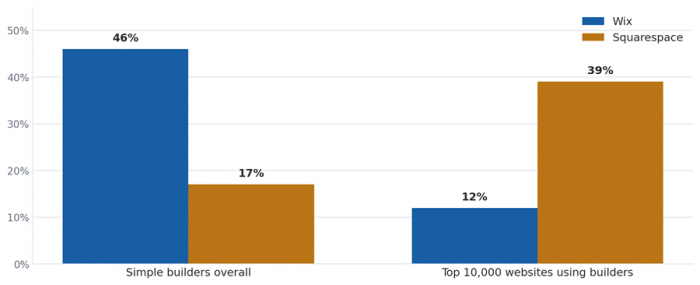
Sources: Sitebuilder Report (broad builder share); W3Techs and Wiserreview analysis of the top 10,000 websites.
This split is the single most useful data point in the whole comparison. Wix wins on volume, with about 46 percent of all simple-builder websites. Squarespace wins on prestige, claiming 39 percent of the top 10,000 sites built on any builder, more than three times Wix’s share at that level. Picking a builder is partly a question of which crowd a site should sit alongside.
The right pick depends entirely on the situation. Here is the unfiltered version.
Wix is the better fit when:
•A free plan to test ideas matters more than aesthetics out of the gate.
•The site needs unusual features like booking systems, multilingual setups, or a community forum, and add-on apps are not a dealbreaker.
•Full creative control over layout is non-negotiable.
•The business is service-based, small, and likely to add tools over time.
Squarespace is the better fit when:
•Visual polish is the top priority, especially for portfolios, restaurants, and creator brands.
•The site will involve regular blogging, courses, or digital products.
•A clean, consistent experience matters more than absolute flexibility.
•The owner would rather spend time on content than on tinkering with layout.
A useful gut check: imagine showing the finished website to a stranger. If the goal is “wow, this looks expensive,” Squarespace will get there faster. If the goal is “wow, this does so much,” Wix has the broader toolkit.
There is also the question of growth. Wix sites can scale to fairly complex setups thanks to the app market and Wix Studio (the more advanced editor). Squarespace tends to stay tidy as it grows, though very large operations may eventually push past its limits.
A Final Note on Long-Term Living
Picking a builder is not a five-minute decision, because moving later is painful. Exporting a Wix site to another platform is famously difficult. Squarespace exports are slightly more portable, though still not seamless. Plan to live with whichever choice for a few years.
The good news: both platforms are mature, both are constantly improving, and both have helped millions of people get online without ever opening a code editor. The choice is not between a good builder and a bad one. It is between two different philosophies of how a website should feel to make.
The Verdict
Back to the question from the beginning: how does anyone turn a half-formed idea into a working website without losing their mind? With Wix, the answer is by exploring a thousand options, occasionally getting lost, but eventually building something flexible and personal. With Squarespace, the answer is by trusting the rails, designing within them, and ending up with something that looks better than it had any right to.
Neither is a bad choice. Both have their fans and their critics, sometimes in the same Reddit thread. The smart move is to use the trial periods generously. Open both editors, try to build a homepage in twenty minutes, and notice which one feels less like work. That feeling matters more than any feature comparison ever will.
Because in the end, the best website builder is the one that actually gets the website built.
Post Comment
Be the first to post comment!





