If you have landed here, you are probably weighing two tools and trying not to waste money on the wrong one. Fair enough. Here is the honest starting point: these two were never really rivals.
AutoDraft AI turns your words into animation and art. DupDub turns your words into voice, dubbing, and talking-avatar video. So the real question is not which is better. It is which one matches the thing you are actually making. Get that right and the decision takes about thirty seconds. Get it wrong and you pay for a subscription you never open.
This guide is built to save you that mistake. There is a quick decision map below, a look at what each tool is genuinely good and not-so-good at, real costs mapped to how much you create, and a short verdict at the end. Skim what you need.
Start Here: The 30-Second Decision
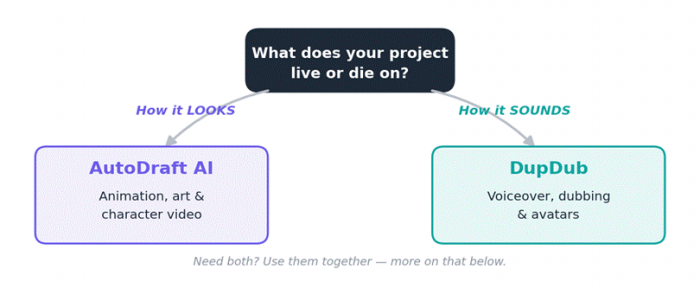
Most people can stop reading right here. The rest is for when you want the why.
The quick rule Making something people will WATCH and look at? Lean AutoDraft AI. Making something people will LISTEN to, or need in many languages? Lean DupDub. Doing both? You can run them side by side for less than one premium suite. |
Side by Side, at a Glance
If you only have a minute, this table covers the essentials. Everything below just adds the detail behind it.
| AutoDraft AI | DupDub | |
|---|---|---|
| Built for | 2D animation, AI art, characters | Voiceover, dubbing, avatars, transcription |
| Ideal user | Animators, storytellers, illustrators | Video creators, marketers, podcasters |
| You get | Images, animated scenes, video to 4K | Voice audio, dubbed + avatar video |
| Languages | Prompt-based, English-first | 90+ languages, 700+ voices |
| Starts at | Big free tier; paid ~$10/mo | Free trial; paid from $11/mo |
| API / integrations | No public API | API + Canva & ChatGPT |
| Watch out for | Learning curve on advanced controls | Credits drain fast on long video |
Prices reflect publicly listed 2026 plans and change often. Confirm on each vendor's site before buying.
AutoDraft AI: For When the Visual Is the Point
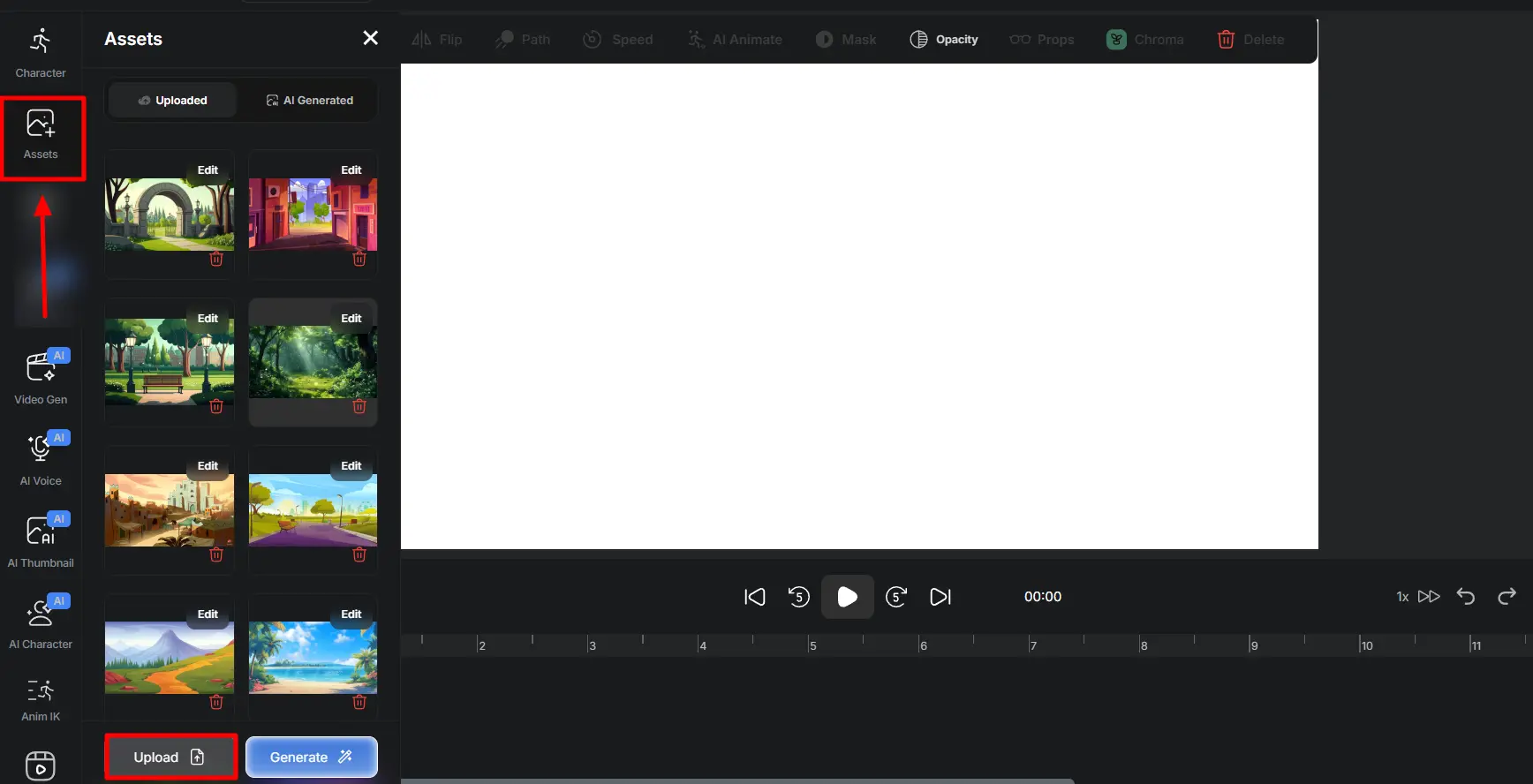
AutoDraft AI is a browser-based tool that turns text prompts into 2D animation, digital art, characters, and short video. Launched in 2023 out of Bangalore, it is aimed at YouTubers, educators, marketers, and storytellers who want finished visuals without hiring a designer or learning animation software.
Here is why people like it in practice. You start with an idea in words, generate the imagery, shape your characters with custom model training so they stay consistent, add movement, and can even drop in narration through the built-in voiceover, all without leaving one tab. For a solo creator, that collapses a week of back-and-forth with freelancers into an afternoon. And because the free tier is unusually generous, you can find out whether the output works for you before spending a cent. That last point is worth dwelling on: most tools in this space ask for a card before you see real results, so being able to test the actual output for free meaningfully lowers the risk of committing. AutoDraft AI appears safe for basic creative use, but private, copyrighted, or client-sensitive material should still be handled carefully.
What you will love
- Text-to-image and AI painting that build storyboards, characters, and backgrounds from a simple prompt.
- A character animation kit covering body movement, lip-sync, and expressions.
- Custom model training that keeps your characters and style consistent across a whole project.
- Built-in AI voiceover, so a short can be narrated without a second app.
- A genuinely generous free tier, with reviewers citing roughly 90% of core features free plus 4K exports.
What might frustrate you
The depth has a cost: the more advanced animation controls take time to learn, and there is no public API, so you cannot wire it into an automated pipeline. The drafts are a strong starting point rather than a finished film, and like any prompt tool, leaning on it too hard can flatten your originality. The best results come from treating its output as raw material you then shape, not the final cut.
Best fit Animated explainers, character-driven stories, illustrations, and 2D video where how it looks is what sells it, and where a free tier matters more than integrations. |
DupDub: For When It Has to Sound Right
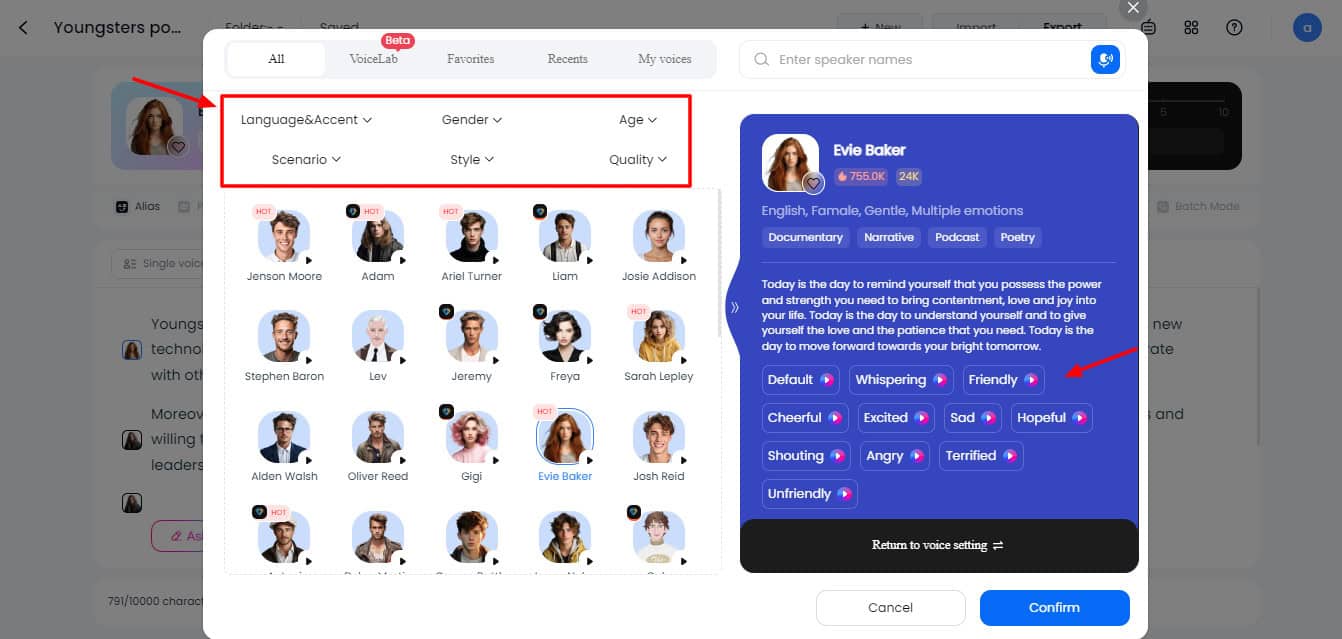
DupDub bundles voiceover, dubbing, avatars, and transcription into one workspace.
DupDub works from the audio side. It is an all-in-one platform for AI voiceovers, video dubbing, talking avatars, transcription, and subtitles. The headline is the voice library, which reviewers put at 700-plus voices across more than 90 languages, with cross-lingual cloning that keeps a speaker's tone steady when switching languages.
That makes it a natural fit for marketers automating campaign content, businesses producing training material, podcasters going international, and YouTube automation channels. One reviewer who ran it for ninety days reported saving more than twenty hours a month, framing it as a real time-saver for creators on a budget rather than a premium studio. Canva and ChatGPT integrations plus an API mean it slots into a bigger workflow instead of being a dead end. If your content already lives across several platforms, that ability to connect rather than silo is often what tips the decision in its favor.
What you will love
- A huge multilingual voice catalog with control over speed, pitch, tone, and emotion.
- Lip-synced video dubbing for localizing content to global audiences.
- Photo and gesture avatars that narrate videos with no on-camera presence.
- Transcription, subtitles, and AI writing tools that round out the workflow.
- API access plus Canva and ChatGPT integrations for existing toolchains.
What might frustrate you
Reviewers are candid here. ElevenLabs still edges DupDub on raw voice realism, and Murf often feels more polished for business-facing work. Testers also report credits draining quickly on long videos and avatars, and the occasional quality wobble on longer audio. The smart move: do not jump to the $110 Ultimate tier before stress-testing credit limits on a cheaper plan, and validate it against your own work during the free trial rather than trusting any single review.
Best fit Voiceover, narration, podcasts, and audiobooks, especially anything that needs to reach multiple languages through dubbing or cross-lingual cloning, or to plug into an existing pipeline via API. |
What You Will Actually Pay
Sticker prices only tell half the story, because the two tools meter usage differently. AutoDraft AI front-loads its value into a wide free tier, so plenty of hobbyists never upgrade. DupDub runs on credits that the best features, long voiceovers, dubbing, and avatars, burn through quickly. The chart below maps likely monthly cost to how much you actually create.
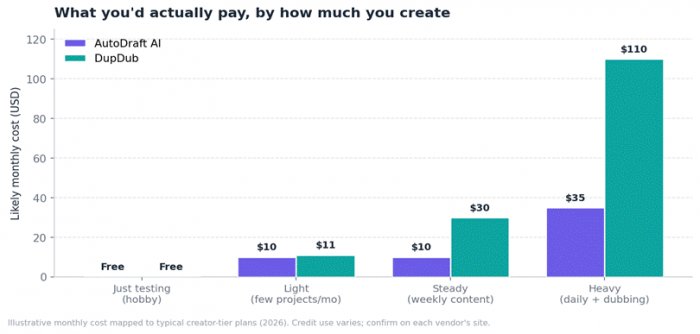
The same $11 plan feels very different to a casual user and a daily creator.
The practical reading: if you are testing the waters, both let you start free, but AutoDraft AI's free tier stretches much further. As output climbs, DupDub's tiers tighten faster because its standout features are the credit-hungry ones. A creator posting one short voiceover a month and a creator dubbing weekly videos into five languages will have wildly different bills on identical plans.
DupDub plans (monthly, 2026)
| Plan | Price | Who it suits |
|---|---|---|
| Free / Trial | $0 | 3-day trial, ~10 credits, no card needed |
| Personal | $11 | Individual creators; core voice, video, avatars |
| Professional | $30 | Serious creators needing more credits + commercial use |
| Ultimate | $110 | High volume; only worth it after testing limits |
| Scale / Business | $250+ | Companies and teams with heavy production needs |
Creator-tier prices vary slightly across resellers; annual billing lowers the effective monthly rate.
AutoDraft AI plans
Simpler structure here. The free tier is the headline, covering most core features with free animations and unlimited downloads, which is rare in this category. A paid plan starts around $10 per month for full access and a monthly credit allowance, with a heavier tier near $35.
| Plan | Price | What you get |
|---|---|---|
| Free | $0 | Most core features, free animations, unlimited downloads |
| Pro / Base | ~$10 | Full feature access with a monthly credit allowance |
| Higher tier | ~$35 | Larger monthly credit pool for heavier output |
AutoDraft AI pricing is drawn from public listings and changes frequently; confirm on the official site.
Feature Face-Off
Laid against each other, the split is clean. One side glows on visuals, the other on audio and localization. Very little genuinely overlaps, which is exactly why the choice is usually easy.
| Capability | AutoDraft AI | DupDub |
|---|---|---|
| Text-to-image / art | Strong | Limited |
| 2D animation | Core strength | Not offered |
| AI voiceover | Basic, built in | Core strength |
| Voice cloning | No | Yes, cross-lingual |
| Video dubbing | No | Yes, lip-synced |
| Talking avatars | Character animation | Photo + gesture avatars |
| Transcription / subtitles | No | Yes |
| Multilingual range | English-first | 90+ languages |
| Public API | No | Yes |
| Free tier depth | Very generous | Short trial only |
One Market Fact That Actually Helps You Decide
Here is something useful rather than a generic growth stat. DupDub rides the AI voice market, and the most telling data point is that the big research firms cannot agree on how large that market even is. They differ by billions. For a buyer, that disagreement is the signal.
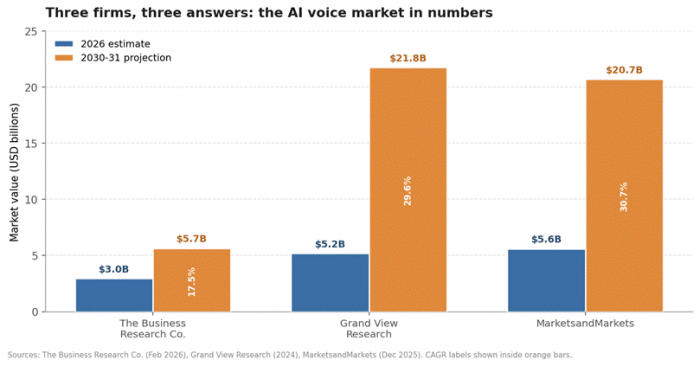
Estimates diverge by billions because each firm defines the market differently.
The Business Research Company scopes narrowly around text-to-speech and pegs 2026 near $2.97 billion, reaching about $5.65 billion by 2030 at a 17.5% CAGR. MarketsandMarkets takes a wider view including enterprise APIs and voice cloning, valuing it near $4.16 billion in 2025 and projecting $20.71 billion by 2031 at a 30.7% CAGR. Grand View Research lands in between at a 29.6% CAGR.
What this means for you: voice AI is young and expanding fast, which is good news. Competition keeps pushing quality up and prices down, so an affordable bundle like DupDub has real room to improve, and the gap with premium names like ElevenLabs is likely to narrow rather than widen over time. AutoDraft AI's animation niche is thinner on hard market data, which itself tells you it is playing in a less crowded lane, with fewer direct rivals breathing down its neck. For a buyer, both readings point the same way: you are not locking into a dying category with either choice.
The Move Most People Miss: Use Both
Because these tools barely overlap, stacking them is often smarter than picking a side. Build your animated scenes in AutoDraft AI, then run narration and multilingual dubbing through DupDub. Two budget subscriptions can still cost less than one premium all-in-one suite, and together they cover far more ground than either could alone. It is the kind of pairing that sounds obvious once said, yet most comparison guides never mention it because they assume you have to choose.
A real example An education channel animates a lesson in AutoDraft AI, generates English narration, then uses DupDub to dub it into Spanish, Hindi, and French while keeping a consistent voice. That single pipeline reaches audiences neither tool could serve alone, for two affordable subscriptions instead of a designer plus a voice studio plus a translator. |
What People Who Actually Use Them Say
Spec sheets only go so far, so here is the lived experience, summarized from the patterns that show up again and again across review sites.
| AutoDraft AI | DupDub | |
|---|---|---|
| Praised for | Effortless setup, no animation skill needed, usable output | Time saved, multilingual reach, one tool replacing several |
| Common gripe | Learning curve on advanced controls; no API | Credits run short fast; dips on long audio |
| Typical user | Hobbyist animators, indie storytellers | Budget creators, multilingual marketers |
| Compared against | Animaker, other DIY animation tools | ElevenLabs, Murf on voice quality |
Summary reflects recurring sentiment across G2, SaaSworthy, and independent 2026 reviews.
On AutoDraft AI, the recurring word is relief. Users with zero animation background describe turning out finished character work and landscapes that would normally need a designer, and several note it cut both time and cost. On DupDub, the standout praise is consolidation, replacing a stack of separate voice, caption, and translation tools with one subscription, balanced by honest grumbles about credits vanishing faster than expected. Neither tool claims to be the absolute best in its category, and both are upfront about it. What they win on is accessibility and value, which for most independent creators is exactly the trade that matters.
The Verdict
After putting both through real projects, the cleanest way to say it is this: there is no winner here, only a right fit. AutoDraft AI is what you reach for when ideas need to become moving pictures, and its free tier makes it almost risk-free to try. DupDub earns its place the moment voice and language matter, even with ElevenLabs ahead on pure realism, because nothing else bundles voice, dubbing, avatars, and transcription this affordably.
If you can only spend on one, ask yourself the single question from the top of this guide: does your project live or die on how it looks, or how it sounds? Answer that and you are done. And if the honest answer is both, do not force a choice. Let each tool do the one thing it does best, and let your work be better for it.
Bottom line Pick AutoDraft AI for visuals. Pick DupDub for voice and language. Pick both if your project needs both, it will still cost less than one premium suite. |
Post Comment
Be the first to post comment!





