I've leaned on Inflact plenty. It's a real Swiss-army knife for Instagram: anonymous viewing, content downloads, a hashtag generator, scheduling and DM automation, all in one tab. When I just want to peek at a competitor or grab a reel for reference, it's right there.
But over time I kept hitting the same walls. The growth automation made me nervous about my account, the full bundle cost more than I wanted to spend, and most months I only touched one or two of its modules. If that sounds like you, you probably don't need a single drop-in replacement so much as the right specialist for the one job you care about most.
So I did the legwork. Below are the six tools I reach for, covering everything you'd turn to Inflact for: quietly viewing and analyzing profiles, scheduling and managing posts, and creating content with AI. I've kept the trade-offs plain and the pricing current, and I'll tell you exactly where each one frustrates me.
Quick take: if you're in a hurry • Best free viewer: Picuki (anonymous viewing and downloads) • Easiest scheduler: Buffer • Best value all-rounder: Metricool (deep analytics for the price) • Best for AI content: Predis.ai for posts, HeyGen for video |
Why people look past Inflact
Inflact isn't a bad tool. Its Trustpilot score sits around 4.2, and the free utilities are handy. But a few recurring frustrations send users searching:
• Account-safety nerves. The growth modules push against Instagram's rules with auto follow/unfollow and bulk DMs, which is the most common cause of account restrictions.
• Cost. At the top end, the full Pro bundle can run up toward €79/month. If you only need a viewer or a scheduler, you're paying for a lot of shelf-ware.
• Feature fit. some people want deep cross-platform analytics, a visual feed planner, or AI video, areas where focused tools simply do more than an all-in-one.
• Reliability. like most third-party Instagram tools, scraping-based features can hiccup whenever the platform changes its rules.
• You only need one piece. maybe you only want hashtags, or only downloads, or only scheduling, with no reason to buy the whole suite.
All six alternatives at a glance
Here's the shortlist before we dig in. Read the full sections for the trade-offs that don't fit in a table.
| Tool | Best for | Standout strength | Free option | Entry price |
|---|---|---|---|---|
| Picuki | Viewing, downloading, light editing | Free downloads + built-in photo editor | Yes | $0 |
| Buffer | Simple multi-platform scheduling | Easiest UI; a free plan you can use | 3 channels | $5 / channel |
| Later | Visual Instagram planning | Drag-and-drop grid preview + Link in Bio | Limited | $25 |
| Metricool | Analytics-led management on a budget | Deep reporting, ads & competitors | 1 brand | $20 |
| Predis.ai | AI content + competitor research | Text/link → ready-to-post content | Free-forever | $19 |
| HeyGen | AI spokesperson video for Reels | Lifelike avatars + 175+ language dubbing | 3 videos/mo | $29 |
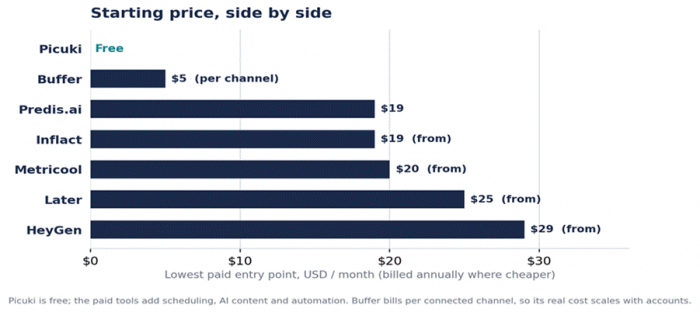
Entry pricing across the field. Picuki is free for viewing and downloads; the paid tools add scheduling, AI and automation.
Now a closer look at each one: what it does well, and where it gets on my nerves.
Picuki
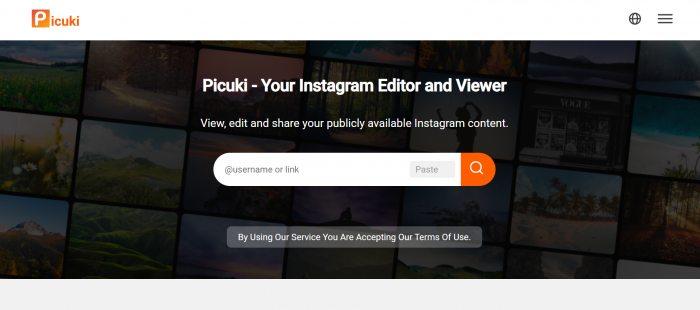
Picuki is the tool people reach for when they mostly want to look and download. It browses public profiles, stories and hashtags anonymously, saves photos, videos and reels in original quality, and throws in a lightweight photo editor for quick tweaks before you save.
Key features
• Anonymous browsing of public profiles, stories, hashtags and locations.
• One-click downloads of photos, videos, reels and stories in original quality.
• Built-in editor: crop, filters, brightness/contrast, plus text and stickers.
• Runs in any browser, desktop or mobile, with no registration.
The essentials
| Detail | At a glance |
|---|---|
| Best for | Anonymous browsing + downloading + quick edits |
| Standout | Free downloads paired with an in-browser editor |
| Pricing | Free |
| Free plan | Yes |
| Scope | Public content only |
| Watch-out | Many copycat domains exist, ads can be intrusive, and the original site has seen downtime |
Pros and cons
| Pros | Cons |
• Completely free, no account needed • Fast downloads in original quality • Built-in photo editor is a bonus • Mobile-friendly and instant | • Public content only; ignore any “private viewer” claims, they're scams • Clone sites and intrusive ads • Analytics are minimal • Uptime can wobble |
Real-world scenario Building a swipe file of reference Reels? Picuki lets you pull clips and stills into a folder for inspiration in seconds. Just credit the creators and never repost their work as your own. |
Buffer
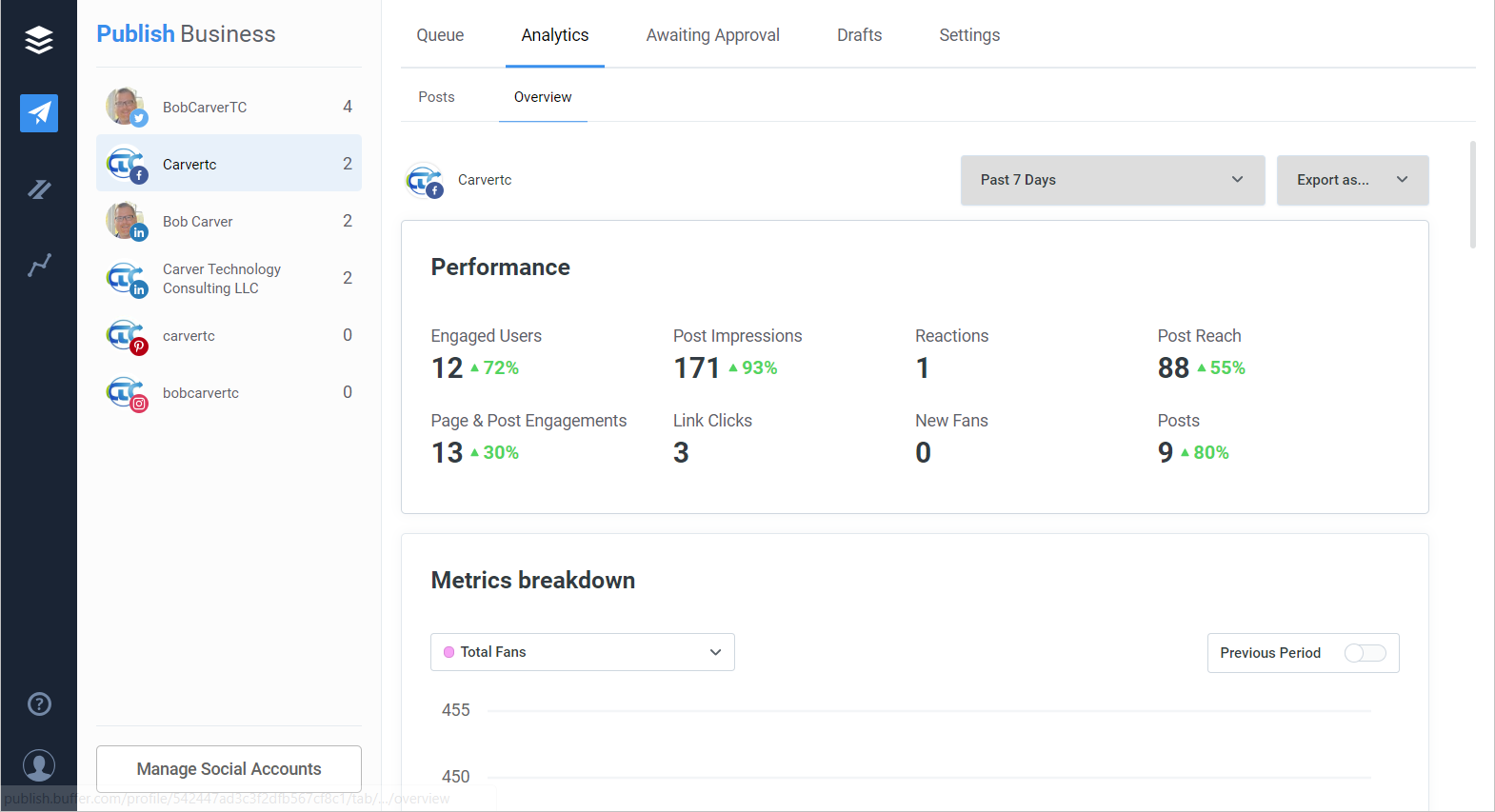
If Inflact's interface feels heavy, Buffer is the antidote. It's the friendliest scheduler in the category: connect your channels, drop posts on a clean calendar, and you're publishing within minutes. The free plan is unusually generous, and an AI caption assistant is included on every tier.
Key features
• Scheduling to 11 networks, including Instagram, LinkedIn, TikTok, Threads, Bluesky, Pinterest, YouTube and Google Business Profile.
• A clean visual calendar and posting queue, plus a unified engagement inbox.
• A free AI assistant for captions, idea generation and repurposing.
• Start Page link-in-bio builder and straightforward per-channel analytics.
The essentials
| Detail | At a glance |
|---|---|
| Best for | Simple, reliable multi-platform scheduling |
| Standout | Easiest UI in the category, plus a free plan you can use |
| Pricing | Free (3 channels, 10 posts each); Essentials $5/channel/mo; Team $10/channel/mo (annual billing) |
| Free plan | Yes, 3 channels |
| Scope | Major social networks |
| Watch-out | Per-channel pricing climbs fast past ~5 accounts; analytics and social listening are light |
Pros and cons
| Pros | Cons |
• Tiny learning curve; onboard in minutes • Reliable Instagram posting • Generous free tier plus free AI captions • Covers newer networks (Threads, Bluesky) | • Per-channel cost adds up for multi-platform brands • Shallow analytics • No social listening • Trustpilot flags billing and support friction |
Real-world scenario A solo founder posting to Instagram, LinkedIn and Threads can run the entire week from Buffer's free plan, draft captions with the built-in AI, and never open the native apps. |
Later
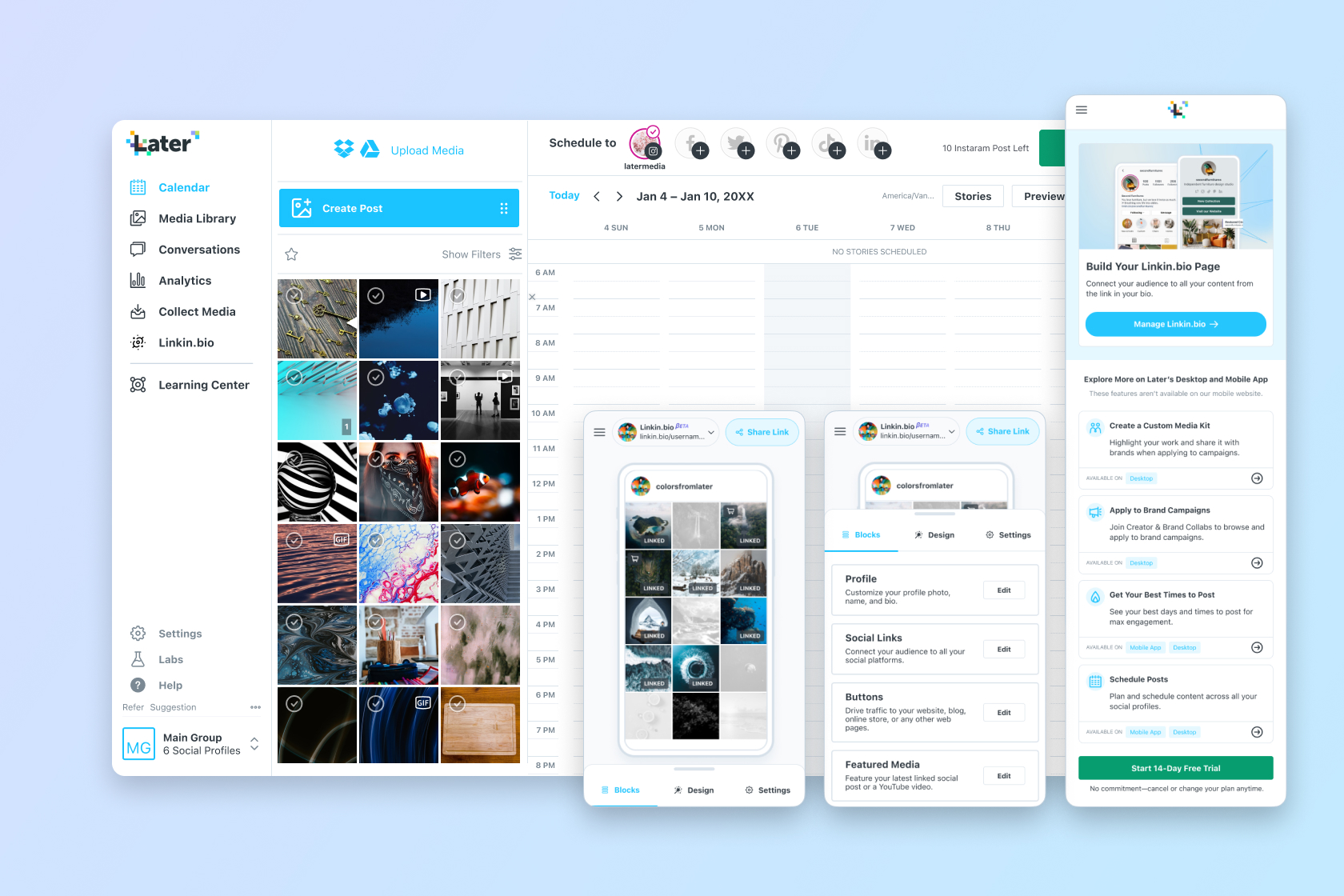
Later built its name on the visual side of Instagram. Its drag-and-drop planner shows exactly how your grid will look before anything goes live, which is gold if aesthetic matters. Add a strong Link in Bio tool plus hashtag and best-time suggestions, and it's a long-standing creator favorite.
Key features
• Visual feed/grid planner that previews your Instagram profile before posting.
• Multi-platform scheduling across Instagram, TikTok, Pinterest, Facebook and more.
• Linkin.bio landing page to route traffic from a single bio link.
• Hashtag suggestions, best-time-to-post and a shared inbox for comments/DMs.
The essentials
| Detail | At a glance |
|---|---|
| Best for | Visual-first Instagram planning |
| Standout | The grid-preview planner, still best-in-class |
| Pricing | Limited Free; Starter ~$25/mo; Growth ~$45/mo (annual; “Social Sets” model) |
| Free plan | Limited |
| Scope | Visual social platforms |
| Watch-out | Monthly post caps per profile, no native AI generation, and it dropped X scheduling |
Pros and cons
| Pros | Cons |
• Best-in-class feed visualization • Linkin.bio drives real traffic • Clean, creator-friendly interface • Solid for Pinterest and TikTok too | • Post limits hit active accounts fast • “Social Sets” pricing can confuse • Light on AI content tools • Can't bulk-reschedule |
Real-world scenario A boutique that lives or dies by a cohesive feed can lay out a month of posts on Later's planner, see the grid as a whole, and rearrange tiles until the aesthetic clicks. |
Metricool
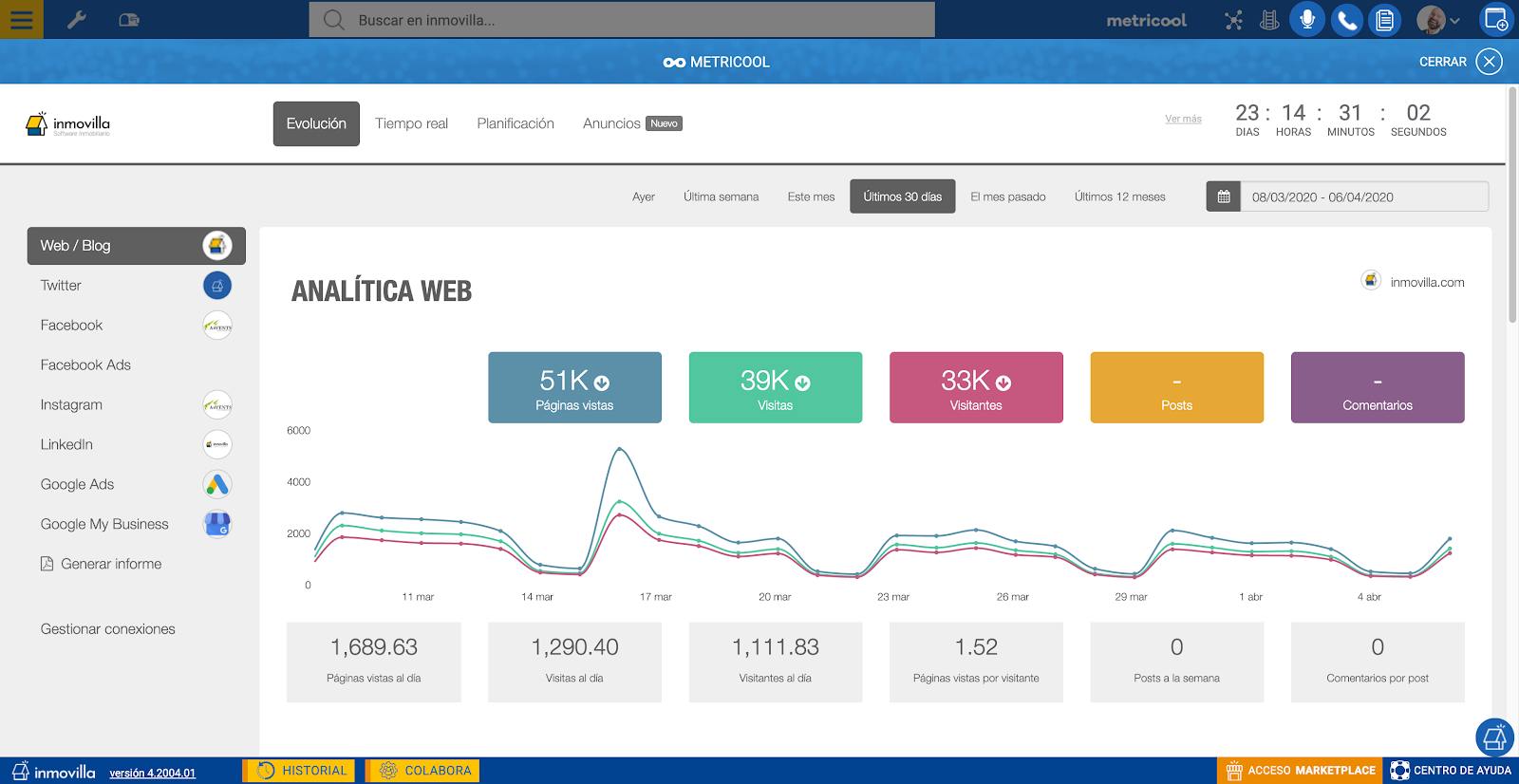
Metricool is the value pick, and the one analysts quietly love. Where rivals chase the prettiest calendar, Metricool went deep on reporting: organic, paid and web data in one dashboard, competitor tracking, automated client reports, and a free plan that's worth using. Scheduling, a link-in-bio and an AI assistant are all folded in.
Key features
• Scheduling across 10+ networks, including Instagram, TikTok, YouTube, LinkedIn, Pinterest, Google Business Profile and Threads.
• Best-in-class analytics with automated PDF/PPT reports, a huge time-saver for client work.
• Competitor analysis plus Google/Meta ad-campaign tracking alongside organic results.
• SmartLinks link-in-bio, a unified inbox and an AI content assistant.
The essentials
| Detail | At a glance |
|---|---|
| Best for | Analytics-led management and client reporting on a budget |
| Standout | Depth of reporting per dollar; nothing else at the price compares |
| Pricing | Free (1 brand, ~20–50 posts/mo); Starter ~$20/mo; Advanced ~$53/mo (annual). X is a ~$5 add-on |
| Free plan | Yes, 1 brand |
| Scope | Broad, organized around “brands” |
| Watch-out | Interface feels a touch dated, no built-in media library, and some IG/TikTok/YouTube publishing quirks |
Pros and cons
| Pros | Cons |
• Outstanding analytics and automated reporting • Very wide platform coverage • Excellent value for money • Competitor and ad tracking built in | • Less polished UI than Later • No reusable media library • Occasional publishing quirks (e.g., video size) • Some billing/auto-renew complaints |
Real-world scenario An agency juggling eight clients can schedule everywhere, then export branded, one-click PDF reports each month, the kind of reporting that used to eat a whole spreadsheet afternoon. |
Predis.ai

Predis.ai attacks content production directly. Feed it a product link or a one-line idea and it generates captions, carousels, ad creatives and even UGC-style avatar videos, then schedules them. Add competitor analysis and a free-forever tier, and it becomes a strong creation engine for lean teams.
Key features
• AI generation of single posts, carousels, videos, UGC avatar videos and ad creatives.
• Auto captions and hashtag suggestions, plus an engagement/performance predictor.
• Competitor analysis to see what's working for similar accounts.
• Scheduling and auto-posting to major networks (up to 60 channels with add-ons), with an approval workflow.
The essentials
| Detail | At a glance |
|---|---|
| Best for | Producing fast, on-brand content at volume |
| Standout | Turning a text prompt or product link into ready-to-post content |
| Pricing | Free-forever (1 brand, 15 AI posts/mo); Lite ~$32/mo; Premium ~$59/mo (from ~$19 on annual) |
| Free plan | Yes, free-forever |
| Scope | Major social networks |
| Watch-out | Watermark on the free tier, a credit/usage model that can get unpredictable, and visuals that sometimes need brand polish |
Pros and cons
| Pros | Cons |
• Big time-saver for routine posts • Competitor analysis is a real standout • Generous free-forever plan • One workflow for copy, visuals and scheduling | • Watermark on the free tier • Image editor is fairly basic • Credit limits create cost surprises • AI visuals can look templated without edits |
Real-world scenario A one-person e-commerce store can paste a product URL, get a week of branded posts plus a short promo video, fix the weakest bits, and schedule the lot, with no designer required. |
HeyGen

HeyGen is the wildcard. It covers a format Inflact doesn't touch at all: AI video. Type a script, pick a lifelike avatar (or a digital twin of yourself), choose a voice, and out comes a polished talking-head clip with no camera or studio. Its translation engine can also re-voice videos into 175+ languages with matched lip-sync.
Key features
• Text-to-video with realistic AI avatars (the Avatar IV engine adds micro-expressions and gestures).
• 500+ stock avatars plus a custom Digital Twin built from a short recording of yourself.
• Voice cloning and a video translator across 175+ languages with synced lips.
• Video Agent turns a single prompt into a full video; it can also convert PDFs and blog posts into clips.
The essentials
| Detail | At a glance |
|---|---|
| Best for | Talking-head and spokesperson video for Reels, ads and training |
| Standout | Avatar realism and multilingual dubbing |
| Pricing | Free (3 videos/mo, watermark); Creator ~$29/mo and up (credit-based) |
| Free plan | Yes, 3 videos/mo |
| Scope | AI video creation |
| Watch-out | The credit system is confusing, “unlimited” has caps, costs escalate with the premium engine, and render queues can lag |
Pros and cons
| Pros | Cons |
• Best-in-class avatar realism • Create video without ever filming • Powerful translation and dubbing • Fast first result | • Credit system and “unlimited” labeling confuse buyers • Costs climb at volume • Render delays at peak times • Not a substitute for a real video editor |
Real-world scenario A course creator who hates being on camera can record two minutes once to build a digital twin, then generate dozens of lesson intros, and dub them into Spanish and German with synced lips. |
What real reviewers say
Scores below are aggregated from G2, Trustpilot, Capterra and Product Hunt and captured in mid-2026. Treat them as a directional snapshot, not gospel; they shift constantly and vary by region and page. Two patterns are worth remembering as you read.
• G2 and Capterra verify business users and tend to reward capability, so scores skew higher.
• Trustpilot is open to anyone and tends to attract billing, refund and support complaints, so scores often run lower for the same product.
The free web viewer (Picuki) doesn't maintain a formal review profile, so its row is marked accordingly.
| Tool | G2 | Trustpilot | Capterra | Product Hunt | What reviewers say |
|---|---|---|---|---|---|
| Inflact | thin profile | ≈4.2 | ≈4.1 | n/a | Praised for the downloader, hashtag generator and support; gripes on price and automation/ban risk |
| Picuki | n/a | n/a | n/a | n/a | A free web tool; users value the anonymity and downloads, dislike clones, ads and downtime |
| Buffer | ≈4.3 | ≈2.1 | ≈4.5 | Positive | Loved for simplicity and the free plan; Trustpilot skews toward billing and support complaints |
| Later | ≈4.5 | n/a | ≈4.5 | Positive | The visual planner is the star; reviewers note post limits and the lack of AI |
| Metricool | ≈4.5 | ≈4.0 | ≈4.6 | Positive | Best value plus strong analytics; some IG/TikTok publishing and billing gripes |
| Predis.ai | ≈4.7 | ≈4.3 | ≈4.5 | Featured | Fast bulk content and competitor analysis; watermark on free, visuals can need polish |
| HeyGen | ≈4.8 | ≈2.4 | ≈4.7 | ≈4.4 | Avatar realism widely praised; the credit system and “unlimited” confusion drag Trustpilot down |
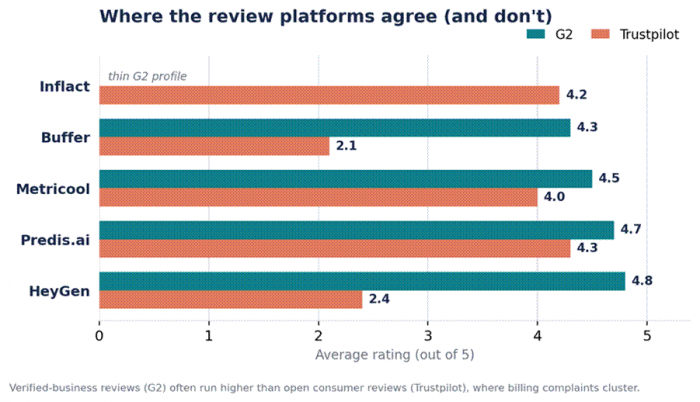
The G2-versus-Trustpilot gap is real. Notice how Buffer and HeyGen are loved on G2 yet bruised on Trustpilot, almost always a billing story, not a product one.
How to choose the right one
Skip the feature-matrix paralysis. Match the tool to the sentence that sounds most like you:
• “I just want to check a profile or story without logging in.” → Picuki.
• “I download competitor content for research.” → Picuki (free) for swipe files, or Inflact's own downloader if you already pay for it.
• “I need to schedule across platforms without a learning curve.” → Buffer.
• “My Instagram aesthetic and feed planning matter most.” → Later.
• “I live in analytics and report to clients, on a budget.” → Metricool.
• “I need content produced fast: captions, carousels, creatives.” → Predis.ai.
• “I want a talking-head video without filming.” → HeyGen.
On a strict $0 budget? You can cover most of Inflact's ground for free: Picuki for viewing and downloads, Buffer's free plan or Metricool's free tier for scheduling and analytics, and Predis.ai's free-forever plan for a trickle of AI posts. It's not seamless, but it gets a lot done. |
A quick word on safety and the rules
Third-party Instagram tools sit in a gray area, so a little caution goes a long way and keeps your account healthy.
• Anonymous viewers only work on public accounts. Anything promising access to private profiles is a scam, so steer clear.
• Automation is the real risk. Pure viewers and downloaders that never log into your account won't get you banned; it's auto follow/unfollow and mass DMs that trigger restrictions. Prefer authentic engagement.
• Respect copyright and Terms of Service. Downloaded content belongs to its creator, so use it for research or inspiration, credit people, and don't repost as your own.
• With AI video, be transparent. Disclose synthetic content where it matters and never use an avatar to impersonate a real person.
My ratings at a glance
These are my own editorial scores after weighing features, ease of use, value and how each tool behaves day to day. They're opinions, not lab benchmarks, and I score the free viewers on a gentler curve than the paid platforms because they're doing a smaller job. Read the column that matters most to you rather than fixating on the overall.
| Tool | Ease | Features | Value | Overall | My one-line verdict |
|---|---|---|---|---|---|
| Picuki | 4.8 | 3.4 | 5.0 | ★★★★☆ 4.3 / 5 | The free viewer and downloader I default to; analytics are thin |
| Buffer | 4.8 | 3.8 | 4.0 | ★★★★☆ 4.3 / 5 | Easiest scheduler to live in; per-channel pricing bites at scale |
| Later | 4.4 | 4.0 | 3.8 | ★★★★☆ 4.1 / 5 | Worth it for the visual planner alone; post caps and no AI |
| Metricool | 4.2 | 4.7 | 4.8 | ★★★★½ 4.6 / 5 | My value pick; the analytics-per-dollar is hard to beat |
| Predis.ai | 4.3 | 4.5 | 4.3 | ★★★★½ 4.4 / 5 | Fastest way to a week of posts; tidy up the AI visuals |
| HeyGen | 4.4 | 4.7 | 3.7 | ★★★★☆ 4.3 / 5 | Best AI video by a mile; the credit system is a headache |
Scoring key: Ease = how quickly you get productive · Features = depth and breadth of what it does · Value = what you get for the price. Overall is a weighted blend, not a straight average.
Also worth a look
These didn't get full sections, but they're solid in their lanes if the six above don't fit:
• Social Blade: influencer growth stats and historical follower charts across platforms.
• Iconosquare: deep, paid Instagram and cross-platform analytics for serious reporting.
• SocialBee and Vista Social: budget-friendly scheduling alternatives with broad platform support.
• Revid.ai and Pippit: AI short-form video, in the same lane as HeyGen but tuned for quick social clips.
• Hootsuite and Sprout Social: enterprise-grade management and social listening when you outgrow the lighter tools.
The verdict
If it were my account, I wouldn't try to replace Inflact with a single tool. I've watched that backfire too often: you pay for a bloated suite and end up using a sliver of it. I pick by the job in front of me, and I'd nudge you to do the same.
For most of what I do, a free viewer like Picuki handles the recon, Metricool (or Buffer when I want something lighter) handles scheduling and reporting, and Predis.ai makes the content I don't have time to. That trio covers most of what Inflact does, at lower cost and far less risk to my account. The day I need a polished talking-head video, HeyGen is the one I open. Start with the free options, pay only when a tool has earned it, and you'll spend less and stress less.
Post Comment
Be the first to post comment!





