★ Key Takeaways at a Glance ▸Picofme AI is the fastest path from a real photo to a polished profile image, with no signup and no data retention. ▸Canva Headshots is really the portrait output of Magic Studio, best when the headshot feeds a larger design. ▸Likeness accuracy for general purpose generators sits around 35 percent per Morphed’s April 2026 testing. ▸LinkedIn profiles with a professional headshot pull 14× more views and 36× more InMail replies. ▸The verdict is fit, not victory, each tool wins in its own lane. |
Hunting for a profile picture that does not scream ‘last-minute screenshot’ has quietly become its own small ritual. After running the same source images through Picofme AI and Canva’s headshot output across several days, the takeaway turned out to be less about which tool is better and more about which one fits the photo a person actually needs. One is a fast utility built for a single job. The other is a creative engine that happens to make portraits among a hundred other things.
A freelancer hopping into a client call needs something different from a founder rebuilding a website hero section. Both tools work, but they solve different problems. Pricing, feature limits, and policy details below were verified against Canva’s pricing page and Picofme’s product page as of 2026.
Quick Verdict Snapshot
For anyone short on time, the table below covers the decision across five common scenarios. The rest of the article explains why.
| Use case | Better pick | Reason in one line |
|---|---|---|
| LinkedIn or CV photo, today | Picofme AI | Three clicks, no login, clean transparent output |
| Personal brand kit or pitch deck | Canva Headshots | Lives inside the design suite where the rest of the work happens |
| Privacy first user | Picofme AI | Images deleted after processing, no account stored |
| Multiple style variations | Canva Headshots | Magic Studio offers prompt control and post edit flexibility |
| Truly free workflow | Picofme AI | Zero paywall, no watermarks, no credit ceiling |
Two Tools, Two Philosophies
Reading these two tools as direct rivals is a category mistake. One is a focused utility, the other is a feature inside a creative platform.
How Picofme AI Approaches the Problem
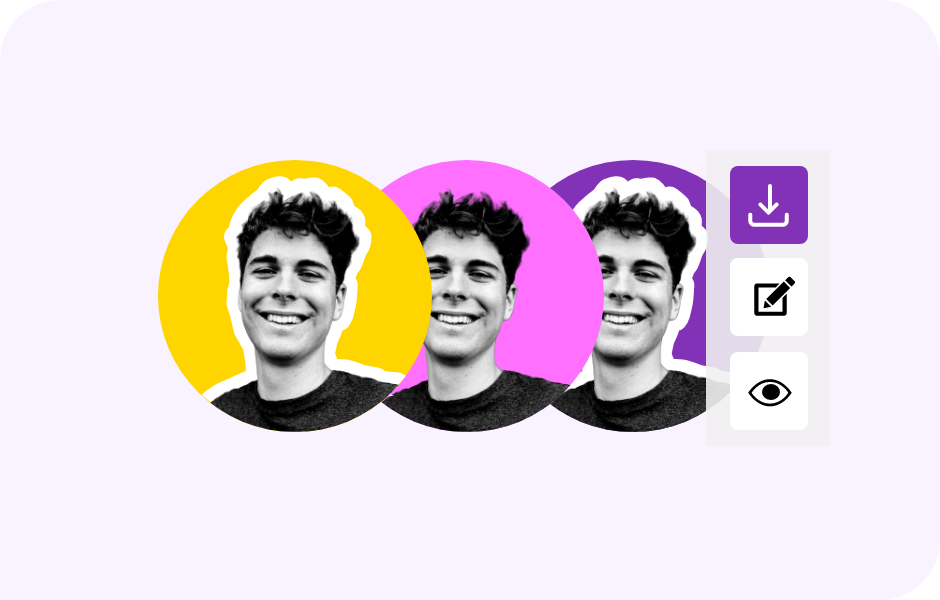
Picofme AI takes the opposite philosophy. Built by Mixilab, it positions itself as a no friction AI Profile Picture generator with one job, taking a photo and giving back a clean, styled portrait that drops straight into LinkedIn, Instagram, or Discord. There is no login, no download, no account, no data retention. The entire workflow runs in a browser tab and the uploaded image is deleted once processing is complete.
The tool supports common image formats including .jpg, .jpeg, .png, .gif, .webp, .bmp, and .tif. Once the background is removed by the AI, layer based editing kicks in. The user can swap in a solid color, a gradient, or a preset backdrop, add a circular border or outline, drop a soft shadow, and adjust colors. Each layer is independent.
How Canva Headshots Approaches the Problem
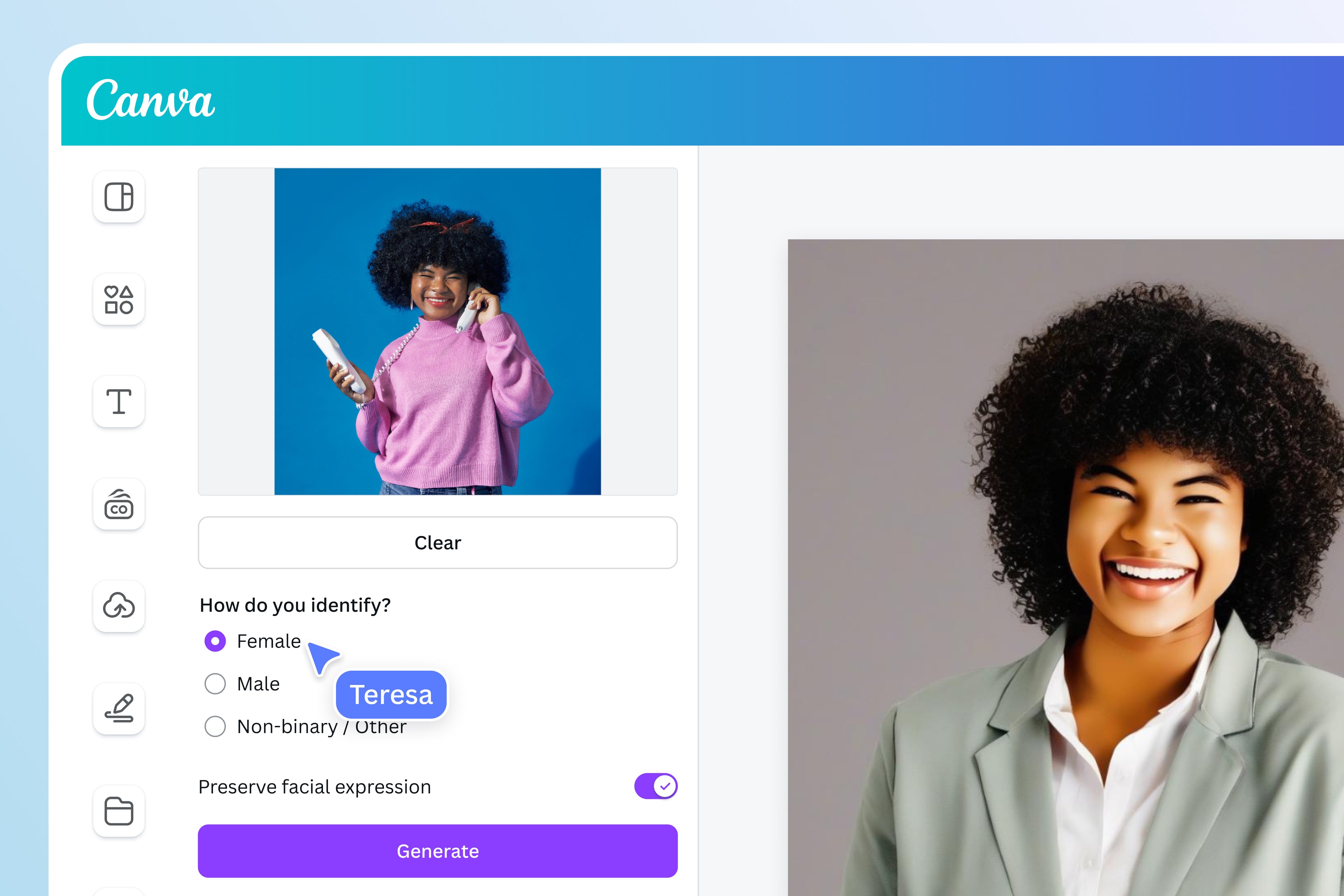
Canva does not ship a standalone ‘headshot generator’ as a separate product. As reviewers at Morphed and others have pointed out, what people call ‘Canva AI Headshots’ is really the headshot style output produced by Canva’s Magic Media, Magic Edit, and broader Magic Studio toolkit, packaged into the same editor that handles posters, social posts, presentations, and brand kits.
A prompt like ‘professional LinkedIn headshot of a woman in a navy blazer’ returns a generated portrait in ten to fifteen seconds, which then lives inside a Canva design where it can be cropped, resized, dropped into a banner template, or combined with brand assets. The tradeoff is identity. Because Magic Media synthesizes the image from a prompt rather than transforming a real photo, the face on the screen is not the user’s face. It is an interpretation. For solo professionals who need their own likeness on LinkedIn, that is the central limitation of the Canva route.
| EDITOR’S NOTE Picofme edits a real photo. Canva generates a new one. That single difference shapes almost every other gap between them. |
Feature Face Off
A clean side by side highlights why the two tools feel so different in practice. The table below maps the core differences without padding.
| Feature area | Picofme AI | Canva Headshots |
|---|---|---|
| Primary function | Background removal plus preset styling | Prompt based portrait generation inside Magic Studio |
| Account or sign in | None required | Canva account required |
| Output type | PNG with transparent or styled backdrop | Generated portrait inside a Canva design |
| Customization | Backgrounds, outlines, shadows, color overlays | Prompt control plus full editor for resize, text, brand assets |
| Photo realism | Edits the original photo, likeness preserved | Synthesizes a new portrait, likeness varies |
| Mobile app | Browser only | iOS, Android, and web |
| Privacy stance | Images deleted, no facial data stored | Subject to Canva’s broader data policy |
| Watermarks or ads | None | Free tier may include limits, Pro removes them |
| Best fit | Solo professionals, freelancers, students | Marketers, creators, anyone already on Canva |
Strengths and Tradeoffs
The same comparison from a different angle, focused on where each tool earns trust and where it falls short.
| Picofme AI | Canva Headshots |
|---|---|
STRENGTHS Zero friction onboarding, no signup wall Free forever for core editing Privacy first, files deleted after processing Preserves likeness, edits real photos Clean output for LinkedIn, Discord, WhatsApp TRADEOFFS No mobile app as of mid 2026 No advanced retouching or skin work Limited template variety No batch processing or API | STRENGTHS Full design suite integration Magic Studio prompts for endless variations Brand kit, fonts, templates ready to use Works across iOS, Android, web Useful when headshot is part of a larger design TRADEOFFS Likeness around 35 percent per Morphed 2026 Credit caps drain faster than expected on Pro Requires login and active Canva account Pro plan price climbed to $15 per month |
Output Quality and Realism
Realism is where the two tools split most clearly. Because Picofme edits a real uploaded photo, the output looks exactly like the person who uploaded it. Edges around hair and shoulders are handled well, although busy backgrounds occasionally leave a faint halo. The face never drifts because the face was never regenerated.
Canva’s headshot output uses a generative pipeline. A prompt produces a person who may or may not resemble the user. Independent testing by Morphed in April 2026 placed the likeness match for general purpose tools like Canva at around 35 percent, against 80 percent or higher for dedicated headshot platforms that train on a user’s own face. The photos look polished, but recruiters and connections may sense the difference.
~35% Canva likeness match (Morphed, April 2026) | 80%+ Dedicated headshot tools (same Morphed study) |
For stylized avatars, branded illustrations, or campaign assets where exact likeness is not the goal, Canva’s output is impressive. For a LinkedIn photo that needs to read as the actual person on the other end of a Zoom call, Picofme’s edit first approach wins by structure.
Speed, Friction, and the First Time Experience
Picofme’s onboarding is effectively zero. The website opens, an upload box accepts a photo, the background removal completes in a few seconds, and the styling panel appears. There is no plan selector, no email capture, no credit counter, no checkout. From cold start to finished image takes under a minute for a clean source photo.
Canva’s flow is longer because Canva is a platform first. The user signs in, navigates to Magic Studio or the relevant headshot template, writes a prompt, waits for generation, and then uses Canva’s editor to finalize. For someone already inside Canva all day, this is friction free. For a first time user opening the tab specifically for a headshot, the path adds five to ten minutes of platform overhead before any portrait is produced.
Credits also tick down with each attempt, discouraging rapid iteration unless the account is on the Pro plan. According to industry data published by Proshoot in early 2026, the top five AI headshot platforms processed over 48 million portrait sessions in 2025, mostly one off needs where Picofme’s zero friction model shines. Canva’s strength shows up later, when that headshot needs to land inside a slide deck, an email banner, or a website hero.
Privacy: The Quiet Differentiator
Privacy rarely makes it into feature comparisons, but it should. Picofme’s product page is explicit: uploaded images are processed and then deleted, no facial data is stored, no account is created, and no third party trackers are involved in the editing flow.
Canva operates under a broader corporate data policy that covers a much larger product surface. Users agree to terms that include analytics, personalization, and AI training opt outs that vary by region. None of this is unusual for a platform of Canva’s scale, but it is a different model from a tool that holds nothing and asks nothing. A frequently cited Trustpilot impression praises Picofme for not retaining personal data, a sentiment echoed across ProductHunt and Reddit threads.
| PRIVACY VERDICT Picofme is the clearer pick when the user wants a profile photo without a footprint. Canva is the trade off when convenience inside an existing workflow outweighs that concern. |
Pricing Breakdown That Actually Matters
The headline numbers are misleading without context. Picofme is free with no listed paid plan. Canva’s headshot output is bundled into the broader Canva subscription. The relevant question is what one good profile photo really costs once usage patterns enter the calculation.
| Plan | Picofme AI | Canva (covers Headshot output) |
|---|---|---|
| Free tier | All features, unlimited edits, no watermark | Around 50 AI credits per month, premium assets locked |
| Paid tier | No paid plan publicly listed | Canva Pro at about $15 per month or $120 per year |
| Pro credit pool | Not applicable | Around 500 AI credits per month, shared across Magic Studio |
| Team or business | Not offered | Canva Teams from about $10 per user per month, 3 seat minimum |
| Cost for one good profile photo | $0 | $0 if existing Canva user, otherwise bundled into $15 monthly |
Anyone already paying for Canva for design work gets headshot generation as a sunk cost, although it still consumes credits. For users who do not need Canva for anything else, paying about $15 per month for a tool that produces a portrait that may not look like the user is a steep ask when Picofme produces a real photo edit for free. Canva’s broader bundle is the reason to subscribe, the headshot is a bonus, not the headline.
Canva also raised its Pro price from $10 to $15 per month in late 2024, confirmed across multiple pricing audits in 2026. That 50 percent jump narrows the value gap between Canva and dedicated headshot generators that charge a one time fee.
Market Reality Check
AI profile photo tools have shifted from a niche category to a mainstream professional habit in under three years. Two data points capture the shift more cleanly than any market size estimate.
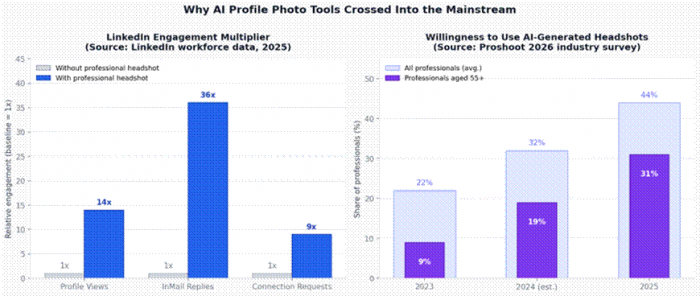
Sources: LinkedIn workforce data (2025) via Narkis.ai analysis; Proshoot 2026 industry adoption survey.
Two findings stand out. LinkedIn profiles with a professional headshot receive roughly 14 times more views and 36 times more InMail replies than profiles without one, according to LinkedIn’s own workforce data. That gap explains why AI profile tools became a category.
The second finding is the steep adoption curve in the 55 and over bracket. Proshoot’s 2026 industry survey put willingness to use AI generated headshots at 9 percent among that group in 2023, climbing to 31 percent in 2025, the fastest relative growth of any age group. The audience that increasingly expects polished profile photos now includes executives, board members, and senior hiring managers.
14× LinkedIn profile views with a professional headshot | 31% of 55+ professionals willing to use AI headshots in 2025 |
Real User Impressions
Aggregated feedback across ProductHunt, Reddit, and review aggregators converges on a few consistent themes.
✦ On Picofme AI ▸Speed and the absence of ads come up most often in user reviews. ▸Frequent mentions of a clean interface and the lack of forced sign up. ▸Common complaint: no mobile app, limited template variety against design first competitors. |
✦ On Canva Headshots ▸Praise for integration with the rest of Magic Studio, especially LinkedIn banner workflows. ▸Concerns center on facial realism and occasional uncanny outputs. ▸Credit caps arrive faster than the 500 monthly Pro allotment suggests once iteration begins. |
Neither tool is universally loved or universally criticized. People who need a fast profile fix love Picofme. People doing layered creative work love Canva. Friction surfaces when a user picks the wrong tool for the actual job.
Head to Head Scorecard
The chart below summarizes the editorial assessment across six dimensions that matter for typical profile photo work. Scores draw on hands on use of both tools with identical source images and verified product documentation.
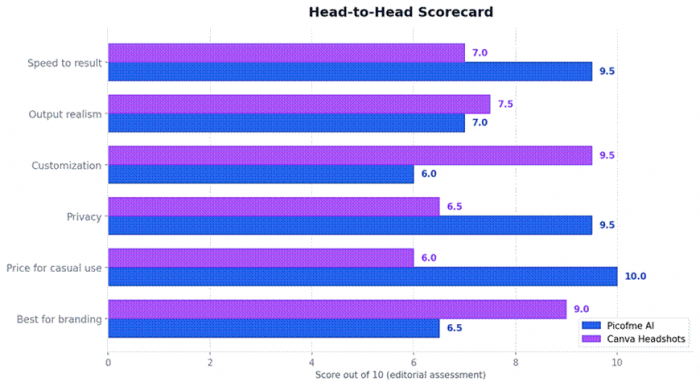
The pattern is symmetric. Picofme leads on speed, privacy, and price. Canva leads on customization and branding. Output realism is close, but the metric measures different things, Picofme preserves an existing photo while Canva generates a new one. The scorecard is a fit chart, not a leaderboard.
Where Each Tool Actually Fits
Pick Picofme AI When
The need is a LinkedIn or CV photo within the next ten minutes. The source photo already exists and only needs a clean background and a polished frame. Privacy matters and account creation is a non starter. The output will be used across multiple platforms and needs to look like the actual person.
Pick Canva Headshots When
A headshot is the start of a larger asset such as a brand kit, a website hero section, a slide deck cover, or a webinar thumbnail. Canva already lives in the daily workflow. Stylized or themed portraits are acceptable. The brand requires consistent design language across multiple touchpoints.
Pick Something Else When
Neither tool is the right answer when the requirement is studio grade AI photoreal portraits that need to pass professional scrutiny. Dedicated tools like Aragon, HeadshotPro, and BetterPic train on the user’s own face from a batch of selfies and produce results closer to a professional shoot. Pricing sits in the $29 to $49 one time range.
Final Verdict
Spending real time with both tools leaves a clean impression. Picofme AI is the one to keep bookmarked for the inevitable ‘oh no, the photo on the deck looks awful’ moment that surfaces ten minutes before a meeting. It is fast, free, private, and quietly excellent at the one thing it does. The lack of a mobile app and the absence of advanced retouching are real limitations, but they do not undermine the core promise.
Canva Headshots is the tool to open when the photo is the beginning of something bigger, not the end product. The Magic Studio environment, the brand kit integration, and the ability to move from generation to publication inside one editor make it a strong choice for marketers, creators, and small teams. The pricing has crept up, but the bundle still earns its place.
A solo professional who needs a clean LinkedIn photo by lunchtime should head to Picofme. A marketing lead building a campaign should head to Canva. Anyone whose headshot will be the difference between a callback and silence on a high stakes job application should pay for a dedicated headshot service instead.
| BOTTOM LINE Different stages of the same workflow, not rival products. Picofme for the fast, real-likeness profile photo. Canva for the headshot that becomes part of a brand design. Pick by job, not by hype. |
Post Comment
Be the first to post comment!