Introduction
I make a lot of short videos during the week, so when two names kept showing up in my feed, MotionMuse AI and Vidnoz AI, I wanted to know how they really compare. The short version surprised me. These are not the same kind of tool. One animates a single photo into a brief clip. The other is a full studio for AI avatars, voiceovers, and templated videos.
This article is my attempt to cut through that confusion. I looked at what each platform does, how the pricing works, where each one shines, and where each one gets in the way. If you are weighing them against each other, the right pick depends almost entirely on the job you are hiring the tool to do.
One note on accuracy before we start. AI video pricing changes often, and Vidnoz in particular runs frequent promotions and regional pricing. I have used the figures listed at the time of writing, and I point you back to the official pages so you can confirm current numbers before you pay.
Quick Verdict
| Your situation | My short answer |
|---|---|
| You want to animate a still photo into a short clip | MotionMuse AI |
| You want avatars, voiceovers, and full videos | Vidnoz AI |
| You want the easiest tool to learn | MotionMuse AI |
| You want the most features overall | Vidnoz AI |
| You want a free plan you can use for real work | Vidnoz AI |
| You want quick social loops or product spins | MotionMuse AI |
| You want talking-head, training, or marketing videos | Vidnoz AI |
What MotionMuse AI Does
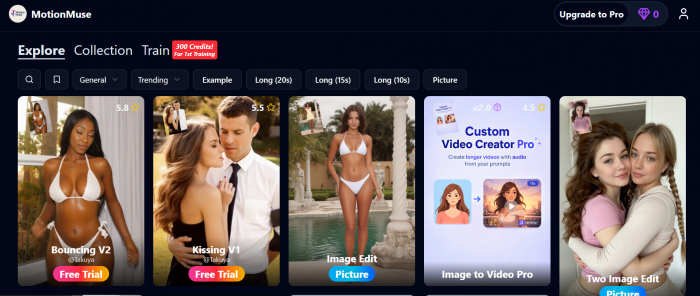
MotionMuse AI is a browser-based tool that turns a still image into a short animated clip. You upload a photo, pick a motion style or type a short prompt, and it returns a clip that runs about four to six seconds. There is nothing to install, and it accepts JPG, PNG, and WebP files.
The platform reads depth and structure in your image, then applies movement to match the style you chose. You get two ways to direct it. There is a preset template library that updates daily, and there is a free text prompt field where you describe the motion you want, such as a slow pan with light fog drifting in.
It launched in April 2025 and grew fast, reaching millions of monthly visits by early 2026 according to third party traffic estimates. The animation types I came across covered parallax depth sweeps, product rotation, and subtle portrait movement on headshots.
What it does not do matters just as much. It does not generate video from text, it does not edit existing footage, and it cannot stretch a clip past that six second ceiling. If you need longer or more layered video, you will run it alongside another tool.
Who MotionMuse AI Is For
• Social media managers who want quick, eye-catching loops
• Product sellers who want a clean rotation or parallax shot
• Anyone who wants motion without learning a video editor
What Vidnoz AI Does
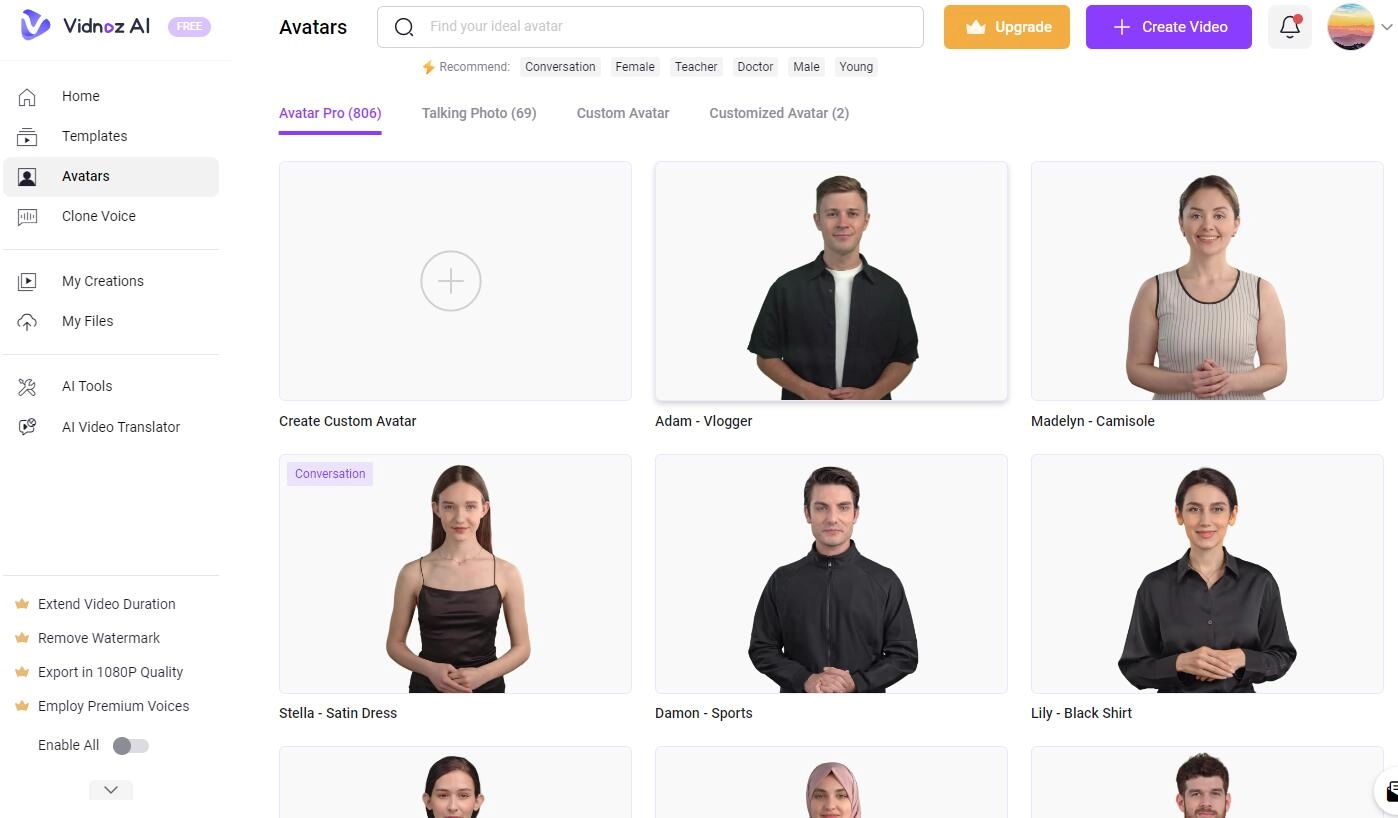
Vidnoz AI is a far broader AI video platform. Instead of animating one photo, it builds complete videos using AI avatars, AI voices, and a large template library. The official site lists more than 1,900 AI avatars, over 3,200 video templates, and a voice library in the thousands.
The core workflow is avatar driven. You pick a presenter, type or paste a script, choose a voice, and the avatar speaks your words on camera. There is also an AI Video Wizard that turns a text prompt or a script into a video, plus tools for talking photos, motion avatars, and product avatars.
Beyond creation, Vidnoz layers in features aimed at teams and businesses. You get one click video translation across many languages, voice cloning, a brand kit, branded share pages, team seats, and video analytics. It also taps a range of well known AI models for image and video generation behind the scenes.
Put simply, Vidnoz is trying to be an all-in-one video studio, while MotionMuse is trying to do one specific thing well.
Who Vidnoz AI Is For
• Marketers and sales teams making spokesperson videos
• Educators and trainers building lessons at scale
• Businesses that need translation, branding, and collaboration
The Key Difference in Scope
This is the part most comparison posts skip, so I want to be direct. MotionMuse and Vidnoz are not really competitors for the same task. They overlap only in the loose sense that both make video with AI.
Drop a single product photo into MotionMuse and you get a polished few-second animation. Drop a script into Vidnoz and you get a presenter delivering it for a minute or more. Asking which is better in the abstract is a bit like asking whether a camera lens is better than a film studio. The honest answer is that it depends on what you are shooting.
Once I framed it that way, my testing got much clearer. I stopped scoring them head to head on raw output and started asking which one removed friction for a given job.
Features Compared
| Feature | MotionMuse AI | Vidnoz AI |
|---|---|---|
| Main purpose | Image to short video animation | Full AI video creation |
| Text to video | No | Yes, via AI Video Wizard |
| Image to video | Yes | Yes |
| AI avatars | No | Yes, 1,900 plus |
| AI voices | No | Yes, thousands of voices |
| Voice cloning | No | Yes, add-on or higher tier |
| Templates | Preset library, updated daily | 3,200 plus video templates |
| Video translation | No | Yes, many languages |
| Max length | About 4 to 6 seconds | Up to 60 minutes on paid plans |
| Edit existing footage | No | Yes, built-in editor |
| Team collaboration | Not a focus | Yes, on the business tier |
| Custom motion prompts | Yes | Through wizard and scripts |
| File inputs | JPG, PNG, WebP | Images, video, scripts, PPT, PDF |
| Free plan watermark | Check current plan | Yes, on the free plan |
| Install needed | No, browser based | No, browser based |
Feature counts reflect figures published at the time of writing and can change.
Pricing and Cost
Both tools use a credit-style model where your plan gives a monthly allowance, and in both cases unused credits do not carry into the next cycle. That is the main thing to budget around.
MotionMuse AI Pricing
At the time of writing, MotionMuse listed a free tier and three paid plans.
| Plan | Monthly | Annual (per month) | Monthly credits |
|---|---|---|---|
| Free | $0 | $0 | 20 one-time credits |
| Basic | $9.99 | $4.99 | 300 |
| Pro | $29.99 | $14.99 | 1,500 |
| Premium | $49.99 | $24.99 | 3,000 |
Higher tiers add faster generation queues, AI training tools, and priority over lower tiers, with top-up credits available when you run short. There are a few lookalike domains around this tool, so confirm plan details on the official site before paying.
Vidnoz AI Pricing
Vidnoz is harder to pin to a single number. It runs frequent promotions, prices vary by region, and it recently moved to a credit-based system. The structure is a free plan, a Starter plan, a Business plan, and a custom Enterprise plan.
| Plan | Who it targets | Price (verify on site) |
|---|---|---|
| Free | Trying it out and light use | $0, with watermark and 720p |
| Starter | Individuals and small creators | Often around $15 to $20 per month on annual billing at the time of writing |
| Business | Teams and heavier use | Higher, varies by promotion |
| Enterprise | Large organizations | Custom, contact sales |
Because the headline price during a sale can differ a lot from the standard rate, I would open the live pricing page rather than trust any single figure. What I can confirm from the official site is the gap between free and paid. The free plan caps videos at three minutes, exports at 720p, and adds a watermark, while paid plans lift exports to 1080p, remove the watermark, allow videos up to about sixty minutes, and speed up processing. Voice cloning and a pro custom avatar are sold as add-ons.
CHART PLACEHOLDER: Pricing comparison Grouped bar chart of entry, mid, and top tier monthly cost for MotionMuse against Vidnoz. Mark Vidnoz bars as approximate since pricing changes.
Pros and Cons
MotionMuse AI
| Pros | Cons |
|---|---|
| Very easy to learn | Clips capped at about 4 to 6 seconds |
| Fast image-to-clip workflow | No text to video, avatars, or voice |
| Custom motion prompts work well | Credits expire each cycle |
| No install, runs in the browser | Free queue is slower at peak times |
| Free credits to test first | Lookalike domains can cause confusion |
Vidnoz AI
| Pros | Cons |
|---|---|
| Large avatar, voice, and template library | Credit math takes time to learn |
| Free plan you can use for real work | Free output has a watermark and 720p cap |
| Text to video and editing built in | Some features are paid add-ons |
| Translation, branding, and team tools | Pricing varies by promotion and region |
| Videos up to about 60 minutes on paid plans | Bigger learning curve |
Side by Side Summary
| Category | MotionMuse AI | Vidnoz AI | My pick |
|---|---|---|---|
| Ease of use | Very simple | Moderate | MotionMuse |
| Range of features | Narrow, focused | Broad suite | Vidnoz |
| Output length | Short clips | Short to long | Vidnoz |
| Avatars and voice | None | Extensive | Vidnoz |
| Free plan for real work | Limited | Usable | Vidnoz |
| Quick social loops | Excellent | Possible, heavier | MotionMuse |
| Talking-head content | Not possible | Strong | Vidnoz |
| Learning time | Minutes | An hour or two | MotionMuse |
What Reviewers Say on G2, Capterra, and Trustpilot
I checked both tools on the three review sites most people use. Scores shift over time and G2 now owns Capterra, so treat these as a snapshot rather than a fixed grade.
| Platform | MotionMuse AI | Vidnoz AI |
|---|---|---|
| G2 | Not listed | About 4.5 to 4.9 out of 5 (about 16 reviews) |
| Capterra | Not listed | 4.0 out of 5 (about 1 review) |
| Trustpilot | Not listed | About 2.3 out of 5 (about 79 reviews) |
What the ratings show
• Vidnoz AI: strong on G2 for ease of use and the daily free minutes, though from a small sample. Trustpilot is low and sharply split, with complaints centered on billing, canceling, and support rather than video quality.
• MotionMuse AI: no presence on these platforms yet, which fits a new and narrow tool. The only signals are automated site-trust checkers, with Scamadviser at about 76 out of 100 and ScamDoc near 60 percent, so test the free tier before paying.
My Final Verdict
After spending time with both, I stopped treating this as a contest and started treating it as a fork in the road.
If your work is short, visual, and built around still images, MotionMuse AI is the one I would reach for. It is quick to learn, it does its narrow job well, and it hands you a clean animated clip without any editing skills. The four to six second limit is real, so go in knowing it is a loop maker, not a film tool.
If you need real videos with a presenter, a voice, and a script, Vidnoz AI is the clear choice, and it is not close. The avatar and voice libraries, the translation, and the team features cover a much wider set of jobs. You pay for that range with a steeper learning curve and credit planning, but the free plan is generous enough to prove the value first.
My bottom line is that I would not pick one to replace the other. I would use MotionMuse for snappy image animations and Vidnoz for anything that needs a talking, scripted video. If I could keep only one, it would be Vidnoz, simply because it covers more ground. But the moment I want a fast photo animation, I would still open MotionMuse.
Whatever you choose, start on the free tier, confirm the current pricing on the official site, and test with your own assets before you commit.
Post Comment
Be the first to post comment!





