On This Page
- What is Vidnoz AI and Why Should You Care?
- Text-to-Video: When You’d Rather Type Than Talk
- Image-to-Video: That Boring Photo Finally Earns Its Keep
- Talking Head Avatars: Actors Who Don’t Complain
- Vidnoz Gen: Genie in Your Browser
- How to Use Vidnoz AI Without Losing Your Patience
- Pricing: The “Free” Deal and the Catch
- Vidnoz AI vs Competitors: The Face-Off
- Who Should Use Vidnoz AI (and Who Should Probably Not)
- Tips & Tricks to Get the Best Results from Vidnoz AI
- FAQs About Vidnoz AI
- Final Verdict: Should You Try Vidnoz AI?
Video editing is exhausting. Between fiddling with transitions, recording clean audio, and pretending to understand Adobe Premiere, you’ve probably wondered, “Isn’t there an easier way?”
Enter Vidnoz AI — the free AI video generator that takes text, images, or scripts and magically turns them into full videos. No cameras, no actors, and no late-night breakdowns over export errors.
But is it actually good, or is it just another AI tool making empty promises? Let’s break it down.
What is Vidnoz AI and Why Should You Care?
Vidnoz AI is basically your AI-powered video sidekick. It combines:
- Text-to-video (turn scripts into narrated videos).
- Image-to-video (animate static images).
- Talking head avatars (realistic AI presenters).
- Vidnoz Gen (a genie-like assistant that auto-builds videos).
Unlike many tools that hide behind paywalls, Vidnoz offers a free plan that actually works. According to Fine Homes & Living, this balance of “powerful” and “free” is what’s making it so popular.
Text-to-Video: When You’d Rather Type Than Talk
Not everyone loves being on camera. Luckily, Vidnoz doesn’t care. With its text-to-video tool, you just paste your script, pick an avatar, and the AI handles the rest.
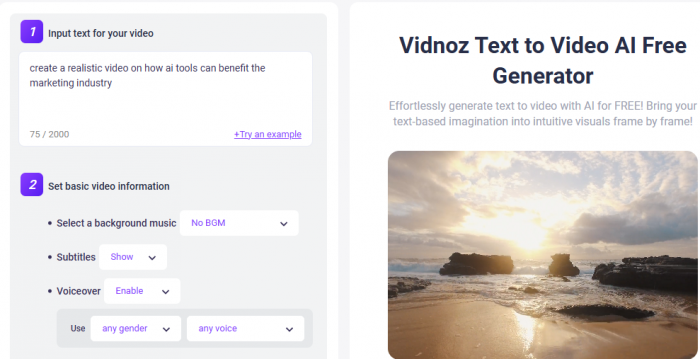
No microphones. No lighting setups. Just you, your keyboard, and an avatar who doesn’t stumble over words like you do when nervous.
Image-to-Video: That Boring Photo Finally Earns Its Keep
Static photos are fine, but wouldn’t it be better if they moved? That’s where image-to-video AI comes in. Upload a product photo, illustration, or presentation slide, and watch Vidnoz add pans, zooms, and subtle animations.
It’s not Pixar, but it does make your picture look less like it came straight from a PowerPoint template.
Talking Head Avatars: Actors Who Don’t Complain
Hiring actors is expensive. Getting Steve from accounting to read a script is painful. Enter Vidnoz’s talking head avatars. These AI-generated presenters lip-sync your script with shockingly good accuracy.
They don’t need coffee breaks. They don’t mess up their lines. They don’t ask for royalties. They just…talk.
Vidnoz Gen: Genie in Your Browser
Vidnoz Gen is like a genie that doesn’t limit you to three wishes. You throw in a half-baked idea like “make a product launch ad”, and Vidnoz builds a video draft faster than you can order coffee.
It’s not always perfect — sometimes the genie misinterprets your wish — but it’s way faster than starting from scratch.
How to Use Vidnoz AI Without Losing Your Patience
Here’s the simple workflow (no manual required):
- Write your script → Paste it into the text-to-video tool.
- Pick an avatar → Choose a talking head who looks professional (or just fun).
- Add a voice → Select from hundreds of AI voices (some good, some GPS-level robotic).
- Style it up → Use templates or the image-to-video AI for extra flair.
- Render → Grab a snack while the AI does the heavy lifting.
- Export & share → Free plan = watermark. Paid plan = clean exports.
Workflow recap: Script → Avatar → Voice → Style → Render → Export.
Pricing: The “Free” Deal and the Catch
Yes, Vidnoz is free. But free comes with:
- Daily limits.
- Watermarks.
- 720p quality.
If you want HD exports, no watermarks, and commercial rights, you’ll need to upgrade. Compared to competitors like Synthesia, though, Vidnoz’s premium tiers are still budget-friendly.
Vidnoz AI vs Competitors: The Face-Off
| Feature / Tool | Vidnoz AI (Free Hero) | Synthesia (Corporate Cousin) | Pictory (Repurpose Champ) | Runway (Cinematic Artist) |
| Pricing | Free plan + cheap upgrades | enterprise-focused | Mid-range subscription | $$$ for pro creators |
| Text-to-Video | Yes, with avatars | Yes, polished | Yes, limited avatars | Not a focus |
| Image-to-Video | Built-in | No | No | Yes, artsy but complex |
| Talking Avatars | Multilingual & realistic | Professional-grade | Not available | None |
Verdict: If you’re broke but ambitious, Vidnoz is your best friend. If you’re a corporate exec, Synthesia will gladly take your budget.
Who Should Use Vidnoz AI (and Who Should Probably Not)
Educators: Turn dull slides into videos students might actually watch.
- Marketers: Crank out ad creatives faster than TikTok trends die.
- Small businesses: Professional training and promo videos without hiring videographers.
- Content creators: YouTubers, podcasters, and influencers who want polish without effort.
Who shouldn’t? Hardcore filmmakers or video editors. If you’re aiming for the next Cannes Film Festival, Vidnoz probably isn’t your red carpet.
Tips & Tricks to Get the Best Results from Vidnoz AI
- Write prompts like a director. Instead of “make a video,” try “30-second product demo with upbeat tone and close-up shots.”
- Pick avatars wisely. Choose professional-looking avatars for business, casual ones for social content.
- Play with voices. Some voices sound robotic — test a few before exporting.
- Batch render off-peak. Users on Futurepedia note queues can happen, so render during low-traffic times.
- Add your own edits. Export and polish in another tool if you want extra customization.
FAQs About Vidnoz AI
Is Vidnoz AI really free?
Yes — but with watermarks and usage caps. Paid plans unlock HD and commercial rights.
Can I use Vidnoz for YouTube videos?
Absolutely. Many creators do, though premium is better for watermark-free exports.
Does it replace editing software?
Nope. Think of Vidnoz as a microwave — fast and convenient, but it won’t cook a gourmet meal.
Is there a mobile app?
Yes. Check the App Store version for creating videos on the go.
Final Verdict: Should You Try Vidnoz AI?
If you’re tired of fighting with editing software, Vidnoz AI is worth a shot. It’s free, fun, and shockingly capable for quick projects.
It won’t replace Hollywood-level production, but for educators, marketers, small businesses, and content creators, it’s a lifesaver. You get realistic avatars, talking heads, animated images, and fast rendering — all in one browser tab.
Final Rating: 8.5/10 — Fast, simple, and perfect for anyone who values sanity over endless timelines.
Post Comment
Be the first to post comment!