THE 20-SECOND VERDICT For real design work, pick Leonardo AI For client work, branding, or anything commercial, Leonardo wins on the essentials: real editing, custom-model training, stronger control, and clearer licensing. Gening is free, instant, and genuinely fun, but it is built for chat, roleplay, and casual images rather than production design. Put simply: use Gening to play, and use Leonardo to ship. |
HOW THIS COMPARISON WAS MADE We checked current vendor information against independent reviews from early and mid-2026. There are no invented benchmarks here, and because prices in this space change often, it is worth confirming the latest figures on each official site before you buy. |
At a glance
These two tools barely overlap in what they set out to do. The table below makes that contrast easy to take in before we get into the detail.
| What matters | Gening AI | Leonardo AI |
| What it really is | Chat and roleplay platform with image generation built in | Dedicated AI image and video creative suite |
| Owned by | Independent (limited public information) | Canva (acquired in 2024) |
| Built for | Casual creators, roleplayers, quick concepting | Designers, game artists, marketing and brand teams |
| Start without sign-up | Yes, open the site and go | No, free account needed |
| Free tier | Daily free credits, no login (goes fast) | 150 tokens/day (free outputs are public) |
| Paid model | One-time credit packs, no auto-renewal | Subscriptions (about $12 to $60/mo) plus an API |
| Editing tools | Minimal (prompt-driven, inside chat) | Canvas: inpaint, outpaint, guidance, upscaler |
| Style consistency | Limited | Custom models (LoRA) plus consistent characters |
| Text inside images | Not a focus | Phoenix renders legible text well |
| Commercial rights | On paid plans | On paid plans |
| Content safety | Optional adult / NSFW mode exists | Standard platform, SFW-oriented |
| Mobile app | None (web only, weak on mobile) | Yes (iOS and Android) |
Reflects publicly available information as of mid-2026 and may change.
Meet the contenders
Before deciding which is better, it helps to understand what each tool was actually designed around, because they were built to solve very different problems.
Gening AI: the playground

Gening AI is a browser-based platform built around AI characters, roleplay, and storytelling, with an image generator and voice tools folded into the chat experience. You can open it and start creating within seconds, which is a real part of its charm, but that casual, all-in-one focus is also why it struggles as a serious design tool.
Strengths
•Instant start: no sign-up, no download, free daily credits
•Fun, expressive styles: anime, cartoon, cyberpunk, painterly
•Characters and voice tools that suit hobby storytelling
•Pay-once credit packs, so nothing auto-renews
Watch-outs
•Output can be inconsistent, with results that come back blurry or off-prompt
•No real editor: no inpainting, layers, or fine control
•Chats can vanish on refresh, and the mobile experience is cramped
•Thin public detail on privacy, and an adult-content mode exists
Leonardo AI: the studio
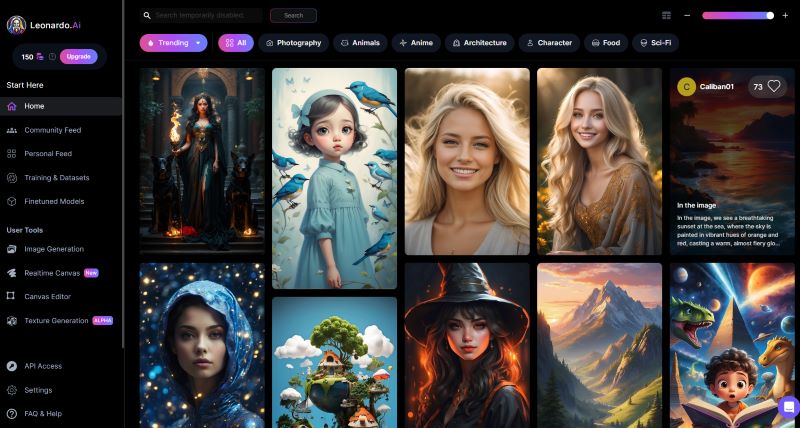
Leonardo AI is a dedicated image and video suite, now owned by Canva, that pairs an in-house flagship model called Phoenix with dozens of fine-tuned and third-party models. It feels closer to a creative workshop than a quick generator, trading a little setup for a great deal more control over the result.
Strengths
•Real control: image guidance, negative prompts, and model choice
•A proper canvas: inpaint, outpaint, upscaling, transparent PNGs
•Custom model training (LoRA) for an on-brand, repeatable look
•Phoenix renders legible text for logos, posters, and banners
Watch-outs
•The token system takes a little learning to budget
•Free generations are public in the community gallery
•Not instant: roughly 15 to 90 seconds per image
•The newer API uses opaque, credit-based pricing
Designer-fit scorecard
The scores below are our editorial read on how each tool serves a working designer, not a lab benchmark. They are meant to show the shape of each one's strengths on a scale of 0 to 10.
| Metric | Gening AI | Leonardo AI |
| Image control and steerability | ████ 4/10 | █████████ 9/10 |
| Editing tools (inpaint, canvas) | ██ 2/10 | █████████ 9/10 |
| Output consistency | ████ 4/10 | ████████ 8/10 |
| Commercial and brand readiness | ████ 4/10 | ████████ 8/10 |
| Ease of getting started | █████████ 9/10 | ███████ 7/10 |
| Free tier and price flexibility | ████████ 8/10 | ███████ 7/10 |
| Mobile and app support | ███ 3/10 | ███████ 7/10 |
Gening leads on speed and zero cost. Leonardo leads everywhere the work becomes professional.
The details that decide it
Four areas separate a fun generator from a tool you can actually build a workflow on.
Image quality and control
On a good day, both tools can produce a striking single image, so raw quality is closer than the marketing implies. The real difference is control. Leonardo lets you steer results with reference images, negative prompts, and a choice of models, while Gening is closer to prompt and hope. That is fine for a meme or a roleplay avatar, but risky for a deliverable you will have to defend to a client.
Editing and consistency
A designer's day is rarely one prompt and done; it is fixing, masking, upscaling, and holding a look across a dozen assets. Leonardo ships those tools, including a full canvas and custom-model training that keeps a style consistent. Gening keeps image generation inside a chat window with no editor, so any real fix or on-brand batch means exporting to another app anyway.
Pricing
Leonardo runs on tokens, with a free tier of 150 a day (output is public) and paid plans that land around $12 to $60 a month, plus an API. Gening takes the opposite route, offering a free daily allowance and pay-once credit packs that never auto-renew. Both grant commercial rights only on their paid options, and because exact prices shift, it is safest to treat any figure as a snapshot rather than a quote.
Commercial use and brand safety
Allowing commercial use is not the same as being safe for a paying client, and neither tool offers the licensed-data, indemnified guarantee that Adobe Firefly is known for. Leonardo is SFW-oriented and comfortable to feature on a business site. Gening's optional adult mode and thin public detail about data make it the riskier choice for brand-facing or client work, even though it can produce perfectly safe images.
Which one fits your situation?
The honest answer to which is better depends on what you are making. Here is how the choice tends to fall for four common types of creator.
| Your situation | Best pick and why |
| Freelance brand or logo designer | Leonardo AI. You need legible text, a consistent style across deliverables, and the ability to refine an image instead of rerolling it. Its canvas, text rendering, and custom models are built for exactly this. |
| Indie game developer | Leonardo AI. Characters and concept art that hold a consistent look. Game-asset models and LoRA training keep your world coherent across many generations. |
| Hobbyist or meme-maker on $0 | Gening AI. You want to build a character and make fun images right now, free and with no sign-up. This is exactly what Gening is good at. |
| Agency shipping client and ad creative | Leonardo AI. You need control, commercial rights, and brand safety. For jobs that demand maximum IP cover, weigh a licensed-data tool like Firefly alongside it. |
The quick decision rule
If you just want a fast gut check, this is it.
Choose Gening AI if
•You want to start instantly, free, and with no account
•The goal is fun, characters, roleplay, or quick ideation
•You would rather pay once than hold a subscription
Choose Leonardo AI if
•The output has to look professional and ship to clients
•You need editing, upscaling, or a consistent brand style
•Text in images and clear commercial rights matter to you
A SENSIBLE THIRD ANSWER Use both, for different jobs: brainstorm loosely in Gening while it is free and low-stakes, then finish and license the real work in Leonardo. |
Honest limitations of both
No tool here is magic, and a few caveats apply to both before you commit.
•Artifacts still happen. Hands, fine text, and busy scenes can break in either tool, so budget time to fix or regenerate.
•Free tiers have strings. Leonardo's free outputs are public, and Gening's credits run out fast while quality wobbles.
•Rights are not indemnity. Neither offers the licensed-data guarantee some enterprise clients require.
•Things change monthly. Verify models, prices, and features before relying on a specific claim.
What it's like to use them
Specifications only tell part of the story, so here is the user's-eye view, drawn from how people describe living with each tool day to day.
Gening AI
The common refrain: a blast to start with, frustrating to lean on.
The first few minutes are the best part. You are generating within seconds with no account, and a vivid prompt can return a punchy, anime-style result that genuinely surprises you. The shine fades when you try to rely on it: dialing in a specific look is trial and error, extras like face swap can look cartoonish, chats sometimes disappear on refresh, and the whole thing feels cramped on a phone.
Leonardo AI
The common refrain: a learning curve up front, real control once it clicks.
The early experience is the opposite of Gening's, with some setup as you pick a model, learn what tokens cost, and find your way around the canvas. Push past that and it stops feeling like pulling a lever and hoping; you steer with reference images, repair a flawed region instead of starting over, and hold a consistent style across a batch. It is slower than instant, but the trade is control and finished work.
REALITY CHECK Your mileage will vary with your prompts and patience, so spend an afternoon in each free tier before trusting either with real work. |
Final verdict
After weighing what each tool is, what it does, what it costs, and how it feels to use, the result is less of a contest than it first looks, because the two are aimed at different goals.
FOR DESIGNERS, THE PICK IS CLEAR Leonardo AI belongs in a professional workflow When work has to be polished, consistent, on-brand, and safe to sell, Leonardo wins on the things that matter: real editing, custom models, legible text, mobile apps, and clearer commercial footing under Canva. The token system and the short wait per image are a fair price for that much control. |
Recommended for designers: Leonardo AI. The right call for client work, branding, game art, and ad creative.
Best for casual play: Gening AI. A free, instant, low-stakes way to mess around and spark ideas.
None of this makes Gening a bad tool; it is an enjoyable, zero-friction way to brainstorm, and its pay-once pricing is a refreshing change. For many creators the smartest path is not choosing one forever but matching the tool to the job: play in Gening, then ship in Leonardo.
Post Comment
Be the first to post comment!





