I signed up for both DupDub and Vidnoz AI expecting two versions of the same thing. I was wrong. After running real scripts through each, I found they solve different problems: DupDub is built for voice and translation, Vidnoz is built for fast talking-head video. Here is what I learned using them side by side, so you can skip the trial-and-error and pick the one that fits your work.
The Quick Verdict at a Glance
For anyone who wants the short version before the deep dive:
| If the priority is... | Lean toward | Because |
|---|---|---|
| Realistic voiceovers & dubbing | DupDub | 700+ voices and dubbing across 90+ languages with strong audio fidelity |
| Talking-head avatar videos | Vidnoz | 1,400+ avatars and 1,900+ templates tuned for fast video output |
| A genuinely free starting point | Vidnoz | Free plan with daily video minutes vs DupDub's 3-day trial |
| All-in-one audio, video & writing | DupDub | Voice, avatars, transcription and AI writing in one workspace |
| Lowest paid entry price | DupDub | Paid plans start near $11/month vs Vidnoz around $14.99/month |
What Each Platform Is Built For
DupDub: An Audio-First Content Studio
Developed by Mobvoi, DupDub leans hard into voice. It bundles narration, cloning, and translation into one browser workspace, and in my testing it felt like a localization engine first and a video tool second. The standouts:
•700+ voices across 90+ languages that held up well even on long, narrative reads.
•Talking-photo avatars that turn a single front-facing portrait into a lip-synced presenter in a couple of minutes.
•Three avatar types to grow into: photo avatars for simple lip-sync, gesture avatars with hand movement and instant cloning, and motion avatars built from animated templates.
•Built-in transcription, subtitles, and AI writing so a script-to-voiceover-to-subtitle loop stays in one place.
•A flexible credit system shared across every task, with unused credits rolling over each month. The catch: video rendering drains credits far faster than plain text-to-speech.
•Best fit: faceless YouTube creators, audiobook and podcast makers, e-learning teams, and anyone translating one piece of content into many languages.
Vidnoz AI: A Fast Avatar Video Factory
Vidnoz approaches the same goal from the video side. Its whole design is built to get a talking presenter on screen in minutes, and the free plan is unusually generous. It also supports image-to-video creation, so users can turn a still visual into a more dynamic video asset without building a full scene from scratch. The highlights:
•1,400+ AI avatars and 1,900+ templates that look polished out of the box, with a wide range of appearances and settings.
•A genuine free tier with real avatars, the full template gallery, and a daily minute of video, enough to learn the tool before paying (a watermark applies).
•Template-first workflow that took me from blank screen to a watchable presenter clip in under five minutes.
•Direct export paths to YouTube, TikTok, LinkedIn, and PowerPoint, so finished clips rarely need a separate editor.
•The trade-offs: voice realism and language depth trail DupDub, lip-sync can slip on longer sentences, and per-minute pricing climbs quickly at higher volume.
•Best fit: sales outreach clips, HR onboarding, training modules, and quick social videos where a face on screen carries the message.
Feature-by-Feature Comparison
The clearest way to see the gap is side by side. Verified specifications as of mid-2026:
| Feature | DupDub AI | Vidnoz AI |
|---|---|---|
| Primary strength | Voiceovers, dubbing, transcription | AI avatar talking videos |
| AI voices | 700+ voices | 340+ to 1,300+ depending on plan |
| Languages | 90+ languages & accents | 70+ languages |
| AI avatars | Talking photo, gesture & motion avatars | 1,400+ prebuilt avatars |
| Video templates | Lighter template library | 1,900+ templates |
| Voice cloning | Yes, on paid plans | Yes, higher tiers |
| Transcription & subtitles | Yes, built in | Limited |
| AI writing / script tools | Yes | AI script generator |
| API access | Yes | Enterprise focused |
| Best suited for | Multilingual audio & narration | Presenter-style marketing video |
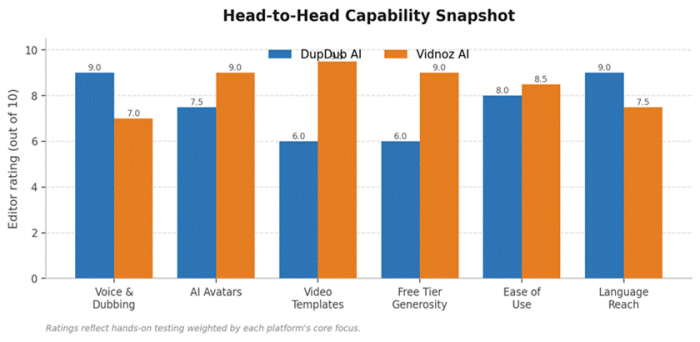
Capability snapshot from hands-on testing, weighted toward each platform's core focus.
Reading the chart: DupDub edges ahead on voice, dubbing, and language reach, while Vidnoz pulls clearly ahead on avatars, ready-made templates, and the generosity of its free tier. Neither is a knockout across the board, which is the whole point.
How They Held Up in a Real Workflow
Specs only say so much, so I ran the same brief through both tools: take a 200-word product script, turn it into a finished, shareable clip, then localize it into Spanish and German. I wanted to see where each platform slowed me down and where it quietly did the heavy lifting. The differences showed up almost immediately.
Speed From Script to First Draft
Vidnoz was faster to a watchable result. Picking a template, dropping in the script, and choosing an avatar produced a presenter video on the first try in under five minutes. DupDub took a little longer to reach a comparable video because the strongest path there runs through voiceover first and avatar second, but the audio it generated needed almost no retouching. For a pure video deadline, Vidnoz won the clock; for an audio asset that also happened to need visuals, DupDub's order of operations made more sense.
The Localization Test
This is where the two diverged most. Translating the clip into Spanish and German inside DupDub was close to a non-event: feed it the script, pick the target languages, and the dubbing came back with believable native-sounding delivery. Vidnoz handled the translation competently, but the lip-sync drifted slightly on longer German sentences and a couple of voices sounded more synthetic than their English counterparts. For a business shipping the same message into many markets, that difference compounds fast across a content calendar.
Output Quality, Honestly Assessed
Quality is subjective, but a few patterns held up consistently across the test files:
•Voice naturalness: DupDub's premium voices carried more emotional range and fewer robotic seams, especially on longer reads. Vidnoz's voices are perfectly usable for short, upbeat scripts but reveal their edges in slower, narrative passages.
•Avatar realism: Vidnoz's prebuilt presenters look polished and professional out of the box, with a wider variety of appearances and settings. DupDub's talking-photo approach is more flexible because any portrait can become a presenter, but results depend heavily on the source image.
•Editing control: Both offer post-generation editing, though Vidnoz's template-driven editor is friendlier for absolute beginners, while DupDub's studio gives finer control over timing, subtitles, and voice tuning.
The short version, from my own ears and eyes: if a listener will spend real time with the audio, DupDub is the safer bet. If a viewer just needs a credible face delivering a quick message, Vidnoz looks the part with far less effort. I stopped trying to force either tool to do the other's job and the whole process got easier.
Pricing Compared
Pricing is where intentions get real. Both run a freemium model, but the free experiences differ sharply. Vidnoz offers an ongoing free plan with a small daily allowance of video minutes, while DupDub leans on a short 3-day trial with limited credits before a subscription is required. Figures below reflect monthly billing; annual plans cut the effective rate on both.
DupDub Plans
| Plan | Price / mo | What it unlocks |
|---|---|---|
| Free / Trial | $0 | 3-day trial with about 10 credits, core tools, no card needed |
| Personal | ~$11 | 150 credits/mo, 100GB storage, commercial license, API access |
| Professional | ~$30 | 500 credits/mo, 300GB storage, heavier voiceover & avatar limits |
| Ultimate | ~$110 | 2,500 credits/mo, 2TB storage, high-volume localization |
Vidnoz AI Plans
| Plan | Price / mo | What it unlocks |
|---|---|---|
| Free | $0 | 1 min/day video, 1,400+ avatars, 1,900+ templates, watermark |
| Starter | ~$14.99 | 15 min/mo, 1080p, no watermark, faster processing |
| Business | ~$37.49 | 30 min/mo, longer videos, premium avatars, branding |
| Enterprise | Custom | Team features, custom avatars, tailored quotas |
The honest read: DupDub wins on entry price and on value if voice and translation are the goal. Vidnoz wins on the free plan, since you can actually ship a (watermarked) video on day one without paying. Watch the units though: Vidnoz meters by video minutes, which disappear quickly, while DupDub meters by credits that stretch differently across voice, avatar, and translation tasks.
Put a dollar figure on it and the picture sharpens. A single freelance voiceover artist can run well over $100 per project, so even DupDub's $11 Personal plan pays for itself the first time it replaces an outsourced narration. Vidnoz's value math works differently: the free tier is the genuine draw, and the question becomes whether the watermark and the daily minute cap are tolerable for the use case. The moment a brand needs clean, unbranded exports at any reasonable volume, the jump to a paid Vidnoz tier arrives quickly, and the per-minute ceiling is the figure to scrutinize before committing to an annual plan.
Strengths and Trade-offs
| DupDub AI | Vidnoz AI | |
|---|---|---|
| Strengths | Natural voices, deep language support, all-in-one audio workflow, low entry price | Huge avatar and template library, generous free tier, very fast video output |
| Trade-offs | Short trial, credits drain fast on video, lighter template selection | Voice realism trails DupDub, lip-sync can slip, higher tiers feel pricey |
Matching the Tool to the Job
Abstract feature lists matter less than concrete scenarios. Here is how the choice tends to fall in common situations:
| Scenario | Better fit | Quick reasoning |
|---|---|---|
| Faceless YouTube narration | DupDub | Voice quality carries the channel; no presenter needed |
| Sales & outreach video | Vidnoz | A friendly avatar lifts reply rates fast |
| Multilingual ad localization | DupDub | 90+ languages and strong dubbing in one pass |
| HR onboarding & training | Vidnoz | Template library spins up consistent modules |
| Podcast & audiobook work | DupDub | Audio-first design and natural long-form voices |
| Social video on a zero budget | Vidnoz | Free plan ships real (watermarked) clips daily |
The pattern is consistent enough to be a rule of thumb. When the message lives in the ear, DupDub is the stronger partner. When the message needs a face and needs it now, Vidnoz gets there with less fuss. Teams that do both regularly often end up keeping a foot in each camp rather than forcing one tool to do work it was never designed for.
Who Should Pick Which
Choosing the right tool comes down to the job, not the brand:
•Pick DupDub if the work is voice-led: narration, podcasts, audiobooks, e-learning, or translating one piece of content into many languages. The audio quality and dubbing reach are the draw.
•Pick Vidnoz if the deliverable is a talking presenter video: sales clips, onboarding, explainers, or social content where a face on screen carries the message and speed matters.
•Run both free options if the budget is zero. Vidnoz lets you ship a watermarked video immediately, and DupDub's trial reveals fast whether its voices fit your brand before any commitment.
A Quick Look at Where the Market Is Heading
It is worth zooming out before deciding, because the tool you pick today is one you may lean on for years. The category is growing fast, and that growth is the reason both DupDub and Vidnoz keep adding voices, avatars, and templates almost monthly.
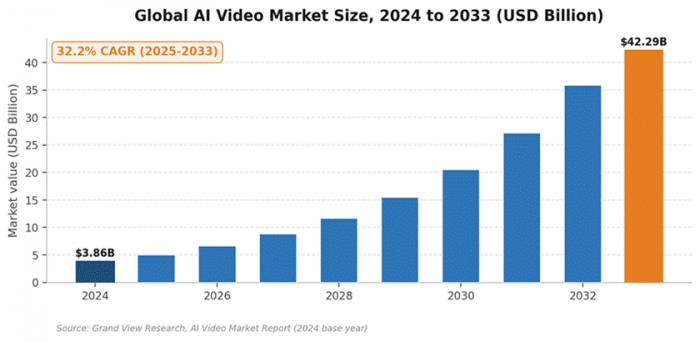
The AI video market is on a steep climb, which keeps both platforms shipping features quickly.
The numbers back it up: the global AI video market sat at roughly $3.86 billion in 2024 and is projected to reach about $42.29 billion by 2033, growing at a 32.2% compound annual rate, according to Grand View Research. For a buyer, that means rapid improvement is likely on both platforms, so picking the one that fits your core workflow now matters more than chasing a feature that may land on either tool within a release or two.
My Final Verdict
If I could only keep one of these open, my choice would come down to what I was actually making that month. Most of my work during testing was multilingual narration, and DupDub kept earning its place: the voices held up under real scrutiny, the dubbing turned what used to be a week of localization into an afternoon, and the $11 entry plan made it an easy yes for me.
That said, I never felt like Vidnoz was the weaker tool, just a different one. The few times I needed a quick presenter video for a landing page, nothing beat how fast it took me from a blank screen to a polished talking-head clip, and because the free plan covered my testing, it cost me nothing to find that out. The avatar and template library genuinely impressed me.
So here is my honest takeaway: these tools complement each other more than they compete. If your budget allows only one, let your content decide for you. If you live in voice, narration, or translation, you will be happier with DupDub. If you need a face delivering a message fast, you will move quicker with Vidnoz. I came away thinking both deserve to be taken seriously in 2026, and that the real question is not which is better, but which problem you woke up wanting to solve.
Post Comment
Be the first to post comment!