In today's digital landscape, visual content is becoming a vital part of how ideas are shared and consumed. Whether it’s for educational purposes, creative projects, or online storytelling, transforming static text and images into motion can help audiences understand concepts more clearly and engage more deeply.
From Static Images to Dynamic Visuals
Many creators, educators, and professionals often rely on slides, diagrams, or static images to communicate information. While these methods convey key points, they sometimes lack the emotional and contextual depth that motion brings. A short, animated video can illustrate a concept in a way that text and images alone cannot.
For example, an educator explaining a complex science concept can enhance comprehension by converting diagrams into animated sequences. Similarly, a designer can bring a concept sketch to life, showing movement and depth that makes a campaign pitch more vivid.
Using AI Video Generator for Everyday Scenarios
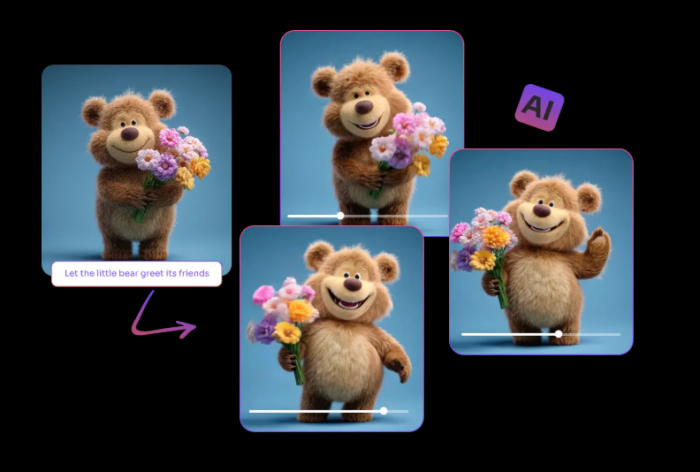
One practical way to achieve this transformation is through an AI video generator, a tool that can convert text prompts or static images into engaging short videos. By leveraging AI models, these generators can handle motion, perspective, and visual style automatically, removing the need for advanced video editing skills.
Tools like PicLumen support both Text-to-Video and Image-to-Video workflows. Users can input a written description or upload an image, select the desired visual style and aspect ratio, and quickly generate a short video ready for sharing or presentation. This makes it easier for content creators to experiment and visualize ideas without investing hours in manual editing.
Example Scenarios
| Scenario | Traditional Approach | AI Video Approach |
| Educational Diagrams | Static slides with annotations | Animated sequences showing motion, depth, and interaction |
| Marketing Concepts | Concept sketches or mood boards | Short videos demonstrating campaign visuals or product usage |
| Storytelling Projects | Storyboards or text scripts | Text or image converted into fully animated video segments |
This approach is particularly useful for educators, designers, and storytellers who want to produce high-quality visual content quickly while keeping the focus on the creative idea rather than the technical process.
Flexibility Across Styles and Formats
AI video generators often provide multiple generation models that cater to different aesthetic preferences. PicLumen, for instance, includes models optimized for cinematic motion, surreal realism, or illustrative animation. Additionally, users can choose from various aspect ratios such as 16:9, 1:1, or 9:16 to ensure the video fits the intended platform.
This flexibility allows creators to adapt their content seamlessly for social media, presentations, or personal projects without switching between multiple software tools.
A Simple Workflow
A typical process for generating a short video might involve:
- Choosing a model that fits the desired visual style.
- Entering a text prompt or uploading an image representing the scene or idea.
- Selecting the video ratio and style, adjusting any optional parameters.
- Generating and previewing the video, then exporting in HD format.
By streamlining these steps, creators can focus on refining the idea itself rather than wrestling with complex editing software.
Conclusion
Turning static content into engaging video is no longer limited to professionals. With AI video generators like PicLumen, creators across fields can bring their ideas to life with minimal technical effort. By focusing on specific scenarios—such as education, design, or storytelling—this approach highlights how motion enhances understanding and engagement.
For anyone looking to visualize concepts quickly and effectively, experimenting with short videos can open new opportunities for creativity and communication.
Post Comment
Be the first to post comment!





