On This Page
- Supawork AI vs Pica AI at a glance
- What each tool is built to do
- Feature face-off
- Strengths and weaknesses
- How users rate them across platforms
- Where the market is heading
- Pricing breakdown
- Output quality and real-world performance
- Tips for better results with either tool
- Capability scorecard
- Who should pick which
- Privacy and responsible use
- Final verdict
Picture the usual content scramble: a clip due Friday, a headshot that suddenly looks dated, a face swap for a group-chat meme, each one living in a different app with its own login and bill. Supawork AI and Pica AI both promise to shrink that pile, and both keep landing on the same shortlists of AI image and video generators. The only question that matters is which one is worth paying for.
Spend a few real afternoons inside each and the answer stops being close. They are not built for the same job. Supawork AI is a sprawling creative workspace built around AI video. Pica AI is a fast, focused photo studio built around face swaps and headshots. The sections below skip the marketing and sort out which one fits which kind of work, with the prices, limits and honest quirks laid bare.
The 10-second answer Need video, lip sync, or many tools under one login? Supawork AI. Only need photo enhancing, restoring, or a quick headshot? Pica AI. Just testing the water? Both give free daily credits, so a trial costs nothing. |
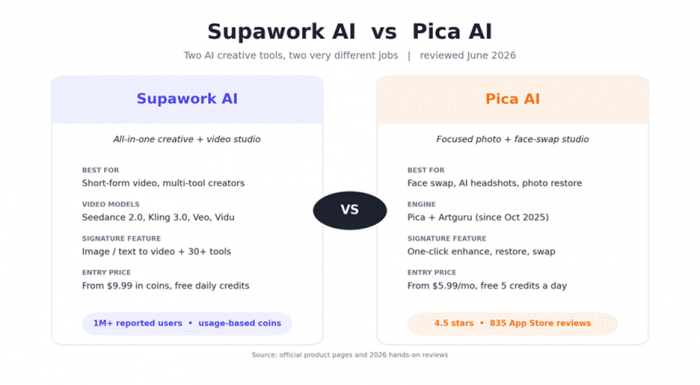
Figure 1. How Supawork AI and Pica AI position themselves.
Supawork AI vs Pica AI at a glance
Start with the short version. The table below is the honest summary, and the pattern inside it repeats everywhere: Supawork spreads wide, while Pica AI goes deep on a handful of photo jobs.
| Supawork AI | Pica AI | |
|---|---|---|
| Category | All-in-one AI creative and video suite | Focused AI photo editor and face swap |
| Maker | Grew from a job-seeker kit into a 30+ tool platform | WEGITAL HK LIMITED, Hong Kong, 2023 |
| Core strength | Image-to-video and text-to-video plus a huge toolset | One-click photo enhance, restore and swap |
| Video generation | Yes, multi-model | No, face swap only |
| Headshots | 300+ variations from 6-10 selfies | Studio-style packs from a few selfies |
| Free tier | 30-60 coins a day | 5 credits a day |
| Entry paid price | Coin bundles from $9.99 | Premium Lite at $5.99/mo |
| Platforms | Web | Web, iOS, Android |
| Best for | Short-form video, multi-tool creators | Casual edits, LinkedIn headshots, restores |
What each tool is built to do
The fastest way to choose is to stop treating these as twins. Set the shared middle aside and the feature lists barely touch.
Supawork AI, the all-in-one creative workspace

Supawork began as a job-seeker's kit, with a resume builder, cover letters and a headshot maker, then grew into a platform of more than thirty AI tools that reportedly serves over a million people. Its recent investment has gone almost entirely into video.
That video suite is the headline draw. It animates a still into a short clip, renders a scene from a written prompt, and syncs lips to audio at six coins per second, routing generations through Seedance 2.0, Kling 3.0, Veo, Vidu and Pixverse at up to 1080p with no watermark on paid plans. The face swap suite runs just as deep, covering images, GIFs, memes and videos up to sixty minutes or one gigabyte with multi-face and batch jobs, while the headshot tool spins six to ten selfies into more than three hundred styled portraits. The pitch is plain: stop leaving the tab.
Pica AI, the focused photo and face-swap studio
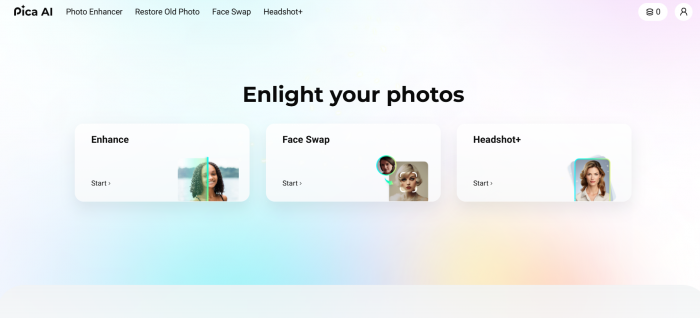
Pica AI takes the opposite approach. Built by Hong Kong based WEGITAL HK LIMITED in 2023, it does a short list of photo jobs and nails each in a single click, with an interface that barely needs explaining. Drop in a picture, pick a tool, wait a few seconds.
Four capabilities carry it: face swap for photos and videos with up to three faces at once, a photo enhancer that upscales toward 4K through the developer's Artguru engine, old photo restoration that revives faded family scans, and an AI headshot generator that has quietly become the feature paying the bills. Magic Avatars, simple text-to-image and background edits round it out. What it pointedly leaves out is just as telling: there is no real text-to-video or image-to-video here, so video means face swap and nothing more.
Feature face-off
Lined up side by side, the gap is impossible to miss.
| Capability | Supawork AI | Pica AI |
|---|---|---|
| Text-to-video | Yes | No |
| Image-to-video | Yes | No |
| AI lip sync | Yes, 6 coins/sec | No |
| Video face swap | Up to 60 min, multi-face, batch | Up to 3 faces, shorter clips |
| Image and GIF face swap | Yes, plus memes | Yes |
| AI headshots | 300+ variations, no watermark | Studio-style packs |
| Photo enhance and upscale | Basic studio tools | Strong, 4K via Artguru |
| Old photo restoration | Limited | Strong |
| Avatars and art styles | Yes | Yes, anime to cyberpunk |
| Resume and cover letters | Yes | No |
| Academic PDF translation | Yes | No |
| Native mobile apps | Web first | Web, iOS, Android |
| Max output resolution | Video up to 1080p | Photo upscale toward 4K |
| Faces per swap | Multiple, batch | Up to 3 |
| Commercial rights | On paid plans | Top tier only |
Three things fall out of that grid. Supawork owns everything that moves, so any job needing a generated clip, a lip-synced character or a long swap is out of Pica AI's reach. Pica AI owns the still image, leaning on a dedicated engine for restoration and clean upscaling that shows in the results. The overlap is real but narrow: face swaps, headshots and avatars are the shared middle where most buyers weigh the two.
Strengths and weaknesses
Every tool has a sweet spot and a sore spot, and weighing both honestly is what actually protects the money.
Supawork AI
Its strengths are breadth and motion. One login covers more than thirty tools, the multi-model video lets quality scale with the coin budget, and the face swap handles long video, batch jobs and GIFs that rivals skip. Headshots come back in the hundreds with no watermark, coins never expire, and several basic tools are free with no signup. The weak spots are just as clear: web only with no native app, output that can fall short of the studio-quality pitch, credit math that confuses when a free tool still asks for coins, and a tilt toward speed over fine control.
Pica AI
Pica AI wins on simplicity and photo craft. The one-click interface needs no manual, the 4K enhancer through Artguru is genuinely strong, and restoration does its best work on old family album scans. Native iOS and Android apps, a $5.99 entry point, free daily credits with no card, and built-in avatars round out the appeal. The limits are real, though: no true video generation, a three-face cap on swaps, a watermark on some free output, commercial rights locked to the $39.99 tier, and tricky angles or sunglasses that can still confuse a swap.
How users rate them across platforms
Star ratings tell their own story, even if the two tools live in different review worlds. The figures below reflect each platform as of mid-2026.
| Platform | Supawork AI | Pica AI |
|---|---|---|
| Apple App Store | No app, web only | 4.5/5, 835 reviews |
| Google Play | No app, web only | Around 4.5/5, 500k+ installs |
| Trustpilot | About 2.1/5, around 10 reviews | A handful, about 6, mostly negative |
| G2 | Not listed | Profile live, no reviews yet |
| Capterra | Not listed | Not listed |
Two caveats keep this honest. G2 and Capterra serve business software, so neither consumer tool has real footing there, which leaves the app stores and Trustpilot as the signals that matter. Pica AI looks strong where its users actually are, on mobile, while its few Trustpilot reviews skew negative on billing, and Supawork's thin, low Trustpilot score leans more on hands-on testing than crowd numbers. Read low-volume scores as direction, not a verdict.
Where the market is heading
Neither tool exists in a vacuum, and the wider boom is exactly why this choice matters now.
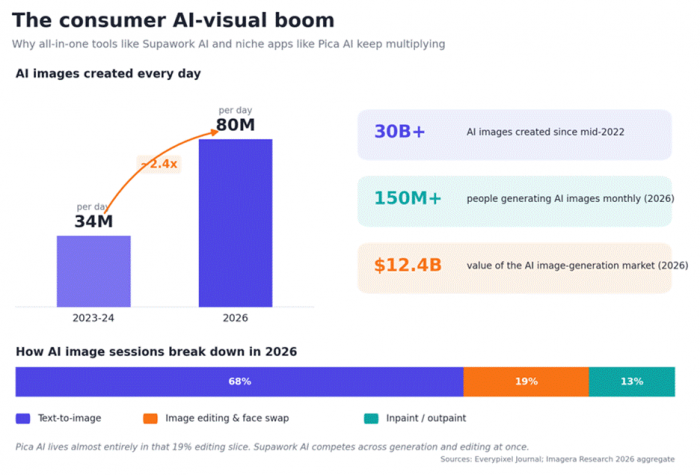
Figure 2. The demand backdrop both tools are competing inside.
The scale is hard to ignore. Daily AI image creation roughly doubled from about 34 million across 2023 and 2024 to around 80 million by 2026, per Everypixel Journal, and more than 30 billion images have been made since consumer generators arrived in mid-2022. Aggregated 2026 estimates put the market near $12.4 billion, with over 150 million people creating images every month.
How those images get made explains the split between these two tools. By session, text-to-image leads at 68 percent, image editing and face swap take 19 percent, and inpainting fills the rest, which is exactly the editing slice Pica AI lives in while Supawork spans the board. Face swap alone is now table stakes: projected to reach $1.5 billion by 2033 at roughly 20 percent annual growth, per Verified Market Reports, the category already draws more than 95 million monthly active users and over $12 million a month, about 58 percent of it from subscriptions, per SQ Magazine's 2026 tracker.
Pricing breakdown
Two philosophies sit behind the price tags: Supawork runs on flexible coins, Pica AI on tidy monthly tiers.
| Plan | Supawork AI | Pica AI |
|---|---|---|
| Free | 30-60 coins daily, coins never expire | 5 credits daily, watermark on some output |
| Entry | Coin bundles from $9.99 | Premium Lite, $5.99/mo |
| Mid | Monthly plan near $25 with 10,000 coins | Premium Plus, $19.99/mo |
| Top | Lifetime 100,000 coins, one-time buy | Premium Max, $39.99/mo, commercial use |
| Annual saving | About 30% off, near $17.50/mo | Standard monthly billing |
| Add-ons | Pay only for the tasks used | One-time packs, $2.99 to $3.99 |
The logic is simple. Supawork rewards irregular, heavy use, since coins never expire and a lifetime bundle suits anyone who batches projects rather than working daily. Pica AI rewards predictable budgets, where a few dollars a month covers casual editing. Commercial rights are the catch worth flagging, gated behind Pica AI's top $39.99 tier, while Supawork's no-watermark output is friendlier to publish. Credit math can get confusing on both, so reading the fine print pays off. For anyone simply curious, the free tiers answer the only question that counts at the start, whether the output is good enough, without spending a cent.
Output quality and real-world performance
Specs only go so far, so here is what actually lands on screen after putting both through real projects, round by round.
| Round | Supawork AI | Pica AI | Winner |
|---|---|---|---|
| Video and motion | Smooth clips, expression-aware lip sync, multi-model | Face swap only, no true video | Supawork |
| Face swap | Long video, batch and GIF swaps | Clean swaps, very simple flow | Supawork |
| AI headshots | 300+ variations, no watermark | Studio-style packs, 4.5 stars | Tie |
| Photo enhance and restore | Basic editing tools | Sharp 4K upscales via Artguru | Pica AI |
A few things stand out after real use. Motion is Supawork's moat: several frontier models in one interface let a creator trade speed for polish, the lip sync reads expression rather than just mouth movement, and batch processing a folder of swaps or headshots quietly saves hours. Switching models is the simplest lever on the final look, since Seedance, Kling and Veo each render motion a little differently.
Headshots are the real contest. Either tool beats a studio session that runs roughly $150 to $400 for an hour, turning a handful of selfies into usable portraits for a few dollars. Restoration is where Pica AI pulls ahead, doing its best work on family album scans from the 1980s and 1990s and rebuilding color and detail that looked permanently lost. Neither tool is print-grade, though: hairlines drift and fabric can look synthetic up close, flaws that vanish on a profile picture or a social clip but show on a billboard.
Tips for better results with either tool
Small habits separate a usable result from an uncanny one.
• Feed the headshot tool six to ten clean, well-lit selfies from a few different angles
• Skip sunglasses and harsh shadows for face swaps, since both confuse the model
• Keep the originals, because aggressive enhancement can flatten natural skin and fabric texture
Capability scorecard
Documented feature depth in mid-2026, scored one to ten. Not lab benchmarks, just what each tool can actually do.
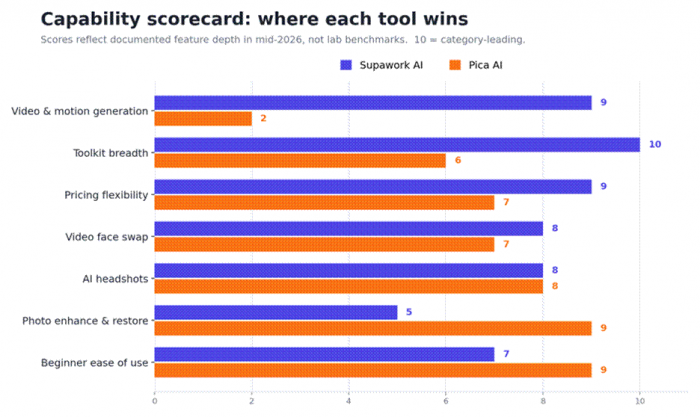
Figure 3. Documented capability scores across seven dimensions.
The pattern holds. Supawork takes video, breadth and pricing flexibility; Pica AI takes photo enhancement, restoration and ease of use; headshots land in a tie. The middle rows are close enough that interface comfort and brand preference can settle them.
Who should pick which
Match the tool to the task and the choice gets simple.
Pick Supawork AI when
• Video is part of the work: image-to-video, text-to-video or lip sync
• One subscription should replace several scattered tools
• Output needs to ship without watermarks across many formats
• Usage is bursty, so coins that never expire beat a flat monthly fee
Pick Pica AI when
• The job is photos: enhancing, restoring or cleanly upscaling
• A polished LinkedIn headshot is needed in minutes for a few dollars
• A minimal, one-click interface matters more than a deep toolbox
• A native iOS or Android app beats a web-only workflow
The deciding question: does the project move? If video is on the table, Supawork is the only one of the two that qualifies. If it begins and ends with still images, Pica AI does that narrow job more elegantly and for less.
Privacy and responsible use
Face swaps sit in a legally touchy corner, so a plain word on safety is worth more here than another feature list. Both tools process uploaded faces on their own servers, so the honest rule is to treat any face uploaded to any AI platform as data that has left the user's hands. Pica AI markets a privacy-first stance and removes some uploaded data after processing, while Supawork has drawn occasional concern over data handling and account deletion worth checking before sensitive photos go up. The legal ground, meanwhile, has shifted fast.
| Rule | Where | What it requires | Status |
|---|---|---|---|
| TAKE IT DOWN Act | U.S. | Remove non-consensual intimate deepfakes within 48 hours of notice | In effect, May 2025 |
| State AI-media laws | U.S. | 46 states regulate AI-generated media; first federal conviction logged | By April 2026 |
| EU AI Act, Article 50 | EU | Label generative output and deepfakes clearly | Full application Aug 2026 |
The practical guidance stays short: only swap faces of people who have clearly agreed, keep AI edits out of deceptive or politically sensitive contexts, and never use a swap or headshot to impersonate someone for money. That responsibility sits with the creator, not the tool, but it is worth stating plainly up front. None of this makes either tool dangerous in everyday use; it simply explains why the guardrails exist.
Final verdict
Put in the hours with both and the rivalry mostly dissolves. There is no single winner here, because each was built for a different job.
| The honest pick | Bottom line |
|---|---|
| Supawork AI | The better buy for anyone who touches video or wants one account for a dozen jobs, backed by its multi-model engine and flexible coin pricing |
| Pica AI | The smarter pick for cleaning photos, swapping faces and producing a sharp headshot without learning a sprawling platform |
On raw range, Supawork AI wins, since it does almost everything Pica AI does and a great deal more. But the more useful truth is quieter: the best tool is the one that matches the work on the desk right now. Since both free tiers make the first test cost nothing, the smart move is to try whichever one fits the next job and let the results settle it.
Post Comment
Be the first to post comment!





