I kept seeing Pippit AI pop up in my feed. Every other ad promised the same thing: paste a product link, get a viral-ready video in under a minute. As someone who actually has to make marketing content (and has been burned by AI tools before), I wanted to know if Pippit lives up to the hype or if it is just another shiny launch riding the CapCut name.
So I signed up for the free trial, tested it across two weeks on real product pages, and then read through every review I could find on Trustpilot, Product Hunt, and across the web. The picture that emerged is more complicated than any single review suggests. There is genuinely good stuff here. There is also a serious customer-support problem that you should know about before you hand over any money. Let me walk you through both.
The quick verdict, if you are short on time Pippit AI does what it advertises. Link to video works, AI avatars are decent, and the free plan is genuinely usable. But the tool sits behind a customer-support system that has frustrated paid users badly enough to drag its Trustpilot score down to 1.8 out of 5. Try it free first. Do not pay annually until you have tested the support response. |
What Exactly Is Pippit AI?
Pippit AI is a content creation platform built by CapCut, which itself is owned by ByteDance (the company behind TikTok). It runs in your browser. You do not download anything. The whole pitch is that it acts like a small marketing team in a box: drop in a product URL and it spits out short videos, product images, ad creatives, and even an AI avatar that can talk to camera in 28 plus languages.
It was originally called CapCut Commerce Pro. The team rebranded it to Pippit in 2025 and pushed it harder toward e-commerce sellers, dropshippers, and small marketing teams who need a constant stream of social-ready content.
The core idea is solid. Most small e-commerce brands cannot afford a videographer, a copywriter, and a designer. Pippit collapses those roles into a single dashboard.
My First Impression After Logging In
Signing up took about thirty seconds. Google sign-in worked fine for me, though I noticed some Trustpilot reviewers complaining that Google sign-in is blocked for them, which is odd.
The dashboard is clean. Not cluttered, not minimal to the point of being confusing. Five main tools sit on the homepage:
•Link to Video, where you paste any product URL and it builds a clip
•AI Product Images, with background removal and lifestyle backdrops
•AI Avatars and Voices, with around 230 avatars and multi-language voice
•Auto-Publishing and Analytics, which schedules posts and tracks performance
•Pre-Cleared Commercial Assets, which means licensed music and stock images you can use in ads without legal worry
I started with Link to Video because that is the headline feature. I grabbed a random Shopify listing for noise-cancelling headphones, pasted the URL, and clicked generate. About 90 seconds later I had three video drafts in vertical 9:16 format, complete with captions, AI voiceover, music, and product cutaways. They were not Apple-keynote level, but they were good enough to post on TikTok without anyone raising an eyebrow.
Going Deeper Into Each Feature

Link to Video
This is the feature that does most of the heavy lifting. You paste a product URL (Shopify, Amazon, TikTok Shop, even a regular site) and Pippit pulls in the images, specs, and price, then writes a short script around them. You pick a style, set a duration, and it generates three to four versions.
What surprised me: the captions are timed well and the music selection actually fits the product. The AI voice is a step below ElevenLabs but well above the robotic options from two years ago.
What annoyed me: you cannot edit the pronunciation of brand names. My product name kept getting mangled and there was no way to force the correct pronunciation. This is the same complaint a Vidmetoo reviewer flagged. They wrote: “there’s no option to customize the pronunciation of specific words or adjust the voice characteristics.” That tracks with my experience.
AI Avatars
Pippit gives you around 230 pre-made avatars. You can also upload a selfie video and create your own digital twin, though that uses a chunk of credits.
The quality is uneven. Maybe 60 percent of the pre-made avatars look natural. The other 40 percent have that distinct AI uncanny-valley thing going on, especially around the mouth on close-ups. For a quick TikTok hook talking head, it works. For anything where the viewer pauses, you can tell.
Image Studio
Honestly the strongest part of the platform for me. Background removal is clean. The AI lifestyle backgrounds (kitchen, bathroom, outdoor scenes) are not photographic but they pass the scroll test. There is a virtual try-on for apparel that puts your clothing on AI models in different poses. I do not sell clothes, so I tested it with a friend’s product and the results were better than I expected.
Auto-Publishing and Analytics
You can connect TikTok, Instagram, and Facebook and schedule posts directly. The analytics dashboard shows views, engagement, and conversions side by side. This is genuinely useful and the kind of thing I used to need three separate tools for. On the free plan you only get one social account, on the Starter plan you get three.
Pricing: What It Actually Costs in 2026
Pippit runs on a credit system, which is annoying but standard for AI tools. Different features burn different amounts of credits. Video generation typically takes around one credit per minute of output, while AI avatars and image generation cost more.
| Plan | Price | Credits | Best For |
|---|---|---|---|
| Free Plan | $0 forever | 150 credits per week (around 2 min of video or 75 images) | Testing the tool, very light use |
| Free Trial | $0 for 7 days | 400 credits (400 sec video or 200 images), full feature access | Trying every premium feature before paying |
| Starter (annual) | $24.17 per month, billed $289.98 yearly | 21,600 credits per year (around 360 min video or 10,800 images) | Solo creators and small e-commerce stores |
| Starter (monthly) | $36.25 per month | 1,800 credits per month | Short projects or month-to-month users who want flexibility |
| Credit top-up | From $0.70 per 100 credits | Bulk packs at 3,000 credits for $21 | When you blow through your monthly allowance |
Source: pippit.ai pricing page and verified credit-pack listings (2026).
Quick math: the annual plan saves you about 20 percent over monthly. But, and this is important, do not commit to a year before you have run the tool through your actual workflow. A lot of the negative reviews come from people who paid annually and then ran into problems they could not resolve.
What Real Users Are Actually Saying
Here is where things get interesting. The blog reviews you find when you Google “Pippit AI review” are almost universally positive, sitting between 4.2 and 4.5 out of 5. But the customer review platforms (Trustpilot and Product Hunt) tell a very different story. I think it is important you see both sides before you decide.
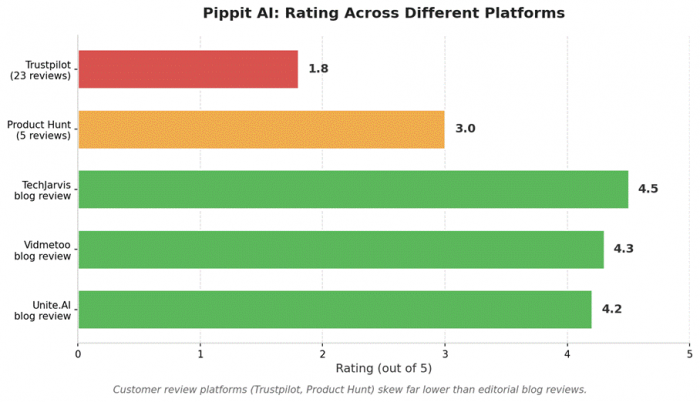
The Trustpilot Picture (1.8 out of 5)
Pippit’s Trustpilot page sits at 1.8 stars from 23 reviews. Ninety-two percent of those are one-star. That is a significant red flag and worth understanding before you swipe a card.
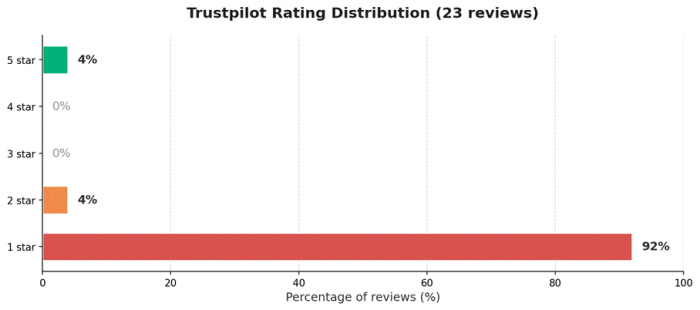
Trustpilot star distribution for pippit.ai, May 2026.
Reading through every Trustpilot review, the same handful of complaints show up over and over. It is rarely the product itself that people are angry about. It is what happens after they pay. Here are five actual reviews, pulled verbatim:
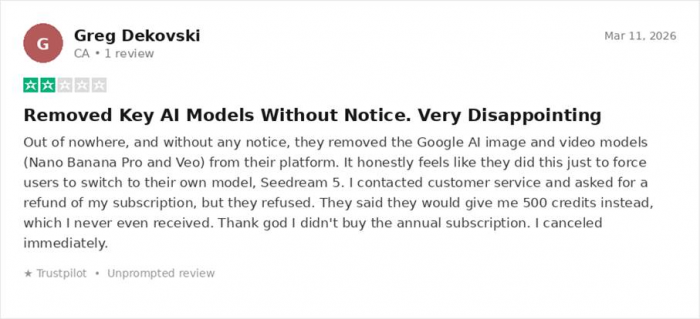
Greg D., March 2026: a real frustration about Pippit removing Google’s Nano Banana Pro and Veo models with no notice.
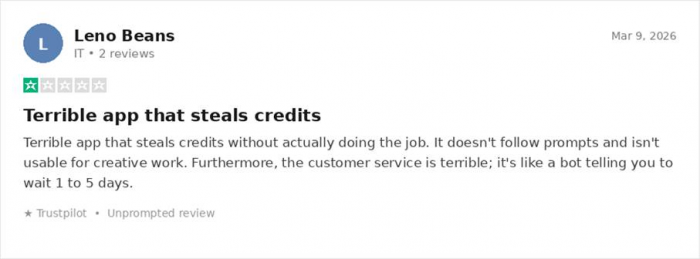
Leno B., March 2026: credits burned with no usable output and bot-like support responses.
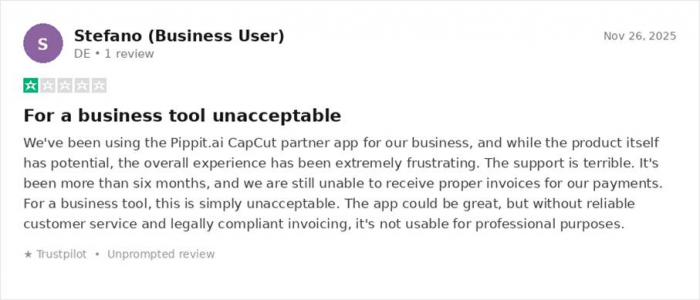
A business user, November 2025: six months without proper invoices, a dealbreaker for any company.
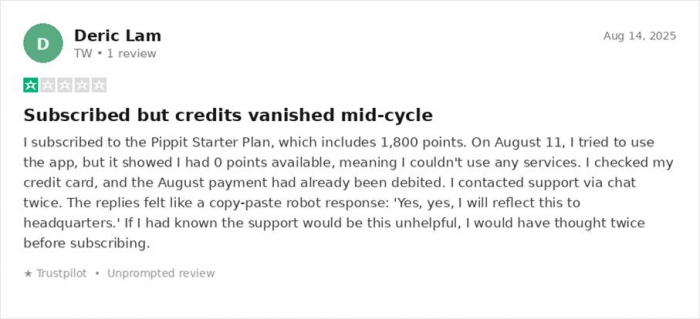
Deric L., August 2025: paid the subscription, credits disappeared mid-billing-cycle, support kept stalling.
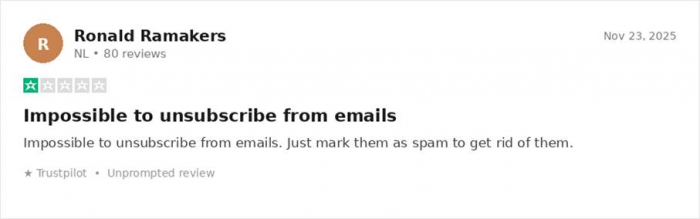
Ronald R., November 2025: 80-review veteran, says you cannot unsubscribe from marketing emails.
When I tallied the most common themes across all the negative reviews on Trustpilot and Product Hunt, this is what came out:
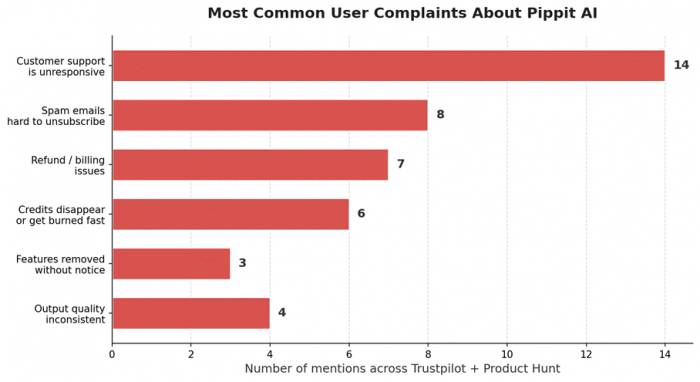
Most repeated themes in negative reviews. Customer support is the single biggest pain point by a wide margin.
The Product Hunt Picture (3.0 out of 5)
Product Hunt is a more even mix. The total review count is small (only 5 at the time of writing) but the spread is useful because you see both the genuine fans and the angry ex-customers in the same place. Here are the three most informative ones:
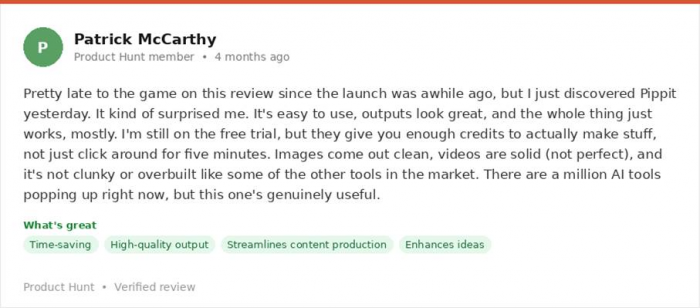
Patrick M., 4 months ago: an honest positive take from a free-trial user who actually liked the outputs.
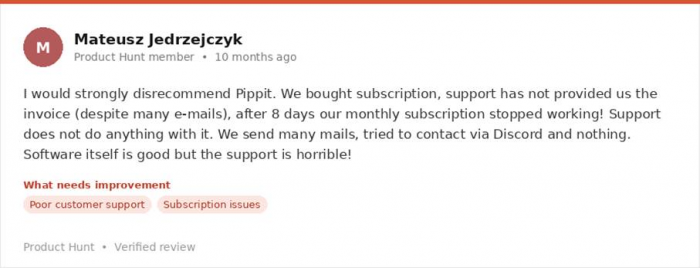
Mateusz J., 10 months ago: software is good, support is horrible (a recurring pattern).
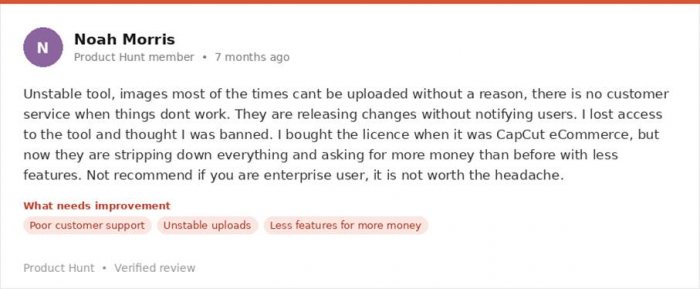
Noah M., 7 months ago: an enterprise user warning others off after Pippit stripped down the toolset.
What I Genuinely Liked
The Good
|
Where Pippit AI Falls Short
The Bad
|
Who Should Actually Use Pippit AI?
Based on my testing and what the reviews collectively say, here is the honest split.
| Good fit if you are... | Wrong fit if you are... |
|---|---|
| A Shopify or TikTok Shop seller who needs lots of product videos every week | Running a business that absolutely needs reliable invoicing for accounting |
| A solo creator or affiliate marketer making short-form social content | An enterprise team that needs SSO, SOC 2, or proper procurement processes |
| A small marketing team that wants to skip hiring a video editor for basic clips | A professional video editor who wants pixel-level control over every frame |
| Someone who just wants to test the free plan before deciding anything | Someone uncomfortable handing over a card to a company with shaky support |
My Final Verdict
Pippit AI is a strange product to review because the tool itself is mostly good. The link-to-video feature works. The avatars are passable. The image studio is genuinely useful. If you are a TikTok seller pumping out daily product clips, this can save you real hours every week.
But the gap between the product and the company around the product is huge. The Trustpilot reviews are not just one bad customer in a bad mood. They are a consistent pattern: support that does not respond, refunds that do not arrive, features that get pulled mid-subscription, and a marketing email machine that does not let you leave. Even Product Hunt reviewers who like the tool flag the support as a serious weakness.

So my recommendation is this. Use the free tier or the 7-day trial first. Push the tool through everything you would actually do in a normal week. If you like it, take the monthly plan, not the annual one, until you have personally tested how support responds when something goes wrong. That single piece of advice would have saved a lot of the people who left those one-star reviews from their experience.
Bottom line A 7 out of 10 product wrapped in a 3 out of 10 customer experience. Try it free, never commit annually until you have stress-tested both the tool and the support. |
Post Comment
Be the first to post comment!