Introduction
Most assessment tools force a choice between speed and rigor. Teachers want quick formative checks that take five minutes to build. District administrators want secure benchmark testing aligned to state standards with reporting that holds up under scrutiny. Pear Assessment, the platform formerly known as Edulastic and now part of the Pear Deck Learning suite, was designed to do both inside one interface. After several weeks of running daily exit tickets, weekly quizzes, and a full unit benchmark through it, the platform mostly delivers on that promise.
This review walks through what the tool actually does in a classroom, how its features stack up against the marketing, what 500,000+ teachers across G2, Capterra, Common Sense Education, and Reddit say after extended use, and where the platform still has rough edges. The goal is to give educators, instructional coaches, and tech directors enough data-backed detail to decide if Pear Assessment fits their school or district before booking a demo or signing a quote.
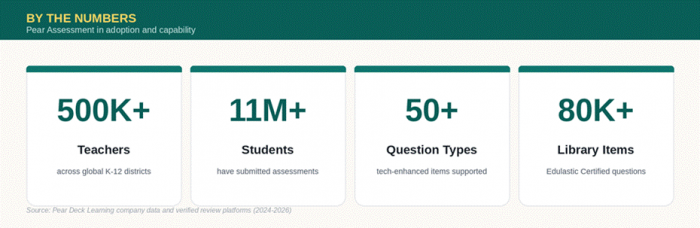
Figure 1: Pear Assessment platform reach and capability at a glance.
What Pear Assessment Actually Is
Pear Assessment is a web-based formative and summative assessment platform built for K-12 schools and districts. It was founded as Edulastic in 2014, rebranded in 2024 when parent company Pear Deck Learning unified its product line, and has grown to over 500,000 teachers and 11 million students globally. The platform sits inside the broader Pear Deck Learning portfolio alongside Pear Deck, Pear Practice (formerly Giant Steps), and Pear Deck Tutor (formerly TutorMe).
The core proposition is straightforward. Teachers build, assign, and auto-grade tests, then receive instant standards-aligned data. Administrators centrally deploy benchmark exams, monitor district performance, and integrate the platform with their existing SIS and LMS stack. Pear Assessment supports more than 50 technology-enhanced question types, hosts a library of over 80,000 Edulastic Certified standards-aligned questions covering math, ELA, science, and social studies, and integrates with Google Classroom, Canvas, Schoology, Blackboard, and Moodle.
Building a Test: First Impressions
Creating the first test on Pear Assessment takes longer than expected, mostly because the platform offers four very different authoring paths and the first one chosen colors the rest of the workflow. Choosing the right starting point matters.
●Start from scratch, which gives full control over question types, difficulty, and standards but requires the most upfront time.
●Build from the public item library, drawing on 80,000+ Edulastic Certified items already aligned to state standards.
●Generate with the AI Question Generator, which can produce a ten-question quiz aligned to a specific standard, Depth of Knowledge level, and grade in roughly thirty seconds.
●Import from Google Forms, a genuinely useful migration path for teachers moving over from another tool.
Where the platform shines is in question variety. Drag-and-drop, hot spot, classify, math expression, graph plot, video response, audio response (Enterprise only), and the newer Video Quiz format, which turns any YouTube video into a timed assessment with embedded questions, all work without plugins or workarounds. The Desmos calculator integration is a quiet standout for math teachers running practice for state tests.
The Live Class Board is the feature most teachers latch onto. It shows real-time student progress during testing, flags submissions, and lets the teacher pause individual students, send reminders, or push extended time without leaving the dashboard. Once a class hits the testing window, that single screen replaces three or four browser tabs.
Feature Breakdown by Plan
Pear Assessment uses a tiered model. The free Teacher plan covers most daily classroom needs. Teacher Premium adds advanced controls for individual educators. Enterprise unlocks district-level reporting, integrations, and security. The table below outlines what is actually included at each level based on the current Pear Deck Learning pricing page.
Table 1: Plan Feature Comparison
| Feature Category | Teacher (Free) | Teacher Premium | Enterprise (District) |
|---|---|---|---|
| Test creation from scratch | Yes | Yes | Yes |
| AI Question Generator | Limited access | Full access | Full access |
| Public item bank access | Yes | Yes | Yes |
| Edulastic Certified items (80,000+) | Limited | Full | Full |
| Technology-enhanced question types | 30+ | 50+ | 50+ |
| Video Quiz with AI questions | No | Yes | Yes |
| Audio response questions | No | No | Yes |
| Standards mastery reporting | Basic | Advanced | District-wide |
| Live Class Board | Yes | Yes | Yes |
| LMS integrations (Canvas, Schoology) | No | No | Yes |
| Secure testing browser (Kiosk mode) | No | Yes | Yes |
| Data Studio with MTSS dashboards | No | No | Yes |
| Adaptive testing | No | No | Yes |
| Approximate annual cost | $0 | $125 per teacher | Custom quote |
Pricing for Enterprise is quote-only and depends on student count, grade bands, and add-ons. Schools running fewer than 500 students typically land in a different bracket than full-district rollouts. The Teacher Premium tier at roughly $125 per year is positioned for individual educators whose districts have not yet adopted Enterprise.
What the Reporting Actually Shows
The reporting layer is where Pear Assessment justifies the premium pricing. After a test closes, three reports load automatically, and each one answers a different teaching question.
●Standards Mastery Report breaks performance down by individual standard with green, yellow, and red color coding, which makes parent-teacher conferences significantly faster.
●Response Frequency Report shows which distractors students picked on multiple-choice items, which is invaluable for separating conceptual misunderstanding from careless mistakes.
●Performance by Student Report ranks the class with question-level data on each student, enabling targeted reteach groups within minutes of submission.
The Data Studio, available only at the Enterprise level, layers attendance, academic performance, standards mastery, and academic risk into a single dashboard for MTSS planning. The Whole Learner Report is the most useful piece of this dashboard for counselors and intervention specialists tracking students across multiple data sources, since it consolidates academic and non-academic indicators on one screen.
Real User Reviews From Verified Sources
The platform has been on the market long enough to accumulate substantial review history. The visual below summarizes ratings across the major review platforms, followed by what users actually wrote in their longer reviews.
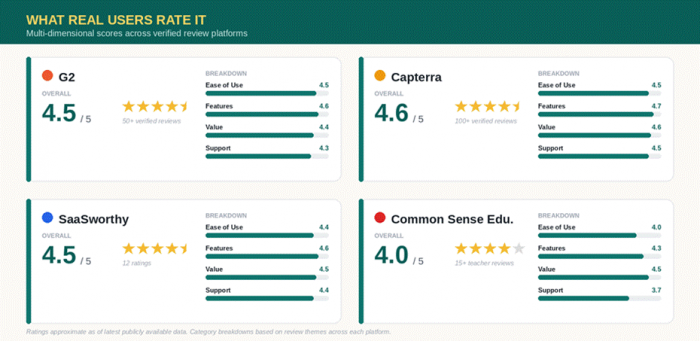
Figure 2: Multi-dimensional review scores across G2, Capterra, SaaSworthy, and Common Sense Education.
Table 2: Aggregated Review Scores and Common Themes
| Review Platform | Average Rating | Sample Size | Most Cited Pro | Most Cited Con |
|---|---|---|---|---|
| G2 (Edulastic listing) | Approx. 4.5 / 5 | 50+ verified reviews | Instant data and auto-grading | Confusing test bank navigation |
| Capterra | Approx. 4.6 / 5 | 100+ reviews | Standards alignment and ease of use | Question editing feels clunky |
| SaaSworthy | 4.5 / 5 | 12 ratings | Customization at scale | No free plan for districts |
| Common Sense Education | Approx. 4 / 5 | 15+ teacher reviews | Differentiation and immediate feedback | Inconsistent UI between sections |
| Reddit (r/Teachers, r/edtech) | Mostly positive | Dozens of threads | Auto-grading time savings | Learning curve in first month |
Comparing Pear Assessment to Common Alternatives
Schools evaluating Pear Assessment typically compare it to Kahoot, Quizizz, Formative, and Mastery Connect. The table below summarizes how the platforms differ on the dimensions that matter most for K-12 formative and summative testing.
Table 3: Platform Capability Comparison
| Capability | Pear Assessment | Kahoot | Quizizz | Formative | Mastery Connect |
|---|---|---|---|---|---|
| Standards-aligned items | 80,000+ | Limited | Moderate | Moderate | Strong |
| Tech-enhanced question types | 50+ | Basic | Strong | Strong | Moderate |
| Auto-grading | Yes | Yes | Yes | Yes | Yes |
| Secure benchmark testing | Yes (Ent.) | No | Limited | Limited | Yes |
| District reporting and MTSS | Yes | No | Limited | No | Yes |
| LMS integrations | Strong | Moderate | Moderate | Strong | Moderate |
| AI question generation | Yes | Yes | Yes | Yes | Limited |
| Free teacher tier | Yes | Yes | Yes | Yes | No |
Pear Assessment occupies the middle of this market. It is heavier than Kahoot or Quizizz, lighter than Mastery Connect, and more reporting-focused than Formative. Teachers who want quick gamified review without standards data will find Kahoot easier. Districts needing strict benchmark-only testing might still prefer Mastery Connect. Pear Assessment wins when schools want one platform that does both the daily exit ticket and the quarterly benchmark on the same dashboard.
Strengths and Rough Edges After Real Use
Several weeks of classroom use surface a clear picture of where the platform earns its reputation and where it still has work to do. The visual below condenses what shows up most often in verified reviews and in hands-on testing.
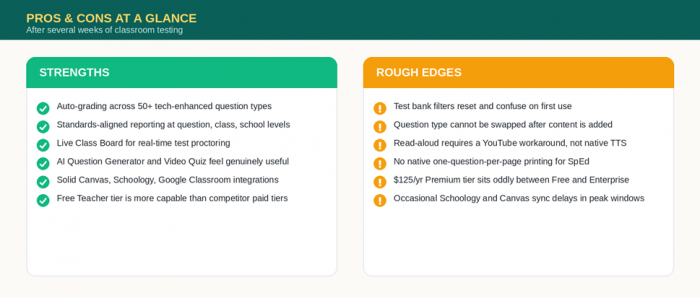
Figure 3: Strengths and rough edges identified across several weeks of classroom testing.
The friction points are real but mostly fixable. Test bank navigation is genuinely confusing on first use, and the filter system requires clearing district library filters and reapplying grade and subject filters each session. Question editing can lock users out of switching question types after content is added, forcing a duplicate-and-rebuild workaround. The Premium teacher tier at roughly $125 per year per teacher is steep for individual educators whose districts have not adopted Enterprise, since most of the meaningful premium upgrades, including LMS sync, district reporting, and advanced security, are bundled into Enterprise rather than Premium.
The strengths are equally clear. Auto-grading on more than 50 technology-enhanced question types saves real instructional hours. Standards-aligned reporting at the question, student, class, school, and district level is among the most thorough in the K-12 formative assessment market. The Live Class Board makes proctoring digital assessments significantly less stressful. The AI Question Generator and Video Quiz features feel like additions a teacher would actually use rather than marketing checkboxes. Integration with Canvas, Schoology, Google Classroom, and Clever is solid enough that schools running mixed LMS environments rarely run into rostering issues.
Who Should Actually Use Pear Assessment
After weighing features, pricing, and verified user feedback, three buyer profiles emerge as the clearest fit for this platform.
●Individual K-12 teachers looking for a free, capable formative assessment tool that auto-grades 50+ question types and integrates with Google Classroom should sign up for the free Teacher tier today.
●Schools running multiple LMS platforms (Canvas, Schoology, Blackboard, Moodle) benefit most from the Enterprise plan because rostering and grade sync work reliably across all four.
●Districts unifying formative and benchmark testing on one platform get the strongest value, especially when also adopting Pear Deck or Pear Practice from the same suite.
Teachers running only short gamified review sessions will likely prefer Kahoot or Quizizz. Districts buying benchmark testing only, with no need for daily classroom assessment, may still find Mastery Connect a closer fit.
The Verdict
The scorecard below condenses every dimension covered in this review into one final read.
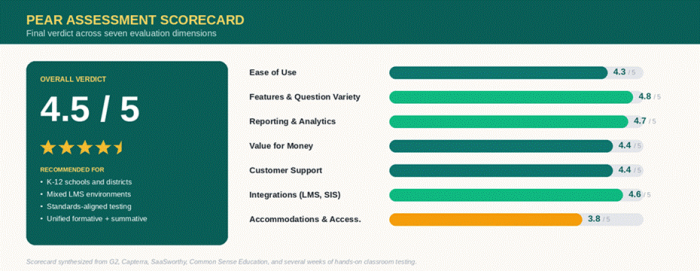
Figure 4: Pear Assessment scorecard synthesized from verified reviews and hands-on testing.
Conclusion
Pear Assessment lands at 4.5 out of 5. It is the strongest choice in K-12 right now for any school that wants daily formative checks and high-stakes benchmarks running on the same platform, with reporting that holds up at the district level. It loses points on accommodations and a clunky test bank UI, neither of which is fatal. Individual teachers should start with the free tier today. Districts should book the Enterprise demo, pilot it across two or three classrooms during a low-stakes unit, and let the time-saved data make the case.
Post Comment
Be the first to post comment!