Instagram Reels were played roughly 200 billion times yesterday. If those plays were spread evenly across the planet, every human on Earth (newborns included) would have watched about 25. Babies are clearly slacking, which means the rest of us are picking up the deficit. That is the scale Reels operate at in 2026, and it explains why a creator armed with three afternoons and Premiere Pro now competes against accounts shipping five Reels a week with AI tooling. This piece evaluates the six AI platforms doing the most useful work in that competition: their underlying mechanics, real-world performance, pricing trade-offs, and the constraints that only surface after the third subscription cycle.
The Reels economy has outgrown manual editing
Three numbers explain why AI tooling stopped being optional. Reels now account for 50% of all time spent on Instagram (Meta, Q1 2026), up from roughly 35% two years prior. Average reach for a Reel is 30.81%, more than double the 13 to 15% range carousels and image posts deliver, and 55% of those views come from accounts that do not follow the creator. Algorithmic discovery rewards volume and originality; static feed posts no longer pull weight.
The cost of that opportunity is operational. Top creator accounts (50K+ followers) ship a Reel every two days. Engagement on Reels declined 24% year over year in 2025 because the platform's Originality Score penalises recycled clips and template fatigue. The format that rewards consistency now also punishes laziness, and the 1.7-second hook window that decides whether a viewer stays through frame three has not gotten any more forgiving. AI tools fix the throughput problem; whether they fix the quality problem depends entirely on which one you pick.
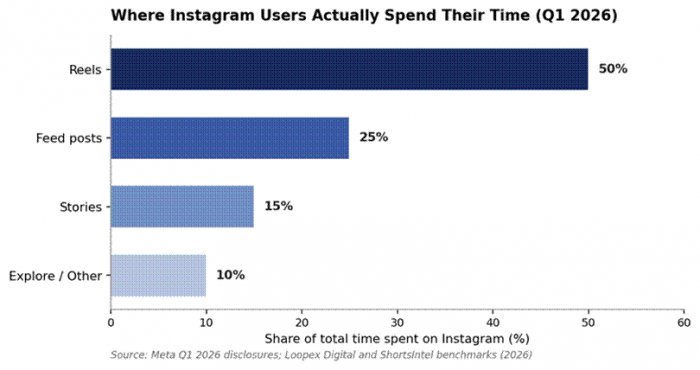
Figure 1. Reels now command half of all session time on Instagram, displacing Feed posts as the platform's dominant content surface.
How the six tools were evaluated
Each tool was assessed across five dimensions: underlying model architecture and workflow design, measurable performance against alternatives, the failure modes that emerge under real production load, the role profiles each fits best, and total cost at common usage levels. Pricing reflects publicly listed rates as of May 2026 from official vendor pages. Ratings aggregate G2 and Capterra public review counts.
CapCut: the default editor for filmed Reels

Architecture and workflow
CapCut runs on a hybrid model: a deterministic timeline editor with discrete AI modules layered on top. Key modules in 2026 include conversational script-to-video generation (a prompt-driven workflow that drafts a complete Reel from a single instruction), automatic beat-sync, AI background removal trained on segmentation models in the SAM family, smart auto-captions in 30+ languages, AI avatars across 54 visual styles, and natural voice generation. Owned by ByteDance, CapCut sits closest to TikTok's algorithmic ranking signals, which translates to template recommendations that mirror what is currently distributing well. Workflow flexibility is its real strength: a creator can stay entirely on the timeline, generate a Reel from a prompt, or mix both approaches inside the same project.
Performance benchmarks
CapCut's free tier remains the most capable free video editor on the market in 2026. There are no locked timeline tracks, no disabled tools, and exports default to 1080p with no watermark on most output (templates and effects marked Pro carry watermarks). Render speed for a 60-second 1080p clip on the desktop client averages under 90 seconds on consumer hardware, faster than DaVinci Resolve at the same setting. The auto-caption engine clears 95% transcription accuracy for clean English audio, comparable to Descript.
Where it breaks
The 2025 pricing restructure split paid plans into Standard and Pro and pushed top-tier monthly billing to $19.99 in some regions, prompting widespread Trustpilot complaints about regional inconsistency. Customer support is the weakest part of the product (one of the most-cited cons in expert reviews). AI generation features lag InVideo and Runway on raw video quality; CapCut is best understood as an AI-augmented editor rather than a generative platform.
Real workflows and ideal user
Solo creators use the free tier as a complete production suite. Small marketing teams use Pro for the brand kit, 4K export, and 100GB cloud storage. Agencies juggling client accounts use the Team plan for shared brand assets, though true enterprise workflows often outgrow it. Use it if you produce 3 to 10 Reels per week from filmed footage and value timeline control over generation. Avoid it if your workflow is text-to-video without source footage, or you require enterprise SOC 2 compliance.
Pricing tiers
| Plan | Price (USD) | Key inclusions and limits |
|---|---|---|
| Free | $0 | Full timeline, multi-track, keyframes, chroma key, 1080p export, basic AI captions; Pro templates carry watermarks |
| Standard | $9.99/mo | Mobile-focused tier, expanded effects, removes most template watermarks |
| Pro (annual) | $4.99–$7.50/mo | 4K at 60fps, motion tracking, full AI suite, 100GB cloud, commercial rights; $89.99/yr typical |
| Pro (monthly) | $9.99–$19.99/mo | Same features; pricing varies meaningfully by region |
| Team | Custom | Shared brand kits, collaborative editing, volume discounts beyond 25 seats |
Feature comparison vs adjacent editors
| Capability | CapCut | InShot | Premiere Rush |
|---|---|---|---|
| Free 1080p, watermark-free export | Yes | Watermarked | No (Adobe ID required, limits) |
| AI auto-captions | 30+ languages | Limited | Yes, English-strong |
| AI avatars and voiceover | 54 styles, included | No | No |
| Conversational script-to-video | Yes (2026) | No | No |
| Cloud storage on entry paid tier | 100GB (Pro) | None | Tied to Creative Cloud |
Pros and cons
| Pros | Cons |
|---|---|
| Free tier rivals paid competitors on raw editing capability | Customer support quality is a consistent complaint |
| Strong template and trend alignment with TikTok and Reels | Pricing varies sharply by region and billing path |
| Conversational AI workflow added in 2026 reduces editing time | Generative video quality trails InVideo and Runway |
| Mobile and desktop parity is rare and valuable | Some Trustpilot complaints around silent renewals |
Ratings and reviews
| Source | Rating | Reviews | Summary insight |
|---|---|---|---|
| G2 | 4.5/5 | 300+ | Praised for ease of use and feature breadth; support cited as weak link |
| Capterra | 4.7/5 | 200+ | Strong scores on value-for-money and learnability |
| Trustpilot | Mixed | 8,000+ | Polarised: editing quality liked, billing and renewal practices criticised |
Opus Clip: the long-form repurposing engine
Architecture and workflow
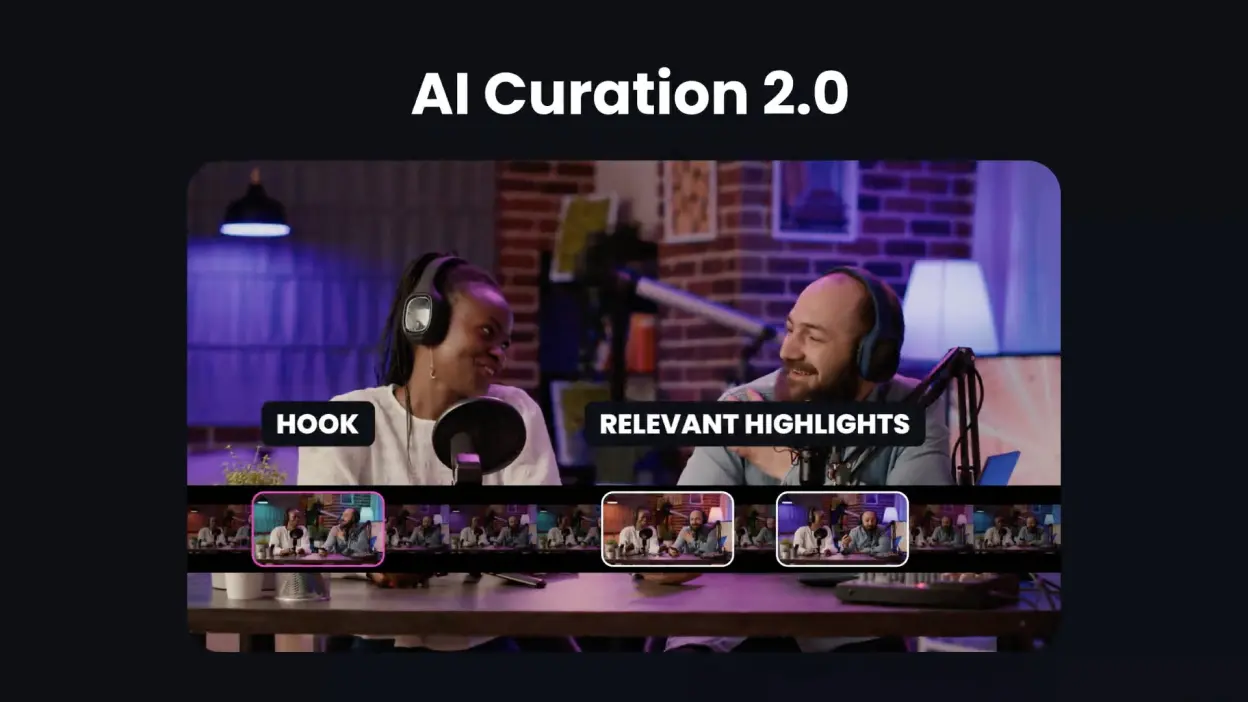
Opus Clip is purpose-built for one job: turning long-form video into short clips. Its proprietary ClipAnything model combines transcript analysis, visual sentiment cues, and audio-energy detection (the company describes it as multi-modal hook identification powered partly by GPT-4-class language models). The user uploads a video or pastes a YouTube, Zoom, or Loom URL, configures language and clip length, and receives 10 to 25 ranked clips with auto-captions, AI-driven 9:16 reframing, and a Virality Score from 0 to 99 based on hook strength, emotional flow, perceived value, and trend alignment.
Performance benchmarks
The platform serves over 16 million creators and has generated 172M+ clips. Independent testing reports an 85% time saving versus manual clipping. Caption accuracy claims exceed 97% across 25+ supported languages, which holds up in practice for clean spoken-word audio. Of the clips it surfaces, 60 to 80% are usable with light edits; 20 to 40% miss punchlines or cut mid-thought. For talking-head and podcast content, 80%+ usability is normal.
Where it breaks
Opus Clip charges per minute of input, not output. A 45-minute podcast costs 45 credits regardless of how many clips you keep. Its credit and subscription model has drawn the bulk of customer complaints (Trustpilot scores range from 2.4 to 4.0 across snapshots; one 302-review snapshot showed 22% one-star reviews, mostly about cancellation friction and credits expiring with subscriptions). Visual-heavy content without dialogue (gaming streams, sports without commentary, music videos) produces lower hit rates. There is no audio cleanup module.
Real workflows and ideal user
Podcasters at platforms like iHeartMedia repurpose hour-long episodes into a fortnight of vertical clips. B2B marketing teams turn webinars and conference recordings into Reels that cross-post to LinkedIn. YouTube creators (Logan Paul, Mark Rober have used it publicly) batch-process Shorts. Enterprise customers include NVIDIA, Visa, and GitHub. Use it if you already publish long-form content and want to extract Reels from it. Avoid it if you create content from scratch on your phone, or you stream more than three times per week (the credit math breaks down).
Pricing tiers
| Plan | Price (USD) | Key inclusions and limits |
|---|---|---|
| Free | $0 | 60 credits/month with watermarks; no AI hook customisation; output download but no editor access |
| Starter | $15/mo | 150 credits, no watermark, basic editor, AI hook, branded captions |
| Pro | $29/mo | 300 credits, 100GB storage, B-Roll, scheduler, full editor, ClipAnything multi-genre |
| Business | $99/mo+ | Higher credits, team seats, brand kit, priority support |
Feature comparison vs other repurposing tools
| Capability | Opus Clip | Vizard | Kapwing |
|---|---|---|---|
| Multi-modal hook detection (visual + audio) | Yes (ClipAnything) | Transcript-only | Manual |
| Auto reframing for 9:16 | AI subject tracking | Yes | Manual frame |
| Virality scoring | 0–99 with 4 sub-scores | Basic | None |
| Native scheduler | Yes (Pro) | Limited | External |
| Pricing model | Per-minute input | Per-minute input | Per-video |
Pros and cons
| Pros | Cons |
|---|---|
| 85% time saving versus manual clipping for talking-head content | Charges per minute of source, not per usable clip |
| Caption accuracy clears 97% on clean English audio | Cancellation flow and renewal billing draw heavy criticism |
| Virality Score is a useful triage signal at high volume | Visual-heavy content with no dialogue produces weak output |
| Strong language coverage for global teams (25+ languages) | Storage and credits expire with the subscription, not with usage |
Ratings and reviews
| Source | Rating | Reviews | Summary insight |
|---|---|---|---|
| G2 | 4.6/5 | 200+ | Time-saving and ease-of-use are the top praise points across reviews |
| Trustpilot | 2.4–4.0/5 | 300+ | Bimodal distribution: power users satisfied; casual users cite billing friction |
| Product Hunt | 4.5/5 | Several launches | Consistently strong for new feature releases |
InVideo AI: cheapest legitimate path to Sora 2 and VEO 3.1

Architecture and workflow
InVideo AI's 2026 differentiator is model bundling. It integrates both OpenAI's Sora 2 and Google's VEO 3.1 into a single subscription, a combination that costs roughly $450 per month if accessed through their respective standalone products (ChatGPT Pro plus VEO 3.1 Ultra). Workflow is prompt-first: describe the video, the agent writes a script, selects B-roll from iStock's 16M+ clip library or generates custom footage with the bundled models, records voiceover from a library of 1,500+ voices in 75+ languages, and assembles the timeline. Voice cloning is included on paid tiers (2 clones on Plus, 5 on Max).
Performance benchmarks
The platform serves 50M+ users across 190+ countries. Generation runs 3 to 5 minutes for short-form content. Stock footage selection has improved meaningfully since early 2025; contextually relevant B-roll is now the default rather than the exception. Voice clones from a 30-second sample pass casual listening tests as non-synthetic. Bundled access to Sora 2 and VEO 3.1 alone is the most compelling pricing argument in the AI-Reels category in 2026.
Where it breaks
The credit system is the consistent pain point in user reviews. The Max plan advertises minutes that real generation consumes faster than headline numbers suggest; bad outputs are not refunded. AI scripts skew formulaic and roughly one in four edit commands needs a retry. The platform pronounces unusual proper nouns and social handles letter-by-letter unless the script is manually corrected pre-render. Output can also feel stock-video-ish if the prompt is generic, which matters because Reels audiences in 2026 increasingly read for authentic phone-shot footage.
Real workflows and ideal user
Solo founders generate explainer Reels for product launches in under 10 minutes. DTC brands use the Money Shot feature (introduced March to April 2026) to turn 4 to 8 product photos into multi-shot commercial Reels that preserve actual packaging text. Agencies use the brand-kit and bulk-generate features for client multi-variant ad workflows. Use it if you produce 5+ Reels per week and need scripted, faceless, or generative video without a camera setup. Avoid it if you need frame-precise editing control, or you publish fewer than 5 Reels per month (subscription economics fail).
Pricing tiers
| Plan | Price (USD) | Key inclusions and limits |
|---|---|---|
| Free | $0 | Limited weekly AI minutes; watermarked output; no Sora 2 or VEO 3.1 |
| Plus | $25–28/mo | 80 AI minutes, 2 voice clones, 95 iStock credits, 1080p, no watermark |
| Max | $50–60/mo | 200 AI minutes, 5 voice clones, 320 iStock credits, 4K, team collaboration |
| Generative add-ons | Variable | Sora 2 / VEO 3.1 access throttled by credit consumption |
Feature comparison vs other generators
| Capability | InVideo AI | Pictory | Fliki |
|---|---|---|---|
| Bundled access to Sora 2 + VEO 3.1 | Yes (only platform) | No | No |
| Voice cloning included | Yes (2–5 clones) | Add-on | Yes (limited) |
| Stock footage library size | 16M+ (iStock) | 3M+ | Smaller, varies |
| Faceless avatar UGC | Yes | Limited | Yes |
| Frame-level edit control | Limited | Limited | Limited |
Pros and cons
| Pros | Cons |
|---|---|
| Sora 2 and VEO 3.1 access at a fraction of standalone pricing | Credit consumption outpaces headline minute counts |
| End-to-end generation in under 10 minutes for short Reels | Generated scripts skew formulaic and need editorial pass |
| Voice cloning quality strong from a 30-second sample | No refund on failed generations or bad outputs |
| Useful for high-volume A/B ad variant production | Output style favours stock B-roll over authentic UGC feel |
Ratings and reviews
| Source | Rating | Reviews | Summary insight |
|---|---|---|---|
| G2 | ~4.5/5 | 1,400+ | Strong on ease-of-use; consistent complaints on credit economics |
| Capterra | ~4.5/5 | 2,000+ | Praised for template breadth; scripted content quality polarised |
| Trustpilot | Mixed | Hundreds | Refund and billing transparency frequently flagged |
Descript: the transcript-first editor for dialogue Reels
Architecture and workflow
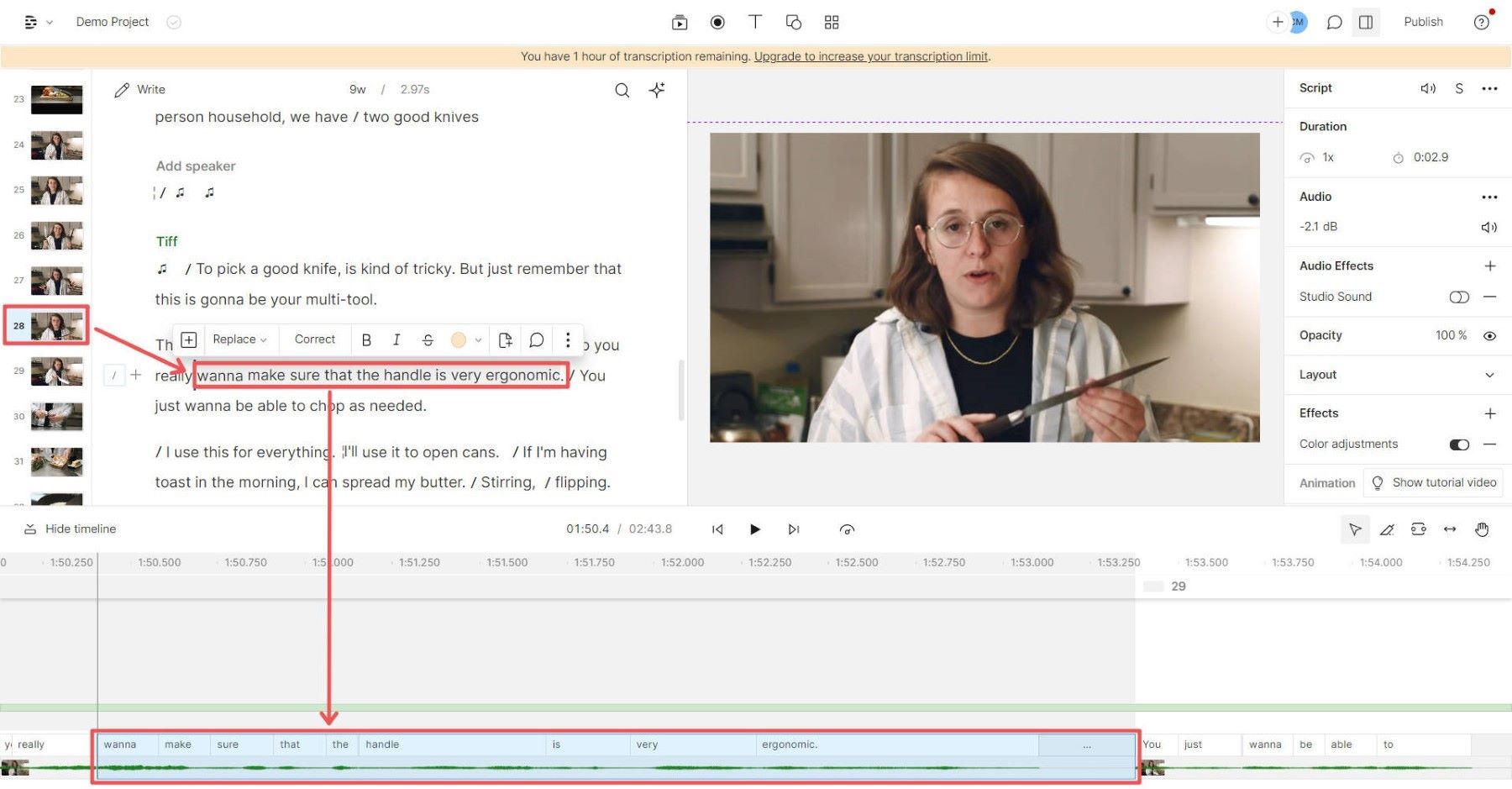
Descript inverts the traditional editing model. Every imported video or audio file is automatically transcribed; every word in the resulting transcript is time-locked to its corresponding video frame. Editing the transcript edits the media. Underlord, the embedded AI co-editor expanded through 2025, handles higher-order operations: filler word removal, awkward pause cleanup, multi-track speaker labelling, automatic chapter detection, and prompt-driven instructions like 'create a 60-second Reel from this episode'. Studio Sound applies neural audio enhancement (functionally similar to Adobe's Enhance Speech), and a voice-cloning module reproduces a creator's voice in 14 languages.
Performance benchmarks
Editors who previously spent four to six hours on a 30-minute talking-head episode routinely complete the same edit in 60 to 90 minutes with Descript, a 60 to 70% time saving cited consistently across 1,200+ G2 reviews. Transcription accuracy holds at 95%+ for clean English audio, dropping for jargon, acronyms, and proper nouns. The platform serves 6M+ creators and is SOC 2 Type II compliant, which matters more than it appears for B2B marketing teams clearing legal review.
Where it breaks
Descript is the wrong tool for visual-heavy editing. Color grading, complex transitions, multi-layer audio mixing, and VFX are weak; serious work in those domains still routes through DaVinci Resolve or Premiere Pro. The AI credit system gates Underlord usage; heavy users on the Creator plan ($24/month) hit ceilings before month-end. Stability on long projects has degraded for some users in late-2025 reviews, with occasional dropped audio segments in long recordings the most common complaint.
Real workflows and ideal user
Podcasters repurpose hour-long interviews into Reels by selecting transcript paragraphs and exporting vertical clips with auto-captions. Course creators clean and caption tutorial recordings in a fraction of the time Premiere demands. Marketing teams convert sales-call recordings into LinkedIn and Reels-ready clips. Use it if your content is dialogue-driven and your bottleneck is editing speed, not visual complexity. Avoid it if you need cinematic post-production, color science, or multi-cam productions.
Pricing tiers
| Plan | Price (USD) | Key inclusions and limits |
|---|---|---|
| Free | $0 | 1 hour transcription, watermark on export, basic editor; useful for evaluation only |
| Hobbyist | $16/mo | 10 hours/month transcription, no watermark, basic AI tools |
| Creator | $24/mo | 30 hours/month, full Underlord access, Studio Sound, voice cloning |
| Business | $50/mo | Unlimited hours, team collaboration, advanced exports, priority support |
| Enterprise | Custom | SSO, Brand Studio, security and compliance bundle |
Feature comparison vs editing peers
| Capability | Descript | CapCut Pro | Premiere Pro |
|---|---|---|---|
| Transcript-based editing | Yes (native) | Limited captions | Add-on workflow |
| Filler-word removal in one click | Yes | Manual | Add-on |
| Voice cloning in 14 languages | Yes | Basic TTS only | No native |
| Color grading and VFX depth | Weak | Moderate | Strong |
| Time saving on dialogue edits | 60–70% | 20–30% | Baseline |
Pros and cons
| Pros | Cons |
|---|---|
| Editing-by-transcript is the fastest workflow for spoken word | Visual editing capabilities trail mainstream NLEs |
| Underlord co-editor handles cleanup most editors do manually | AI credit metering frustrates heavy users mid-month |
| Replaces a transcription tool, caption tool, and basic editor | Stability on multi-hour projects has been inconsistent |
| SOC 2 Type II compliance opens enterprise use cases | Free plan watermark limits commercial use during evaluation |
Ratings and reviews
| Source | Rating | Reviews | Summary insight |
|---|---|---|---|
| G2 | 4.6/5 | 1,200+ | Highest praise for transcript editing; learning curve flagged |
| Capterra | 4.6/5 | 300+ | Strong on speed and value; visual editing depth criticised |
| Product Hunt | 4.7/5 | Multiple launches | Underlord and Studio Sound rated as standout features |
Canva Magic Studio: design-led Reels for brand-consistent teams
Architecture and workflow
Canva Magic Studio is a suite of generative modules layered on top of Canva's existing design platform: Magic Media for AI image and video (the video module is powered in 2026 by Google's Veo-3, capped at 8-second generations with synced audio), Magic Resize for instant 9:16 reformatting, Magic Write for AI copy, beat sync, AI-driven background removal, and Highlights (auto-extracts the most engaging moments from uploaded video). Critically, Canva is design-first: video is one capability inside a tool used primarily for static graphics, presentations, and posters. That ancestry shapes both its strengths and its limits.
Performance benchmarks
Canva serves 260M+ users across 190 countries. The Magic Resize feature alone cuts production time noticeably for creators publishing the same concept across Reels, Stories, and feed posts. The Veo-3-powered video module produces decent 8-second clips with synchronised audio, suitable for B-roll insertion or stand-alone short Reels. Beat sync delivers competent music-to-clip alignment, comparable to CapCut's auto-rhythm feature. According to Canva's 2026 AI in Marketing report, 85% of marketers using its AI suite save at least 4 hours per week.
Where it breaks
Magic Credits run out fast. Pro users (allocated approximately 500 credits per month) frequently report exhausting their AI allowance within the first 1 to 2 weeks of active use, with no à la carte top-up available. The built-in voiceover quality is noticeably synthetic compared to ElevenLabs-tier models. There is no automated stock footage sourcing; clips must be manually placed. Generative video output is basic relative to Runway or InVideo's bundled Veo and Sora pipelines, suitable for safe brand content rather than scroll-stopping creative.
Real workflows and ideal user
Marketing teams already standardised on Canva for design produce branded Reels without leaving the platform. Small businesses adapt one design across every social format using Magic Resize. Educators and nonprofits (Canva Pro is free for registered nonprofits) build visually consistent video content without a separate editor. Use it if design and video both sit in your workflow, and you value brand consistency over generative depth. Avoid it if video is your primary deliverable and you need professional-grade output per dollar spent.
Pricing tiers
| Plan | Price (USD) | Key inclusions and limits |
|---|---|---|
| Free | $0 | 250K+ templates, basic editor, ~50 Magic Media uses/month, 5GB storage |
| Pro (annual) | $9.99/mo ($120/yr) | Brand Kit, Magic Resize, ~500 AI credits/month, 1TB storage |
| Pro (monthly) | $14.99/mo | Same features at higher monthly cost |
| Teams | $10/user/mo | Shared brand kits, approval workflows, team templates |
| Enterprise | Custom | Advanced security, SSO, unlimited storage |
Feature comparison vs other design-video hybrids
| Capability | Canva Magic Studio | Adobe Express | VEED |
|---|---|---|---|
| AI video generation (built-in) | Veo-3, 8s clips | Firefly Video | Multi-model |
| Brand kit and Magic Resize | Yes | Yes | Limited |
| Frame-level editing precision | Weak | Moderate | Moderate |
| AI credits per month (entry paid) | ~500 | Generative credits | Tied to seat |
| Bundled stock library size | 100M+ assets | Adobe Stock partial | 10M+ |
Pros and cons
| Pros | Cons |
|---|---|
| Magic Resize collapses cross-platform repurposing time | AI credits deplete in 1–2 weeks for active users |
| Brand Kit drives genuine consistency at marketing-team scale | Built-in voiceover lags ElevenLabs-tier quality |
| Veo-3 integration delivers competent short-form video | 8-second generation cap limits stand-alone Reel production |
| Canva Pro free for nonprofits, broad accessibility | Video is a secondary capability; not a video-first toolchain |
Ratings and reviews
| Source | Rating | Reviews | Summary insight |
|---|---|---|---|
| G2 | 4.7/5 | 5,000+ | Highest-rated of the six tools on G2 by review volume and score |
| Capterra | 4.7/5 | 12,000+ | Praised across non-designer profiles; AI credit limits noted |
| TrustRadius | 8.6/10 | 1,500+ | Consistently strong on workflow integration |
Runway: cinematic-quality generation for hero-tier Reels

Architecture and workflow
Runway is the only tool on this list designed for filmmakers first and Reels creators second. Its Gen-4 and Gen-4.5 models generate text-to-video and image-to-video outputs with character and location consistency across frames, supporting up to 60 seconds of continuous generation in 4K. The Aleph in-video editor (launched 2025) lets users describe edits in natural language, for example 'remove the lamp in the background' or 'make the subject look at camera', instead of regenerating clips from scratch. Act-Two captures motion from a reference video and applies it to a generated character. As of 2026, Runway has become a multi-model marketplace, bundling access to Google Veo, Kling, Seedance, and FLUX models alongside its native Gen-4 family under one subscription.
Performance benchmarks
Runway is used in Oscar-winning film VFX work and is partnered with Lionsgate. Its Gen-4 model leads the cinematic-quality category, particularly for character consistency, complex motion, and camera control. It is backed by Google, Nvidia, and Salesforce Ventures (raised $308M+, valued at $1.5B). Generation speed runs 2 to 5 minutes per clip on Gen-4 Turbo, longer for full Gen-4.5. For the rare Reels use case where visual originality is the primary KPI, no other product matches it.
Where it breaks
Runway is expensive per output relative to a Reels-first toolchain. The free tier delivers a one-time 125-credit allocation (not monthly), enough to test only. Standard plans ($12/month annual) supply 625 credits, which translate to roughly 90 short Gen-4 Turbo clips or 18 longer Gen-4.5 clips before iteration. With a realistic 3:1 keep ratio (three generations per usable clip), monthly output is 25 to 35 polished deliverables. Output style is cinematic by default, which is the wrong feel for UGC-style ads where authentic phone-shot footage converts better.
Real workflows and ideal user
Filmmakers use Gen-4 for previs and concept work that previously required full-scale shoots. Motion designers and creative agencies generate narrative-driven Reels for hero brand campaigns. Music labels create stylised music-video Reels. E-commerce brands generally avoid it for performance ads (UGC tooling like InVideo serves that purpose better). Use it if visual originality and cinematic quality matter more than throughput. Avoid it if your audience expects raw, phone-shot UGC, or you need 20+ Reels per month at low cost.
Pricing tiers
| Plan | Price (USD) | Key inclusions and limits |
|---|---|---|
| Free | $0 | 125 one-time credits; Gen-4 Turbo image-to-video only; 5GB storage |
| Standard (annual) | $12/mo | 625 credits/month, full Gen-4.5, Gen-4, Aleph, Veo access; 100GB storage |
| Pro (annual) | $28/mo | 2,250 credits, custom voice for lip sync, 500GB storage |
| Unlimited (annual) | $76/mo | 2,250 credits + Explore Mode (unlimited relaxed-rate generation), 10 users |
| Enterprise | Custom | SSO, configurable credits, workspace analytics, priority support |
Feature comparison vs other generative tools
| Capability | Runway Gen-4 | Sora 2 (standalone) | Pika |
|---|---|---|---|
| Continuous video length | Up to 60s, 4K | Up to 60s | 10–20s typical |
| Character consistency across scenes | Strong | Strong | Moderate |
| Natural-language in-video edits | Aleph (yes) | Limited | No |
| Multi-model marketplace in one sub | Yes (Veo, Kling, FLUX) | No | No |
| Standalone monthly entry price | $12 (annual) | $200 (ChatGPT Pro) | $8 |
Pros and cons
| Pros | Cons |
|---|---|
| Highest cinematic quality available in the category | Cost-per-keeper is high relative to throughput-first tools |
| Aleph lets you describe edits instead of regenerating | Cinematic output style is wrong for UGC-style ad performance |
| Multi-model marketplace under one subscription is unique | Free tier is testing-only (125 credits one-time, not monthly) |
| Character and location consistency is best in class | Iteration-heavy workflows burn credits fast on lower tiers |
Ratings and reviews
| Source | Rating | Reviews | Summary insight |
|---|---|---|---|
| G2 | 4.5/5 | 200+ | Cinematic quality and Aleph praised; credit pricing flagged |
| Capterra | 4.4/5 | 100+ | Strong with creative professionals; learning curve noted |
| Product Hunt | 4.8/5 | Major launches | Industry-leading on each model release |
How the entry tiers stack up on price
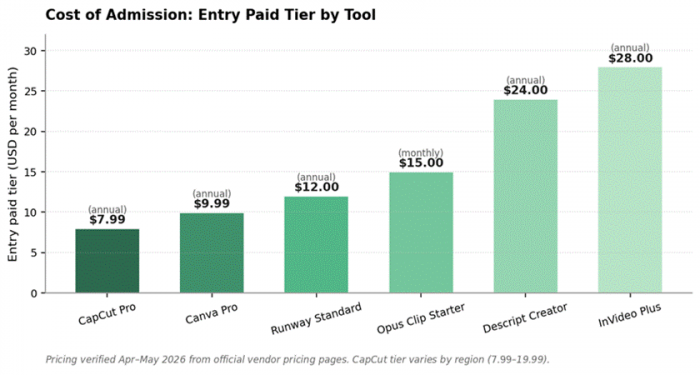
The cost of admission is not the same as the cost of operation. CapCut Pro is the cheapest paid tier in the category, but it is an editor; InVideo Plus is the most expensive entry tier, but it bundles Sora 2 and VEO 3.1 access. Read the chart below as a starting line, not a finish line: actual monthly spend depends on credit consumption, regeneration rate, and how many tools the workflow requires.
Stack selection: matching tool to workflow
The six platforms divide cleanly into four functional categories: timeline editing with AI modules (CapCut), repurposing of long-form content (Opus Clip, partly Descript), text-to-video generation (InVideo AI, Canva), and frontier generative video (Runway). Most creators end up running two tools, not one. A podcaster typically pairs Descript or Opus Clip (extraction) with CapCut (final polish). A solo founder running a personal brand pairs InVideo AI (drafting) with CapCut (editing). An e-commerce brand pairs Canva (design and template Reels) with InVideo AI (UGC-style ad variants). A film-led brand uses Runway (hero spots) and CapCut (everything else).
The cost of running a sensible two-tool stack at entry tiers is $20 to $40 per month. The cost of running the same workflow without AI tooling is roughly 8 to 12 hours of editing labour per week for a creator publishing five Reels weekly. At any commercial valuation of that time, the stack pays for itself within the first week of any month.
Recommended stacks by creator type
| Creator profile | Primary tool | Secondary tool |
|---|---|---|
| Podcaster, weekly long-form | Opus Clip Pro | CapCut Pro for finishing |
| YouTuber repurposing for Reels | Descript Creator | CapCut Free for templates |
| Solo founder, faceless content | InVideo AI Plus | CapCut Pro for thumbnail polish |
| DTC e-commerce brand | InVideo AI Max | Canva Pro for static and brand kit |
| Marketing team, brand-led | Canva Pro (Teams) | CapCut Pro or Descript for video editing |
| Creative agency, hero-tier ads | Runway Pro | CapCut Pro for distribution variants |
Conclusion
The 2026 AI Reels landscape no longer rewards generalists. CapCut wins on cost and timeline flexibility for filmed content. Opus Clip is the right tool for anyone with a backlog of long-form video they have not yet repurposed. InVideo AI is the cheapest legitimate path to Sora 2 and VEO 3.1 access in a single product. Descript leads on dialogue-heavy editing speed. Canva Magic Studio remains the right fit for design-led teams already standardised on its ecosystem. Runway is the only credible choice when cinematic quality is non-negotiable.
The strategic decision is rarely 'which tool is best' and almost always 'which two tools fit my content type and publishing cadence'. Throughput, originality penalty, and credit economics now matter more than feature lists. Pick the categories first, then pick the tools. The accounts gaining the most reach in 2026 are not the ones using the fanciest model; they are the ones whose stack matches the cadence their audience expects.
Post Comment
Be the first to post comment!