Why You Might Be Looking Beyond myimg.ai
Understanding the limitations - and what the market offers instead
myimg.ai has carved out a niche as a fast, low-friction web tool for image manipulation - particularly for casual users interested in cartoon stylization, face swaps, and basic upscaling. Its no-install, browser-based model appeals to users who just want quick results without learning curves. Monthly traffic estimates in early 2026 suggest the platform sees significant interest, peaking around 3.8 million visits.
But spend more than a few hours with myimg.ai and its structural limitations become apparent. The feature set is narrow and fixed - you get the tools it ships with, nothing more. Privacy policies are opaque; the platform's trust signals are weak compared to established players. Commercial licensing is ambiguous. And the AI quality, while acceptable for casual use, trails the current generation of serious AI editing platforms significantly.
This guide profiles six alternatives that outperform myimg.ai across one or more critical dimensions - whether that's raw AI quality, professional integration, pricing transparency, mobile experience, or commercial safety. Each tool has been evaluated across usability, feature depth, pricing, performance, and real-world user feedback so you can make a genuinely informed decision about where to direct your creative workflow in 2025.
6 Tools Reviewed | $3.99 Lowest Paid Tier | 5/6 Offer Free Tiers | 4.3★ Avg. Overall Rating |
In-Depth Tool Reviews
Comprehensive analysis of each myimg.ai alternative
Getimg.ai
The Developer-First AI Image Powerhouse
💰 Pricing$12/month (Basic) · $29/month (Starter) · $49/month (Hobbyist) · $99/month (Pro) · Free: 100 images/month | Platform Overview |
Getimg.ai is one of the most feature-rich AI image platforms in the market today, catering to both casual creators and technically inclined users who want granular control. Unlike myimg.ai's web-based simplicity, Getimg.ai exposes a full API, multiple generative models (Stable Diffusion, FLUX, custom fine-tuned checkpoints), and a canvas-style editor - all accessible through a clean, intuitive interface.
What genuinely sets Getimg.ai apart is model variety. Users can pick from over 60 AI models, fine-tune their own LoRA models, and even train custom models directly on the platform. For users who have outgrown myimg.ai's fixed feature set, this flexibility is transformational.
The platform also includes an AI Canvas that lets users perform inpainting, outpainting, and sketch-to-image operations - workflows that myimg.ai simply does not support in any meaningful way. Real-time image generation with interactive sliders makes it feel like working with a professional creative partner rather than a basic web app.
Key Features
•60+ pre-loaded AI models (SDXL, FLUX, custom)
•LoRA fine-tuning and custom model training
•Text-to-image, image-to-image, inpainting, outpainting
•AI Canvas for multi-layer editing
•RESTful API access for developers
•Bulk generation and batch processing
•Controlnet support for precise composition control
•Real-time generation with live sliders
Why Switch from myimg.ai?Getimg.ai outperforms myimg.ai on nearly every technical dimension. While myimg.ai provides a quick, surface-level cartoon or face-swap pipeline, Getimg.ai provides full creative control. The API access alone makes it infinitely more useful for developers building products. The ability to train custom models means your brand style, character, or aesthetic can be baked directly into the AI - something myimg.ai cannot offer at any price tier. |
What Users Are Saying
| "Finally switched from myimg.ai after realizing how limited the model selection was. Getimg.ai's FLUX integration alone was worth it - my product mockups are night-and-day better." - Verified G2 user" | "The API is clean and well-documented. We integrated it into our CMS in under a day. The credit system is transparent and the results are consistently high quality." - Product designer via Trustpilot" |
Pros & Cons at a Glance
| ✅ Pros | ❌ Cons |
| • 60+ diverse AI models | • Learning curve for non-technical users |
| • Developer API with great docs | • Premium models cost more credits |
| • Custom model fine-tuning | • Custom training can take hours |
| • Canvas editor with inpainting | • No mobile app |
| • Transparent credit pricing | |
| • Fast generation speeds |
Performance Ratings
| Criteria | Score |
| Usability | ★★★★☆ 4.2/5 |
| Performance | ★★★★⯨ 4.7/5 |
| Pricing Value | ★★★★☆ 4.3/5 |
| Feature Depth | ★★★★⯨ 4.9/5 |
| Support | ★★★★☆ 4.1/5 |
| Overall | ★★★★☆ 4.4/5 |
👤 Who Should Choose This Tool?Getimg.ai is perfect for developers, AI researchers, product designers, and creative agencies who need API access, model variety, and precision editing beyond what a basic web tool can provide. If you're generating images at scale or embedding AI visuals into a product, Getimg.ai is the clear winner over myimg.ai. |
Canva AI
Design Meets Artificial Intelligence at Scale
💰 Pricing$12.99/month (Pro) · $14.99/month (Teams, per user) · Free tier: broad access with AI credit limits · Enterprise: custom | Platform Overview |
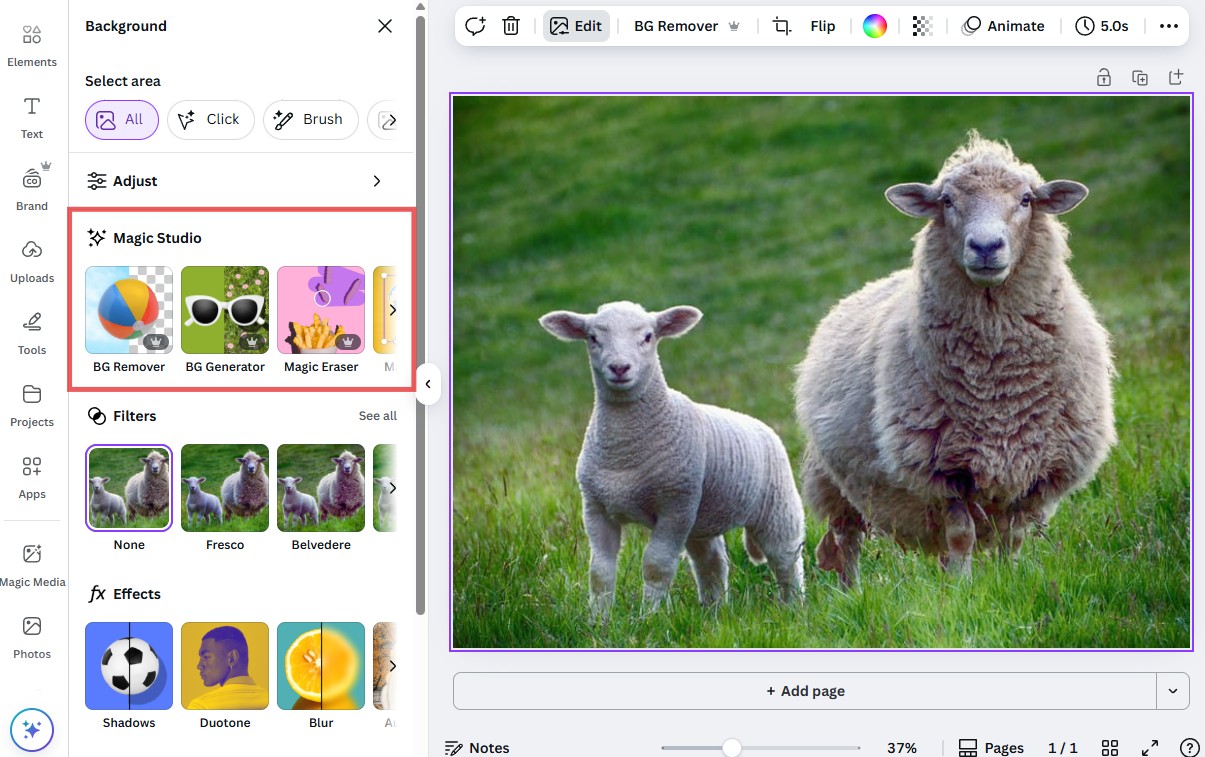
Canva is the world's most-used online design platform, and its AI-powered editing features have quietly become one of the most capable in the consumer market. With over 150 million users and a deeply integrated AI layer spanning image generation, background removal, magic resizing, generative fill, and AI-powered text, Canva offers something myimg.ai structurally cannot: a complete creative workflow.
Where myimg.ai functions as a standalone image manipulation tool, Canva AI sits inside a broader ecosystem - templates, brand kits, collaboration tools, and direct publishing to social platforms. This means edited images can flow directly into a finished social post, presentation, or ad creative without leaving the platform.
The Magic Edit and Magic Eraser tools are particularly noteworthy. Magic Edit allows natural language instructions to modify parts of an image contextually - replace a sky, add objects, remove clutter - while Magic Eraser handles object removal with a single brush stroke. Canva's AI doesn't just generate; it enhances complete design workflows.
Key Features
•AI Magic Edit with natural language prompts
•Magic Eraser for seamless object removal
•Background Removal with one click
•Text-to-image generation inside designs
•Smart Mockup for product placement
•Magic Expand (outpainting for any image)
•AI-powered resize and format conversion
•Brand Kit for style consistency across outputs
Why Switch from myimg.ai?Canva AI beats myimg.ai for anyone who needs more than raw image editing. The deep template library, direct social scheduling, team collaboration features, and consistent output quality at scale make it a professional upgrade. For marketers, social media managers, and small business owners, Canva AI eliminates the multi-tool workflow that myimg.ai forces by covering editing, design, and distribution in one place. |
What Users Are Saying
| "I replaced five different tools - including myimg.ai - with Canva Pro. The AI features work seamlessly inside my existing design workflow. Magic Edit alone saves me 3 hours per week." - Social media manager, Trustpilot" | "The background remover is the best I've used and it's one click. Everything just works. The team collaboration features are leagues above anything else we tried." - Marketing director via G2" |
Pros & Cons at a Glance
| ✅ Pros | ❌ Cons |
| • World-class template library | • AI image generator is less powerful than dedicated tools |
| • Seamless design-to-publish workflow | • Pro plan needed for most AI features |
| • Excellent team collaboration tools | • Can feel overwhelming for new users |
| • Generous free tier | • Limited fine-tuning of AI outputs |
| • Consistent, high-quality AI outputs | |
| • Available on all platforms |
Performance Ratings
| Criteria | Score |
| Usability | ★★★★⯨ 4.8/5 |
| Performance | ★★★★☆ 4.4/5 |
| Pricing Value | ★★★★⯨ 4.5/5 |
| Feature Depth | ★★★★⯨ 4.6/5 |
| Support | ★★★★⯨ 4.7/5 |
| Overall | ★★★★⯨ 4.6/5 |
👤 Who Should Choose This Tool?Canva AI is the best choice for social media managers, content marketers, small business owners, and non-designers who need polished, publish-ready visuals without a steep learning curve. If your workflow involves creating images and putting them somewhere - social, email, ads - Canva AI is miles ahead of myimg.ai. |
Adobe Firefly
Enterprise-Grade AI Imagination with Commercial Safety
💰 Pricing$4.99/month (Firefly standalone, 2,000 credits) · Included in Creative Cloud All Apps ($54.99/mo) · Free: 25 generative credits/month | Platform Overview |
Adobe Firefly represents the most commercially safe and professionally mature AI image generation tool available today. Built on training data that Adobe owns or has licensed, Firefly is specifically designed to produce outputs that businesses can use without intellectual property concerns - a critical differentiator from myimg.ai, where commercial rights and content provenance are ambiguous at best.
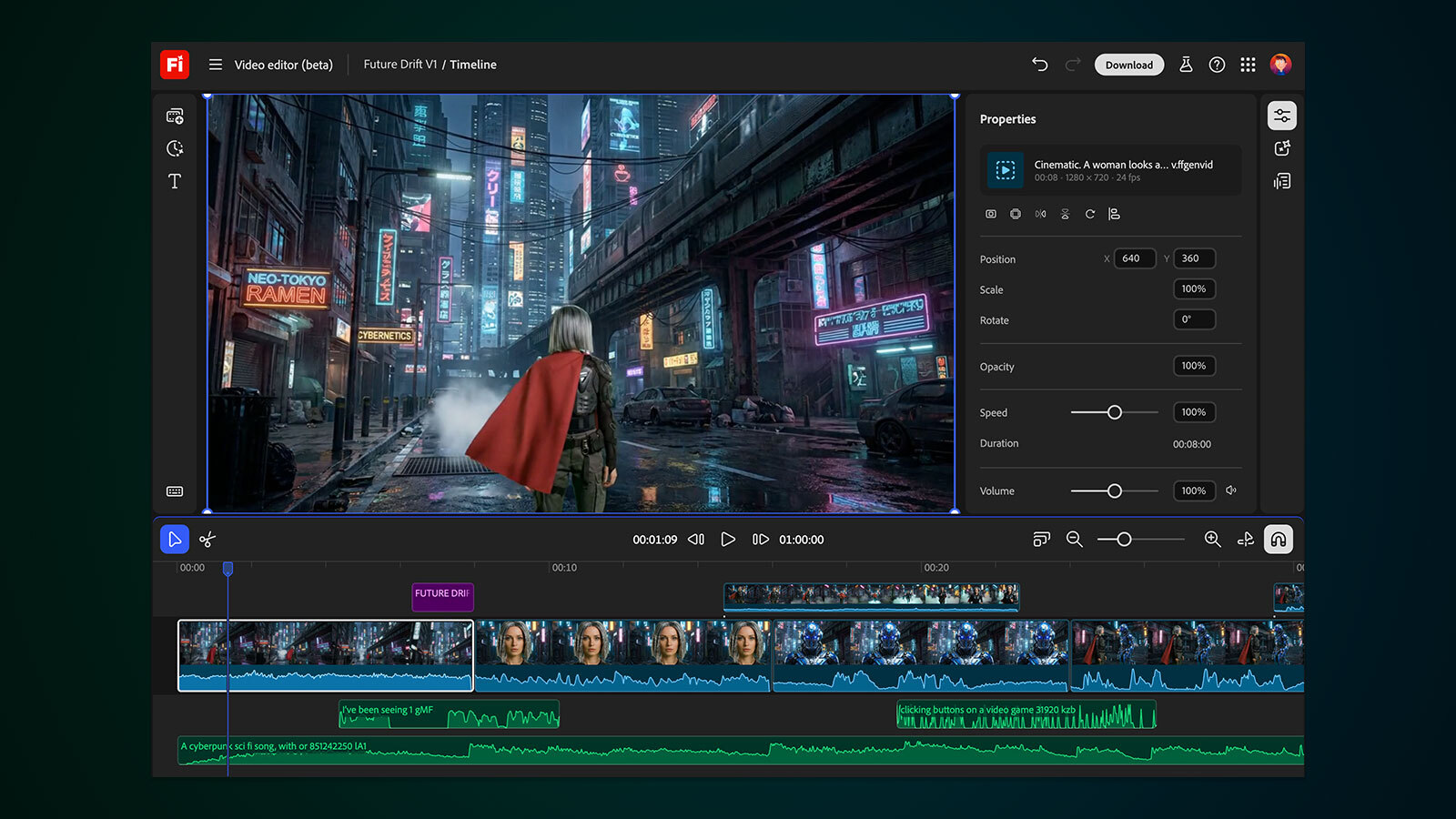
Firefly is deeply integrated into the Adobe Creative Cloud ecosystem. Generative Fill in Photoshop, Generative Recolor in Illustrator, and Text Effects in Adobe Express all run on Firefly's models. For teams already embedded in Creative Cloud, this makes Firefly nearly invisible - it's just part of the tools they already use, adding AI magic to familiar workflows.
The image quality is consistently photorealistic and stylistically versatile. Firefly's "Style Reference" feature lets users upload a visual guide image and generate outputs that match its aesthetic - a capability that makes brand consistency achievable without custom model training.
Key Features
•Generative Fill and Expand in Photoshop
•Style Reference for brand-consistent outputs
•Text-to-image generation with prompt guidance
•Generative Recolor for vector artwork
•IP-safe training data for commercial use
•Content Credentials for transparency
•Structure and Style Transfer references
•Integration with Photoshop, Illustrator, Express
Why Switch from myimg.ai?Adobe Firefly is the only tool in this list that explicitly guarantees commercial IP safety on all outputs. For agencies, brands, and enterprise marketing teams, this alone justifies the switch from myimg.ai. The depth of Photoshop integration means that AI augments an already professional workflow rather than replacing it - users get the best of generative AI and industry-standard editing together. |
What Users Are Saying
| "The commercial IP safety is what sold our legal team. We can generate product visuals and use them in ads without worrying about copyright disputes. That peace of mind is priceless." - Brand manager via Adobe community forums" | "Generative Fill in Photoshop is genuinely magical. I removed an entire crowd from a background and filled it with a forest in under 10 seconds. Nothing else comes close to this level of quality." - Photographer, G2 review" |
Pros & Cons at a Glance
| ✅ Pros | ❌ Cons |
| • Commercial IP-safe outputs guaranteed | • Requires Creative Cloud for best results |
| • Deep Photoshop and Illustrator integration | • Credit system can run out fast |
| • Consistent, photorealistic quality | • Standalone plan feels limited without CC |
| • Content Credentials for provenance | • Less flexible for niche or stylized outputs |
| • Style Reference for brand consistency | |
| • Global enterprise support |
Performance Ratings
| Criteria | Score |
| Usability | ★★★★☆ 4.1/5 |
| Performance | ★★★★⯨ 4.6/5 |
| Pricing Value | ★★★★☆ 4/5 |
| Feature Depth | ★★★★⯨ 4.5/5 |
| Support | ★★★★⯨ 4.7/5 |
| Overall | ★★★★☆ 4.3/5 |
👤 Who Should Choose This Tool?Adobe Firefly is ideal for professional photographers, advertising agencies, enterprise marketing teams, and any creator for whom commercial IP safety is non-negotiable. If you are already on Creative Cloud, Firefly is effectively free and is an unmistakable upgrade over myimg.ai. |
Fotor AI
The Beginner's All-in-One Photo Enhancement Suite
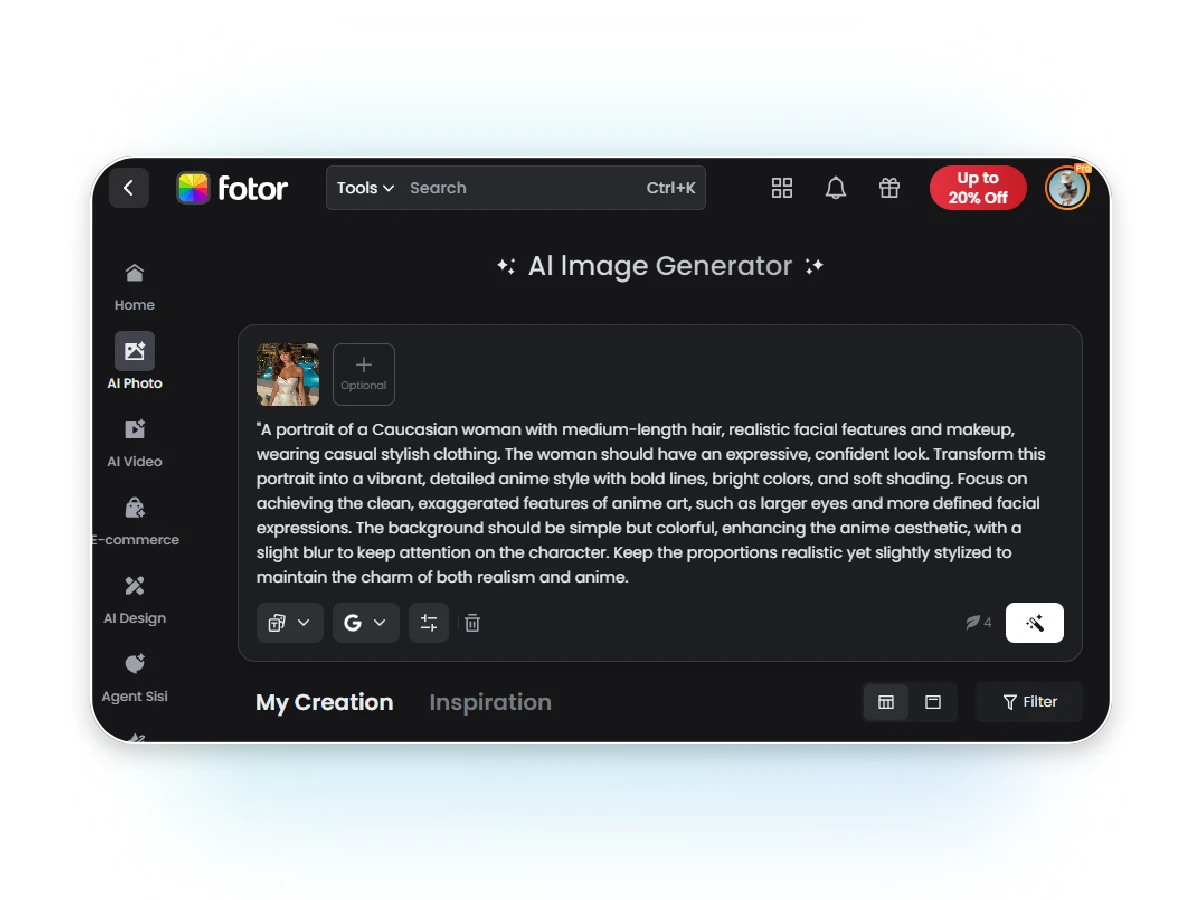
💰 Pricing$3.99/month (Pro, billed annually, 100 AI credits) · $8.99/month (monthly Pro) · Free tier: basic editing with watermarks | Platform Overview |
Fotor has been in the online photo editing space since 2012, and its AI transformation over the last two years has been genuinely impressive. The platform balances breadth with approachability - offering AI enhancement, background removal, portrait retouching, object removal, and AI image generation in a single, clean browser interface that requires zero technical knowledge.
What Fotor does particularly well is consistency. Batch processing across dozens of images delivers predictable, reliable results - a real advantage for e-commerce sellers who need uniform product photo quality across large catalogs. The one-click AI enhancer applies intelligent adjustments to brightness, contrast, sharpness, and color temperature, and in independent tests it performs comparably to much more expensive tools on standard enhancement tasks.
Compared to myimg.ai, Fotor offers significantly better privacy transparency, well-documented commercial usage rights, and a cross-platform experience that includes desktop apps for Windows and macOS alongside the web interface - making it accessible for users who prefer working offline.
Key Features
•1-Tap AI Enhance for instant photo improvement
•AI Background Remover with hair-accurate detection
•Magic Eraser for object and person removal
•AI Upscaler up to 4x resolution
•AI Portrait Retouching with skin, face controls
•Batch processing for high-volume editing
•AI Image Generator from text prompts
•Collage maker and social media templates
Why Switch from myimg.ai?Fotor's strongest advantage over myimg.ai is pricing transparency and professional legitimacy. At $3.99/month billed annually, it is one of the most affordable AI editors with commercial rights clearly stated. The batch processing is faster and more reliable, and the platform's decade-long track record provides confidence that myimg.ai's relatively opaque background cannot match. |
What Users Are Saying
| "Fotor's batch enhancer saved me hours on a product shoot. I uploaded 80 images and they all came out consistent and clean. Way more reliable than anything else I tried at this price." - E-commerce seller via Trustpilot" | "The portrait retouching is subtle and natural. It doesn't over-smooth or make people look plastic. I now use it for all my client deliverables before sending." - Portrait photographer, G2 review" |
Pros & Cons at a Glance
| ✅ Pros | ❌ Cons |
| • Most affordable paid tier in this list | • Free plan is heavily watermarked |
| • Excellent batch processing | • AI generation quality lags dedicated generators |
| • Clean, intuitive UI for beginners | • Limited advanced editing controls |
| • Cross-platform (web, Windows, Mac, iOS, Android) | • Magic Eraser can leave artifacts on complex backgrounds |
| • Reliable portrait retouching | |
| • Transparent commercial licensing |
Performance Ratings
| Criteria | Score |
| Usability | ★★★★⯨ 4.5/5 |
| Performance | ★★★★☆ 4.1/5 |
| Pricing Value | ★★★★⯨ 4.7/5 |
| Feature Depth | ★★★★☆ 4/5 |
| Support | ★★★★☆ 4.1/5 |
| Overall | ★★★★☆ 4.2/5 |
👤 Who Should Choose This Tool?Fotor AI is the right choice for e-commerce product photographers, small business owners, bloggers, and beginners who need reliable, affordable AI photo editing without complexity. If you're processing large batches of images on a tight budget, Fotor offers the best value-per-dollar in the market. |
Picsart AI
Social-First Creative Platform Built for Mobile Creators
💰 Pricing$5/month (Plus, billed annually) · $7/month (Pro, billed annually) · Free: unlimited basic edits · Enterprise: custom | Platform Overview |
Picsart has built the most mobile-centric AI creative platform of any tool in this comparison. With over 150 million monthly active users - a figure that dwarfs myimg.ai's audience - Picsart combines AI editing tools with a creator community, social sharing layer, and a sticker/asset marketplace that makes it uniquely sticky for content creators.
The AI feature set covers a wide range: background removal, AI image generation, style transfer, content-aware fill, face effects, smart cutout, and AI-powered photo collages. What distinguishes Picsart is how seamlessly these features integrate into a mobile-first workflow. Editing, applying AI effects, and posting to Instagram or TikTok happens inside a single, fluid app experience.
For creators who primarily work on smartphones and need fast, visually striking outputs for social platforms, Picsart's combination of AI power, templates, and social context makes it far more relevant than myimg.ai, which has a limited and inconsistent mobile experience.
Key Features
•AI Background Removal with one tap
•AI Image Generator from text prompts
•Style Transfer with artistic presets
•AI Photo Enhancer for mobile shots
•Smart Cutout for precise subject isolation
•Sticker marketplace with millions of assets
•Video editing and collage creation
•Social community for sharing and discovery
Why Switch from myimg.ai?Picsart outperforms myimg.ai on mobile usability by a wide margin. The social layer creates a creative community that inspires and enables users in ways a pure editing tool cannot. The pricing is among the most competitive in the market, and the free tier covers enough functionality for casual creators to get real value. The asset marketplace alone - with millions of stickers, overlays, and effects - provides a level of creative variety myimg.ai's fixed feature set cannot match. |
What Users Are Saying
| "I've been using Picsart for two years and it gets better every month. The AI background remover on mobile is faster and cleaner than most desktop tools I've tried." - Instagram creator via App Store" | "The sticker library and template collection are unmatched. I create content for three brands and Picsart lets my whole team stay consistent without expensive software." - Social media manager, G2 review" |
Pros & Cons at a Glance
| ✅ Pros | ❌ Cons |
| • Best-in-class mobile experience | • Web version feels secondary to mobile app |
| • Massive creator community and asset marketplace | • AI generation quality below Midjourney/FLUX tools |
| • Affordable plans starting at $5/month | • Free tier has limitations on advanced AI features |
| • Fast, reliable AI background removal | • Interface can feel cluttered with assets |
| • Excellent template collection for social media | |
| • Continuous feature updates |
Performance Ratings
| Criteria | Score |
| Usability | ★★★★⯨ 4.6/5 |
| Performance | ★★★★☆ 4.2/5 |
| Pricing Value | ★★★★⯨ 4.6/5 |
| Feature Depth | ★★★★☆ 4.3/5 |
| Support | ★★★★☆ 4/5 |
| Overall | ★★★★☆ 4.3/5 |
👤 Who Should Choose This Tool?Picsart AI is the ideal choice for mobile-first content creators, social media influencers, and anyone who creates primarily for Instagram, TikTok, or YouTube. If your workflow lives on your phone and you want AI editing plus a creative community, Picsart is the most complete solution in its price range. |
Pixlr AI
Browser-Based Photoshop Power with AI Intelligence
💰 Pricing$7.99/month (Plus) · $14.99/month (Premium, billed annually) · Free tier: available with ads · Team: $12/user/month | Platform Overview |
Pixlr occupies a unique position in the AI editing landscape: it bridges the gap between consumer-level tools and professional editors like Photoshop, delivering layers, masks, blend modes, and advanced selection tools in a browser - no installation required. Its AI features layer on top of this solid editing foundation, rather than replacing it with a simplified pipeline.
The platform offers two primary editing interfaces: Pixlr X (simpler, great for quick edits and beginners) and Pixlr E (advanced, with Photoshop-style layers and tools). Both now incorporate AI features including background removal, AI cutout, smart resize, generative AI fill, and one-click photo enhancement. This dual-track approach means Pixlr grows with its users in a way that myimg.ai simply doesn't.
For users who need real editing power - the ability to work with non-destructive layers, blend modes, curves adjustments, and masking - Pixlr offers that foundation while adding AI acceleration. It is the most technically capable browser-based editor in this comparison, and at $7.99/month, it significantly undercuts Adobe Photoshop while covering most of its day-to-day use cases.
Key Features
•Dual interface: Pixlr X (simple) and Pixlr E (pro)
•Full layers, masks, blend modes in browser
•AI Background Removal and Cutout
•Generative AI Fill (expand, replace, remove)
•Smart Resize for social media formats
•AI Photo Enhancer with one-click application
•Batch editing tools for bulk workflows
•100+ effects, overlays, and border templates
Why Switch from myimg.ai?Pixlr completely outclasses myimg.ai on editing depth. Where myimg.ai operates as a fixed-pipeline tool (upload, apply preset, download), Pixlr E offers genuine non-destructive editing with layers - the same foundational approach used in Photoshop. For users who want AI speed without sacrificing editing control, Pixlr is the definitive choice. The browser-based architecture also means nothing to install, aligning with myimg.ai's web convenience while adding dramatically more capability. |
What Users Are Saying
| "Pixlr E replaced Photoshop for 80% of my daily work. The AI background remover is fast and accurate, and having real layers in a browser feels like cheating." - Graphic designer via Capterra" | "The dual interface is genius. I use Pixlr X for quick social posts and Pixlr E when I need real editing power. Two tools, one subscription. The generative fill update was a game changer." - Digital marketer, G2 review" |
Pros & Cons at a Glance
| ✅ Pros | ❌ Cons |
| • Real layers and non-destructive editing in browser | • Free version has intrusive ads |
| • Dual interface for different skill levels | • Can be slow on older hardware/browsers |
| • Strong generative AI fill and expand tools | • Premium plan needed for best AI features |
| • More affordable than Photoshop | • Mobile app less powerful than web version |
| • No software installation required | |
| • Professional-grade selection and masking tools |
Performance Ratings
| Criteria | Score |
| Usability | ★★★★☆ 4.3/5 |
| Performance | ★★★★☆ 4.2/5 |
| Pricing Value | ★★★★☆ 4.4/5 |
| Feature Depth | ★★★★⯨ 4.5/5 |
| Support | ★★★⯨☆ 3.9/5 |
| Overall | ★★★★☆ 4.2/5 |
👤 Who Should Choose This Tool?Pixlr AI is perfect for graphic designers, photographers, and digital marketers who need professional editing power in a browser without paying for Creative Cloud. If you've hit the ceiling of what myimg.ai can do and need layers, masking, and generative AI fill, Pixlr is the most natural migration path. |
Side-by-Side Comparison
All six alternatives at a glance
The table below consolidates the key dimensions across all six tools. Use it as a quick reference when shortlisting your migration target.
| Tool | Best For | Pricing | Free Tier | Ease of Use | Overall |
| Getimg.ai | Developers & Gen AI | From $12/mo | ✓ (100 imgs) | 4.2/5 | 4.4/5 |
| Canva AI | Marketers & Teams | From $12.99/mo | ✓ (limited) | 4.8/5 | 4.6/5 |
| Adobe Firefly | Enterprise & Pros | From $4.99/mo | ✓ (credits) | 4.1/5 | 4.3/5 |
| Fotor AI | Beginners & Batch | From $3.99/mo | ✓ (limited) | 4.5/5 | 4.2/5 |
| Picsart AI | Social Media | From $5/mo | ✓ (basic) | 4.6/5 | 4.3/5 |
| Pixlr AI | Browser-based Pros | From $7.99/mo | ✓ (limited) | 4.3/5 | 4.2/5 |
Choosing the Right Alternative
Match your use case to the optimal tool
| If you need... | Best Tool | Why |
| API access + model variety | Getimg.ai | 60+ models, full API, fine-tuning |
| Design workflow integration | Canva AI | Templates, brand kits, social publishing |
| Enterprise / IP-safe outputs | Adobe Firefly | Licensed training data, CC integration |
| Affordable batch processing | Fotor AI | Best $/image, great batch tools |
| Mobile-first social content | Picsart AI | Leading mobile app, asset marketplace |
| Browser-based pro editing | Pixlr AI | Real layers & masks in-browser |
Final Thoughts
Making the switch with confidence
myimg.ai works well enough for casual, one-off edits where privacy, provenance, and long-term reliability are not priorities. But for anyone serious about their creative workflow - whether that is a solo freelancer, a growing e-commerce brand, or an enterprise marketing team - the alternatives in this guide offer meaningfully better outcomes across almost every dimension that matters.
The standout recommendation for most users is Canva AI, which combines the broadest feature set with the smoothest workflow integration and the most transparent pricing. Getimg.ai wins for developers and power users who need model diversity and API access. Adobe Firefly is the only rational choice for businesses where commercial IP safety is a hard requirement.
For users on tight budgets, Fotor AI's $3.99/month annual plan is exceptional value, offering reliable batch processing and decent AI enhancement that outperforms myimg.ai on consistency and commercial transparency. Picsart and Pixlr round out the list for mobile creators and browser-based professionals respectively - both offering depth that myimg.ai's fixed-pipeline approach fundamentally cannot match.
Whatever your use case, the tools reviewed here represent the current state of the art in accessible AI image editing - and each one provides a clear, justifiable upgrade path from myimg.ai.
Post Comment
Be the first to post comment!