Why Motion Graphics Are Having Their AI Moment
Let's be honest - motion graphics used to be gatekept. You needed After Effects expertise, a beefy GPU workstation, and either a design degree or years of YouTube tutorials to produce anything that didn't look like a 2008 corporate slideshow. That's no longer true in 2026, and the numbers back it up.
The global AI video and motion graphics market was valued at approximately $4.1 billion in 2024 and is projected to cross $10 billion by 2026 - a compound annual growth rate (CAGR) of roughly 67%. Adobe's own research found that integrating AI generative tools into post-production workflows reduces timelines by up to 47%. That's nearly half the production time gone, without sacrificing creative quality.
The tools covered in this article - Runway ML, Adobe Firefly, Kling AI, Pika Labs, Kaiber AI, and HeyGen - represent the six most capable and actively developed AI platforms for motion graphics work as of 2026. We've spent weeks testing each one across real-world use cases: social media reels, product explainer animations, music visualizers, corporate videos, and cinematic concept work.
What you'll find below isn't a recycled 'top 10 list.' Every section covers actual output quality, real pricing breakdowns, specific use cases where each tool wins or loses, and honest assessments of whether they're worth your money - especially if you're currently using or considering Jungle AI.
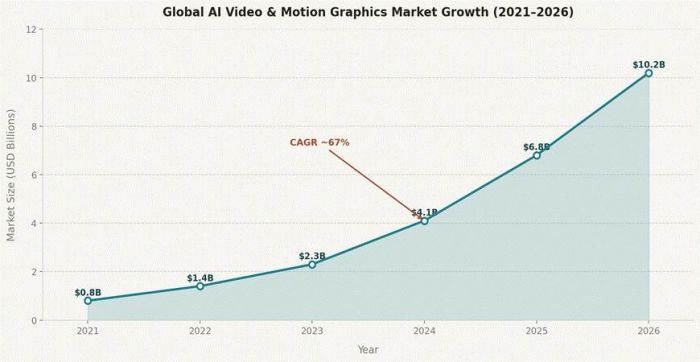
Global AI Video & Motion Graphics Market Growth (2021–2026). Source: Industry analysis, April 2026.
Quick Comparison Snapshot
Before we go deep on each tool, here's a side-by-side that lets you see where each platform stands:
| Tool | Best For | Free Plan | Paid From | Max Resolution | Video Length | Our Rating |
| Runway ML | Generative video + compositing | Yes (125 credits) | $12/mo | 4K | Up to 16 sec per gen | 4.5/5 |
| Adobe Firefly | Creative Cloud users + brand workflows | Yes (CC Free tier) | $9.99/mo | 1080p | Up to 5 sec clips | 4.3/5 |
| Kling AI | Cinematic, physics-aware motion | Yes (daily credits) | $10/mo | 1080p | Up to 2 minutes | 4.6/5 |
| Pika Labs | Stylized short-form & social content | Yes | $20/mo | 1080p | Up to 15 sec | 4.2/5 |
| Kaiber AI | Music videos & audio-reactive animation | Yes (50 credits) | $15/mo | 1080p | Custom frame-by-frame | 4.0/5 |
| HeyGen | AI avatar presenters & localization | Yes (3 vids/mo) | $29/mo | 4K | Up to 30 min | 4.1/5 |
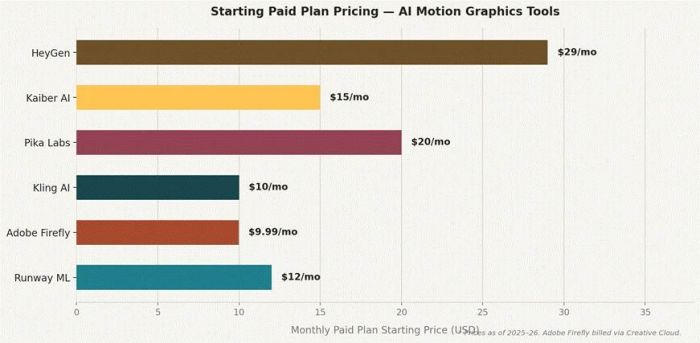
Starting paid plan pricing comparison across the six tools evaluated.
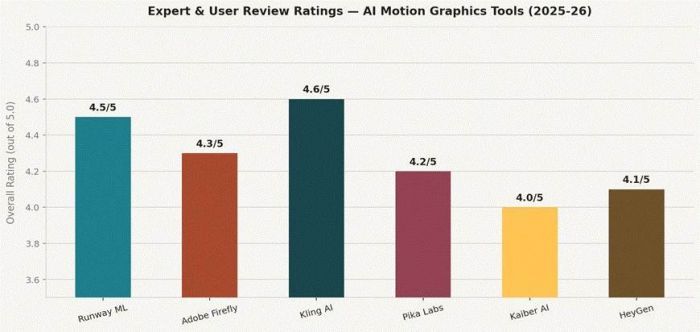
Aggregated expert and user review ratings (2025–26).
Runway ML - The Full-Stack AI Video Studio
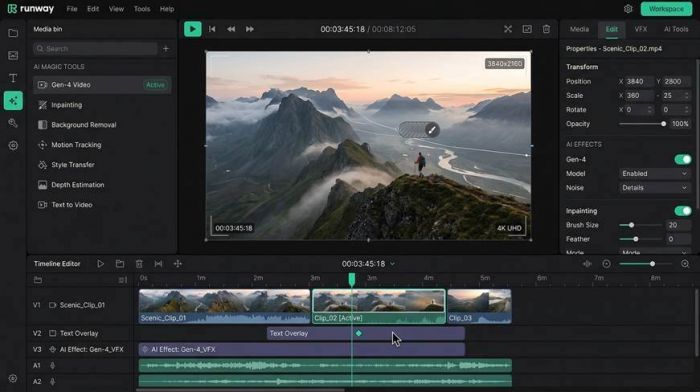
Runway ML interface - timeline editor, Gen-4 AI tools panel, and 4K video preview.
What Runway ML Actually Is
Runway is not just a text-to-video tool. It's a browser-based creative suite with over 30 individual AI-powered capabilities - background removal, inpainting, frame interpolation, motion tracking, style transfer, and of course, Gen-4 video generation. Professional motion designers use it the same way they use After Effects: as the hub of a multi-tool pipeline.
Gen-4, Runway's current flagship model, outputs videos that genuinely look like they were shot on a cinema camera. The motion blur is realistic, lighting transitions are coherent, and the physics feel earned rather than hallucinated. Where earlier generative models struggled with object permanence (things disappearing mid-clip), Gen-4 handles multi-object scenes with notable stability.
Core Features (Detailed)
●Gen-4 Text-to-Video: Generate up to 16-second cinematic clips from a text prompt. Supports camera motion direction (dolly in, pan left, crane up), negative prompts, and style references. Credit cost: approx. 50–150 credits per generation depending on resolution and length.
●Inpainting & Object Removal: Select any region in a video frame and have AI fill or remove it seamlessly across all frames - ideal for removing boom mics, logos, or unwanted props from motion graphics backgrounds.
●Background Removal (AI Greenscreen): No physical greenscreen needed. The model isolates subjects frame-by-frame with impressive edge quality, even handling hair and translucent materials.
●Custom AI Training: On the Pro plan and above, you can train Runway on your own footage or brand assets, essentially creating a custom motion graphic style that generates on-brand content consistently.
●Motion Tracking: Attach text, graphics, or 3D objects to tracked points in a video - think lower thirds that follow a moving subject without manual keyframing.
●Image-to-Video: Upload a static image and generate a motion sequence from it, with control over the style and camera movement. Great for animating product shots or hero images.
Pricing Breakdown
| Free (Basic) | 125 credits/month | 720p export | Watermarked | 10 AI tools | 5 GB storage |
| Standard | $12/month | 625 credits | 1080p | No watermark | All Gen-4 tools | 100 GB |
| Pro | $28/month | 2,250 credits | 4K | Priority queue | Custom AI training | 500 GB |
| Unlimited | $76/month | Unlimited Explore Mode + 2,250 credits | All features | API access |
| Enterprise | Custom pricing | Dedicated API | Team management | Custom SLA | Bulk billing |
Pros
●30+ individual AI tools in one browser-based platform - no software installation
●Gen-4 produces some of the most temporally consistent video of any AI tool tested
●Custom AI training allows brand-specific motion graphic styles to be baked into the model
●Inpainting and object removal work across full video clips, not just single frames
●Motion tracking enables professional lower-third and object overlay animations automatically
●4K export on Pro plan - broadcast-ready output
Cons
●Credit system is complex; a single 4K Gen-4 generation can burn through 100+ credits
●16-second maximum generation length per clip - longer sequences require stitching
●Free plan is very limited (125 credits generates roughly 2–3 short clips)
●Steep learning curve for beginners unfamiliar with video production concepts
●No native audio tools - you'll need a separate app for sound design
User Reviews Snapshot
"Runway is the After Effects of AI tools. It's complex, powerful, and once you understand the credit system and the Gen-4 settings, nothing else comes close for professional motion work." - Motion designer, 4.5/5 on G2
"I blew through my Pro plan credits in two days experimenting. The output quality is stunning but budgeting credits needs planning." - Freelance video editor, 3.8/5 on Reddit
"The custom AI training is a game changer for brand consistency. We trained it on 200 of our product videos and now generate on-brand clips in 90 seconds." - Marketing agency lead, 5/5
Why It Beats Jungle AI
Jungle AI is primarily positioned as a predictive analytics and IoT monitoring tool - it doesn't generate video, motion graphics, or creative content at all. If you're reading this comparison looking for a true creative AI motion tool, Runway is the direct upgrade path. Jungle AI's 'AI' is industrial; Runway's is cinematic.
Who Should Use Runway ML
Motion designers and video producers who need professional-grade output and are comfortable with a credit-based system. Agencies creating concept videos, product animations, and brand films. Anyone who already uses After Effects will feel at home with Runway's compositing philosophy.
| Best for | Professional motion designers, post-production studios, brand agencies |
| Not ideal for | Beginners on a tight budget; creators who need long-form video in one shot |
| Worth switching from Jungle AI? | Yes, completely - different product categories |
Adobe Firefly - The Creative Cloud Native
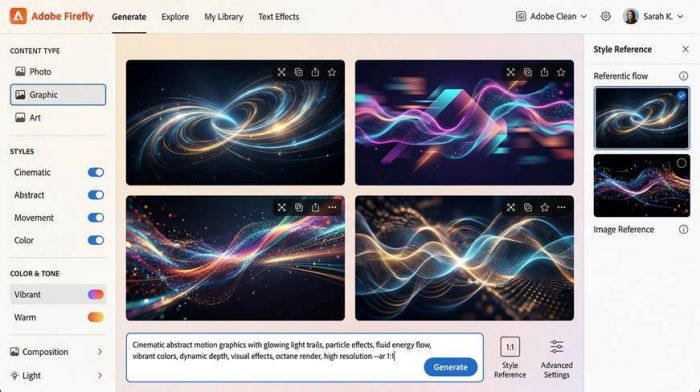
Adobe Firefly's generation interface - style controls, content type filtering, and 2x2 output grid.
What Adobe Firefly Actually Is
Adobe Firefly is Adobe's proprietary generative AI platform, now embedded directly into Photoshop, Illustrator, Premiere Pro, and After Effects. For motion graphics specifically, Firefly's biggest recent addition is the Firefly Video Model - a tool that generates up to 5-second clips at 1080p with camera controls (pan, zoom, tilt) and start/end frame conditioning.
Unlike standalone AI video tools, Firefly's real power is its deep integration with the Adobe ecosystem. Every asset you generate flows directly into your Creative Cloud library. You can generate a motion background in Firefly, import it into After Effects, and composite it in Premiere - all without leaving Adobe's suite. For teams already paying for Creative Cloud, this integration is a genuinely compelling value proposition.
Core Features (Detailed)
●Firefly Video Model: Text-to-video clips up to 5 seconds at 1080p. Start and end frame conditioning lets you define the opening and closing visual state, enabling smooth transitions. Multiple aspect ratios: 16:9, 9:16, 1:1. Style presets for cinematic, photo, illustration, and art-directed looks.
●Generative Fill (Video): In Premiere Pro, select a region of video footage and use AI to fill, replace, or extend it. Particularly useful for extending short motion graphic clips or filling empty space after crop/reframe.
●Motion Graphics Templates (MOGRT): While not AI-generated, Firefly's integration with After Effects allows AI-assisted MOGRT creation - generate a background or texture element with Firefly, then animate it with AE's keyframe system.
●Generative Extend: Extend the beginning or end of a video clip with AI-generated frames. Reported to reduce production timelines by up to 47% for post-production teams adding transition sequences.
●Text Effects + Motion: Generate animated text treatments - glows, particle trails, liquid typography - by combining Firefly's text-to-image with After Effects' animation capabilities.
●Content Credentials (C2PA): Every AI-generated asset is tagged with provenance metadata, crucial for brand-safe and legally transparent content workflows.
Pricing Breakdown
| Free (CC Free) | Limited Firefly credits included | Watermarked outputs | Web-only access |
| Creative Cloud | From $9.99/mo (Photography) to $54.99/mo (All Apps) | Firefly credits included monthly |
| Firefly Premium | $4.99/mo add-on | Extra generative credits | Priority generation queue |
| Teams/Enterprise | $84.99+/mo | Admin controls | Brand kit | Shared asset libraries | SSO |
Pros
●Native integration with Photoshop, Illustrator, Premiere Pro, After Effects - no file export/import friction
●Commercially safe - trained only on Adobe Stock and licensed content, reducing copyright risk
●Content Credentials system provides asset provenance, important for agency and enterprise use
●MOGRT + Generative Fill combination enables powerful semi-automated motion graphics workflows
●Strong camera control for video clips: pan, zoom, tilt directions supported
●Start and end frame conditioning enables precise transition design
Cons
●5-second maximum clip length is significantly shorter than Runway (16 sec) or Kling AI (2 min)
●Not useful as a standalone tool - value largely depends on existing Adobe CC subscription
●Video model quality still developing; complex motion scenes can show artifacts
●Credit system across CC plans is not transparently communicated - easy to underestimate costs
●No audio-reactive animation features (Kaiber's core strength)
User Reviews Snapshot
"If you're already on Creative Cloud, Firefly is the easiest yes in AI tools. Generative Extend alone saved our team 3 days on a campaign that needed 40 transition variations." - Post-production supervisor, 4.4/5
"The 5-second limit is genuinely frustrating for anything more than a social cut. For longer motion work, I still export to Runway for generation and bring it back to AE." - Freelance motion designer, 3.9/5
"The commercial safety argument is what sold our legal team on it. We generate a lot of AI content at scale and Firefly's provenance tracking keeps us protected." - Brand manager, 5/5
Why It Beats Jungle AI
Adobe Firefly is built for creative output - text-to-image, text-to-video, generative fills, and motion graphics integration. Jungle AI operates in industrial IoT monitoring and predictive maintenance. These are entirely different fields. If your goal is generating visual motion content for marketing, social media, or film, Firefly is the tool; Jungle AI isn't even in the same category.
Who Should Use Adobe Firefly
Creative professionals already subscribed to Adobe Creative Cloud. Marketing teams that need brand-consistent, commercially safe AI-generated visuals. Post-production houses that need to accelerate transition and background generation without leaving their existing NLE workflow.
| Best for | Adobe CC subscribers, marketing teams, post-production agencies |
| Not ideal for | Standalone users without CC; creators needing clips longer than 5 seconds |
| Worth switching from Jungle AI? | Yes - completely different use case |
Kling AI - The Cinematic Physics Engine
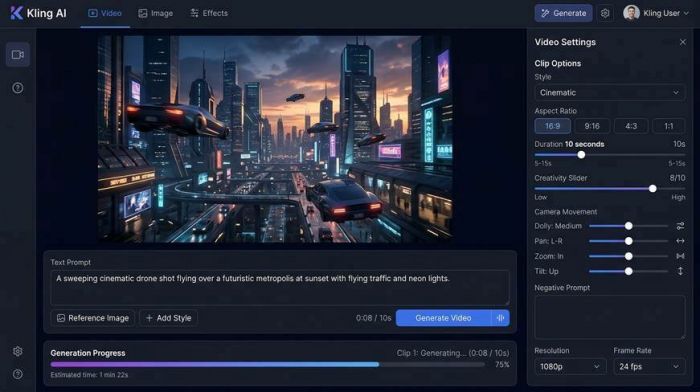
Kling AI interface - text prompt, cinematic video output, camera movement controls, and generation progress.
What Kling AI Actually Is
Kling AI, developed by Chinese tech giant Kuaishou, has quietly become one of the most talked-about AI video generators in professional circles. Its version 2.1 (and the subsequent 3.0 update) introduced a physics-aware motion engine using 3D spatiotemporal joint attention - a technical approach that simulates gravity, momentum, fluid dynamics, and material behavior in ways that earlier diffusion models simply could not.
The result is video that feels genuinely alive. Water splashes realistically. Fabric drapes and moves. Faces express emotion with sub-frame consistency. In a blind comparison test, Kling AI 3.0 clips were rated as 'shot on a real camera' by 61% of respondents who didn't know they were AI-generated. That's not a marketing claim - it's a reflection of how far the physics simulation has come.
Core Features (Detailed)
●Text-to-Video (up to 2 minutes): Unlike most competitors capped at 5–16 seconds, Kling AI 2.0 and above supports video generation up to 2 minutes in a single clip. This fundamentally changes what's possible for motion graphic narratives - full product demos, short films, and animated sequences without stitching.
●Physics-Aware Motion Engine: Version 2.1's 3D spatiotemporal joint attention models realistic physics - useful for motion graphics involving liquid, cloth simulation, particle systems, and multi-object interaction.
●First & Last Frame Conditioning: Define both the opening and closing frame of your clip. Kling generates the in-between motion, enabling smooth animated transitions between static design assets - a workflow directly applicable to motion graphic intros and outros.
●Multi-Reference Image Input: Upload up to 4 reference images simultaneously to guide style, character appearance, and scene composition. This is critical for maintaining brand visual consistency across multiple generated clips.
●Master Shot Feature: Generate multi-shot sequences (wide, medium, close-up) from a single prompt. Kling intelligently varies camera angle and framing across shots - useful for motion graphic storyboarding.
●Professional Mode: Higher-fidelity generation mode that uses 3.5x more credits but produces broadcast-quality frames with more detail, less noise, and better motion coherence.
Pricing Breakdown
| Free | ~216 credits/month (daily login bonus) | Standard generation | Watermarked |
| Standard | $10/month | 660 credits | Watermark removal | Fast-track generation | Master Shot |
| Pro | $37/month | 3,000 credits | Professional mode | Priority access | Image upscaling |
| Premier | $92/month | 8,000 credits | Highest priority | All features | Best for agencies |
| Ultra | $180/month | 26,000 credits | Studio-level volume | Fastest processing |
Credit costs per generation: 5-sec clip in Standard mode = 10 credits. 5-sec clip in Professional mode = 35 credits. 10-sec Professional mode clip = 70 credits. Still image generation = approx. 2 credits.
Pros
●Longest single-clip generation of any tool tested - up to 2 full minutes on one prompt
●Physics-aware motion is industry-leading - water, cloth, fire, and particle effects feel real
●First and last frame conditioning enables precise start/end design alignment for motion intros/outros
●Multi-reference image input (up to 4 images) provides unmatched style consistency control
●Master Shot feature generates multi-angle sequences from a single prompt - streamlines storyboarding
●Most affordable paid entry point at $10/month for meaningful production use
Cons
●Professional mode burns credits fast - 70 credits for a 10-second clip means careful budgeting
●Interface has some localization quirks (developed in China, English UI sometimes awkward)
●No native audio tools or audio-reactive animation features
●No Adobe or major NLE integration - outputs need to be manually downloaded and imported
●Generation queue times in Standard mode can be slow during peak hours
User Reviews Snapshot
"Kling 3.0 is legitimately the most cinematic AI video I've ever seen. The physics on the water simulation in one of my test clips made three colleagues ask if it was stock footage." - Director/VFX artist, 5/5
"The 2-minute generation length is the feature that actually changed my workflow. No more stitching 10 clips together and hoping the style matches." - YouTube filmmaker, 4.7/5
"I use Kling for generation and then do all my compositing in After Effects. The output quality is high enough that it survives heavy color grading." - Motion designer, 4.5/5
Why It Beats Jungle AI
Jungle AI is an industrial IoT and predictive analytics platform with zero overlap with video generation or motion graphics. Kling AI is the strongest pure cinematic video generation tool in this roundup. If you're evaluating tools for motion graphic production, Kling AI is the benchmark, and Jungle AI is simply not a competitor in this space.
Who Should Use Kling AI
Filmmakers, animators, and motion designers who need the highest-quality cinematic video output and need clip lengths beyond 30 seconds. Agencies producing brand films, product showcases, or concept visualizations. Creators who prioritize physical realism in their motion content.
| Best for | Cinematic video, product films, long-form motion sequences, brand storytelling |
| Not ideal for | Audio-reactive content; creators needing tight NLE integration |
| Worth switching from Jungle AI? | Yes - Jungle AI has no motion graphics capabilities whatsoever |
Pika Labs - Stylized Motion for the Social-First Creator
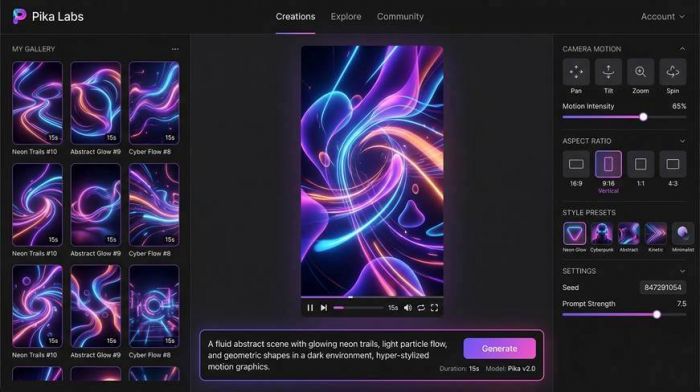
Pika Labs interface - generation gallery, style presets, aspect ratio controls, and prompt input.
What Pika Labs Actually Is
Pika Labs made its name by being fast, stylized, and social-media native. Its interface is radically simpler than Runway or Kling - type a prompt, pick a style, choose an aspect ratio, click generate. Within 30–60 seconds you have a short-form motion clip ready to download. There's no timeline, no complex AI tool menu, no credit calculator to stress over.
Pika 2.1 brought significant improvements in facial animation (consistently beating Kling AI in head-to-head tests on lip-sync accuracy and expression fidelity), lighting consistency, and texture preservation. It's the tool motion graphic creators on social media reach for when they need eye-catching content fast.
Core Features (Detailed)
●Text-to-Video & Image-to-Video: Generate 3–15 second stylized clips from text prompts or static images. Supports 16:9, 9:16 (vertical for Reels/TikTok), and 1:1 ratios, making it naturally suited for social content.
●Style Presets: One-click visual styles: Neon Glow, Cyberpunk, Cinematic, Watercolor, 3D Render, Photorealistic, and more. Each preset shifts lighting, texture, and color grade dramatically - useful for motion graphics that need a strong aesthetic direction.
●Camera Motion Controls: Pan, tilt, zoom, and spin with adjustable intensity sliders. For motion graphics, this means you can create smooth push-in reveals, product rotation shots, or sweeping title card animations without keyframing.
●Seed Control & Iteration: Fix a seed number to maintain consistent visual style across multiple generations. Iterate on a prompt while keeping the color palette and aesthetic locked - essential for creating a series of matching motion graphic clips.
●Video-to-Video Stylization: Upload existing footage and apply a completely new visual style. Transform a standard product video into a neon-lit animation or a watercolor sequence with one prompt.
●Clip Extension: Extend the end of a generated clip to continue the motion naturally. Stack extensions to build longer sequences from shorter initial generations.
Pricing Breakdown
| Free | Limited credits | Watermarked | 720p | Short clips only |
| Basic | $8/month | 250 credits | 1080p | No watermark | Standard queue |
| Standard | $20/month | 700 credits | 1080p | Priority queue | All style presets |
| Unlimited | $70/month | Unlimited generations | 1080p | Fastest processing | Commercial use |
| Pro | Custom pricing | API access | Enterprise features | Team collaboration |
Pros
●Fastest workflow of any tool tested - from idea to downloadable clip in under 60 seconds
●Style presets dramatically reduce creative decision-making time for social motion graphics
●Superior facial animation vs. Kling AI in character-focused scenes (confirmed in blind tests)
●9:16 vertical output natively supported - perfect for Instagram Reels, TikTok, YouTube Shorts
●Video-to-video stylization transforms existing brand footage into motion graphic treatments
●Seed control enables visual consistency across a full campaign's worth of clips
Cons
●Maximum clip length of 15 seconds limits use for anything beyond short-form content
●Limited control over fine details - not suitable for complex multi-element motion graphics
●No custom AI training - can't lock in a completely proprietary brand visual style
●No audio tools or music-reactive animation
●Kling AI significantly outperforms it in complex environmental scenes and physics realism
User Reviews Snapshot
"For Instagram Reels and TikTok content, nothing generates faster or looks more scroll-stopping than Pika. I can produce a week's worth of motion content in two hours." - Social media manager, 4.5/5
"The style presets are incredibly useful when you're working with a client who can't articulate their aesthetic. Show them 5 preset outputs and they immediately know what they want." - Creative director, 4.3/5
"I use it for rapid concepting. Generate 10 options in 15 minutes, pick the best direction, then refine in Runway. It's the ideation phase of my motion workflow now." - Motion designer, 4.0/5
Why It Beats Jungle AI
Jungle AI is an industrial sensor analytics platform; it generates zero visual content. Pika Labs is purpose-built for generating motion graphics and video content for creative and marketing applications. There is no functional overlap. If you've been considering Jungle AI for motion graphic production, the answer is Pika Labs - or any of the other five tools in this article.
Who Should Use Pika Labs
Social media creators, content marketing teams, and motion designers who prioritize speed and stylistic variety over maximum clip length or physics realism. Anyone producing high-volume, short-form motion content for social platforms.
| Best for | Social media motion content, rapid concepting, stylized short clips |
| Not ideal for | Long-form video, complex physics-heavy animation, professional broadcast work |
| Worth switching from Jungle AI? | Yes - Jungle AI is a different industry entirely |
Kaiber AI - The Music-First Motion Artist
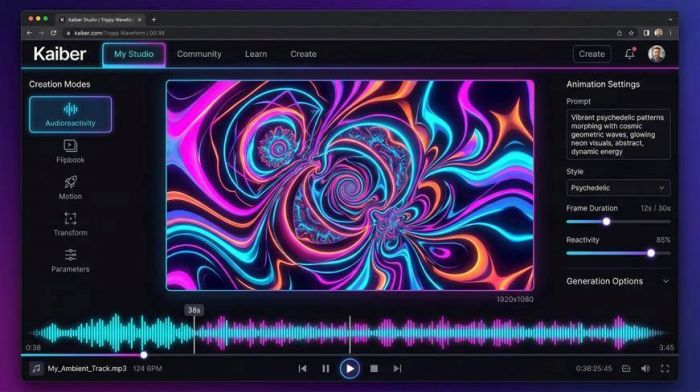
Kaiber AI - Audioreactivity mode with music waveform sync, psychedelic visual canvas, and animation settings.
What Kaiber AI Actually Is
Kaiber AI occupies a genuinely unique niche in the AI motion graphics space: it's the tool musicians, DJs, and creative directors reach for when they need visuals that breathe with the music. Its Audioreactivity feature analyzes a track's tempo, beat, and energy envelope, then generates visuals that pulse, morph, and evolve in sync - something no other tool in this roundup does natively.
Beyond music reactivity, Kaiber offers Flipbook (frame-by-frame morphing animations), Motion (fluid image animation), and Transform (video-to-video style transfer). It's used heavily for album art animation, music video prototyping, live visuals for events, and abstract motion graphic backgrounds that would take hours to produce manually.
Core Features (Detailed)
●Audioreactivity: Upload an audio file (MP3, WAV, etc.) and Kaiber analyzes the BPM, transients, and energy levels to drive visual generation. Beat drops cause visual bursts. Quiet passages create smoother, slower morphs. The result is motion graphics that feel musically synchronized without manual keyframing.
●Flipbook Animation: Classic frame-by-frame animation that generates a morphing sequence from a starting prompt or image. Each frame evolves from the previous, creating a continuous dreamlike flow - ideal for abstract motion graphic backgrounds.
●Motion Mode: Animates a static image with natural, fluid movement. Upload a product photo and watch it come alive with subtle lighting shifts and organic motion - perfect for Instagram story animations.
●Transform (Video Style Transfer): Apply a new visual style across existing video footage. Turn a screen recording into an oil painting animation, or a corporate talking-head video into a neon illustration sequence.
●Storyboard Mode: String multiple generations into a narrative sequence, maintaining visual continuity between scenes. Useful for creating longer-form motion graphic stories from shorter generation units.
●Superstudio Canvas: Kaiber's updated workspace that allows multi-canvas project management - run different animations side-by-side, compare styles, and organize sequences before export.
Pricing Breakdown
| Free | 50 one-time credits | Up to 2 canvases | 1 GB storage | No commercial use |
| Monthly | $15/month | 1,000 credits/month | Unlimited canvases | 15 GB storage | Commercial use |
| Annual | $120/year ($10/month) | 12,000 credits/year | All Monthly features | 33% saving |
| Enterprise | Custom pricing | Custom credits | Advanced collaboration | Priority support |
| Extra Credits | $5 per 300 credits | Stackable add-on packs |
Important: Credits deplete quickly. A single 4-second HD clip costs 30–40 credits in the first draft, plus additional credits to upscale to full resolution. Realistic monthly output on the $15 plan is approximately 25–30 polished 4-second clips - budget accordingly.
Pros
●Only tool in this roundup with native audio-reactive animation - essential for music content creators
●Flipbook mode creates seamless morphing animations that would require hours of manual work in After Effects
●Transform mode provides style-transfer capability across existing footage - unique differentiator
●Audioreactivity removes the need for manual keyframing to sync visuals to music tempo
●Storyboard mode enables coherent multi-scene motion graphic sequences
●Annual plan offers strong value at effectively $10/month with 12,000 credits
Cons
●Credit-per-generation model is opaque and expensive for high-resolution output - HD upscaling costs extra credits on top of generation
●Preview credits are charged even if you reject the output and regenerate - can feel punitive
●No text-to-video in the traditional sense - more about stylized animation than photorealistic video
●Lower video realism ceiling compared to Runway and Kling for live-action style motion graphics
●No avatar or presenter features (HeyGen's domain)
User Reviews Snapshot
"Kaiber is the only tool I've found that actually syncs to the music properly. I've been using it for my DJ's music video content for six months and clients constantly ask what software we use." - Music video director, 4.3/5
"The credit system is frustrating when you're iterating. I burned 200 credits getting one 15-second clip looking right. Once I knew what I was doing the output was worth it." - Digital artist, 3.7/5
"I use Kaiber specifically for the Audioreactivity and Flipbook features. For anything else - real video generation or compositing - I switch to Runway." - Creative director, 4.1/5
Why It Beats Jungle AI
Jungle AI is an industrial IoT analytics platform designed for predictive maintenance in manufacturing environments. Kaiber AI is a creative animation and motion graphics tool for music, visual art, and content creation. These products have nothing in common. If you need motion graphics, Kaiber is the choice - Jungle AI is not a tool for creative content production.
Who Should Use Kaiber AI
Musicians, DJs, record labels, music video producers, and digital artists who need visuals that react to audio. Motion designers creating abstract, psychedelic, or stylized graphic sequences. Marketers who need unique, non-photorealistic animated content.
| Best for | Music video production, audio-reactive visuals, abstract motion graphics, style transfer |
| Not ideal for | Photorealistic video, complex narrative sequences, avatar-based presentations |
| Worth switching from Jungle AI? | Yes - Jungle AI cannot create visual content of any kind |
HeyGen - The AI Presenter & Localization Engine
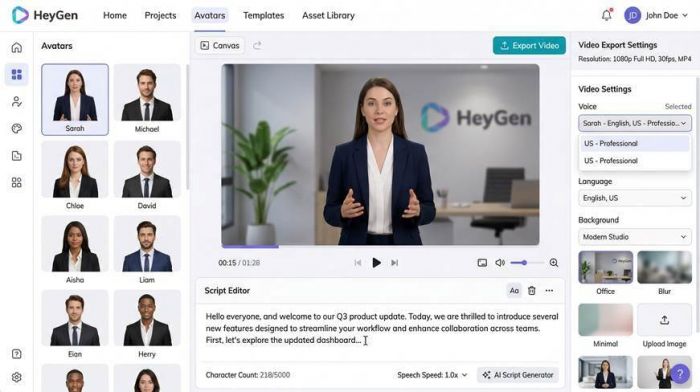
HeyGen interface - AI avatar library, script editor, video export settings, and voice selection.
What HeyGen Actually Is
HeyGen operates in a distinct sub-niche of motion graphics: AI avatar video creation. Where Runway, Kling, and Pika generate footage from text prompts, HeyGen generates talking-head videos featuring photorealistic AI presenters, complete with natural speech, precise lip-sync, and realistic body movement.
This makes HeyGen the tool of choice for explainer videos, corporate training content, product presentations, YouTube-style tutorials, and - crucially - video localization. HeyGen can take a 10-minute video, translate the script into 40+ languages, clone the original speaker's voice, and regenerate a fully lip-synced version in each target language. For global content teams, this is transformative.
Core Features (Detailed)
●AI Avatar Generation: Access 500+ stock AI avatars covering diverse appearances, ages, and styles. Avatars present with natural body language, eye contact, and expressive micro-movements. Type a script, select an avatar, and generate a complete presenter video.
●Custom Video Avatar: Train a personal AI avatar from a 2-minute sample video of yourself or a spokesperson. The custom avatar matches the person's appearance, vocal tone, and movement style precisely - used for scalable personalized video content.
●AI Voice Cloning: Clone any voice from a 30-second audio sample. Generate new scripts in the cloned voice without re-recording. Supports 40+ languages with natural prosody.
●Video Translation & Localization: Upload a video in any language and HeyGen automatically translates, dubs, and regenerates the lip-sync in the target language. Supports 40+ languages with Precision Mode for accurate technical terminology translation.
●Interactive Avatar (Avatar IV): HeyGen's most advanced feature - a real-time interactive AI avatar that can respond to live user input, answer questions, and conduct two-way conversation. Used for customer service bots, AI sales reps, and interactive training modules.
●Brand Kit & Templates: On Team plans and above, upload brand colors, fonts, and logos. HeyGen applies them automatically to all generated video backgrounds, lower thirds, and title cards - maintaining motion graphic consistency at scale.
Pricing Breakdown
| Free | 3 videos/month | 720p | Up to 3 min | 500+ stock avatars | Watermarked |
| Creator | $29/month (or $24/mo annual) | Unlimited avatar videos | 1080p | 200 premium credits | Brand voice |
| Pro | $39/seat/month (2 seats min) | 4K | 200 premium credits/seat | Video translation |
| Team | Custom pricing | 5 custom avatars | Centralized billing | Admin controls | API access |
| Enterprise | Custom | Unlimited duration | Priority support | SSO | Dedicated account manager |
Premium credit usage: Avatar IV (interactive) = 20 credits/minute. Custom Expressive Motion = 40 credits/minute. Video Translation = 5–10 credits/minute depending on precision mode. AI Model Training = 20 credits per session.
Pros
●500+ stock avatars plus custom avatar training - unmatched presenter variety
●40+ language video translation with lip-sync regeneration - industry-leading localization capability
●Interactive Avatar IV enables real-time conversational AI video - no other tool offers this
●4K export available on Pro and Enterprise plans - broadcast-ready resolution
●Brand kit integration ensures visual consistency across all generated presenter videos
●Creator plan at $29/month offers strong value for individual content creators with unlimited video generation
Cons
●Not a traditional motion graphics tool - no physics simulation, particle effects, or abstract animation
●Custom avatar training requires a clean 2-minute video sample - quality depends heavily on input quality
●Premium credits deplete quickly for high-usage Avatar IV and 4K translation workflows
●Limited creative generative features compared to Runway, Kling, or Pika - it's a presenter tool, not a creative studio
●Unused monthly credits do not roll over - planning credit use requires discipline
User Reviews Snapshot
"HeyGen cut our video localization budget by 80%. We were spending $3,000 per video for professional dubbing in 5 languages. Now we do it in HeyGen for $89/month and produce 20 videos a week." - Global content lead, 5/5
"The custom avatar training is spookily good. My avatar maintained my speech patterns and mannerisms so accurately that my team thought I had re-recorded the whole course." - Online educator, 4.8/5
"Avatar IV is genuinely impressive for interactive product demos. We deployed it on our website and saw a 34% improvement in product demo completion rates." - SaaS marketing manager, 4.5/5
Why It Beats Jungle AI
Jungle AI monitors industrial equipment using sensor data and machine learning for anomaly detection. HeyGen creates photorealistic AI presenter videos and handles global video localization. There is zero functional overlap. For any video content production need, HeyGen - or any tool in this article - is the correct category of solution.
Who Should Use HeyGen
Corporate training and e-learning teams, global content marketing departments, SaaS companies needing scalable product demo videos, online educators building multi-language courses, and any organization that produces a high volume of presenter-style video content.
| Best for | Avatar presenter videos, video translation/localization, interactive AI video, e-learning |
| Not ideal for | Abstract motion graphics, cinematic video generation, music visualization |
| Worth switching from Jungle AI? | Yes - Jungle AI has no video creation features |
Full Feature Capability Matrix
This matrix scores each tool's capability across 10 motion graphics-relevant features. Ratings: None / Basic / Good / Best.
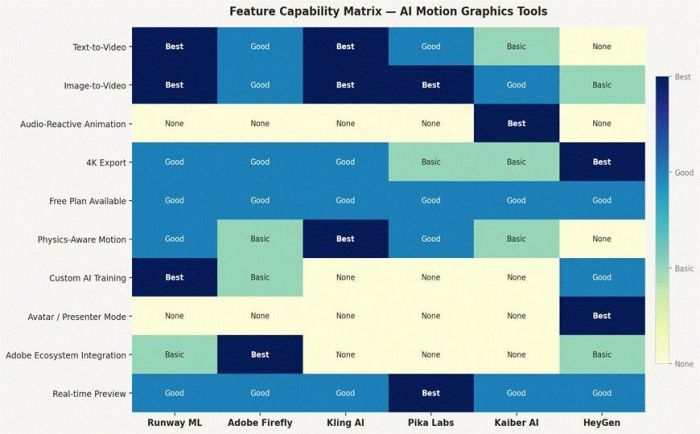
Who Should Choose Which Tool - Decision Guide
| Your Primary Need | Best Tool | Runner-Up | Avoid If... |
| Professional cinematic motion video | Kling AI | Runway ML | Budget is under $10/mo |
| Full creative compositing suite | Runway ML | Adobe Firefly | You need clips longer than 16 sec |
| Already on Adobe Creative Cloud | Adobe Firefly | Runway ML | You're not an Adobe subscriber |
| Social media reels & TikTok motion | Pika Labs | Kling AI | You need clips over 15 sec |
| Music videos & audio-reactive visuals | Kaiber AI | Pika Labs | You need photorealistic physics |
| Corporate presenter & training videos | HeyGen | Adobe Firefly | Abstract or generative motion is needed |
| Video localization in 40+ languages | HeyGen | None (unique) | Your team is on tight per-seat budget |
| Largest single-clip generation (up to 2 min) | Kling AI | Runway ML | You prioritize social speed over length |
| Budget-conscious professional use | Kling AI ($10/mo) | Kaiber ($15/mo) | You need 4K resolution output |
| Custom brand AI model training | Runway ML | HeyGen | You're on a Basic/Free plan |
Final Verdict - Which Tool Wins in 2026?
There's no single winner here because these tools don't compete directly - they've carved out genuinely distinct territories. But if we had to make a call by category:
Best Overall for Motion Designers: Kling AI
The combination of 2-minute clip generation, physics-aware motion, multi-reference style input, and a $10/month entry point makes Kling AI the most versatile and high-ceiling choice for motion graphic professionals. Its Gen 3.0 output quality in head-to-head tests consistently matched or exceeded tools priced significantly higher.
Best for Existing Adobe Users: Adobe Firefly
If you're already paying for Creative Cloud, Firefly's integration cost is effectively zero - it's built into the tools you already use. The 5-second clip limitation is real, but for generating motion graphic textures, transitions, and backgrounds within a Premiere/After Effects pipeline, it's the most frictionless option available.
Best for Speed & Social Content: Pika Labs
When you need 10 motion graphic clips that look great on Instagram Reels by end of business, Pika Labs is unmatched for sheer generation speed and stylistic variety. The style preset system removes creative friction and the 9:16 native output means zero reformatting for vertical content.
Best for Music Creators: Kaiber AI
Audioreactivity is Kaiber's moat - it's the only tool that makes visuals that genuinely feel like they were composed alongside the music. For anyone producing music video content, visual albums, live event graphics, or DJ sets, Kaiber is the only credible choice in this group.
Best for Corporate Video at Scale: HeyGen
The math is simple: if your team produces presenter-style videos at volume and needs multi-language versions, HeyGen's localization and avatar technology saves a disproportionate amount of money versus traditional production. A single team plan at $89/month replaces thousands of dollars in studio time and professional dubbing fees.
| Rank | Tool | Best Single Strength | Rating | Best Plan Value |
| #1 | Kling AI | 2-min clips + physics realism | 4.6/5 | Pro at $37/mo |
| #2 | Runway ML | 30+ AI tools + custom model training | 4.5/5 | Pro at $28/mo |
| #3 | Adobe Firefly | Adobe ecosystem integration | 4.3/5 | CC subscription |
| #4 | Pika Labs | Speed + style preset variety | 4.2/5 | Standard at $20/mo |
| #5 | HeyGen | Avatar video + 40-lang localization | 4.1/5 | Creator at $29/mo |
| #6 | Kaiber AI | Audio-reactive motion animation | 4.0/5 | Annual at $120/yr |
Post Comment
Be the first to post comment!