Introduction
If you are weighing up MotionMuse against InVideo, you have probably noticed they get mentioned together a lot, and you want to know which one is right for you. Here is the short version before we dig in: they look similar on the surface, but the more you learn about each, the clearer it becomes that they are built for different jobs. Picking well comes down to knowing which job is yours.
This guide is written to save you that research time. I will walk you through what each tool actually does, where each one shines, where each one will frustrate you, what real users say, and a clear verdict at the end. It is a research-based comparison drawn from official information and public user feedback, so you can make the call with the full picture in front of you.
IMAGE PLACEMENT: Hero comparison image showing the MotionMuse logo and the InVideo logo side by side with a 'vs' in the middle. JPEG, full content width.
Quick Verdict Table
If you only read one section, read this one.
| Question | MotionMuse | InVideo |
|---|---|---|
| Best for | Animating a single still image into a short clip | Building a full video from a text prompt |
| Typical output | 4 to 6 second animated clip | Complete videos, often 30 seconds to several minutes |
| Learning curve | Very easy, almost no setup | Easy to moderate, prompt and edit workflow |
| Entry price | Free tier with daily credits; paid from a few dollars per month | Free tier (watermarked); paid plans roughly 20 to 25 dollars per month |
| My pick if | You want quick motion on photos for social posts | You need finished, narrated videos at volume |
Numbers above are rounded and were accurate at the time of writing. Always confirm current pricing on each official site before you buy.
What Each Tool Actually Does
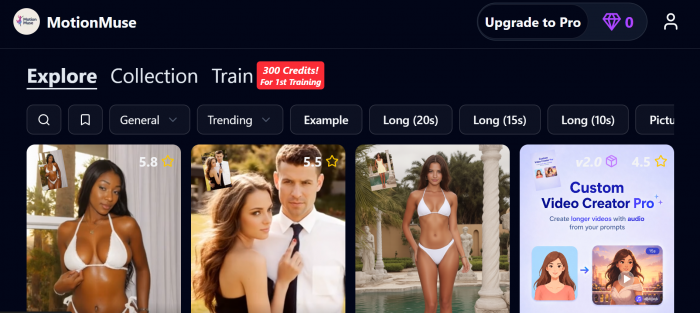
Before you choose, it helps to be clear on the basics. MotionMuse is an image-to-video tool: you feed it a still picture, pick a motion style or write a short prompt, and it animates that image into a clip of roughly four to six seconds. InVideo is a full AI video generator: you describe the video you want in plain language, and it builds a complete piece with scenes, stock footage, voiceover, music, and captions. That difference is the whole story, so here is each one in a bit more detail.
MotionMuse in Plain Terms
MotionMuse is built around one core action: take a static image and give it motion. You upload a photo, choose a template or write a short prompt describing the movement you want, and the AI generates a short animated clip. It supports common formats like JPG, PNG, and GIF, and it offers an easy mode for fast results plus an expert mode for more control over things like panning and zoom.
The output length is short by design. Clips land in the four to six second range, which makes the tool well suited to social snippets, looping backgrounds, and eye-catching motion for a post, but not to long-form storytelling.
InVideo in Plain Terms
InVideo has been around since 2017 and started as a template-based editor. Today the product most people mean is InVideo AI, where you type a prompt and the system assembles a complete video: it writes a script, pulls stock footage, generates a voiceover, adds music, and lays in captions. There is also a separate InVideo Studio, a traditional drag-and-drop timeline editor for people who want manual control.
The headline change in 2026 is that InVideo integrated frontier generative video models into its pipeline, including OpenAI's Sora and Google's Veo. That matters because buying access to those models on their own is expensive, and InVideo bundles them into a single subscription. For anyone who wants finished, narrated videos from a single prompt, that is a meaningful advantage.
Key Differences in Practice
Once you look past the surface, the two tools diverge in a few ways that matter more than any feature list.
Speed and Simplicity
MotionMuse is built for a fast result. Upload an image, choose a motion style or write a short prompt, and you get a clip in moments. There is very little to learn, which is part of the appeal. InVideo asks for a bit more thought because you are describing a whole video, but the conversational workflow keeps it approachable. You type what you want, review the draft, and refine with plain instructions rather than a timeline.
Output and Control
The output gap is the clearest difference. MotionMuse produces short clips in the four to six second range, which suits social snippets and looping motion but not storytelling. InVideo produces complete videos with scripts, voiceover, music, and captions, and it can run from short clips up to multi-minute pieces. If you need narration and multiple scenes, only one of these tools can do it.
Where Each One Tends to Struggle
Based on public feedback, MotionMuse can show less convincing motion on busy images with fine detail or faces, and its free tier is credit-limited. InVideo's free plan adds a watermark and caps resolution, its AI voiceover can mispronounce unusual names, and it is less precise than a manual editor if you need frame-level control. Neither is a flaw that rules the tool out; they are just worth knowing before you commit.
Features Compared
| Feature | MotionMuse | InVideo |
|---|---|---|
| Core function | Image to video animation | Text prompt to full video |
| Output length | About 4 to 6 seconds | Short clips up to multi-minute videos |
| Script generation | No | Yes, AI writes the script |
| AI voiceover | No | Yes, many voices and voice cloning on higher tiers |
| Stock media library | Templates and presets | Large library plus premium stock on paid plans |
| Generative video models | In-house animation engine | Integrates Sora and Veo (2026) |
| Manual timeline editor | Limited (expert mode) | Yes, via InVideo Studio |
| Aspect ratios | Standard social formats | Multiple ratios, often exported together |
| Watermark on free tier | Credit-limited free use | Yes, watermark on free exports |
| Commercial rights | Included on paid plans | Included on paid plans |
CHART PLACEHOLDER: Radar or spider chart comparing the two tools across five axes: ease of use, output length, customization, voiceover quality, and price value. Plot MotionMuse and InVideo as two overlaid shapes.
Pricing and Cost
Pricing for both tools changes often, and third-party trackers report slightly different numbers depending on monthly versus annual billing. Treat the figures below as a guide and confirm on the official sites.
MotionMuse Pricing
MotionMuse uses a credit-based model. There is a free tier that gives you a starting batch of credits plus a small daily top-up, which is enough to test the tool. Paid plans add monthly credits, faster generation queues, and priority over free users.
| Plan | Rough monthly cost | Monthly credits | Notes |
|---|---|---|---|
| Free | 0 | Starter credits + daily top-up | Good for trying it out |
| Basic | Around 5 to 10 | About 300 | Hobbyists and light use |
| Pro | Around 15 to 30 | About 1500 | Regular creators |
| Premium | Around 25 to 50 | About 3000 | Heavy users and studios |
Ranges reflect the difference between annual and monthly billing. The lower number generally reflects annual billing.
InVideo Pricing
InVideo uses a freemium model with usage limits tied to AI generation. The free plan is usable for testing but adds a watermark and caps resolution. Paid plans remove the watermark, raise generation limits, unlock premium stock, and add features like voice cloning and more AI avatars at the top tiers.
| Plan | Rough monthly cost | Key limit | Notes |
|---|---|---|---|
| Free | 0 | Low generation cap | Watermarked, lower resolution |
| Plus | About 20 to 25 | Moderate AI generation | Watermark-free, good for individuals |
| Max | About 48 to 60 | High AI generation | Heavy creators and small teams |
| Generative / top tier | About 96 to 120 | Highest generation | Studios and agencies |
InVideo measures usage in AI generation allowance that resets each cycle and does not roll over, so match the plan to your real output volume rather than overbuying.
CHART PLACEHOLDER: Bar chart comparing approximate monthly entry-to-mid plan cost: MotionMuse paid tiers versus InVideo Plus and Max. Use the rounded ranges above.
Pros and Cons
MotionMuse
| Pros | Cons |
|---|---|
| Extremely easy to use | Output capped at a few seconds |
| Fast generation | No script, voice, or full editing |
| Free tier to experiment | Motion can look off on complex images |
| Cheap paid plans | Credit limits on the free tier |
InVideo
| Pros | Cons |
|---|---|
| Builds complete videos from a prompt | Free plan is watermarked and limited |
| AI script, voiceover, music, captions | Less precise than a manual editor |
| Bundles Sora and Veo access (2026) | AI voice mispronounces unusual names |
| Strong template and stock library | Costs climb for heavy use |
Which One Should You Choose?
| If you are | I would point you to |
|---|---|
| A social creator wanting motion on photos | MotionMuse |
| Making short looping clips or story snippets | MotionMuse |
| On a very small budget for quick effects | MotionMuse |
| A marketer or YouTuber making full videos | InVideo |
| Producing narrated explainers at volume | InVideo |
| A small team or agency needing scale | InVideo |
| Wanting Sora or Veo without paying for each | InVideo |
Honestly, for many people the answer is not either-or. You could use MotionMuse for a quick animated thumbnail or intro shot and InVideo for the main video. They overlap less than their marketing suggests.
My Personal Verdict
These tools are not really rivals. MotionMuse does one thing well: it brings a still image to life in a few seconds, with almost no learning curve and a low price. InVideo does something much bigger: it turns a sentence into a finished, narrated video and, in 2026, gives you access to top generative models inside one subscription.
If I had to name a single winner for the broadest set of needs, it would be InVideo, simply because it produces complete videos that most people can actually publish. But that is not a knock on MotionMuse. If your goal is animating photos for social, MotionMuse is faster, simpler, and cheaper, and InVideo would be overkill.
Bottom line: choose MotionMuse for short animated clips from images, and choose InVideo for full AI-generated videos with narration. Pick based on the output you need, not the brand.
User Ratings Compared
If you are deciding between these two, what other users say matters as much as any feature list. So I went looking on the review platforms people actually trust: G2, Capterra, and Trustpilot. Here is what I found, and one honest gap you should know about before you read the table.
InVideo has a long, verified track record on all three platforms. MotionMuse is newer and, at the time of writing, does not have a listing on G2, Capterra, or Trustpilot at all. The only score it publishes is on its own website, which I have left out because a company rating itself is not the same as verified user reviews. Rather than invent a number to fill the gap, I have marked it honestly so you can weigh that yourself.
| Platform | MotionMuse | InVideo | What users say |
|---|---|---|---|
| G2 | Not rated yet | About 4.5 / 5 ★★★★☆ | Praise for ease and templates |
| Capterra | Not rated yet | About 4.6 / 5 ★★★★☆ | Liked by beginners |
| Trustpilot | Not rated yet | About 3.6 / 5 ★★★☆☆ | Some credit and billing complaints |
Star values are rounded and were accurate at the time of writing. Ratings move as new reviews arrive, so check each platform for the current number before you commit.
Post Comment
Be the first to post comment!





