On This Page
- AI Video Creation Is Accelerating, and MotionMuse Is Riding the Trend
- The Platform’s Structure: Simple Mode and Expert Mode
- Motion and Animation Features Add Extra Range
- What User Engagement Data Reveals
- Community Reactions: Balanced Mix of Enthusiasm and Concerns
- The Platform’s Practical Position in the AI Video Landscape
- Who Gets the Most Out of MotionMuse AI
- Safety, Transparency, and Trust Signals
- Future Outlook: Where the Platform May Be Headed Next
- FAQs
MotionMuse AI has become one of the fastest-rising names in AI video creation, appearing everywhere, from Semrush traffic charts to creator discussions on Reddit, Quora threads, and tool directories. With over 16 million visits in September 2025 alone, many are now asking whether MotionMuse is genuinely improving video workflows or simply benefiting from the AI wave.
This article cuts through the noise by analyzing real platform data, community feedback, and independent trust signals from the official site, Steam page, Crunchbase, AI directories, and ScamAdviser.
AI Video Creation Is Accelerating, and MotionMuse Is Riding the Trend
Video is now the dominant format online, and AI-driven creation tools are filling the growing demand for fast, repeatable content. MotionMuse is part of this shift, and its growth metrics show exactly how quickly the platform is scaling.
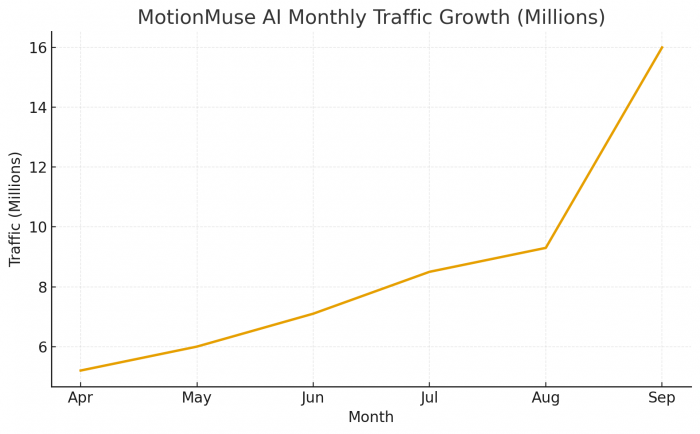
Semrush reports that motionmuse.ai attracted over 16 million visits in September 2025, marking a 72% month-over-month spike. That kind of explosive rise usually signals:
- high user retention
- strong word-of-mouth
- increasing global adoption
- creator dependency for regular content
Such growth patterns often reflect a platform that fits neatly into daily workflows, especially for short-form content where speed matters more than complexity.
The Platform’s Structure: Simple Mode and Expert Mode
MotionMuse AI uses a dual-mode approach that helps both newcomers and more advanced creators.
Simple Mode
- This mode focuses on speed and ease. Users can:
- Enter short prompts or keywords
- Let the AI generate scenes and transitions
- Choose vertical, horizontal, or square formats
- Export videos for social platforms
It’s continuously mentioned in communities like r/KeepWriting and AI tool directories for being quick and beginner-friendly.
Expert Mode
For users wanting more control, Expert Mode includes:
- Script editing
- Asset and background replacement
- Custom transitions
- Character motion adjustments
While not a replacement for professional editors, it’s flexible enough for marketers, educators, and small teams who need consistent output without learning complex software.
This dual workflow is one reason MotionMuse appeals to both casual creators and semi-professional teams.
Motion and Animation Features Add Extra Range
MotionMuse also extends into light motion-animation territory, something emphasized across multiple listings like AI Directories and “There’s An AI For That.”
Key capabilities mentioned across sources include:
- Motion retargeting
- Basic rigging
- Automatic caption generation
- Multilingual subtitle support
- Editable scene animations
These features make MotionMuse effective for animated explainers, educational visuals, or simple character-based content.
It’s not a pro animation suite, but it offers enough functionality for users experimenting with motion graphics without deep technical knowledge.
What User Engagement Data Reveals
Traffic insights show that users aren’t just visiting MotionMuse; they’re actively spending time inside the platform.
According to Semrush:
- Average session time: ~11 minutes
- Pages per session: Nearly 3
- Device split: Primarily mobile
- Top regions: India, Thailand, U.S.
Such engagement levels usually indicate:
- multi-step workflows
- frequent iterations
- users completing full projects in one session
The numbers suggest that MotionMuse is becoming a regular part of creators’ weekly routines rather than a one-time novelty tool.
Community Reactions: Balanced Mix of Enthusiasm and Concerns
Feedback across Reddit, Quora, Facebook groups, and AI communities shows mixed but constructive sentiment.
Positive Themes Consistently Seen
- Fast turnaround time
- Good for social media content
- Easy learning curve
- Subtitles and multilingual captions appreciated
- Templates speed up routine production
Critical Themes That Show Up Regularly
- Some creators worry about template rigidity
- Writers express concerns about AI replacing creative work
- Mixed clarity around subscription policies
- A few users want more documentation or guidance
According to ScamAdviser, motionmuse.ai scores well on trust and safety, with no major warnings or red flags.
The concerns are more about creative ethics and customer clarity, not platform security.
The Platform’s Practical Position in the AI Video Landscape
Based on platform data and user responses, MotionMuse sits in a category between simple template apps and professional-grade editing software.
Its strengths include:
- Quick, structured video generation
- Script-based editing
- Mobile-first design
- Easy onboarding
- Fast adaptation for reels, explainers, ads, and tutorials
Its limitations mostly affect high-end workflows, such as:
- advanced VFX
- cinematic editing
- collaborative multi-editor environments
MotionMuse is optimized for speed and convenience, not for professional-grade visual effects or film-level storytelling.
Who Gets the Most Out of MotionMuse AI
MotionMuse proves most effective for:
- social media creators
- micro-businesses
- marketing teams
- teachers and instructional designers
- beginner animators
- content marketers needing high volume
It becomes less ideal when:
- deep customization is needed
- the project demands shot-by-shot editing
- teams require multi-person collaboration
- filmmakers require advanced effects or compositing
MotionMuse works best when creators want fast production with moderate customization, not high-end cinematic output.
Safety, Transparency, and Trust Signals
MotionMuse’s trust profile is positive across the independent checks available:
- ScamAdviser reports a high-trust score
- Steam listing confirms a public product identity
- Crunchbase records show company details
- YouTube demonstrations reinforce tool legitimacy
Community feedback does mention occasional confusion around customer support or subscription terms, but there are no trends indicating security risks.
The platform appears legitimate, with room to improve user communication and clarity.
Future Outlook: Where the Platform May Be Headed Next
Industry trends point to the next generation of AI video tools merging:
- automated scene creation
- storyboard-to-video pipelines
- richer motion controls
- smarter voice and narration models
- cloud collaboration
- higher-fidelity generation
Given its traffic growth, MotionMuse is well-positioned to tap into these shifts, especially in the short-form and mobile-first segments.
As AI video techniques evolve, MotionMuse’s dual-mode system could expand into deeper customization without abandoning simplicity.
FAQs
Q: What can MotionMuse AI be used for?
MotionMuse AI is commonly used for social videos, explainers, animated clips, and quick marketing content.
Q: Is MotionMuse considered safe?
Based on ScamAdviser and platform listings, MotionMuse appears safe with no notable domain issues.
Q: Who benefits most from using MotionMuse?
Creators, small businesses, teachers, and marketing teams benefit the most due to fast turnaround and customizable templates.
Post Comment
Be the first to post comment!





