The short version
• Real breadth, done simply. Documents, audio, video, YouTube and external connectors (Drive, Notion, Dropbox) all live in one searchable library, and every answer carries clickable source citations.
• Privacy-first and affordable. Files are never used to train models, paid tiers start at $19/mo, and a no-card free plan is enough to kick the tyres.
• Onboarding is uneven. Email sign-up gave me trouble; “Continue with Google” logged me in instantly. Pick the Google route.
• The free YouTube path stalled. It asked for timestamps, then a transcript it couldn’t generate itself, so I had to transcribe the video elsewhere and paste it back in.
• Output was thin and there’s no one-click PDF. Notes came back shallower than I asked for, and an export request returned “paste-ready” text rather than a finished file.
Worth it if… you want one private place to chat across many documents and verify answers by citation, and you’ll mostly feed it files you already have.
Skip it if… your core need is fast, hands-off YouTube-to-notes on the free tier, or polished one-click PDF/Word exports out of the box.

| How this was tested. One real session, free plan, June 2026. I created an account, signed in with Google after the email route failed, pasted a single YouTube tutorial (“Java Programming for Beginners”), and asked for study notes, following each prompt the tool gave me. Feature and price details were then cross-checked against Knowbase’s official pages, and reviewer sentiment against independent AI-tool directories. No affiliation, no paid placement. |
What it is
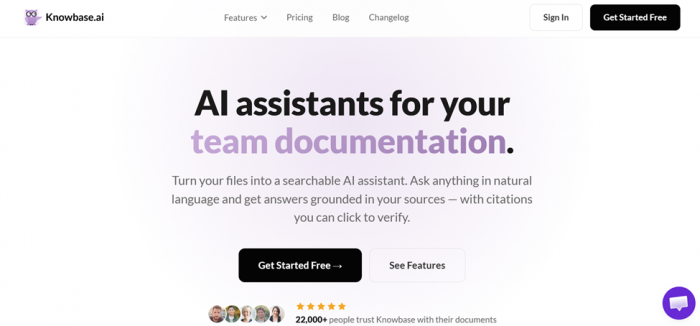
A “Dropbox meets ChatGPT” for your own knowledge.
Knowbase.ai launched in 2023 and now says it’s trusted by more than 22,000 people. The idea is straightforward: you upload your files (or connect Google Drive, Notion and Dropbox) and then talk to all of it in plain language. Because answers are grounded in your own material with numbered citations, you can click any reference and jump to the exact page or timestamp instead of taking the model’s word for it.
Beyond search, it doubles as a builder: you can turn a knowledge base into a shareable AI chatbot, embed it on a website, and collect leads, so it straddles the line between a personal study aid and a lightweight customer-support widget.
Knowbase.ai at a glance
| Detail | What you get |
|---|---|
| Category | AI knowledge base + document chat + transcription |
| Best at | Conversational Q&A across many files, with click-to-verify citations |
| File types | PDF, DOCX, DOC, PPTX, TXT, MD, MP4, MP3, AVI, MOV, WMV, plus YouTube links (max 1 GB per file) |
| Connectors | Google Drive, Notion, Dropbox, Web Search |
| Languages | 50+ for processing and chat |
| Citations | Yes, numbered, click to jump to page/timestamp |
| Privacy | Files not used to train models; private by default; sharing is opt-in and revocable |
| Free plan | Yes, no credit card (50 MB storage · 25 queries · 10 uploads) |
My test, step by step
The plan was simple: take one YouTube tutorial and get clean study notes out of it. Here’s the actual path the tool walked me down: the green stretches were smooth, the amber stretches were friction, and the red stretches stopped me cold.
Getting in: lose the email form, use Google
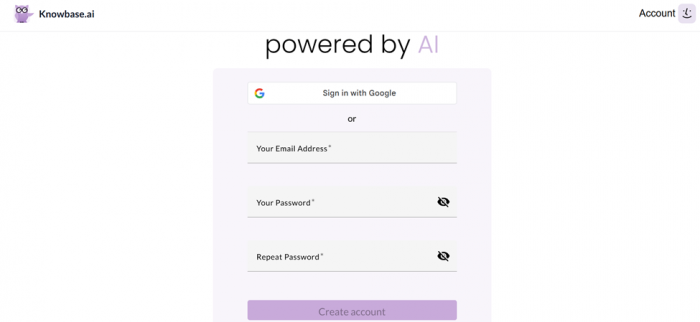
My first stumble came before I’d done anything useful. Creating an account with a normal email simply wasn’t cooperating, and after burning a few minutes I gave up on it. Switching to “Continue with Google” logged me in instantly and dropped me straight into the interface. It’s a small thing, but a frustrating first impression, and an easy fix if you skip the email route entirely.
The main task: YouTube notes, the long way round
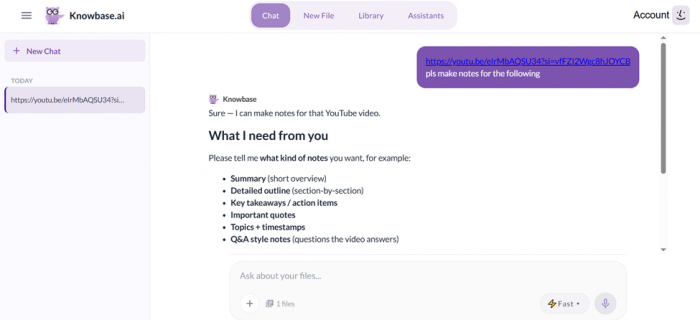
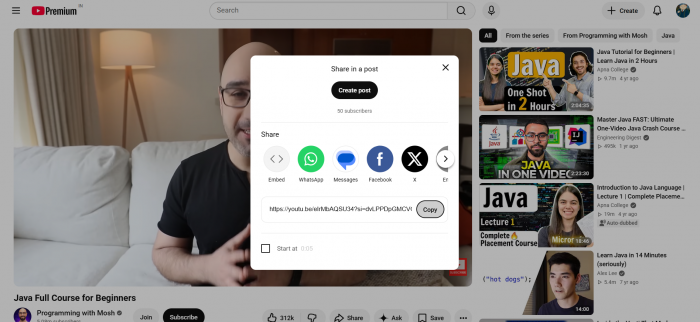
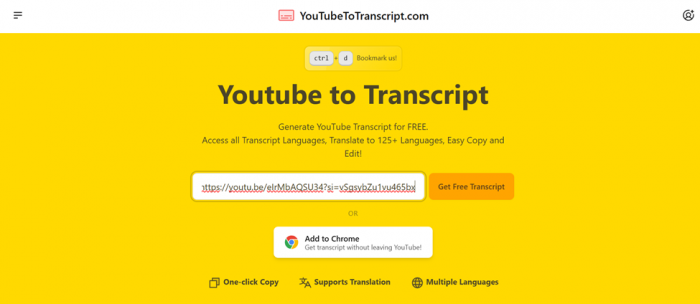
There’s a clear option to paste a YouTube link, which is exactly what I wanted, so I dropped in “Java Programming for Beginners” and asked it to make notes. Instead of just processing the video, it first asked me for timestamps, which I pulled from the video’s description box, and then asked for a transcript. This is where it fell down: it couldn’t produce the transcript itself. For a tool that markets built-in transcription, having to leave, generate a full transcript on a separate website, and paste it back in is the opposite of the “upload anything, ask anything” promise.
The payoff: notes that under-delivered
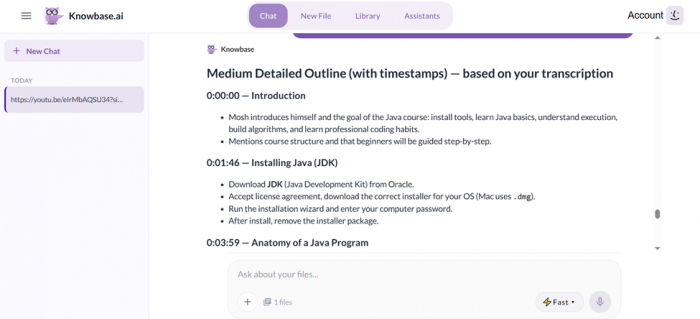
Even after feeding it a complete transcript, the notes came back noticeably less detailed than I’d asked for. They were usable as a skeleton, but “make notes” returned something closer to a short summary than the structured, thorough set I expected from a full tutorial.
The finish line: no real export
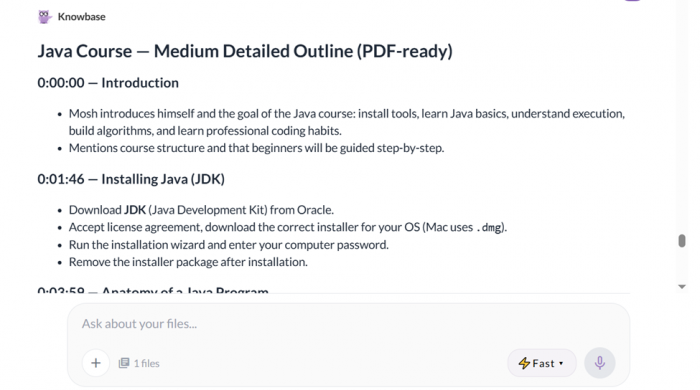
I asked for a PDF to round things off. That was declined too: instead of a downloadable file, I got “PDF-ready” text to copy and paste into a PDF myself. It works, but it’s manual, and it caps off a workflow that asked me to do more of the heavy lifting than I’d planned.
Session log: what happened at each step
| Step | Expected | What actually happened | Read |
|---|---|---|---|
| Sign-up | Quick email registration | Email/account creation wouldn’t work; Google sign-in was instant | Friction |
| Add source | Paste a YouTube URL | Link option present and accepted the video | Smooth |
| Timestamps | Auto-detected | It asked me to provide them; copied from the description | Friction |
| Transcript | Built-in transcription | Couldn’t generate one; needed an external transcriber and paste | Blocked |
| Notes | Detailed, structured notes | Came back thin; more summary than full notes | Friction |
| Export | One-click PDF | Declined; returned paste-ready text instead of a file | Blocked |
What’s in the box
On paper, the feature set is genuinely broad for a tool in this price range. The headline pieces are the cross-library chat and the citation system; the rest fills out the “one place for everything” pitch.
| Feature | What it does | Notes |
|---|---|---|
| Chat-All | Ask one question across your entire library at once | Also searches connected Drive, Notion and the web |
| Source citations | Every answer carries numbered references | Standout: click to jump to the exact page or timestamp |
| Document chat | Q&A over PDFs, Word, slides and more | Page-level citations |
| Transcription + speakers | Turns audio/video into searchable text | Speaker diarization; export subtitles (SRT/VTT); free-tier limits apply (see Pricing) |
| Smart Library + “Nests” | Organise files into collections | Batch uploads supported |
| AI Assistant | Build a chatbot from your docs | Deploy on a site; built-in lead capture |
| Share & Embed | Share files or embed a chat widget | Recipients can chat without an account |
| Thinking Mode | Deeper, multi-step analysis | Paid plans only (Pro and up) |
What it costs in 2026
Pricing is refreshingly readable, with no “contact sales” wall until you genuinely outgrow it. Prices below are the annual-billing rate (Knowbase advertises roughly 20% off versus monthly). The free plan is fine for testing, but its caps are tight.
| Plan | Price | Storage | Queries / mo | Uploads | Transcription | Notable |
|---|---|---|---|---|---|---|
| Free | $0 | 50 MB | 25 | 10 | English YouTube only | 1 assistant, no card |
| Starter | $19/mo | 2 GB | 500 | 100 | 1 hour | 1 connector, 3 shared bots |
| Pro Best value | $49/mo | 25 GB | 2,000 | 500 | 10 hours | Thinking Mode, Web Search, API |
| Team | $99/mo | 100 GB | 5,000 | Unlimited | 30 hours | 3 assistants, priority support |
| The transcription catch that bit me. Knowbase’s small print explains my dead end: on the free plan, YouTube transcription is limited to English videos that already have captions, which don’t count against any quota. If a video’s captions aren’t available to pull, the free tier can’t transcribe it, which is exactly why I was asked to supply a transcript. Paid plans add real transcription minutes (Starter 60, Pro 600, Team 1,800), and independent testers report the underlying engine is accurate on clear audio. The lesson: the seamless “paste a link and chat” experience mostly lives on the paid tiers. |
The reputation, honestly assessed
Here’s something a trustworthy review should say plainly: Knowbase.ai has a thin independent-review footprint. It doesn’t carry a substantial verified profile on the big B2B review sites yet, so most third-party coverage comes from AI-tool directories and editorial roundups rather than crowds of named users. That’s not a red flag on its own (it’s a young, indie product), but it means you should weight a free trial more heavily than star averages.
Where the reviews actually live (checked Jun 2026)
| Platform | Verified listing? | What’s there |
|---|---|---|
| Capterra | Not found | No dedicated Knowbase.ai profile located |
| G2 | Not found | No dedicated Knowbase.ai profile located |
| Trustpilot | Not found | No substantial Knowbase.ai page located |
| AI directories | Editorial | Covered by AppCritica, ToolsForHumans, 10Web and others; generally cautiously positive |
Across the directory and editorial coverage that does exist, the sentiment is consistent, and it lines up with my own test:
| Source | The gist |
|---|---|
| AppCritica | Calls it competent and increasingly polished; praises the breadth, the citation system, and a Whisper-based transcription pipeline that’s accurate on clear audio. Flags the 5,000-query Team ceiling and notes it isn’t built for developer docs or deep helpdesk integrations. |
| ToolsForHumans | Powerful on features, but with a learning curve and meaningful free-plan limits, and observes that the online buzz around it is surprisingly quiet. |
| 10Web / Zegashop | Lists the multi-format support, interactive chat, bulk upload and multilingual transcription as pros; the interface can feel cluttered, and the free plan is limited. |
Pros and cons
What’s good
• Click-to-verify citations on every answer, a genuine trust feature
• Wide input support: docs, slides, audio, video, YouTube, web
• Drive, Notion and Dropbox connectors searched in one chat
• Clear, affordable pricing with a no-card free tier
• Strong privacy stance; your files aren’t used to train models
• 50+ languages for processing and answers
What’s not
• Email sign-up was unreliable; Google login is the safe path
• Free-tier YouTube transcription is conditional and stalled my test
• Notes came back shallower than requested
• No one-click PDF/Word export in my session, just paste-ready text
• Best transcription and depth sit behind paid plans
• Very few independent, verified user reviews to lean on
Should you use it?
| If you are… | Verdict | Why |
|---|---|---|
| A student / researcher with PDFs | Good fit | Citation jumps make verifying claims fast across many papers |
| A team wanting a doc chatbot | Good fit | Build, embed and share without per-seat complexity |
| Privacy-conscious professional | Good fit | No model training on your files; opt-in sharing |
| YouTube-to-notes on the free tier | Be cautious | Transcription is conditional; expect manual steps |
| Needing polished file exports | Look elsewhere | Export was paste-ready text, not a finished document |
| Building developer documentation | Look elsewhere | Purpose-built docs tools fit better |
How I scored it
Weighted toward the things I actually did in the session. Breadth, value and privacy lift the score; the transcription dead end, thin output and missing export pull it down.
| Dimension | Score | Read |
|---|---|---|
| Sign-up | 6.0 / 10 | Friction |
| Feature breadth | 8.0 / 10 | Strong |
| YouTube task | 4.5 / 10 | Weak |
| Note depth | 5.5 / 10 | Mixed |
| Export | 5.0 / 10 | Weak |
| Value | 7.5 / 10 | Strong |
| Privacy | 8.0 / 10 | Strong |
| Overall | 6.4 / 10 | Capable, with caveats |
The verdict
A capable, private knowledge tool, let down by a rough free-tier run.
Knowbase.ai gets the big ideas right. Pulling documents, audio, video, YouTube and external sources into one place and answering with verifiable citations is a real, useful trick, and the privacy posture and pricing are easy to respect. When you feed it files you already own, it does the job it advertises.
But my hands-on session kept hitting friction it shouldn’t have: a flaky email sign-up, a YouTube workflow that couldn’t transcribe on the free tier and sent me to another website, notes thinner than I asked for, and a “PDF” that was really copy-paste text. None of it is fatal (most of it eases on paid plans or with the Google login), yet together it’s enough to hold back a confident recommendation today. Start on the free plan, lead with Google sign-in, and treat it as a document-chat tool first and a YouTube-notes machine second.
Post Comment
Be the first to post comment!





