Goth AI has one core promise: point your camera at a math problem, and it hands back a worked, step-by-step solution. No typing, no setup, just scan and solve.
It reaches a little beyond math, too, with an AI tutor chat for science and other subjects and support for 22 languages. This review takes a careful, user-first look at what it does well, where it falls short, how much it really costs in dollars, what it does with your data, and whether it deserves a place on your phone.
THE QUICK TAKE
Scan a math or homework problem and Goth AI returns step-by-step answers in seconds, with an AI tutor chat across 22 languages. It is free to download but only solves about one to three problems before a paywall, and paid plans run from roughly $6.99 a week to $59.99 a year. On the US App Store it holds 4.6 stars from about 1,500 ratings, with praise for speed but real complaints about the quick paywall and some wrong answers.
The Rise of Scan-to-Solve Apps
Goth AI did not appear in a vacuum. Over the past few years, a whole genre of homework apps has grown up around a single idea: that a phone camera and an AI model can read a problem and explain how to solve it. The App Store is full of them, and it suggests a long list of near-identical alternatives whenever you open one.
That context matters for two reasons. First, it means the basic experience here is familiar rather than groundbreaking, so the things that set an app apart are accuracy, price, polish, and how it treats your data. Second, it means you have real choice, and trying a few before you pay is sensible rather than disloyal.
What Goth AI Actually Is

Goth AI is made by TUME INFINITIES, a Hong Kong developer, and listed on the App Store under the name AI Questions. It launched in April 2024 and has been updated steadily ever since. It is worth noting that it is a separate app from Gauth, a larger homework app that was removed from US app stores in early 2025, since the similar names cause a lot of confusion.
The premise is refreshingly simple. When you are stuck on a problem, you photograph it, and the app shows you how to reach the answer rather than just stating it. The essentials are below.
| Goth AI at a glance | |
| Developer | TUME INFINITIES (Hong Kong), listed as AI Questions |
| Category | Education, rated 4+ |
| Price | Free to download; paid plans from about $6.99 per week |
| Languages | English plus 21 others, including Hindi |
| Size | About 99 MB |
| Works on | iPhone and iPad (iOS or iPadOS 15.6 or later), also Mac and Apple Vision |
| Released | April 2024, updated through early 2026 |
| App Store rating | 4.6 out of 5, from about 1,500 ratings (US) |
What It Does
What you get
Scan & solve Snap a photo | Step-by-step See the working | AI tutor Ask follow-ups | 22 languages Including Hindi |
The headline feature is scanning to solve. You photograph a problem and the app returns an answer within seconds, along with the working that leads to it. It is not limited to tidy equations either, since it is built to handle word problems and geometry as well.
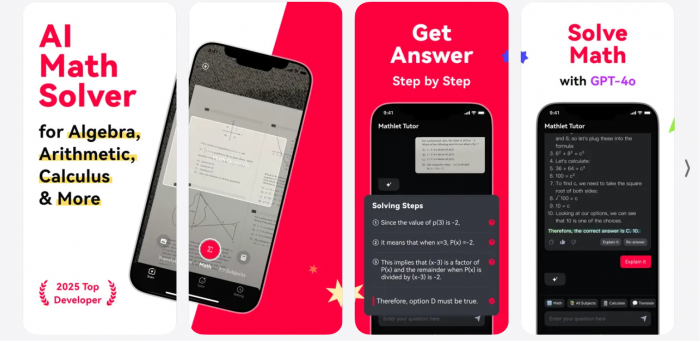
Around that sits an AI tutor chat. Instead of only reading a printed problem, you can type or ask a question and get a guided explanation, and the subject range stretches past math into science and the liberal arts. The developer also describes a personalized tutor that aims to adapt to you over time.
All of this works across the app's 22 languages, so a student can study in the language they think in rather than translating in their head first. For learners who are more comfortable in Hindi or another supported language than in English, that alone can change how much actually sticks.
How It Works in Practice
In day-to-day use the flow is quick and forgiving, and it comes down to four simple moves:
1. Open the camera, frame the problem, and snap a clear, well-lit photo, since blurry or angled shots read worse.
2. Within a few seconds the app returns an answer, with the working laid out in order.
3. Read the steps slowly, so you understand why each one follows from the last.
4. If a step still does not click, ask the chat to explain it in plainer words or with another example.
Using It to Actually Learn
It is worth being honest about the obvious temptation. An app that answers homework can be used to skip the work entirely, and used that way it mostly cheats the person holding the phone, because the practice is the thing that makes the next test easier.
The better approach treats Goth AI as a patient tutor rather than an answer key. A simple routine keeps it on the right side of that line:
• Read the whole solution and check that each step follows from the one before.
• Close the app and redo the problem from memory.
• Ask the chat to explain a step you missed, or to show a second method.
• Verify the answer against your textbook, since it might be wrong.
Use it to learn, not to copy
Scan Photograph the problem | → | Read the steps Follow the worked solution | → | Practice Redo it without the app |
× ÷ =
The Ratings, Honestly
On the US App Store, Goth AI holds 4.6 out of 5 from about 1,500 ratings, which is a real sample rather than a handful. The reviews split along a familiar line. Many users find it quick and helpful, while a steady stream of complaints focus on two things: a free version that stops after only a few problems and then pushes hard for a subscription, and answers that are sometimes wrong.
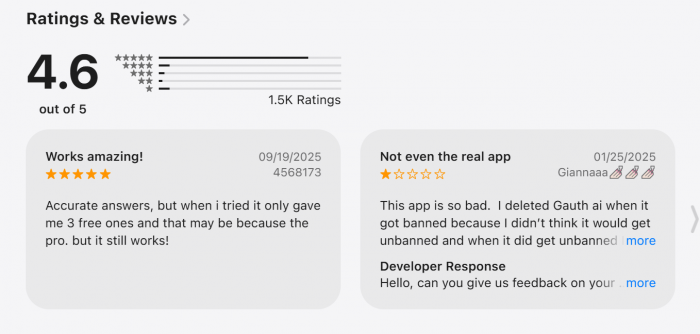
| The rating at a glance | |
| Star rating | 4.6 out of 5 |
| Number of ratings | About 1,500 |
| Where | US App Store |
| Common praise | Fast answers that are usually right for basic problems |
| Common complaint | A paywall after a few free questions, and some wrong answers |
So the headline number is reassuring, but read past it. The most recent written reviews tell you how the current version actually behaves, which matters more than a single average, especially for an app that updates often and leans heavily on its paywall.
Reviews Across Platforms
Goth AI is a consumer phone app, so its reviews live on the app stores rather than on business-software sites. Here is how it lands across the places people tend to check:
| Platform | Rating | What the reviews say |
| Apple App Store | About 4.6 / 5 (~1,500 ratings) | Fast and helpful on simple problems, with complaints about the quick paywall and some wrong answers |
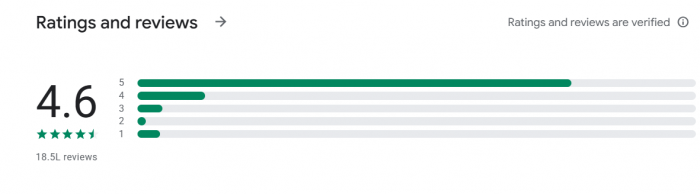
| Google Play | About 4.6 / 5 (~1,400 ratings) | The same themes as the App Store |
| Trustpilot | No real profile | Low Trustpilot scores online belong to Gauth, a different app, not this one |
| G2 | Not listed | G2 reviews business software, not consumer study apps |
| Capterra | Not listed | Capterra reviews business software, not consumer study apps |
The pattern is consistent wherever it is actually rated. The headline score is high, close to 4.6 on both app stores, but the written reviews are uneven. Reactions are strong when a problem is simple and clearly typed, and far more frustrated on messy handwriting, multi-step word problems, and college-level work, with a recurring complaint that the free version runs out after only a few problems. Two cautions are worth repeating: business-software review sites like G2 and Capterra do not cover an app of this kind, and the low Trustpilot score you may find online belongs to Gauth, a separate app, not Goth AI.
What's Good and What to Watch
Weighed up, the picture is a familiar mix of genuine promise and genuine caution:
| Strengths | Watch-outs |
| Fast scan-to-solve with worked steps | Free stops after only a few problems |
| Covers more than just math | Weekly plan is pricey, about $30 a month |
| Built-in AI tutor for follow-ups | Some answers come back wrong |
| 22 languages, including Hindi | Collects and shares data for ads |
| A real 4.6 from about 1,500 ratings | Rated 4+, but its terms require age 18+ |
How It Compares
Because this is such a crowded category, it helps to know how to weigh one solver against another rather than to take any single one on faith. The App Store points you toward similar apps like Answer.AI, Solvely, and Quizard, and if you want a more established and transparent option, Photomath, now owned by Google, is a common pick. When choosing between them, weigh a few practical things:
• Accuracy on the subjects you actually study, since strengths vary by topic.
• The real cost of a useful plan, not just the headline price.
• What the app collects about you, and whether it tracks you.
• How it feels on your own homework before you pay anything.
What It Costs
Goth AI is free to download, but the free version is closer to a demo: reviewers report a paywall after only about one to three problems. The paid plans, in US dollars, look like this. Treat them as a guide rather than a promise, since the monthly rate has been reported as low as $3.99 and may be an introductory price, and pricing can change.
What each plan costs per month
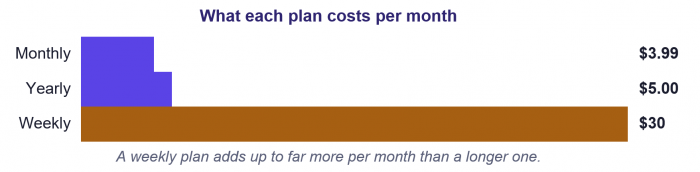
A weekly plan adds up to far more per month than a longer one.
| Plan | Price | Roughly per month |
| Weekly | $6.99 | about $30 |
| Monthly | $3.99 | $3.99 |
| Yearly | $59.99 | about $5 |
As with most apps of this kind, the subscription renews automatically. Apple charges your account within a day of each period ending, and the plan keeps going until you cancel it at least a day before the next renewal, which you do in your iPhone Settings under your name and then Subscriptions, rather than inside the app.
Heads-up: the free version only covers a few problems before it asks you to pay, and a weekly plan at $6.99 works out to roughly $30 a month, far more than a single month or a yearly plan. If you only need it for one assignment crunch, set a reminder and cancel the moment you are done, or that weekly charge quietly becomes a much bigger one.
Your Data
The privacy side deserves a careful read. According to its App Store listing, the app collects the following and uses it for advertising and analytics, with its terms and privacy policy hosted on a third-party service rather than the developer's own site. Independent reviews also note that it collects device identifiers and shares data with a third-party AI service.
| Data collected | How it is used |
| Usage data | Linked to you, used for third-party advertising and analytics, and may track you across other apps and websites |
| Advertising data | Linked to you, used for third-party advertising and analytics |
In plain terms, some of what you do in the app can be linked to you and used to target ads and measure behavior, including beyond the app itself. For a free tool this is a common trade, but it is still a trade, and it is worth weighing against paid apps that promise to collect less.
One flag stands out. The app is rated 4+ in the App Store, yet its own terms require users to be at least 18. Apple also notes the privacy details are not verified, since they come from the developer. Both are reasons for a parent to think twice before handing this to a young child, and to review your device's tracking and privacy settings first.
Who Should Use It
Who actually benefits depends a lot on how you plan to use it and who you are:
| Who | How it fits |
| A student who is stuck | A tutor available at midnight, as long as they read the steps and then practice without it |
| A parent helping at home | Handy to refresh a method, but it is rated 4+ while its terms require 18+ and it shares data, so think twice for a young child |
| An adult or returning learner | Flexible and low pressure, with multi-subject help across 22 languages |
| Anyone hoping to skip the work | A poor fit, since answers can be wrong and very little is actually learned |
The short version is that the value lives entirely in the studying it supports, not the studying it replaces. Lean on it to understand a method and it can genuinely help. Lean on it to copy and it gives you answers that are not always right and very little that lasts.
× ÷ =
The Verdict
Goth AI does the core job of a modern homework helper: point your camera, get a worked solution, and ask a follow-up when a step does not land. The multi-subject coverage and the 22 languages are real strengths, and a 4.6 rating from about 1,500 reviewers says plenty of people get value from it. The catches are just as real. The free version barely lets you try it, the weekly plan is an expensive trap at roughly $30 a month, some answers come back wrong, and the data practices lean on advertising and tracking, with a 4+ label that sits oddly against its own 18+ terms. The sensible path is to scan a few problems on the free tier, judge the answers honestly, and compare it against a more transparent option like Photomath before you pay. Do that, lean on it to learn rather than to copy, and always verify the math yourself, and it can be a useful study companion rather than just another solver.
Post Comment
Be the first to post comment!





