AI image tools are fun… until you realize you’re just clicking “Generate” 20 times
There are two phases of using AI image tools.
Phase one: “This is insane.”
Phase two: “Why does the hand have six fingers?”
Frosting AI sits right in between those two phases.
It promises speed, simplicity, and instant results without the complexity of tools like Midjourney or Leonardo. And to be fair, it delivers on some of that. But once you start exploring deeper, things get interesting. Some parts feel genuinely impressive, while others feel restricted or slightly unfinished.
This is not a feature list. This is what actually happens when Frosting AI is used properly.
First Experience: Smooth Login, Slight Confusion, Then a Social Feed You Didn’t Expect
The onboarding starts clean. Login options include Google, Apple, and email, and email login includes OTP verification. That small detail makes the platform feel more secure than many similar tools.

After logging in, the system asks for a username and pushes you to follow profiles. This is where the experience shifts from a typical tool to something else entirely.
Instead of landing directly on a generator, you are dropped into a feed. It looks like a mix between Instagram reels and Reddit threads, filled with AI-generated images.

What makes it interesting is that every image includes its prompt. You are not just scrolling through visuals. You are learning how those visuals were created.
This makes Frosting AI feel like both a tool and a community at the same time.
Multiverse Section: Where Things Start Feeling Like Reddit Meets AI
The “Multiverse” section is essentially a collection of channels where users post images based on themes or interests.
Each channel works like a niche community. Users share outputs, reuse prompts, and even chat with each other. There is also a chat system built in, which makes the platform feel more interactive than most AI tools.
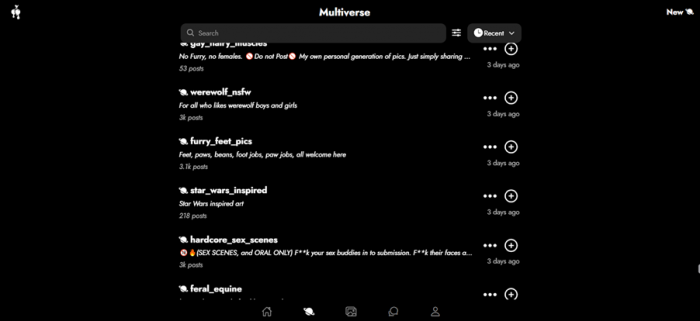
This is one of Frosting AI’s most unique aspects. It is not just about generating images. It is about discovering, copying, remixing, and interacting.
The downside is distraction. Instead of focusing purely on creation, the platform encourages browsing. For some users, this is inspiration. For others, it breaks workflow.
Image Generation Test: Where Frosting AI Actually Delivers
A structured prompt was used:
“adult_woman, beautiful_female, curvy_body, slim_waist, wide_hips, large_breasts,
long_hair, messy_hair, soft_waves, bedroom_eyes, sultry_expression, parted_lips,
looking_at_viewer, teasing_pose, leaning_forward, arched_back,
revealing_outfit, lace_lingerie, sheer_fabric, off_shoulder, visible_cleavage, bare_thighs,
smooth_skin, glowing_skin, soft_shadows,
cinematic_lighting, warm_lighting, depth_of_field, high_detail, masterpiece, 8k,
bedroom_setting, dim_lighting, intimate_atmosphere”
Negative prompt:
“worst quality, blurry, bad_hands…”
The result was strong.

The AI handled lighting, skin texture, and composition well. The cinematic feel came through clearly, and most elements of the prompt were reflected in the output.
But it was not perfect.
Some prompt details were interpreted loosely, and small inconsistencies appeared. This is expected with Stable Diffusion-based systems.
The important part is this: Frosting AI produces visually appealing outputs quickly, even if it does not follow prompts perfectly.
Testing Breakdown: What Works and What Doesn’t
| Feature Tested | Input Type | Result | Verdict |
| Login & Setup | OTP email login | Smooth and secure | Strong start |
| Social Feed | Prompt-based gallery | Highly engaging | Unique feature |
| Image Generation | Structured prompt | Detailed output, partial accuracy | Reliable |
| Video Generation | Prompt input | Blocked (no credits) | Frustrating |
| Character Tools | Prompt-based | Locked behind paywall | Limited |
Output Quality: Good Enough to Use, Not Good Enough to Trust Fully
Frosting AI performs best when expectations are aligned with its strengths.
Prompt interpretation is decent for structured inputs but weak for complex storytelling prompts. The more detailed and layered the prompt becomes, the more the output starts drifting.
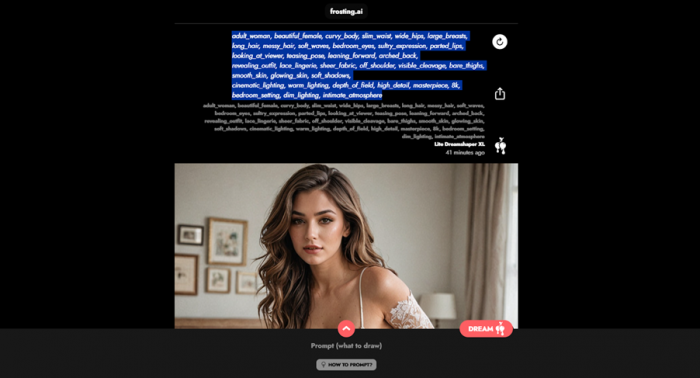
Visually, the tool performs well. Lighting, colors, and composition are strong, especially for quick-use visuals like social media posts or blog graphics.
However, consistency remains an issue. Each generation feels slightly independent. This makes it useful for ideation but unreliable for projects that require uniform outputs.
Pricing Reality: Free Enough to Try, Paid Enough to Frustrate
| Plan | Price | Access | Reality |
| Free | $0 | Limited credits | Good for testing |
| Paid | Varies | More credits + features | Core features locked |
The biggest issue is not the price itself. It is the restriction.
Video generation and advanced features are visible but not usable without upgrading. This creates a “preview without access” experience, which can feel limiting.
Overall Sentiment (Interpreted)
Across platforms, the pattern is consistent.
Frosting AI is appreciated for how quickly it produces usable visuals. It removes friction and makes AI image generation accessible.
At the same time, it is not trusted for precision-heavy workflows. When expectations shift from casual creation to professional output, limitations become visible.
The tool is liked. It is used frequently. But it is not relied upon for critical creative work.
Where Frosting AI Works Best
- Social media visuals
- Blog graphics
- Quick creative ideas
- Fast iteration workflows
Where It Falls Short
- Complex prompt accuracy
- Feature accessibility in free tier
- Consistency across outputs
- Professional-grade design work
Final Verdict: Fast, Fun, and Slightly Limited
Frosting AI does exactly what it claims.
It makes AI image generation fast and easy.
The platform removes friction, adds a social layer, and delivers visually appealing outputs without requiring expertise. For casual creators and marketers, this is more than enough.
But the experience has limits.
Important features are locked, prompt accuracy is not perfect, and consistency is not strong enough for high-end workflows.
Frosting AI is not built for perfection. It is built for speed.
And if speed is what you need, it does the job well.
Post Comment
Be the first to post comment!





