AI video generators promise speed, automation, and cinematic results without the learning curve of traditional editing software. That’s exactly what caught my attention when I first tried Deevid.ai. The idea of converting simple text or still images into dynamic videos within minutes sounded like a major productivity boost for creators.
After spending time with the platform myself and comparing my results with real feedback from review sites and creator communities I found that Deevid.ai is both exciting and inconsistent. It can deliver impressive outputs in seconds, but it can also consume credits quickly when things don’t go as planned.
This in-depth review blends practical usage, pricing insights, feature analysis, and real user sentiment to help you decide whether it’s worth your time and budget.
What Is Deevid.ai?
Deevid.ai is an AI-powered video creation platform built to automate one of the most time-consuming parts of digital content production, turning ideas into visually engaging videos. Instead of working on a traditional timeline with layers, keyframes, transitions, and manual edits, you interact with Deevid.ai using prompts, uploads, and style selections. The system then interprets your input and generates a finished video for you.
At its core, the platform is designed around a simple shift in workflow: you describe what you want, and the AI handles how it should look and move.
First Impressions: Fast, Clean, and Beginner-Friendly
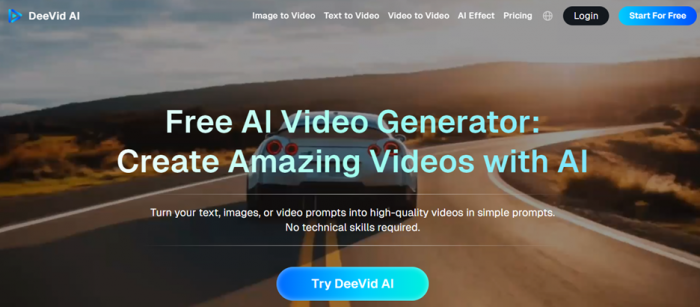
The very first interaction with Deevid.ai gives the feeling that the platform has been designed for speed rather than complexity. From the moment you log in, there is no overwhelming dashboard packed with timelines, layers, or technical panels. Instead, the layout is minimal, visually modern, and clearly built for people who may have never touched traditional video editing software.
What stands out immediately is how quickly you understand where to start. The main creation area is centered around a simple input flow, enter your idea, choose a style, and generate. There’s no need to “learn the tool” before using it. That alone removes the hesitation many beginners feel when opening professional editing platforms for the first time.
The interface feels responsive and lightweight. Buttons are clearly labeled, navigation is intuitive, and the overall experience is closer to using a creative web app than operating complex production software. Even the terminology avoids technical jargon, which makes the process feel accessible rather than intimidating.
The Speed of the First Video
Creating the first video is surprisingly fast. After entering a short prompt and selecting a visual style, the generation process begins almost immediately. There is no long setup phase, no need to configure project settings, and no requirement to import assets manually.
When the first result appears, the most noticeable thing is the motion. The transitions are smooth, the scenes are already arranged, and the output feels like something that would normally take real editing time to assemble. For a new user, this moment is important; it delivers instant proof that the system works.
This quick turnaround creates a strong early impression because it turns the platform into something you experience rather than something you learn. Within minutes, you go from idea to finished visual content.
Designed for Non-Editors
One of the biggest strengths in the first impression phase is how clearly the platform is aimed at people who don’t want to deal with technical workflows.
There is:
- no timeline to manage
- no manual keyframe animation
- no complex export settings
Instead of constructing a video piece by piece, you’re guiding the AI and reviewing results. For beginners, this feels empowering. For experienced editors, it feels like a completely different creative process less about precision and more about direction.
Visual Appeal and Style
Another reason the initial experience feels positive is the visual quality of simple outputs. For short prompts, the AI often produces:
- cohesive scene transitions
- cinematic camera movement
- modern visual styles
This makes even basic content look polished without any manual effort. It creates the impression that high-quality video production is suddenly much easier than expected. That early success is important because it builds confidence and encourages experimentation.
Where the First Friction Appears
The smooth experience continues as long as the prompts remain simple and direct. The moment you move toward something more detailed or more specific, the behaviour of the platform begins to change.
You start noticing that:
- the AI interprets some scenes differently than intended
- certain elements are skipped or simplified
- occasional renders fail while still using credits
This doesn’t completely break the experience, but it shifts your mindset. The platform stops feeling like a magic one-click solution and starts feeling like a system that requires strategy especially in how you write prompts and how often you regenerate outputs.
The Credit Awareness Moment
Another key part of the first impression is when you realize that every generation consumes credits.
At the beginning, while testing simple ideas, this doesn’t feel significant. But as soon as you begin refining outputs trying again for better alignment or improved visuals—you become more conscious of how quickly those credits are used.
That awareness changes how you interact with the platform. You move from casual experimentation to more planned creation.
Overall First Experience
As a first-time user, the strongest impression is that Deevid.ai removes the traditional barrier between an idea and a video. You don’t spend time learning tools—you spend time generating results.
It feels:
- fast
- visually polished
- welcoming to beginners
- creatively exciting
At the same time, the early experience also hints at the platform’s current limitations. The more complex your expectations become, the more you realize that consistency is still evolving. So the first impression is genuinely positive but it also teaches you very quickly that success with the platform depends on how you use it.
Core Features: Where Deevid.ai Performs Well (and Where It Doesn’t)
1. Text-to-Video Generation: Fast Idea-to-Visual Workflow, but Not Always Precise
The most defining feature of Deevid.ai is its ability to convert written prompts into complete video sequences. This dramatically reduces the time between having an idea and seeing a visual output. For short scripts, simple concepts, and social media content, the results can look surprisingly polished with smooth transitions and a coherent visual flow.
However, as the level of detail in your prompt increases, the accuracy of the output can become inconsistent. The AI may capture the general mood but miss specific elements of your narrative. This makes the feature excellent for quick drafts and concept visualization, but less dependable for structured storytelling or projects that require scene-by-scene precision.
2. Image-to-Video Animation: Visually Engaging, but Limited in Control
Animating still images is one of the most enjoyable parts of the platform. Uploading a static photo and watching it turn into a cinematic clip takes only seconds and requires no technical skill. This is particularly useful for creative posts, memory-based content, and stylized visuals where motion adds emotional impact.
The limitation lies in realism and customization. Facial movements and micro-expressions can sometimes appear slightly artificial, and there is very little control over how the motion behaves. You receive a generated result rather than shaping the animation yourself, which means it works best for expressive content rather than highly natural or detail-sensitive visuals.
3. Video-to-Video Transformation: Quick Restyling, but Basic Depth
This feature allows you to upload existing footage and apply a new visual style or atmosphere. It’s a fast way to repurpose content for different platforms or give older clips a fresh identity without re-editing them manually. For creators who produce content in volume, this can save a significant amount of time.
That said, the transformation is more about applying a visual treatment than performing a true re-edit. The creative range is narrower than what you would get in a full editing suite, and the lack of manual fine-tuning means you are dependent on the AI’s interpretation of the style.
4. Templates and Pre-Built Structures: Beginner-Friendly, but Sometimes Generic
Templates help remove the need to think about layout, timing, and scene structure. This is especially useful for users who want to create promotional videos, announcements, or short-form content quickly. Even without design experience, the output looks organized and platform-ready.
The drawback is that heavy reliance on templates can make videos feel similar to one another. While they speed up production, they also reduce the sense of uniqueness unless you combine them with strong prompts and creative inputs.
5. Automated Scene Creation and Transitions: Major Time Saver, but Less Flexible
One of the biggest advantages of the platform is that it automatically decides how scenes should flow, how the camera should move, and how the overall pacing should feel. This eliminates the most technical and time-consuming parts of traditional editing.
The trade-off is the lack of micro-level control. You cannot adjust individual frames, reposition elements with precision, or fine-tune timing in small increments. If something feels slightly off, the only real option is to regenerate rather than edit.
6. Credit-Based Generation System: Encourages Efficiency, but Limits Experimentation
All core features are tied to the credit system, which means every generation has a measurable cost. This encourages careful planning and structured prompting, which can actually improve workflow efficiency over time.
On the other hand, it reduces the freedom to experiment endlessly. Multiple attempts to refine a result can quickly consume credits, making the platform feel less flexible for users who are used to unlimited revisions in traditional software.
7. Overall Creative Experience: Speed and Accessibility vs Precision and Consistency
Taken together, the features make Deevid.ai extremely powerful for rapid content creation. You can move from concept to finished visual in minutes without any editing background.
Where it still evolves is in consistency and detailed control. The platform delivers its best results when used for quick, high-impact visuals rather than projects that demand exact alignment with a complex creative vision.
Real User Sentiment: What People Are Actually Saying
Looking at Deevid.ai’s official feature list tells only part of the story. The real clarity comes from independent review platforms and community discussions, where users talk about what happens after the subscription is paid and the credits start running.
Overall Rating Trend
On Trustpilot, Deevid.ai holds a low average rating, with a large portion of reviews sitting in the 1-star category, which immediately signals a gap between marketing expectations and real-world experience.
You can explore the live review distribution here:
https://www.trustpilot.com/review/deevid.ai

What stands out is not just the rating itself, but the pattern in the feedback; the same issues appear again and again across different users, which makes the sentiment more meaningful.
When Users Are Happy with Deevid.ai
Even among the critical reviews, there is a consistent theme: people like the idea and the ease of use.
Many first-time users describe their initial experience as surprisingly smooth. They mention that generating a short clip from a simple prompt takes only a few minutes and doesn’t require any editing knowledge. That makes the platform appealing to beginners and casual creators who just want to test AI video without learning traditional software.
Some reviewers also say the free credits are genuinely useful for experimentation, because they allow you to produce a rough mock-up before committing to a paid plan. For quick social content, mood visuals, or concept testing, a few users feel the tool delivers results that are “good enough” for early drafts.
Another positive point that appears in multiple reviews is that the interface feels modern and unintimidating, especially compared to complex timeline-based editors.
So the positive sentiment is not fake, it's just very use-case dependent. People who keep their expectations small and their prompts simple tend to be more satisfied.
The Most Common Frustrations
Where the sentiment turns negative is in the transition from experimentation to serious use.
1. Output Doesn’t Always Follow the Prompt
A recurring complaint is that the generated videos don’t reliably match the input text, especially when the prompt becomes more detailed.
Users describe situations where:
- the visuals are unrelated to the script
- captions appear in the wrong language
- scenes feel random rather than story-driven
This inconsistency makes it difficult for creators who need predictable results for client work or scheduled content.
You can see community discussions around AI video reliability here:
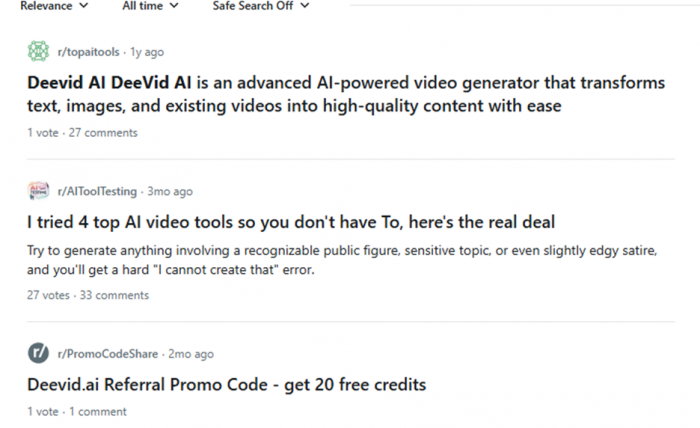

On Reddit, AI creators often compare tools based on how controllable the output is, and Deevid.ai is frequently described as more “experimental” than “production-ready.”
2. Credits Disappear Faster Than Expected
The second major theme, possibly the biggest one is the credit consumption model.
Many users say they didn’t initially realize how quickly credits would be used when:
- regenerating a scene
- fixing mistakes
- trying multiple variations to get usable output
Because there is no guarantee that a generation will be correct, people feel they are paying for failed attempts, not just successful videos.
This creates a strong emotional reaction in reviews. It’s not only about cost it’s about the lack of control over the cost.
3. Billing and Cancellation Complaints
Another cluster of negative reviews revolves around subscription management.
Some users claim they:
- were charged after attempting to cancel
- struggled to get refunds
- received slow responses from support
Whether these cases are individual misunderstandings or systemic issues, they heavily influence public perception because billing problems tend to generate the strongest negative feedback.
4. Customer Support Feels Inconsistent
Support quality appears to be uneven rather than universally bad.
A small number of users mention getting helpful responses, but a much larger group says:
- replies took too long
- their issue wasn’t resolved
- they received generic answers
For a credit-based platform, where every failed render costs money, slow support becomes a major trust factor.
Trust Signals and Website Transparency
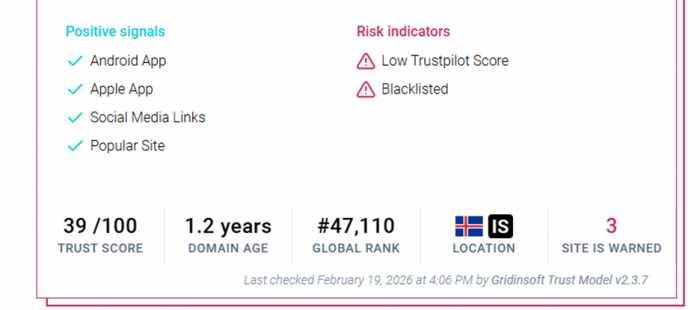
Some third-party site-analysis tools give Deevid.ai moderate to low trust scores, mainly due to:
- limited company transparency
- mixed user reviews
- relatively new domain history
These scores don’t prove anything fraudulent, but they do influence how cautious new users feel before subscribing.
Example of such an automated analysis:
The Real Pattern Behind the Mixed Sentiment
When you step back and look at all the reviews together, a clear pattern emerges:
People love the concept of Deevid.ai.
They enjoy the first successful result.
But frustration begins when they try to use it consistently for real work.
In other words, the platform is often described as:
- exciting for experimentation
- risky for production
That doesn’t make it useless, it just defines the type of user who will benefit from it.
Final Sentiment Snapshot
If we translate the overall feedback into plain language:
- Casual creators → often satisfied
- AI hobbyists → find it fun and inspiring
- Professionals → struggle with reliability and cost control
And that perfectly explains why the public opinion is so divided. Deevid.ai isn’t universally bad, it's highly expectation-sensitive.
Deevid.ai vs Other AI Video Tools (2026)
| Tool | Best For | Key Strength |
| Synthesia | Corporate & training videos | AI avatars + multilingual support |
| InVideo | Social media content | Huge template library |
| Pictory | Repurposing long content | Blog/script → video automation |
| Canva Video | Design-first creators | Drag-and-drop + branding tools |
| D-ID | Budget experimentation | Affordable entry plans |
| Veed.io | Editors who want AI help | Strong manual control |
Quick Recommendations
- Fast AI social clips: Deevid.ai / InVideo
- Professional avatar videos: Synthesia
- Editing + AI balance: Veed.io / Canva
- Low-budget testing: D-ID / Pictory
Who Should Use Deevid.ai?
| User Type | Why It Works for Them | Primary Use Case | Overall Fit |
| Short-form social media creators | Need fast, visually engaging content and can tolerate minor inconsistencies in exchange for speed | Instagram Reels, YouTube Shorts, TikTok videos, quick trend content | Excellent |
| AI enthusiasts and experimental creators | Enjoy testing new creative tools and exploring different visual styles rather than demanding perfect control | Concept videos, creative experiments, idea visualization | Excellent |
| Beginners with no editing background | The prompt-based workflow removes the technical learning curve of traditional editing software | First video projects, personal storytelling, simple visual content | Very strong |
| Solo creators with limited production time | Can convert ideas into videos within minutes without managing timelines, layers, or complex exports | YouTube visuals, quick marketing creatives, rapid content production | Very strong |
| Marketers creating draft or mock-up videos | Useful for producing early-stage campaign visuals before investing in full production | Ad concepts, pitch presentations, campaign previews | Good for pre-production |
| Small businesses handling their own content | Allows regular content creation without hiring a full-time editor for every video | Product highlights, announcements, promotional snippets | Good with planned usage |
| Educators making micro-learning content | Works well for short, focused explainers where speed matters more than cinematic perfection | Visual summaries, bite-sized lessons, educational social content | Good for short formats |
| Agencies delivering client-ready projects | Regeneration costs and output variability make it difficult to maintain strict brand and quality consistency | Client campaigns, high-precision marketing videos | Limited suitability |
| Professional video editors and filmmakers | Lack of frame-level control and manual fine-tuning reduces creative flexibility | High-end production, detailed storytelling, cinematic work | Not ideal |
| Long-form content creators | Credit consumption increases significantly for longer, structured videos that require multiple refinements | Documentaries, long YouTube videos, in-depth branded content | Weak fit |
| Corporate teams needing consistent branded output | Repeatable structure, exact visual alignment, and predictable results are essential in this environment | Training modules, internal communication videos, corporate presentations | Limited suitability |
My Final Verdict
Using Deevid.ai feels like collaborating with a creative assistant that sometimes produces brilliant ideas and other times misses the brief.
When it works, the speed and visual quality are genuinely impressive.
When it doesn’t, you lose both time and credits.
It’s a platform with strong potential, but it still feels like it’s maturing.
Final Thoughts
Deevid.ai is best approached as an experimental, fast-draft AI video tool, not a replacement for professional editing software.
If you:
- plan prompts carefully
- monitor credit usage
- accept occasional unpredictability
you’ll likely enjoy the experience. If you expect consistent, production-ready output every time, you may find better value in hybrid AI editors with more manual control.
Post Comment
Be the first to post comment!





