On This Page
Modern internet users are tired. Not emotionally, but technically exhausted from fighting popup jungles, fake download buttons, and “free” tools that behave like digital pickpockets. The need is simple: grab a video or audio file quickly, safely, and without installing questionable software.
That is exactly where Cobalt Tools positions itself. It promises a paste-and-download experience with no ads, no tracking, and no nonsense. Sounds bold. So this walkthrough puts the tool under a proper real-world lens.
Why People Are Using Cobalt Tools
Most downloader websites still follow an outdated formula filled with aggressive popups, fake download buttons, forced redirects, and painfully slow processing pages. Instead of making downloads simple, many of them create a frustrating and sometimes risky experience for users.
It takes a very different approach. The platform is designed as a lightweight, minimalist web app focused on speed, privacy, and ease of use. It avoids shady installers, removes ad clutter entirely, skips mandatory account creation, and keeps everything browser-based. The concept is refreshing because modern users increasingly want fast, clean tools that work instantly without unnecessary distractions or privacy concerns .
What Cobalt Tools Actually Does (Reality Check)
At its core, Cobalt Tools is a link-based media downloader. Paste a supported media URL and the tool fetches the underlying video, audio, image, or GIF file for direct download.
It does not:
- edit videos
- summarize content
- bypass DRM
- access private media
Its job is singular and very focused.
What works well
The tool handles:
- public videos
- audio extraction
- high-resolution media
- multi-platform links
Where expectations must stay realistic
At the same time, expectations still need to remain realistic. The platform does not bypass private videos, login-protected content, or DRM-restricted services such as Netflix and Spotify. Instead of making exaggerated promises, it stays clear about its limitations and focuses on straightforward browser-based downloading. That honesty works in its favor because many similar tools rely on vague claims and misleading messaging, while this approach feels far more transparent and grounded in what the service can actually deliver.
Supported Platforms at a Glance
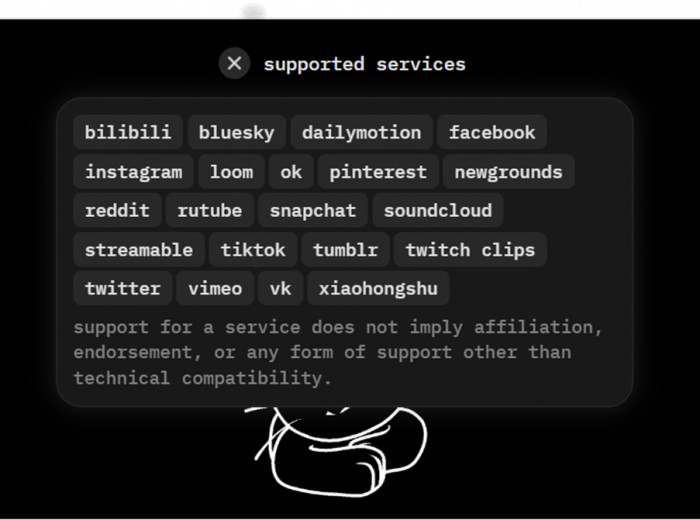
The image below shows the broad ecosystem Cobalt currently supports.
Key takeaway
Cobalt works across a surprisingly wide range of platforms including:
- Twitter/X
- TikTok
- SoundCloud
- Vimeo
- Twitch Clips
⚠️ Important note: YouTube is currently not supported on the official instance due to platform blocking. Community or self-hosted instances may still work.
Step-by-Step Walkthrough: How Cobalt Tools Works
The workflow is refreshingly simple. No maze. No “wait 15 seconds.” No suspicious green buttons.
Step One: Copy the Source Link
Start at the content source.
For example:
- open the tweet containing the video
- click Share
- copy the tweet URL
Pro tip: Always use the clean, direct link. Weird redirect links sometimes confuse any downloader.
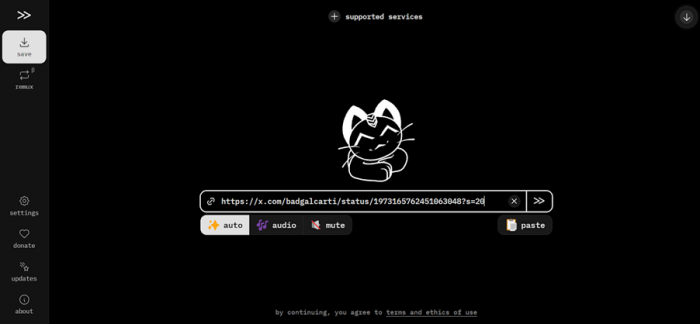
Step Two: Paste Into Cobalt
Go to:
Paste the link into the input field and press Enter.
What happens next:
- Cobalt detects the platform
- fetches media streams
- prepares download options
Processing usually takes just a few seconds.
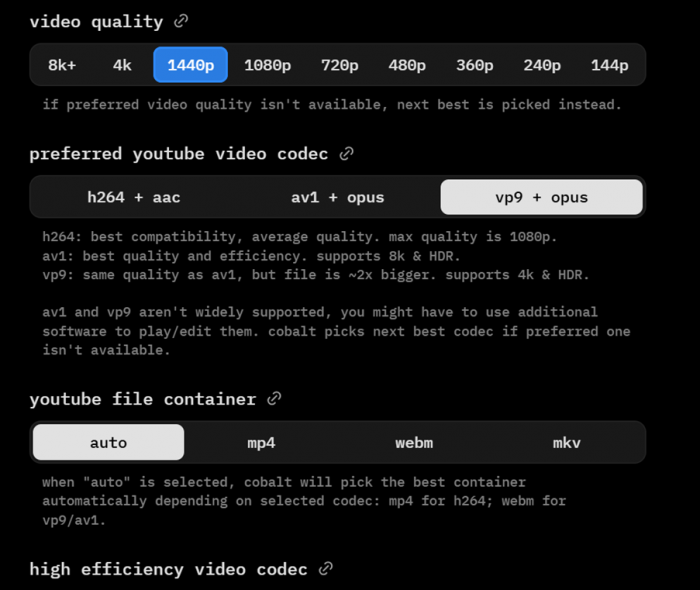
Step Three: Choose Output Format
Once processed, Cobalt presents format choices.
Typical options include:
| Format | Best For | Compatibility |
| MP4 (H.264) | universal playback | very high |
| WebM (VP9/AV1) | high-res video | medium |
| MP3 | audio extraction | very high |
Choose based on your use case, not just the biggest number.
Step Four: Download the File
Click the desired format and the download begins.
What to expect:
- browser save prompt appears
- file downloads directly
- no ads interrupt the process
Clean. Fast. Suspiciously drama-free.
Real Test: Downloading a Twitter Video
To see how the tool behaves in the wild, a real Twitter/X video download test was performed.
Observed workflow
The process went like this:
- tweet link copied
- pasted into Cobalt
- format selected
- download started almost instantly
No login prompts. No paywalls. No redirect circus.
Performance notes
- processing was quick
- file quality matched the original
- audio remained in sync
- filename was reasonably clean
For Twitter downloads specifically, Cobalt feels extremely polished.
Visual Walkthrough Section

Copying videos link from X
Putting it on cobalt tools website
Video Format and resolution selection

Click on the Download button

and you're done
Speed and Performance Observations
Cobalt is fast largely because it removes the usual friction.
Real-world behavior
For short videos:
Shorter videos processed very quickly, with downloads starting almost instantly after the link was pasted. The overall experience felt smooth and responsive, especially compared to many downloader sites that intentionally slow users down behind queues or delays. Longer videos naturally took more time to process, and final download speeds depended largely on the user’s internet connection. Even then, no obvious artificial throttling or forced waiting periods were observed during testing, which helped the platform feel noticeably faster and less frustrating than many alternatives in the category.
Why it feels faster than competitors
Because it avoids:
- ad countdown timers
- fake intermediate pages
- bandwidth throttling tricks
The result is a noticeably cleaner experience.
File Quality and Output Reliability
One of the biggest concerns with online downloaders is output quality. Many tools quietly compress files.
Cobalt generally does not.
What was observed
During testing, the downloaded videos generally matched the quality of the original source, with audio staying properly synced throughout playback. In most cases, there was no obvious forced recompression that noticeably degraded clarity or introduced artifacts. High-resolution formats were also available when supported by the source platform, helping the downloads retain a cleaner and more usable final output.
When conversion is requested (like MP3), standard FFmpeg processing is used, which is reliable.
Known Limitations and Edge Cases
Even good tools have boundaries.
Situations where Cobalt may fail
- private content
- age-restricted YouTube videos
- DRM platforms
- region-locked media
- extremely long videos on weak devices
Special note on YouTube
At the time of testing:
- official Cobalt instance does not support YouTube
- this is due to active blocking by YouTube
- community instances may still function
This is important to state clearly in any honest review.
Privacy, Ads, and Tracking Reality Check
This is where the platform quietly separates itself from much of the modern internet. During testing, the experience felt far more like a clean utility than a growth-focused marketing funnel. There were no banner ads cluttering the interface, no popup traps interrupting navigation, and no forced signup walls slowing access. The site also avoided the aggressive cookie prompts and visible tracking patterns commonly seen on downloader websites. That simplicity changes the overall experience because users can focus entirely on the task instead of constantly dealing with distractions, redirects, or unnecessary friction.
Optional privacy feature
Cobalt also offers forced tunneling, which routes downloads through its server for additional privacy. Most users will never need to touch this, but privacy enthusiasts will appreciate it.
Who Should Use Cobalt Tools
Good fit
- content creators grabbing clips
- social media editors
- students saving lectures
- offline viewers
- privacy-focused users
Less ideal
- bulk archival workflows
- private content access needs
- fully automated pipelines
Should You Actually Use Cobalt Tools?
Cobalt Tools delivers something rare on today’s internet: a downloader that behaves like it respects the user’s time and intelligence.
The biggest strengths become obvious almost immediately during use. The interface is extremely clean and lightweight, making the entire experience feel faster and less distracting than most downloader websites. Processing speeds are consistently quick, supported by broad compatibility across multiple platforms without adding unnecessary complexity. The platform also stands out for its strong privacy-focused approach, avoiding the aggressive ads, trackers, and clutter that dominate much of this category online.
The Twitter download test in particular showed how frictionless the experience can be when the platform is fully supported.
However, expectations should stay grounded. The current lack of YouTube support on the official instance is a meaningful limitation for many users. Additionally, this is still a focused utility, not an all-in-one media suite.
Overall, for supported platforms, Cobalt Tools feels less like another shady downloader and more like what online utilities should have evolved into years ago. For quick, safe media downloads without the usual internet chaos, it earns a strong, cautious recommendation.
Post Comment
Be the first to post comment!





