Img2Go is a web-based image editing and conversion platform designed to help users perform common image-related tasks directly in a browser. According to its official website, Img2Go provides tools for editing images, converting file formats, compressing files, and extracting text using OCR technology. The platform supports a wide range of image formats and is accessible without installing desktop software, making it suitable for quick
Subscription plans offer up to 45% savings compared to Pay As You Go.
| Credits | Cost (Monthly) | Cost (Yearly) | Price per Credit | Features |
|---|---|---|---|---|
| 480 | $6.42 USD | $4.62 USD (Save 28%) | $0.0134 | Up to 480 tasks |
| 2800 | $23.17 USD | $16.68 USD (Save 28%) | $0.0083 | Up to 2800 tasks, 350 AI-supported tasks |
| 5100 | $39.17 USD | $28.20 USD (Save 28%) | $0.0077 | Up to 5100 tasks |
Broad tool and format support: Img2Go offers a wide array of editing, conversion, and enhancement tools in one place, including compression, cropping, resizing, and watermarking. It supports over 250 file formats, encompassing common raster and vector types as well as documents like PDF.
Occasional performance issues: The platform can sometimes work slowly, which affects the user experience.
Lifetime Free
Yes
Proprietary
Features
Features
Features
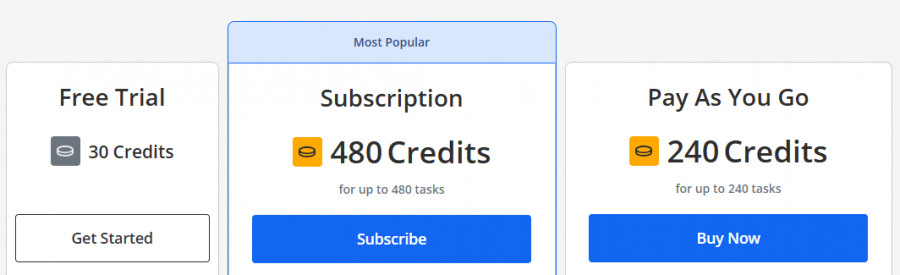
*Check the current pricing on Img2Go's website.

For the price, I expected more reliable performance. The background blur tool, for instance, left noticeable outlines around the subject. A stronger focus on refining these tools would make it worth the subscription cost.
This platform delivers incredible results, especially with image upscaling and background removal. The process is straightforward and doesn't require any downloads, making it convenient for busy professionals. The colorization feature transformed my old photos beautifully, adding depth and vibrancy.
The AI-powered tools when trying to remove backgrounds, the results were inconsistent, with parts of the image either left untouched or poorly cropped. Processing times were sluggish, and the output didn’t justify the effort. This service might work for basic tasks.
Compressing files to share over email is seamless, and resizing images takes just a few clicks. It’s best for working with visuals regularly, and the intuitive interface.
Resizing images for social media or removing backgrounds for product shots, it performs every task with precision. While advanced AI functions sometimes take a bit longer to process, the results are consistently impressive.
The AI image enhancer provided excellent quality, significantly improving my photos. The results were outstanding, bringing new life to my images. A must-try for anyone looking to enhance their pictures.

Turn your ideas into stunning visuals

Craft Your Ideal AI Companion on Promptchan!

Create your perfect dream companion in just seconds!

Transform your photos effortlessly with AI-powered editing and enhancement.

Create Stunning Designs and Content Instantly with AI-Powered Tools

Easily create stunning photos online with powerful AI tools.