On This Page
- What Google Block Breaker Looked Like When I First Saw It
- How I Access the Game and When It Shows Up
- What the Gameplay Actually Feels Like
- What Happens Under the Hood
- The Limitations I’ve Noticed While Playing
- Safety Observations: Google’s Version vs Other Sites
- Problems I Encountered and How I Solved Them
- My Final Thoughts on Google Block Breaker
When I first stumbled onto Google Block Breaker inside the search results, I didn’t immediately think much of it. But the more I explored it, the more I realized that this tiny pop-up game is actually an interesting reflection of how Google experiments with user behavior, nostalgia, interface design, and browser capability.
This breakdown captures everything I’ve observed not just as a user, but as someone trying to understand why this game exists at all.
What Google Block Breaker Looked Like When I First Saw It
The first time I saw the game appear, what struck me was how unobtrusive it looked. Google didn’t brand it heavily or frame it like a promotional add-on. It simply sat there above the search results, almost behaving like a featured snippet, except that it was interactive.
I noticed immediately that:
- The edges were rounded, matching Google's Material UI design.
- The game launched instantly without a loading sequence.
- It didn’t ask for any permissions.
- It didn’t take me away from the search results page.
That subtlety is intentional. It allows the game to behave like a “micro-interaction” rather than a full feature.
From a UX standpoint, Google’s ability to embed a playable object inside Search without breaking the layout is impressive.
How I Access the Game and When It Shows Up
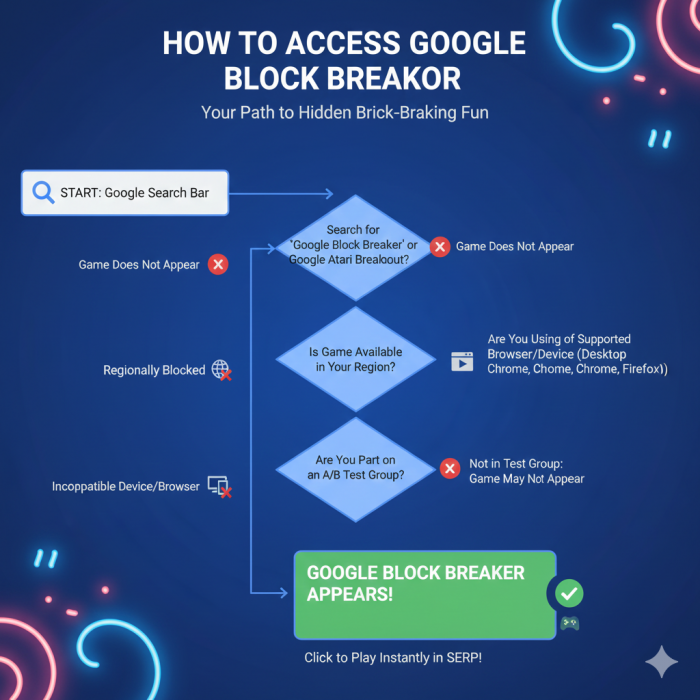
The more I tried to reproduce the appearance of the game, the more I understood how selective the rollout is.
Keyword Sensitivity
Some exact phrases triggered it immediately:
“Block Breaker”
“Google Block Breaker game”
“brick breaker Google”
But synonyms like:
“ball breaking game”
“breakout google game”
did not consistently trigger it.
Device-Specific Behavior
When I switched devices:
My tablet showed it even when my laptop did not.
On Android, it loaded more reliably than on iOS.
This made me think Google might be prioritizing mobile users first.
A/B Testing Observations
I tried repeatedly over days, and sometimes the game disappeared completely.
This is exactly how Google tests features showing them only to a percentage of users at a time.
In other words, if someone doesn’t see it, it isn’t their fault it’s Google’s controlled testing environment.
My Experience Playing Block Breaker on Desktop and Mobile
I played multiple rounds on both interfaces to understand how the experience differs.
Desktop
On desktop, gameplay feels more “classic.”
I can flick the paddle quickly with fine-tuned control. This precision allows me to influence the angles more accurately.
- The screen field is wider.
- The ball’s bounce pattern feels slower relative to the field size.
- Keyboard control makes it feel more predictable.
Mobile
On mobile, my finger essentially becomes the controller.
- The paddle reacts to the speed of my swiping.
- The game feels faster because the ball travels across a smaller visible area.
- The physics feel the same, but my reaction time becomes more important.
Interestingly, mobile offers a more reflex-based version of the same game.
The exact mechanics are identicaL but my interaction with them changes dramatically.
What the Gameplay Actually Feels Like
The game strikes an unusual balance: simple enough for anyone to play, yet intentionally unforgiving.
Here’s what I learned from extended play:
Ball Dynamics
The ball’s movement in the game is not random. Its trajectory changes depending on where it hits the paddle, how fast the paddle was moving at the moment of contact, and the angle of the paddle’s edges. When the ball strikes closer to the edge of the paddle, the next bounce usually becomes sharper, allowing players to control direction and target specific bricks.
Brick Behavior
Not all bricks react the same way during gameplay. Some break immediately after a single hit, while others require multiple hits before disappearing. In certain cases, hitting specific bricks can slightly change the ball’s speed, which adds an extra layer of unpredictability and strategy to the game.
Speed Scaling
As the game progresses, the difficulty increases gradually without explicitly telling the player. The ball’s velocity slowly rises, reaction time becomes shorter, and brick placement patterns become more complex. This subtle scaling makes the game feel more challenging the longer a session continues.
Why I Believe Google Added Block Breaker to Search
Over the years, I’ve seen Google introduce several mini-games inside Search. I think Block Breaker follows a clear set of motivations.
1. Keeping Users Engaged
Google wants people to stay in Search longer.
Micro-games help them achieve that without pushing users to external sites.
2. Highlighting Browser Capabilities
Beyond being a simple Easter egg, the game also demonstrates several capabilities of modern web browsers. It relies on real-time rendering to update gameplay smoothly, uses responsive design so the interface adapts to different screen sizes, and incorporates lightweight physics simulation to control ball movement and collisions. At the same time, the game runs efficiently through HTML5 Canvas, showing how modern browsers can handle interactive graphics without heavy processing. Google often includes these small experiments to showcase the performance and flexibility of current browser technologies.
3. Nostalgia Appeal
Brick-breaker games are universally understood.
No tutorial is needed, making this perfect for casual interaction.
4. Testing User Behavior
Google often tests which interactive elements keep people on the platform. Block Breaker is likely a data-gathering tool disguised as entertainment.
To me, Block Breaker feels like a strategic experiment, not a fully fledged product.
What Makes People Confused About Its Official Status
People keep asking, “Is this really made by Google?”
From what I’ve observed:
- The version inside Google Search is absolutely Google’s.
- The hundreds of websites hosting “Block Breaker” games are not.
Because the concept is not owned by anyone, third-party developers have recreated it everywhere — and that leads users to assume Google made all versions.
Google did nothing to brand the game heavily, which contributes to the mystery.
What Happens Under the Hood
I inspected the game using browser tools.
Rendering
It uses an HTML5 Canvas, which:
- allows smooth animations
- avoids heavy DOM manipulation
- supports fast rendering on most devices
Physics
The physics seem to be:
- deterministic
- low overhead
- based on simple formulas
The collision detection is consistent, indicating a clean physics engine.
Script Behavior
No external scripts are loaded.
Everything is embedded directly into the Search feature bundle.
This means Google intentionally kept the game extremely lightweight.
The Limitations I’ve Noticed While Playing
The game’s simplicity comes with clear constraints:
- No advanced scoring system
- No ability to save progress
- No difficulty settings
- No multiplayer
- No sound cues
- No customization
- No pause features beyond clicking away
- No full-screen mode
These limitations confirm what I strongly believe:
Block Breaker is not meant to be a “real game,” it’s meant to be a quick interaction.
What Makes People Compare It to Breakout
Breakout shares almost all fundamental mechanics with Block Breaker:
- One paddle
- One ball
- Grid-based destruction
- Increasing difficulty
But when I compare them:
Breakout:
- Had knobs or dials for control
- Was designed as a dedicated arcade challenge
- Required precise timing
Google Block Breaker:
- Lives inside a browser
- Is designed for accessibility, not mastery
- Doesn’t penalize mistakes harshly
It’s a simplified cousin, not a remake.
Why There Are So Many Clone Versions of Block Breaker
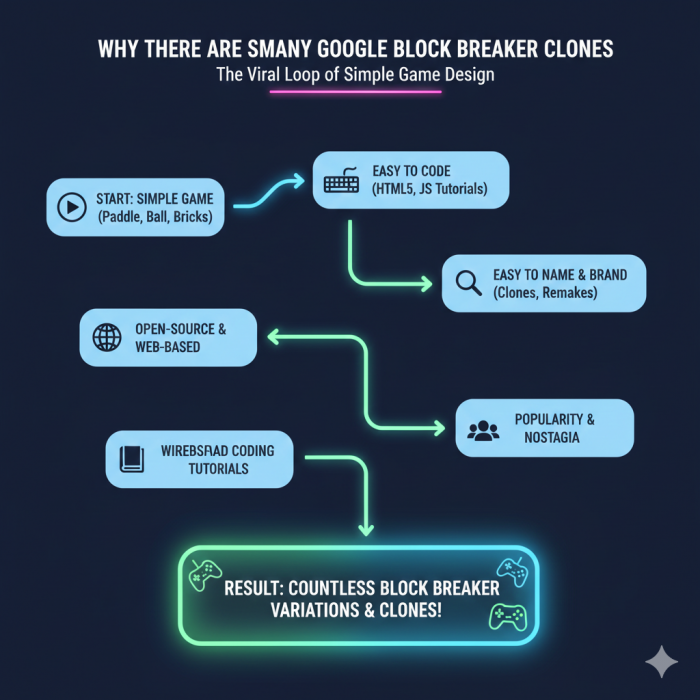
During my research, I found dozens of clones. Some are more advanced than Google’s version.
Why clones exist:
The logic is easy to code.
- It’s often used as a learning project in coding tutorials.
- The name “Block Breaker” isn’t protected.
- Developers experiment with power-ups, themes, and variations.
- The concept has existed for decades.
This is why people often mistakenly think clones originate from Google.
Safety Observations: Google’s Version vs Other Sites
Google Search Version:
- No ads
- No redirects
- Minimal tracking
- Secure sandbox environment
- Very fast loading
Third-Party Sites:
I frequently encountered:
- banner ads
- autoplay video ads
- cookie pop-ups
- tracking scripts
- slow performance
- aggressive design layouts
Google’s version is by far the safest.
Problems I Encountered and How I Solved Them
When the game didn’t load
Switching to Chrome made it appear instantly.
When the paddle felt delayed
Closing heavy tabs improved responsiveness.
When the game ran off-screen
Resetting zoom helped realign the display.
When the ball didn’t launch
Turning off my ad-blocker solved it.
After dealing with these issues, I realized most problems come from browser conditions, not the game itself.
My Final Thoughts on Google Block Breaker
After thoroughly exploring it, I don’t see Google Block Breaker as a traditional game. Instead, I see it as:
- A test of search interaction
- A showcase of browser rendering
- A throwback to arcade nostalgia
- A micro-break feature for casual engagement
It’s simple, unbranded, minimalistic, and intentionally dispensable.
But that’s exactly why it’s interesting, it’s a tiny window into how Google experiments with user experience at scale.
Whether it stays or disappears, it shows how a search engine can blur the line between utility and entertainment without overwhelming users.
Post Comment
Be the first to post comment!