On This Page
- Quick rating snapshot
- Third-party review snapshot
- How I looked at AI Studios
- Test 1: Creating an avatar-led explainer from a script
- Test 2: Dubbing an existing video into other languages
- Test 3: Turning documents and PPTs into training videos
- Test 4: Using generative video models for b-roll
- What AI Studios does well
- Where AI Studios still feels limited
- AI Studios vs Synthesia, HeyGen, and Colossyan
- Best use cases
- Final verdict
- Closing thoughts
The short answer
AI Studios is the consumer-and-business-facing product within DeepBrain AI's broader portfolio. The company, founded by Eric Jang in 2016 and headquartered in South Korea with offices in Palo Alto, also runs separate enterprise lines for conversational AI, Human Resources, and HR interview automation. AI Studios is the piece most relevant to creators, marketers, and L&D teams.
Under the hood, the platform is built around four overlapping capability layers. Each one is a self-contained product in its own right, and treating them separately is the only way to assess whether AI Studios is a fit for a given workflow:
- An avatar engine spanning 2,000+ stock avatars plus custom avatars trained from a user-supplied video clip.
- A multilingual production pipeline covering text-to-speech in 110+ languages, voice cloning, and AI Dubbing that translates and lip-syncs existing video into 150+ languages.
- A learning content layer that converts PowerPoint, PDF, or document inputs into branched, quiz-equipped video modules and exports them as SCORM 1.2, SCORM 2004, or xAPI packages.
- A generative video layer that exposes external models like Veo 3.1, Seedance 2.0, Kling, and Nano Banana through a single credit-based interface.
That last layer is newer and the most strategically interesting. It positions AI Studios as a hybrid product: part avatar tool, part generative video aggregator. For creators who would otherwise juggle separate subscriptions across Runway, Pika, Kling, and an avatar tool, that consolidation has real cost and workflow value, even if it sacrifices some of the per-model depth those standalone tools provide.
Quick rating snapshot
| Review Area | Score | My View |
| Avatar video quality | 8.2/10 | Strong lip-sync, but stock avatar movement can feel repetitive. |
| AI dubbing | 8.6/10 | One of the strongest use cases, especially for localization. |
| Training video workflow | 8.8/10 | Very useful for HR, onboarding, compliance, and L&D teams. |
| Generative video layer | 7.8/10 | Convenient for b-roll, but not as deep as specialist tools. |
| Ease of use | 7.6/10 | Simple for basic videos, more complex for advanced workflows. |
| Pricing clarity | 6.8/10 | Some key features sit behind higher-tier plans. |
| Overall value | 8.2/10 | Best for teams that need scale, localization, and repeatable video production. |
Third-party review snapshot
Public reviewer platforms show a mixed but generally positive picture. G2 and Capterra users rate the platform well for ease of use, multilingual output, and avatar quality. Trustpilot feedback is more cautious, with users raising concerns around feature gating, render speed, and support response times.
| Platform | Public Score | Sample Size | Common User Sentiment |
| G2 | 4.2 / 5 | 1,013+ reviews | Easy video creation, useful avatar workflow, strong multilingual reach |
| Capterra | 4.5 / 5 | 51+ reviews | Good lip-sync and dubbing, but template depth could improve |
| Trustpilot | 3.6 / 5 | 230+ reviews | Complaints around higher-tier access, rendering, and support |
| Gartner Peer Insights | 4.3 / 5 | Enterprise reviewers | Positive for scale and language coverage, some UI friction |
The gap between Capterra/G2 and Trustpilot is important. It suggests AI Studios works well for many users, but friction appears when people need heavier projects, faster support, or features reserved for higher plans.
How I looked at AI Studios
Instead of reviewing AI Studios only feature by feature, I looked at it through four practical workflows. This gives a more realistic view of how the platform performs when someone actually tries to produce content with it.
| Test Workflow | Why It Matters |
| Script to avatar video | Tests the core promise: can written text become a usable presenter-led video? |
| Existing video to dubbed video | Tests whether creators can localize content quickly. |
| Document or PPT to training video | Tests its value for HR, compliance, onboarding, and education teams. |
| Avatar video plus generated b-roll | Tests whether AI Studios can work as a broader video production system. |
This approach is more useful than simply asking whether AI Studios has many features. A tool can have many features and still fail in a real workflow. AI Studios mostly holds up, but its strengths and weaknesses are not evenly distributed.
Test 1: Creating an avatar-led explainer from a script
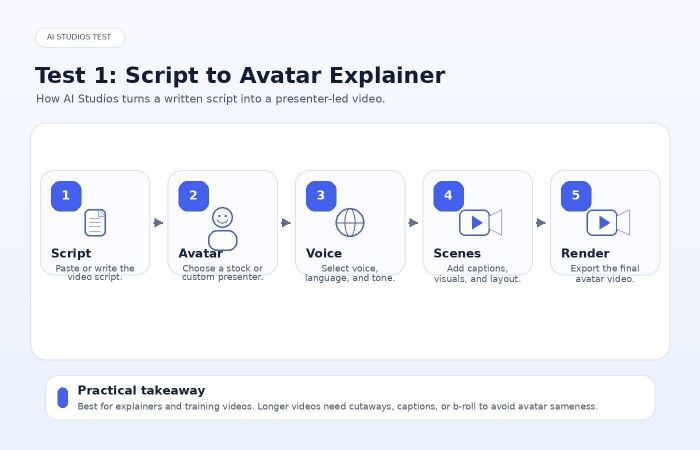
The core AI Studios workflow is simple. You write or paste a script, choose an avatar, select a voice, adjust scenes, and generate the video. For basic explainer videos, the process is straightforward enough for a non-technical user.
The lip-sync is the strongest part of the avatar experience. Mouth movement is generally clean, and the voice timing feels suitable for training videos, product explainers, and faceless YouTube formats. The output is not perfect, but it is good enough for many business and educational use cases.
The weaker part is body language. Stock avatars can feel visually repetitive after a few minutes. Gestures, posture shifts, and idle movement do not always carry enough personality to hold attention on their own. For short videos, this is not a major issue. For longer presenter-led content, you need cutaways, captions, product shots, screen recordings, or generated b-roll.
My practical view is simple: AI Studios works best when the avatar is treated as one part of the edit, not the entire video. A two-minute product explainer can work with a single presenter. An eight-minute YouTube video needs more visual variation.
Test 2: Dubbing an existing video into other languages
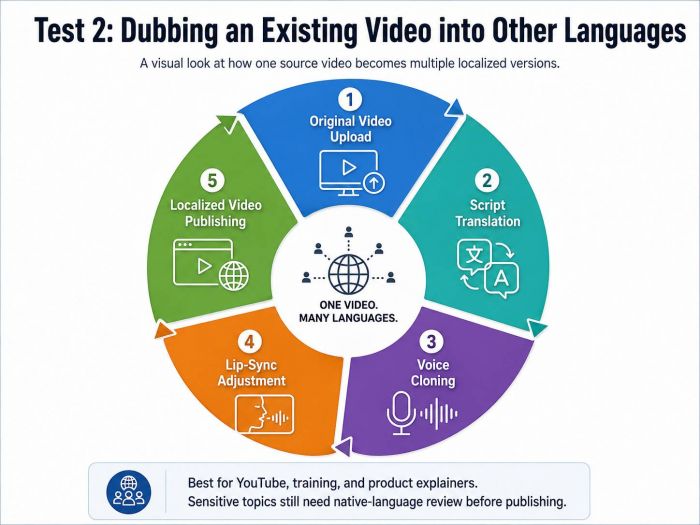
AI Dubbing is one of the more practical parts of AI Studios because it solves a real production problem: how to repurpose one video for multiple language audiences without rebuilding the entire project from scratch. The platform supports automatic translation, subtitle generation, voice cloning, lip-sync adjustment, and wide multilingual coverage, which makes it especially useful for creators and teams working across regions.
The value becomes clearer when you think about the normal localization process. A single English video may need separate translators, voice artists, editors, subtitle files, and review cycles before it can be published in Spanish, Hindi, French, Portuguese, Korean, or other languages. AI Studios compresses much of that workflow into one system, which can save time for YouTube creators, course creators, internal training teams, and international marketing departments.
For anyone evaluating how this works in real output, the official AI Studios YouTube channel, @AISTUDIOS_Official, is a useful reference point. It gives a practical look at avatar videos, dubbing examples, product walkthroughs, and localization-focused use cases outside the dashboard. That makes the channel helpful for judging whether the platform’s presentation style and multilingual output match the kind of content you actually want to publish.
The limitation is that AI dubbing still needs human review. Translation may be technically correct, but not always culturally natural. Tone can also become slightly flat in emotional, persuasive, or highly brand-sensitive scenes. For general training, tutorials, and business explainers, the output can be very useful. For legal, medical, financial, or brand-sensitive content, a native speaker or subject expert should review the final script before publishing.
| Dubbing Use Case | Fit Level | Reason |
| YouTube localization | Strong | Fast way to test new language audiences. |
| Internal training | Strong | Useful for global teams and repeatable learning content. |
| Product explainers | Strong | Good balance of speed and quality. |
| Entertainment dubbing | Medium | Emotion and performance may feel limited. |
| Legal, medical, finance content | Medium | Needs expert review before publishing. |
Test 3: Turning documents and PPTs into training videos
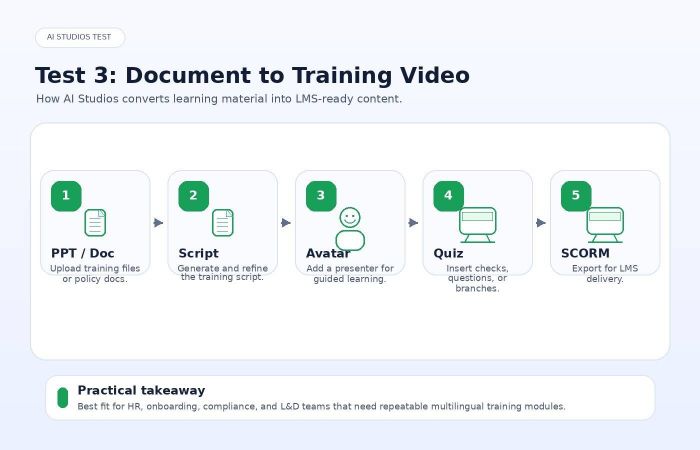
The training video workflow is where AI Studios becomes more than a creator tool. This is probably its most serious business use case.
The platform can take a document, PowerPoint, or training material and help turn it into a video-based learning module. From there, teams can add an avatar presenter, quizzes, checkpoints, branching paths, and export options such as SCORM 1.2, SCORM 2004, or xAPI. The partnership brief also specifically positions this feature for onboarding, compliance training, internal education, and LMS integration.
This matters because training content changes often. Policies change. Product workflows change. Compliance language changes. In a traditional video setup, even a small update can require another shoot, another editor, another voiceover, and another delivery cycle. With AI Studios, the update can often be handled by editing the script and rendering again.
That said, AI Studios should not be confused with a full replacement for advanced learning authoring tools like Articulate Storyline or Rise. Its branching and quiz features are useful, but not as deep as dedicated instructional design platforms. The better way to view AI Studios is as a fast training video production layer that can connect with an LMS, not as a complete learning ecosystem by itself.
| Training Feature | Practical Value |
| PPT/document to video | Saves time when converting existing learning material. |
| Avatar presenter | Makes internal training feel more guided and human. |
| Quizzes/checkpoints | Useful for basic engagement and knowledge checks. |
| SCORM/xAPI export | Important for L&D teams using LMS platforms. |
| AI dubbing for training | Strong value for companies with multilingual teams. |
Test 4: Using generative video models for b-roll
AI Studios also includes access to generative video models such as Kling, Veo, Nano Banana, and similar tools through one interface. This makes the platform feel less like a pure avatar tool and more like a broader video production workspace.
The benefit is convenience. Instead of using one tool for avatars, another for dubbing, another for generated video, and another for editing, users can create supporting visuals inside the same workflow. For creators producing educational videos, product explainers, or marketing content, that can reduce tool-switching.
The limitation is control. If you are a serious cinematic AI video creator, you may still prefer dedicated tools with deeper prompt controls, camera movement options, seed control, motion precision, and advanced editing flexibility. AI Studios is better for generating useful cutaways than for creating highly controlled cinematic sequences.
For most business users, that is acceptable. They do not need perfect cinematic control. They need a quick visual that makes an avatar-led video less static.
What AI Studios does well
AI Studios performs best when it is used as a repeatable video production system. Its value increases when a team needs to create many versions of similar content across languages, teams, audiences, or markets.
The avatar quality is strong enough for explainers, training videos, internal communications, faceless content, and product walkthroughs. The dubbing workflow is a major advantage for localization. The training video tools make the platform especially relevant for HR and L&D teams. The generative video layer adds flexibility by helping users create b-roll without leaving the platform.
The strongest point is consolidation. AI Studios does not always beat specialist tools at their strongest feature, but it combines enough useful capabilities to reduce the number of separate tools a team may need.
Where AI Studios still feels limited
The platform still has clear limitations. Stock avatars can look polished but emotionally limited. If a video relies entirely on one avatar speaking for several minutes, the result may feel repetitive. Users should plan to use captions, scene changes, product visuals, screen recordings, and b-roll.
Feature gating is another concern. Some of the most valuable business features, such as SCORM export, custom avatars, SSO, and deeper enterprise workflows, may require higher-tier access. That makes sense for enterprise buyers, but smaller teams may feel limited if they expected those features on lower plans.
Rendering speed can also become an issue for heavier projects. Public reviews mention slow exports and support delays, especially outside higher-tier plans. This does not make the platform weak, but buyers should test a real project before committing.
| Limitation | Why It Matters |
| Stock avatar sameness | Longer videos need more visual variation. |
| Enterprise feature gating | Smaller teams may not get the full L&D value. |
| Render-time friction | Heavy projects may take longer than expected. |
| Limited cinematic control | Generative video layer is useful but not specialist-level. |
| Translation review needed | AI dubbing still needs human checking for sensitive content. |
AI Studios vs Synthesia, HeyGen, and Colossyan
AI Studios sits in a crowded market. It should not be judged as if it exists alone. The real question is which tool fits which workflow.
| Platform | Best For | Where AI Studios Competes |
| Synthesia | Enterprise training, governance, brand control | AI Studios competes well on L&D, dubbing, and broader video flexibility. |
| HeyGen | Personal avatars, short-form marketing, lip-sync quality | AI Studios offers broader workflow coverage, especially training and generative b-roll. |
| Colossyan | L&D-focused video creation | AI Studios feels broader because it combines avatars, dubbing, SCORM, and generative video. |
| Vidnoz / Elai-style tools | Lower-cost avatar entry | AI Studios is stronger for teams needing scale, localization, and business workflows. |
Synthesia may still be the safer choice for large enterprises that prioritize governance and controlled rollout. HeyGen may be more attractive for creators who only care about avatar realism and short-form marketing videos. Colossyan may appeal to L&D teams that want a narrower training-focused product.
AI Studios is best understood as the breadth-first option. It becomes more compelling when your workflow needs several things together: presenter videos, multilingual versions, training exports, and generated visuals.
Best use cases
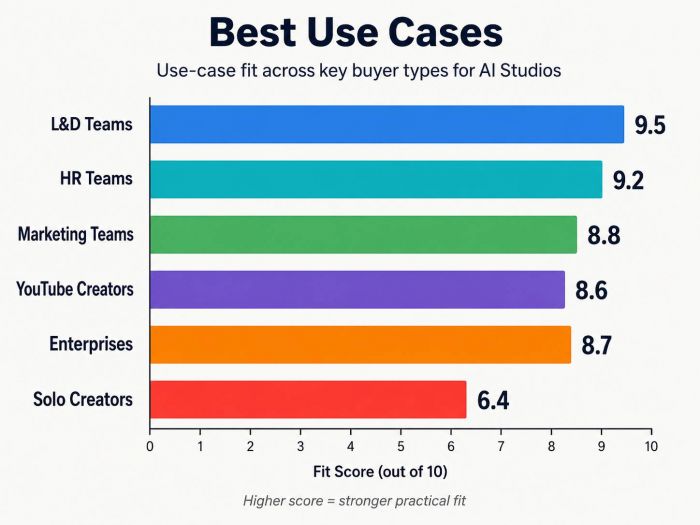
| User Type | Fit | Why |
| L&D teams | Excellent | Training video, quizzes, SCORM, dubbing, and easy updates create strong ROI. |
| HR teams | Excellent | Useful for onboarding, compliance, and policy training. |
| Marketing teams | Strong | Good for product explainers, sales enablement, and localized campaigns. |
| Faceless YouTube creators | Strong | Avatar plus dubbing plus b-roll can support repeatable content production. |
| Enterprise teams | Strong | Custom avatars, multilingual scale, and integrations make sense at larger volume. |
| Solo casual creators | Medium | May be more platform than they need. |
| Cinematic AI video creators | Medium to weak | Dedicated generative video tools offer more control. |
| Personality-led creators | Weak | A real human presence may still matter more than an avatar. |
Pricing and plan caution
I would avoid judging AI Studios only by its entry plan. The free or lower-tier experience is useful for testing, but the platform’s real value appears when users access advanced workflows such as custom avatars, SCORM export, team collaboration, and larger-scale production.
At the same time, buyers should confirm current pricing and feature access directly on the official AI Studios website before making a decision. The sponsor brief itself advises avoiding unapproved pricing claims, and the plan structure may change over time.
The best approach is to test one complete workflow before upgrading. Create one avatar video, dub it into another language, generate one b-roll scene, and check whether the result is good enough for your actual use case.
Final verdict
AI Studios by DeepBrain AI
Overall rating: 4.2 / 5
AI Studios is a strong AI video platform for users who need more than a basic avatar generator. Its biggest advantage is the combination of avatar-led video, multilingual dubbing, training video workflows, and built-in generative video access.
The platform is especially valuable for L&D teams, HR departments, in-house marketing teams, and creators producing repeatable content across multiple languages. The dubbing and training workflows are stronger than the average avatar platform, and the ability to mix avatar content with generated b-roll makes the editing process more flexible.
It is not perfect. Stock avatars can feel repetitive. Some important features may require higher-tier plans. Heavy projects may face slower rendering. The generative video layer is convenient but not as deep as specialist AI video tools.
Still, AI Studios is worth shortlisting if your video workflow involves scale, localization, training, or repeatable content production. It is less suitable if you only need occasional videos, highly cinematic AI scenes, or a creator brand built around your own on-camera personality.
Closing thoughts
The honest way to evaluate AI Studios is not to ask whether it has many features. It clearly does. The better question is whether those features match your actual production workflow.
For a solo creator making one video a month, the platform may feel bigger than necessary. For a team creating training videos, localized explainers, product walkthroughs, and recurring content, AI Studios starts to make much more sense.
My recommendation is to test it with one real project, not a sample script. Use the same kind of content you would actually publish. If the avatar quality, dubbing output, render speed, and editing workflow hold up in that test, AI Studios can become a practical production system rather than just another AI video tool.
Post Comment
Be the first to post comment!