Monica AI has quietly become one of the most talked-about browser assistants in the productivity space. Instead of being another chatbot tab you forget to open, Monica lives directly inside your browser as a sidebar that follows you across websites. The promise is simple but ambitious: less tab-switching, more getting things done.
What makes Monica interesting in 2026 is not just that it bundles multiple models like GPT-4-class systems, Claude, and Gemini. It is the way it tries to stitch together everyday workflows like summarizing articles, rewriting emails, translating content, and even generating media without forcing users to leave the page they are on.
That said, the big question remains the same one productivity tools always face. Is Monica genuinely saving time, or is it just a very enthusiastic sidebar with a long feature list and a shorter patience limit? This review breaks down what actually works, where friction appears, and who will benefit most.
Monica AI at a Glance
Monica positions itself as an all-in-one AI assistant that works across browser, desktop, and mobile environments. The platform focuses heavily on knowledge workers, students, marketers, and anyone who spends unhealthy amounts of time staring at Chrome tabs.
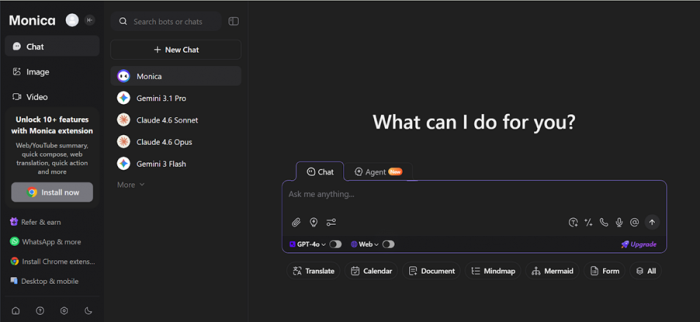
Below is a focused snapshot based specifically on Monica’s current positioning.
| Attribute | Details |
| Product Type | All-in-one AI assistant with browser sidebar |
| Primary Use Cases | Chat, summarization, rewriting, translation, media tools |
| Platforms | Chrome, Edge, Web app, Windows, Mac, iOS, Android |
| Model Access | Multiple LLMs depending on plan tier |
| Free Plan | Yes, limited daily queries |
| Paid Plans | Pro and Unlimited tiers |
| Best For | Heavy browser users and research workflows |
The key takeaway here is breadth. Monica is not trying to be the best at one thing. It is trying to be good enough at many things while staying glued to your browser window.
Onboarding and Everyday User Experience
Getting started with Monica is refreshingly painless. Installing the extension and signing in takes only a couple of minutes, and the sidebar appears without forcing users through a long tutorial maze. For most users, the first successful summary or rewrite happens within the first few clicks.
The sidebar design is clearly the product’s centerpiece. It slides in smoothly, responds quickly, and feels native to the browsing experience rather than bolted on as an afterthought. Highlight text on a webpage and Monica immediately offers options to summarize, translate, or explain, which dramatically reduces friction during research sessions.
In day-to-day use, the experience is mostly smooth, but not perfectly magical. During heavier queries or multi-step tasks, there are moments where responses take longer than expected. It is not slow enough to be frustrating, but it is noticeable enough that power users will occasionally glance at the loading spinner and sigh.
Core Features: What Monica AI Actually Brings to the Table
Monica is feature heavy, and unlike many tools that hide behind vague marketing, most of its tools are genuinely accessible from the sidebar. The real question is not whether features exist. It is whether they are useful in real workflows.

Browser Sidebar and Context Overlay
The sidebar is Monica’s strongest differentiator. It can read the current webpage, summarize long articles, translate highlighted text, and answer contextual questions without requiring manual copy paste. For researchers and students, this alone can remove dozens of micro-interruptions per day.
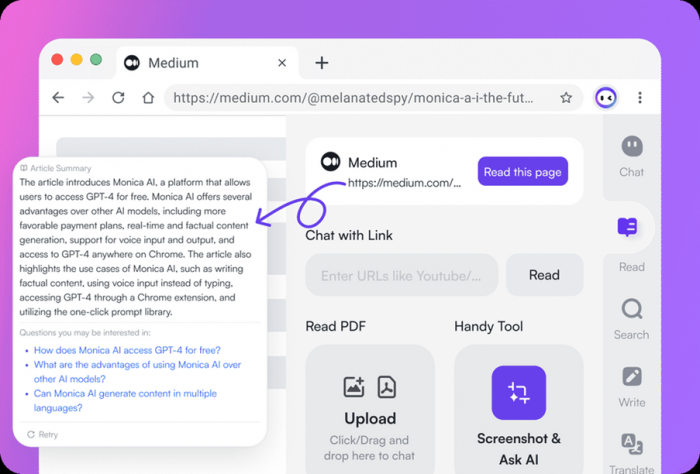
What stands out is how naturally the highlight workflow fits into browsing behavior. Select text, click once, and the AI response appears beside the content. When it works well, it genuinely feels like the browser got smarter overnight.
However, the experience is still dependent on quotas and model access. Users on lower tiers will quickly notice that the most powerful responses are gated behind paid plans, which slightly undercuts the “always-available assistant” vibe.
Deep Research and Live Web Assistance
Monica’s research mode attempts to go beyond static answers by pulling live web information into responses. This is particularly useful for current events, market research, and competitive analysis tasks where stale data would otherwise be a problem.
In testing scenarios, the research feature performs well for structured summaries and multi-source answers. It is especially helpful when generating quick briefing notes or topic overviews without opening ten separate tabs.
That said, like most AI research helpers, it occasionally oversimplifies complex topics. It is best treated as a fast research assistant rather than the final authority on nuanced subjects.
Document, Video, and Media Tools
Monica extends into document and media handling with PDF summaries, YouTube video breakdowns, table analysis, and basic generative media tools. For students and analysts, the PDF and video summarizers are among the most practically useful features.
The video summarizer is particularly convenient for long lectures and webinars. It can extract key points and timestamps quickly, although very dense videos sometimes get slightly surface-level summaries.
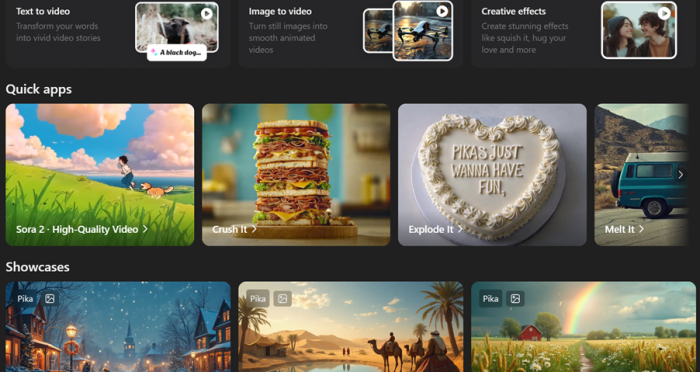
The media generation tools exist but feel more like bonus utilities than primary selling points. They work for quick visuals, but professionals looking for high-end creative output will still rely on dedicated tools.
Pricing and Plan Reality
Monica’s pricing structure looks straightforward at first glance, but the real experience depends heavily on usage patterns. The platform offers a free tier, a Pro plan, and an Unlimited plan with progressively higher caps.
| Plan | Price (Annual) | Approx Monthly | Key Limits | Best For |
| Free | $0 | $0 | 40 basic model accesses daily | Casual testing and light use |
| Starter | $39/year | ~$3.3/month | 5,000 basic model queries monthly, 200 advanced queries | Budget users and students |
| Max | $149/year | ~$12.4/month | Unlimited basic models, unlimited advanced models (fair use) | Regular power users |
| Ultra | $995/year | ~$82.9/month | Highest throughput, full advanced access | Heavy professional users and teams |
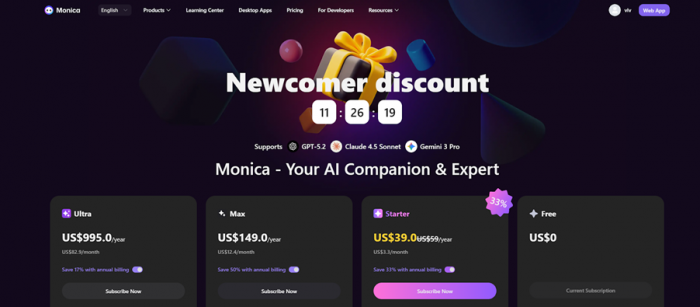
Plan Reality Check
The Free plan is clearly positioned as a sampler tier. Forty daily accesses sound generous at first glance, but anyone doing real research or content work will hit that ceiling quickly.
Starter is where Monica becomes meaningfully usable for individuals. The 5,000 monthly basic queries are comfortable for most students and light creators, but the 200 advanced model cap means heavy GPT-5.2 or Claude usage still requires discipline.
Max is the practical sweet spot for serious daily users. The inclusion of unlimited access to both basic and advanced models under fair use makes it far more flexible for research-heavy workflows.
Ultra is clearly enterprise leaning. At nearly $1,000 per year, it only makes sense for teams, agencies, or extremely heavy AI users who need maximum throughput without constantly watching quotas.
Real Performance: Speed, Accuracy, and Daily Reliability
In most everyday tasks, Monica performs reliably and quickly. Summaries generate fast, rewriting tools are responsive, and the sidebar rarely crashes. Stability is clearly one of the platform’s stronger engineering points.
Response quality is generally strong because the system routes through capable underlying models. For writing, summarization, and translation tasks, the outputs are usually clean and usable with minor edits.
Where friction appears is during peak usage moments or heavier multi-step tasks. Occasionally the assistant takes longer to respond than expected, and in a few instances the flow feels slightly less instant than the marketing implies. It is not a dealbreaker, but frequent users will notice.
Key Strengths Users Consistently Notice
- The sidebar integration genuinely reduces tab switching
- Highlight-to-summarize workflow feels natural and fast
- Multi-tool bundle replaces several separate extensions
- Cross-platform availability is surprisingly solid
- Voice interaction works but is not always instant
These strengths explain why Monica has built strong momentum among students and knowledge workers.
Where Monica Still Shows Friction
- Usage quotas can interrupt heavy workflows
- Some features feel broader than they are deep
- Advanced models require higher-tier plans
- Occasional response delays during busy periods
- Media generation tools are functional but not industry-leading
None of these are fatal flaws, but together they define the realistic boundaries of the product.
Real User Ratings Across Platforms
The sentiment around Monica is generally positive but not universally glowing. Different platforms highlight different strengths and frustrations.
Monica AI Review Scores by Platform
| Platform | Average Rating | Review Volume | Sentiment Trend | What Users Praise | Common Complaints |
| Chrome Web Store | 4.9 / 5 | 13K+ | Very Positive | Sidebar workflow, ease of use | Limited written negatives visible |
| Apple App Store | 4.7 / 5 | 6K+ | Positive | Multi-platform convenience | Update frequency concerns |
| G2 | 4.2 / 5 | 29 reviews | Mixed Positive | Versatility, productivity boost | Pricing clarity, support speed |
| Product Hunt | 4.6 / 5 | 50+ | Positive | All-in-one approach | Learning curve for new users |
| Third-party reviews | Mixed | — | Balanced | Browser integration | Quota frustration |
Sentiment Breakdown (Estimated)
| Sentiment | Share |
| Positive | ~64% |
| Neutral / Mixed | ~23% |
| Negative | ~13% |
The pattern is clear. Users love the convenience and integration, but power users repeatedly bump into usage limits and occasional responsiveness issues.
Best Use Cases Where Monica Actually Shines
Monica performs best in research-heavy and writing-heavy environments. Students summarizing readings, marketers rewriting copy, and analysts scanning reports will see the most immediate benefit.
Content creators who live inside Google Docs, Gmail, and research tabs will particularly appreciate the highlight tools and quick drafting capabilities. The time savings add up quickly over a week of heavy browsing.
Professionals doing light competitive research or daily knowledge work will also find Monica helpful, especially when juggling multiple sources. It is less compelling for users who only need occasional AI chat.
My Verdict: Is Monica AI Worth It in 2026?
After extended hands-on use, Monica AI feels like one of the more practical browser assistants currently available. The sidebar integration genuinely improves workflow efficiency, and the highlight-based tools remove a surprising amount of daily friction.
However, the experience is not perfectly seamless. During heavier usage sessions, the calling and response system occasionally requires a short wait before replies appear. It is not slow enough to be frustrating, but frequent users will definitely notice the pauses during peak moments.
Post Comment
Be the first to post comment!