On This Page
- Step 1: Creating an Account and Choosing the Right Starting Mode
- Step 2: Running Your First Practice Session (Baseline Test)
- Step 3: Understanding the Feedback
- Step 4: Using AI Roleplays the Right Way
- Step 5: Activating Real-Time Nudges for Live Calls
- Step 6: Reading Post-Session Reports Like Training Data
- Step 7: Long-Term Usage Strategy
- Yoodli AI Alternatives: Comparison Table
- Final Takeaway: How to Get Real Value From Yoodli
- Frequently Asked Questions
Yoodli AI is not the kind of tool you “understand” by signing up and clicking around for five minutes. Most of its value shows up only when you use it in the right sequence and with the right expectations.
This guide explains how to actually use Yoodli step by step, what each feature is meant to do, and how to get meaningful results instead of just surface-level feedback.
Step 1: Creating an Account and Choosing the Right Starting Mode
After signing up on Yoodli, the first decision is how you want to use it, not which plan you choose.
Most users fall into one of these starting paths:
- Practicing upcoming interviews or presentations
- Improving daily meeting communication
- Working on long-term speaking habits (fillers, pacing, clarity)
Best practice:
Start with roleplays or recorded practice, not live nudges. This helps you understand your baseline before trying to correct habits in real time.
Step 2: Running Your First Practice Session (Baseline Test)
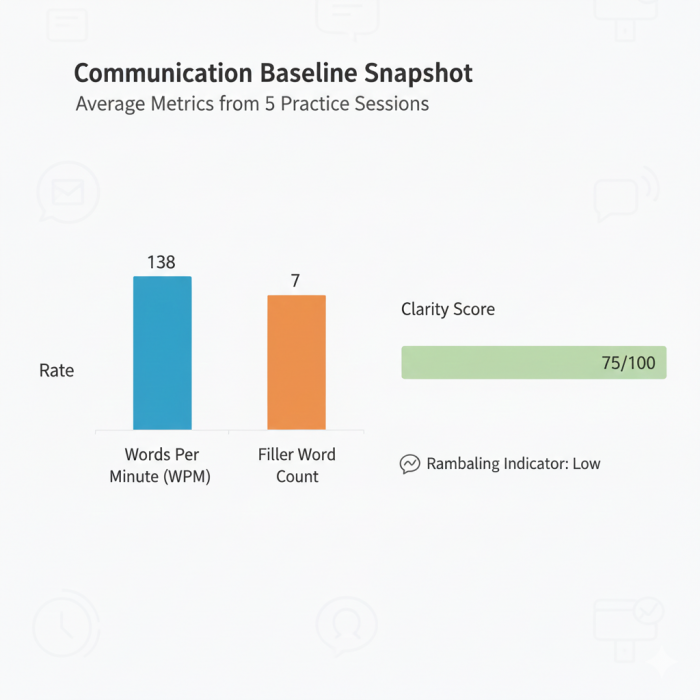
Before trying to “improve,” you need a baseline session.
How to do it correctly
- Choose a simple scenario (interview or open-ended explanation)
- Speak naturally, do not try to sound polished
- Complete the full session without restarting
Why this matters
Yoodli’s analytics are comparative. If your first session is artificially controlled, future improvements won’t be meaningful.
This first report answers:
- How fast you naturally speak
- How often fillers appear
- Where clarity breaks down
Step 3: Understanding the Feedback
Yoodli provides multiple metrics, but trying to fix everything at once does not work.
Priority order most users find effective:
- Filler words – easiest to reduce, fastest visible improvement
- Pacing consistency – not speed, but stability
- Conciseness – avoiding overlong answers
- Engagement signals – eye contact and presence
Tip:
Pick one metric per week. Treat Yoodli like a training tool, not a report card.
Step 4: Using AI Roleplays the Right Way

Yoodli’s AI roleplays work best when used repeatedly, not once.
Recommended workflow
- Select a scenario (e.g., interview question)
- Answer it naturally
- Review the analytics
- Repeat the same scenario 2–3 times, focusing on one metric
What roleplays are best for
- Interview preparation
- High-pressure Q&A practice
- Difficult conversations that require calm delivery
What they are not best for
- Writing scripts
- Teaching persuasion strategies
- Deep emotional coaching
Step 5: Activating Real-Time Nudges for Live Calls
Once you understand your patterns, you can move to real-time nudges.
How real-time nudges work
- Runs privately during Zoom / Teams / Google Meet
- Shows short prompts like “slow down” or “pause”
- Only visible to you
Best use cases
- Important meetings
- Interviews
- Client conversations where clarity matters
When not to use them
- Casual chats
- Brainstorming sessions
- Conversations where spontaneity matters more than structure
Step 6: Reading Post-Session Reports Like Training Data
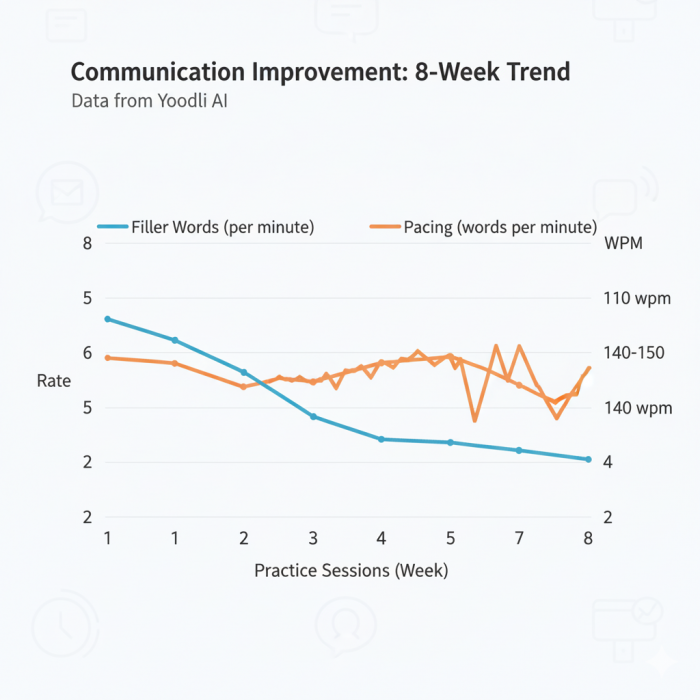
After each session, Yoodli generates a detailed report.
How to use reports effectively
- Look for patterns, not single-session mistakes
- Compare sessions week over week
- Track improvement trends, not perfection
What the reports are best at
- Showing habit reduction over time
- Identifying persistent speaking issues
- Creating self-awareness without human bias
Step 7: Long-Term Usage Strategy
Users who report the most value follow this pattern:
- 2–3 roleplays per week
- One live session with nudges
- One metric focus per week
- Monthly review of trends
Yoodli works best when treated like communication training, not a one-time check.
Common Mistakes New Users Make
- Expecting instant confidence boost
- Trying to fix all metrics at once
- Ignoring historical trend data
- Using it once before an interview and stopping
- Yoodli rewards repetition, not urgency.
Yoodli AI Alternatives: Comparison Table
Below is a comparison of Yoodli with common alternatives, based on real usage patterns.
| Tool | Primary Focus | Best For | Key Limitation |
| Yoodli AI | Speech delivery analytics | Interviews, meetings, habit correction | Limited strategic/persuasion analysis |
| Gong | Sales conversation intelligence | Revenue teams, deal analysis | Expensive, not for individual users |
| Mindtickle | Sales enablement & coaching | Sales orgs, training programs | Overkill for solo users |
| Orai | Public speaking practice | Speech practice, presentations | Less detailed analytics |
| Poised AI | Live meeting coaching | Daily meetings, execs | Fewer deep post-session insights |
| Speechify Coach / Similar apps | Basic speaking feedback | Beginners | Limited depth and trend tracking |
Choosing Between Yoodli and Alternatives
Choose Yoodli if:
- You want measurable improvement in how you speak
- You care about habits like fillers and pacing
- You prefer private, data-driven feedback
Choose other tools if:
- You need deal-level sales insights
- You want scripted persuasion coaching
- You are training entire sales pipelines
Final Takeaway: How to Get Real Value From Yoodli
Yoodli is not a shortcut to confidence.
It’s a system for exposing communication habits and correcting them over time.
Used casually, it feels informative.
Used deliberately, it becomes a genuine training tool.
If you approach it with the mindset of practice, measurement, and iteration, Yoodli delivers exactly what it promises, and no more than that.
Frequently Asked Questions
1. Can Yoodli AI be used without turning on the camera?
Yes. Most core speech analytics, such as filler words, pacing, and clarity, work without the webcam.
2. Does Yoodli record or store my live meetings?
Yoodli analyzes your speech during sessions, but live nudges are private and not visible to others on the call.
3. How accurate are filler word and pacing measurements?
Filler word detection is one of Yoodli’s most consistently accurate features, according to user feedback.
4. Can Yoodli replace a human communication coach?
No, and it is not designed to.
Yoodli replaces repetitive, baseline feedback (fillers, speed, clarity) but does not replace:
- emotional nuance coaching
- storytelling or persuasion frameworks
- audience psychology analysis
Many users treat it as a pre-coach tool to improve fundamentals before human coaching.
Post Comment
Be the first to post comment!





