Cutout.Pro walks into the AI editing arena with a very specific promise. Remove backgrounds in one click. No layer wrestling. No Photoshop-induced emotional damage. Just upload, wait a few seconds, and watch the background disappear like it remembered it left the stove on.

That promise sounds great on paper. The real question is whether it survives contact with messy hair, cluttered backgrounds, and real ecommerce workflows.
This hands-on review evaluates exactly that. Multiple test cases were run, community feedback was analyzed, and the updated 2026 pricing structure was examined carefully.
Quick Overview
Before diving into the pixel-level drama, here is the structured snapshot.
| Attribute | Details |
| Product Type | AI background removal and image editing suite |
| Platform | Web based |
| Best For | Ecommerce sellers, creators, marketers |
| Free Plan | Limited free credits plus preview mode |
| Batch Processing | Yes |
| API Access | Yes |
| Processing Speed | Fast in most cases |
| Learning Curve | Very low |
| Primary Strength | One-click automation |
| Primary Limitation | Occasional edge inaccuracies |
Short takeaway: Built for speed and convenience, not obsessive pixel perfection.
First Impressions: Clean, Focused, No Nonsense
The Cutout.Pro interface wastes very little time trying to look fancy. The background remover sits front and center like it knows exactly why visitors showed up.

Navigation is simple and logical. Tools like Face Cutout, Retouch, and Photo Enhancer are easy to locate. Even first-time users can start processing images within seconds.
Performance also feels snappy. Typical 2 to 3 MP images processed in under five seconds during testing. That immediate responsiveness sets the tone for the rest of the experience.
The only visible friction appears at download time, where the credit reminder shows up. It is not aggressive, but it does gently remind users that “free forever” has some fine print attached.
Background Remover Test: Where It Actually Matters
This is the feature most users care about, so multiple real-world scenarios were tested.
Complex Hair Portrait
Hair is the traditional boss battle for AI background tools.
Cutout.Pro handled this surprisingly well. Most fine strands remained intact, and edge detection looked clean without the heavy blur seen in weaker tools.

A few wispy areas blended slightly into the background, but overall performance was strong enough for ecommerce portraits and social media use.
Verdict: Above average hair handling for an automated tool.
Product on a Cluttered Background
A smartphone placed on a busy desk was used to test object precision.

The tool removed the majority of background elements quickly. However, small artifacts appeared near reflective edges. This aligns with user feedback that very intricate areas can occasionally confuse the model.
The built-in retouch tool cleaned these leftovers quickly, keeping the workflow efficient.
Verdict: Strong performance with minor cleanup sometimes required.
Busy Scene With Foliage
A human subject standing in front of dense plants introduced additional complexity.
Subject isolation remained mostly accurate, though a few plant edges near the feet were clipped imperfectly. This is a common failure zone across most AI cutout tools.
Edge quality overall remained crisp, but perfectionists will still want to double-check results.
Verdict: Reliable for most use cases, not bulletproof in complex scenes.
Speed and Batch Performance
Speed is one of Cutout.Pro’s biggest advantages.
Even larger images around 10 MP processed within roughly 8 to 10 seconds. Batch processing also delivered on its promise. Processing 10 images sequentially took under one minute.
For ecommerce teams handling product catalogs, this time savings adds up very quickly.
If the goal is production efficiency rather than artistic micromanagement, the platform performs exactly as intended.
Image Enhancer and Upscaler Test
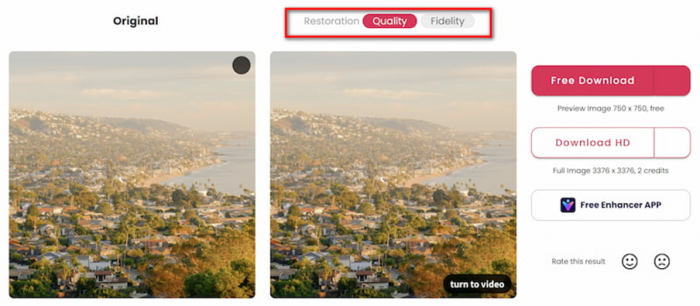
The Photo Enhancer was evaluated across different image types to see whether it adds real value or just enthusiastic sharpening.
Small Logo Enhancement
A low-resolution logo became noticeably sharper and more readable. Edge clarity improved significantly.
However, mild over-sharpening artifacts appeared when zoomed in closely. This is typical behavior for AI upscalers.
Smartphone Photo Enhancement
General sharpness improved, and on-screen text became clearer. Noise reduction worked well.
The trade-off was slightly plastic-looking skin in portrait areas. Casual users may not notice, but professional photographers probably will.
Low-Light Portrait
Brightness and noise reduction performed well. The image looked cleaner overall, though some natural grain disappeared.
Enhancer verdict: Useful for moderate improvements but not a miracle worker for professional photography.
Real Ecommerce Workflow Simulation
To simulate real usage, a standard product listing workflow was tested.
Step 1: Product Upload
A kitchen gadget image processed in about six seconds. Subject isolation was clean, and natural shadow retention helped realism.
Step 2: Background Replacement
Switching to a white ecommerce background was straightforward. The editor is clearly designed for speed rather than artistic experimentation.
Step 3: Minor Retouch
A small halo under the product edge was removed quickly using the brush tool.
Step 4: Enhancement
The final enhancer pass produced a crisp, store-ready product image.
Total workflow time: Under one minute
Manual effort: Minimal
This is exactly the type of scenario where Cutout.Pro shines.
Pricing and Plans
Cutout.Pro uses a credit-based system that varies depending on whether images or videos are being processed.
Image Pricing Structure
Subscription Plans (Monthly Credits)
| Credits per Month | Price (INR) | Approx Cost per Credit |
| 80 credits | ₹246.50 | ₹3.081 |
| 170 credits | ₹586.50 | ₹3.450 |
| 300 credits | ₹1096.50 | ₹3.655 |
| 550 credits | ₹2116.50 | ₹3.848 |
| 1000 credits | ₹4165.00 | ₹4.165 |
| 1450 credits | ₹5865.00 | ₹4.045 |
Important note: Credits can roll over up to five times the monthly budget.
Pay-As-You-Go Image Credits
| Credit Pack | Price (INR) | Cost per Credit |
| 30 credits | ₹254.15 | ₹8.472 |
| 300 credits | ₹2465.00 | ₹8.217 |
| 900 credits | ₹6715.00 | ₹7.461 |
| 3000 credits | ₹16915.00 | ₹5.638 |
| 30000 credits | ₹118915.00 | ₹3.964 |
Rule of thumb: Subscriptions offer better per-credit value for regular users.
Video Pricing (Pay As You Go)
Cutout.Pro also supports AI video tools, priced per second.
| Duration Pack | Price | Effective Cost |
| 1 minute | $9 | $0.317 per second |
| 3 minutes | $24 | $0.161 per second |
| 5 minutes | $39 | $0.150 per second |
| 15 minutes | $108 | $0.143 per second |
| 45 minutes | $299 | $0.111 per second |
| 120 minutes | $599 | $0.083 per second |
| 330 minutes | $1299 | $0.066 per second |
| 1390 minutes | $4999 | $0.060 per second |
| 5800 minutes | $19999 | $0.057 per second |
Observation: Pricing becomes significantly more efficient at higher volumes.
User Sentiment Snapshot
Real-world feedback paints a more nuanced picture.
| Platform | Rating | Overall Mood | Common Praise | Common Complaints |
| G2 | 4.4 / 5 | Mostly positive | Speed, simplicity, batch tools | Edge accuracy on complex images |
| Product Hunt | Limited data | Neutral positive | Automation focus | Few detailed reviews |
| Mixed positive | Early adopters satisfied | Hair handling quality | Credit limitations | |
| Trustpilot | 1.8 / 5 | Largely negative | Works for simple cases | Reliability concerns |
What This Actually Means
The pattern is consistent. When Cutout.Pro works, users are happy. When it struggles with complex edges, frustration appears quickly.
This is very typical for automation-first tools.
Pros
- Extremely fast background removal
- Beginner friendly interface
- Strong hair detection in many cases
- Batch processing saves serious time
- Transparent credit pricing
- Useful all-in-one toolkit
Cons
- Not perfect on intricate backgrounds
- Credit usage can add up at scale
- Mixed Trustpilot reputation
- Web-only workflow
- Occasional artifacts require cleanup
Final Verdict: Is Cutout.Pro Worth It in 2026?
Cutout.Pro understands its job very clearly. It is not trying to replace Photoshop. It is trying to eliminate the repetitive, soul-draining part of image editing.
For most everyday workflows, it succeeds.
Ecommerce sellers, marketers, and content creators will likely see immediate time savings. Batch processing and one-click automation make a noticeable difference in production speed.
However, users expecting flawless, studio-grade precision on every image should keep expectations realistic. Complex scenes still require occasional manual cleanup, and heavy users must monitor credit usage carefully.
Bottom line:
Cutout.Pro is absolutely worth considering for fast, automated background removal workflows in 2026. It performs best as a high-speed production assistant rather than a perfectionist editing tool.
Post Comment
Be the first to post comment!