On This Page
- Tool Overview: What They Actually Are
- Airtable: Built Like a System, Not a Workspace
- Notion: Flexible Until It Becomes Fragile
- Direct Comparison: Where the Difference Becomes Obvious
- What Actually Matters in Real Workflows
- Scenario-Based Breakdown
- What Becomes Clear After Using Both
- Should You Replace One With the Other
- Final Interpretation
Most people do not choose between Airtable and Notion correctly.
They compare features. Tables, views, templates, integrations. That comparison looks logical on the surface, but it misses the actual decision point.
The real question is not what these tools can do.
The real question is what kind of work structure you are trying to build.
Because Airtable and Notion are not competing tools in the traditional sense. They represent two completely different philosophies of how information should be organized, manipulated, and used in real workflows.
Tool Overview: What They Actually Are
| Tool | Official URL | Core Philosophy | Best Known For | Where It Fits |
| Airtable | https://www.airtable.com | Structured database-first system | Spreadsheet-database hybrid | Operations, pipelines, structured workflows |
| Notion | https://www.notion.so | Flexible block-based workspace | Docs + knowledge + lightweight databases | Content, docs, team knowledge, planning |
Airtable: Built Like a System, Not a Workspace
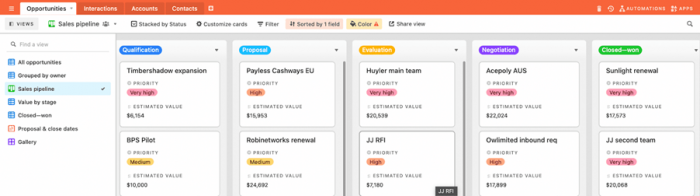
Airtable behaves less like a note-taking tool and more like a lightweight operational backend.
At its core, it is a relational database wrapped in a user-friendly interface. You are not writing content first. You are defining structure first. Tables, fields, relationships, and views come before anything else.
This changes how teams use it.
Instead of storing information, Airtable organizes workflows. A marketing team does not just track campaigns. It builds a system where campaigns, assets, deadlines, and stakeholders are all linked together. A sales team does not just log leads. It creates a pipeline where every stage, interaction, and outcome is structured and trackable.
The biggest strength of Airtable is control. You can define exactly how data behaves, how it connects, and how it is visualized. Grid, Kanban, calendar, gallery, timeline. All views are just different ways of interacting with the same structured dataset.
Where it becomes powerful is automation. Triggers, actions, integrations. Airtable can move data, notify teams, update records, and sync across tools without requiring engineering effort.
But this strength comes with a cost.
Airtable is not forgiving. If the structure is wrong, everything breaks. You do not casually start using it. You design it first.
Airtable: What stands out in real use
- relational linking actually holds up under complex workflows
- automation replaces repetitive operational work instead of just assisting it
Airtable: Where it struggles
- onboarding is heavy if you are not used to database thinking
- content-heavy work feels unnatural inside structured tables
Notion: Flexible Until It Becomes Fragile
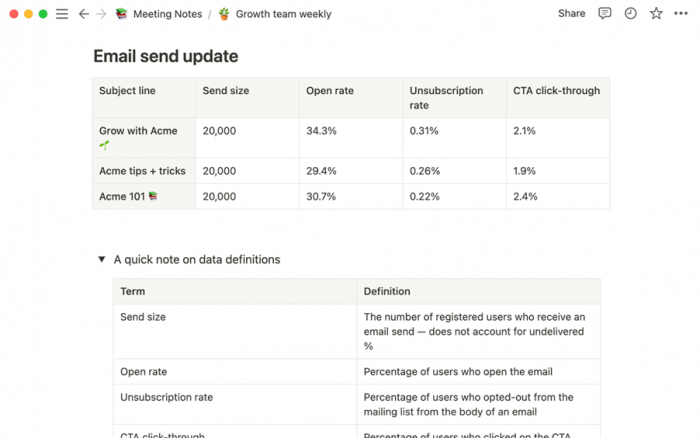
Notion starts from the opposite direction.
Instead of structure first, it begins with content. Everything is a block. Text, headings, images, tables, toggles. You build pages the way you think, not the way a system expects.
This makes Notion incredibly easy to start with.
You can write notes, build a wiki, track tasks, create dashboards, and organize projects without planning a system upfront. It adapts to you rather than forcing you to adapt to it.
For individuals and content teams, this flexibility is its biggest advantage. You can create editorial calendars, knowledge bases, documentation, and planning systems in one place without switching tools.
Notion also includes database functionality, but it behaves differently from Airtable. Databases in Notion feel like an extension of content rather than a standalone system. They are useful, but not deeply operational.
The problem appears at scale.
As complexity increases, Notion starts to bend. Relationships become harder to manage. Data consistency becomes manual. Systems that looked clean at the start begin to feel fragile.
Notion: What stands out in real use
- writing, planning, and organizing content feels natural
- one workspace can replace multiple tools for small teams
Notion: Where it struggles
- database logic does not scale well for complex workflows
- systems rely heavily on manual discipline rather than enforced structure
Direct Comparison: Where the Difference Becomes Obvious
| Category | Airtable | Notion |
| Core Strength | Data structure and workflow systems | Content flexibility and organization |
| Learning Curve | High upfront, low once structured | Low upfront, increases with complexity |
| Automation | Advanced and reliable | Basic and limited |
| Scalability | Handles operational complexity well | Breaks under heavy structured workflows |
| Best Use Case | CRM, pipelines, operations | Docs, content, planning |
| Weak Point | Not content-friendly | Not system-friendly |
What Actually Matters in Real Workflows
Most comparisons stop at features. That is where they go wrong.
The real difference appears when both tools are used daily for actual work.
In Airtable, the system dictates behavior. If a field exists, it must be filled correctly. If a relationship exists, it must be maintained. This creates consistency across teams.
In Notion, behavior is flexible. You can structure things however you want, but that also means inconsistency creeps in quickly. Two people can build two completely different systems for the same task.
This distinction matters more than any feature list.
Airtable enforces discipline.
Notion relies on discipline.
Scenario-Based Breakdown
| Scenario | Better Choice | Why |
| Managing a sales pipeline | Airtable | Structured stages, tracking, automation |
| Running a content calendar | Notion | Flexible writing + planning in one place |
| Building internal tools without code | Airtable | Database logic + automation workflows |
| Creating a team wiki | Notion | Clean, readable, easy to navigate |
| Handling multi-team operations | Airtable | Data consistency across teams |
| Personal productivity system | Notion | Adaptable to individual workflow |
What Becomes Clear After Using Both
The difference is not about which tool is better.
It is about how they break.
Airtable breaks early if the system is poorly designed.
Notion breaks later when the system grows beyond its limits.
This is why teams often start with Notion and move to Airtable when operations become complex. Not because Notion is weak, but because it was never designed to handle structured data at scale.
At the same time, teams that start with Airtable often struggle with documentation, content, and internal communication. They end up pairing it with Notion or another writing tool.
Should You Replace One With the Other
Trying to replace Airtable with Notion usually leads to fragile systems.
Trying to replace Notion with Airtable usually leads to rigid workflows.
They solve different problems.
The more effective approach is understanding where each tool fits.
Final Interpretation
Choosing between Airtable and Notion is not a tool decision. It is a workflow decision.
If your work depends on structure, relationships, and automation, Airtable creates systems that scale. It reduces chaos by enforcing logic, even if that makes onboarding harder.
If your work depends on thinking, writing, and organizing ideas, Notion creates an environment that feels natural. It reduces friction, even if that makes long-term structure weaker.
What becomes obvious after working with both is this.
Airtable is where operations live.
Notion is where thinking lives.
The mistake is expecting one to do the job of the other.
Post Comment
Be the first to post comment!