Overview

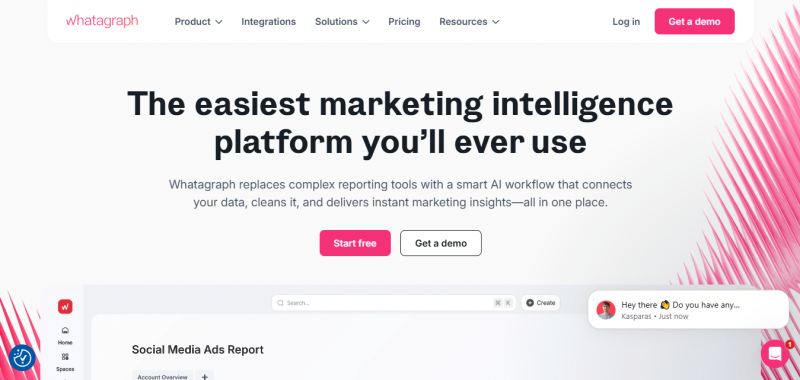
Whatagraph consolidates marketing data from multiple sources into one platform. It skips messy imports and endless spreadsheets by offering 55+ native integrations, custom integrations via API, Google Sheets, or BigQuery, and a secure hub for all data without middleware. Users get ready-to-use data with unified naming across sources, custom formulas, reusable transformations, and blended metrics across channels for unified KPIs. Insights flow instantly through performance overviews by country, team, or product, IQ chat for answers, personalized auto-generated summaries, and goals with alerts. Reports and widgets build via drag-and-drop or Whatagraph IQ generation, with pre-built templates and auto-branding.

Core Features:

  • 55+ native integrations
  • Custom integrations via API, Google Sheets, or BigQuery
  • Unified naming across sources
  • Custom formulas and reusable transformations
  • Blended metrics across channels
  • Performance overviews by country, team, or product
  • IQ chat for instant answers
  • Personalized auto-generated summaries
  • Goals and alerts
  • Drag-and-drop report builder

How It Works:

  • Connect data sources: Link advertising, social, analytics, CRM, SEO, and e‑commerce channels.
  • Clean & unify data: The platform normalizes naming and prepares data for reporting.
  • Generate insights: Use Whatagraph IQ to auto‑generate summaries and answers.
  • Build reports: Choose templates or build custom reports with drag‑and‑drop widgets.
  • Share results: Automate deliveries via email, live links, or export to destinations like BigQuery or Looker Studio.

Pros & Cons

Pros:

Drag-and-drop widgets are simple to use and speed up report creation.

Ready-to-use templates and intuitive builder reduce setup time.

Interactive dashboards allow clicking through tabs and hovering over charts.

Pre-made blocks and shortcuts facilitate quick customization.

Cons:

Advanced customizations like precise widget sizing feel limited.

Data refresh occurs approximately every 30 minutes.

Some users note constraints in unique layout options.

Software Trial

7 Days

Free Version

No

Licensing Type

Proprietary

Starting Price

Price Type

  • Contact Vendor

Currency

  • USD ($)

Subscription

  • Monthly
  • Annually
  • Quote Based

Whatagraph Software Features

Dashboard Features

  • Alerts/Notifications
  • Dashboard Templates
  • Data Filtration
  • Embedded Analytics
  • KPI Monitoring
  • Visual Representation

Reporting Features

  • Automated Reports
  • Customizable Dashboard
  • Data Source Connectors
  • Drag & Drop
  • Drill Down
  • Financial Reports
  • Marketing Reports
  • Report Export
  • Sales Reports
  • Visual Analysis

Web Analytics Features

  • Campaign Management
  • Conversion Tracking
  • Dashboard
  • Dashboard
  • Goal Tracking
  • Referral Source Tracking
  • Time on Site Tracking
  • User Interaction Tracking

Data Visualization Features

  • Dashboard
  • Dashboard
  • Data Import/Export
  • Data Management
  • Data Mining
  • Filtered Views
  • Relational Display
  • Visual Discovery

Deployment

  • Cloud Hosted

Platform

  • Web-Based
  • Windows
  • Mac
  • Linux

Support

  • Email
  • Chat
  • Phone

Training

  • Documentation
  • Blogs
  • Help Guides
  • Infographics
  • In-Person Training

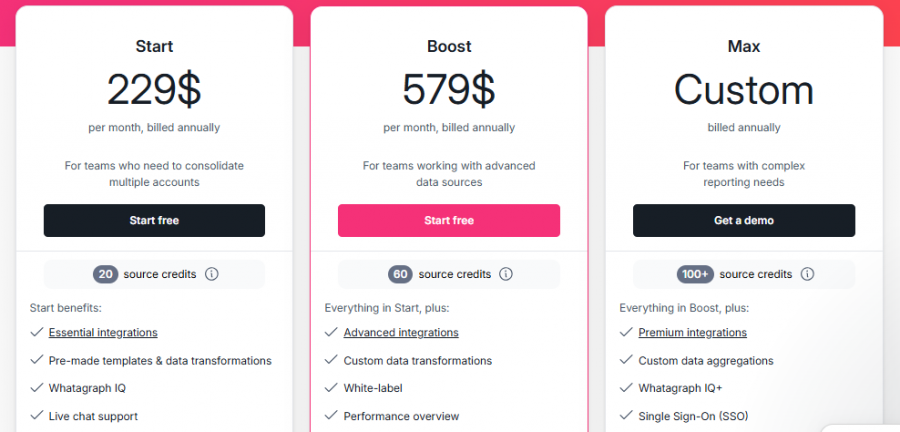
Whatagraph Pricing

Whatagraph Pricing

*Check the current pricing on Whatagraph's website.

Software Category

Dashboard Data Visualization Reporting Web Analytics

Reviews

Login to review Whatagraph.

Explore Other Top Dashboard Software