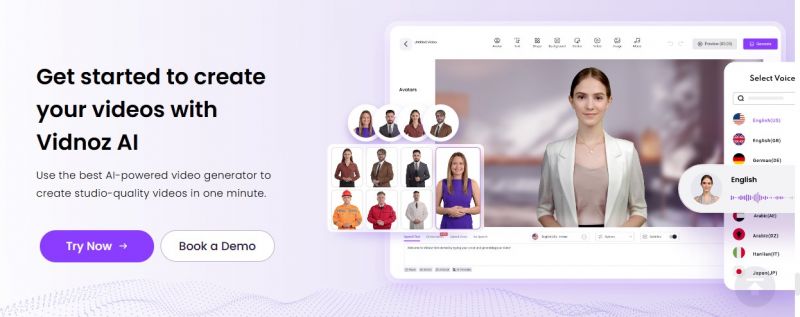
Vidnoz AI is a browser-based video creation platform that lets users turn text into videos using AI avatars, text-to-speech, voice cloning, and ready-made templates no previous editing experience required. Its simple interface offers 1,500+ avatars, 2,800+ templates, hundreds of AI voices, and drag-and-drop editing. The tool is primarily used for explainer, marketing, e-learning, and social content. Users can create and translate videos in multiple languages, add custom avatars, and quickly export to social channels. Vidnoz AI appeals to content marketers, agencies, educators, and individual creators seeking scalable video production.
Rapid text-to-video and avatar animation for non-editors.
Large selection of avatars, voices, and templates; easy drag-and-drop.
Voice cloning and translation for global/multilingual content.
Works fully online; nothing to install, easy cloud sharing/export.
Good for explainer, social, marketing, and learning video use cases.
Customization limited avatars and backgrounds sometimes look generic; pro editing features are basic.
Lip sync/speech sometimes lag, especially in translation.
Support response and upgrade experience noted as inconsistent.
15 Sec/Day
Yes
Proprietary
Features
Features
Features
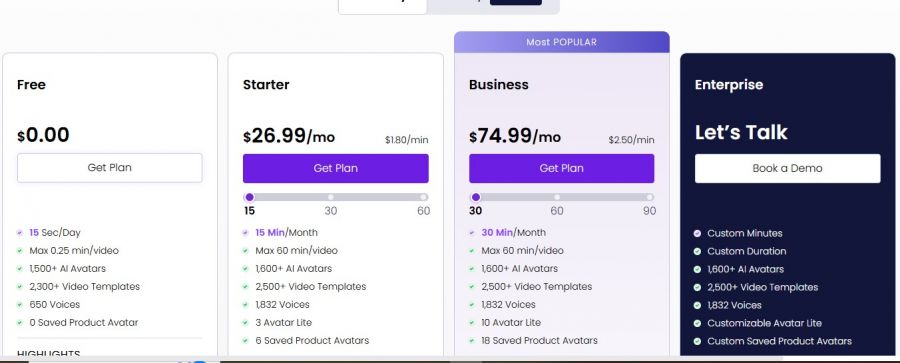
*Check the current pricing on vidnoz AI's website.

Started using Vidnoz on my old Lenovo laptop to make quick talking‑head videos for internal training, because I honestly hate recording myself on camera. The avatars look way better than I expected, and being able to just paste a script, pick a template, tweak the background, and hit generate turned a painful half‑day recording session into like 20 minutes of work. Lip‑sync isn’t 100% perfect, but for slides, explainers, and simple HR updates it’s totally good enough
Tried Vidnoz one evening to make a short training video without recording myself. and the avatar options are surprisingly good. Still, the credit system confused me at first, and I hit the free limit sooner than I thought.
The avatar variety is honestly impressive, and for simple scripts the voiceovers sync fairly well. The editor is browser-based and mostly intuitive, which I appreciated late at night when I didn’t want to learn a new system.