Overview

Dialpad Meetings provides video conferencing with AI tools for transcriptions and summaries. It supports hosting meetings with up to 150 participants and durations up to five hours on the Business plan. The free plan offers unlimited meetings limited to 10 participants and 45 minutes. Real-time transcripts and post-meeting summaries keep participants focused. Video recordings capture sessions. Add-ons include rooms licenses and toll-free dial-in numbers. This separates video functionality from Dialpad's core phone system.

Core Strengths:

  • Provides live AI transcription during meetings.
  • Produces automated meeting summaries and action items.
  • Offers HD video conferencing and browser‑based join links.
  • Includes screen sharing and collaboration tools.
  • Supports calendar scheduling and 1‑click joins.
  • Tracks keywords and sentiment in conversations (via Dialpad AI).
  • Saves recordings and searchable transcripts to history.
  • Enables host controls like mute and waiting rooms.
  • Works with external app integrations (Google/Outlook calendars).
  • Scales up to 1,000 participants in beta large meetings.

Use Cases:

  1. Remote team standups and coordination.
  2. Client calls with live notes and recaps.
  3. Sales and customer presentations.
  4. Interview and onboarding meetings.
  5. Training sessions with searchable transcripts.

Pros & Cons

Pros:

Free plan supports unlimited meetings for basic use

AI transcriptions and summaries available on Business plan

Supports up to 150 participants and 5-hour durations on Business plan

Cons:

Free plan limits meetings to 10 participants and 45 minutes

Larger meetings or longer durations require paid add-ons or upgrade

Separate from Dialpad phone system, requiring additional purchase for VoIP

Software Trial

14 Days

Free Version

Yes

Licensing Type

Proprietary

Starting Price

Price Type

  • Flat Rate

Currency

  • USD ($)

Subscription

  • Monthly
  • Quote Based

Dialpad Meetings Software Features

Screen Sharing Features

  • Audio/Video Conferencing
  • Collaboration Tools
  • Desktop/Browser Sharing
  • Event Scheduling
  • File Sharing
  • File Sharing
  • File Sharing
  • Live Chat/Text
  • Mobile Screen Sharing
  • Screen Capture
  • Screen Mirroring
  • Session Recording

Video Conferencing Features

  • Auto Framing
  • Electronic Whiteboards
  • File Sharing
  • File Sharing
  • File Sharing
  • HD Audio & Video
  • Mobile Access
  • Mobile Access
  • Online Meetings
  • Polls & Survey
  • Presentation Streaming
  • Presentation Streaming
  • Real Time Chat
  • Real Time Chat
  • Record & Playback
  • Screen Sharing
  • Screen Sharing
  • Verified Security

Web Conferencing Features

  • Group Collaboration
  • Mobile Access
  • Mobile Access
  • On-Demand Webcasting
  • Presentation Streaming
  • Presentation Streaming
  • Presentation Tools
  • Real Time Chat
  • Real Time Chat
  • Record & Playback Ability
  • Screen Sharing
  • Screen Sharing
  • Two-Way Audio & Video
  • Video Conferencing

Deployment

  • Cloud Hosted

Platform

  • Web-Based
  • Android
  • Windows

Support

  • Email
  • Chat
  • Phone

Training

  • Documentation
  • Blogs
  • Help Guides
  • Infographics
  • In-Person Training
  • Videos
  • Webinars

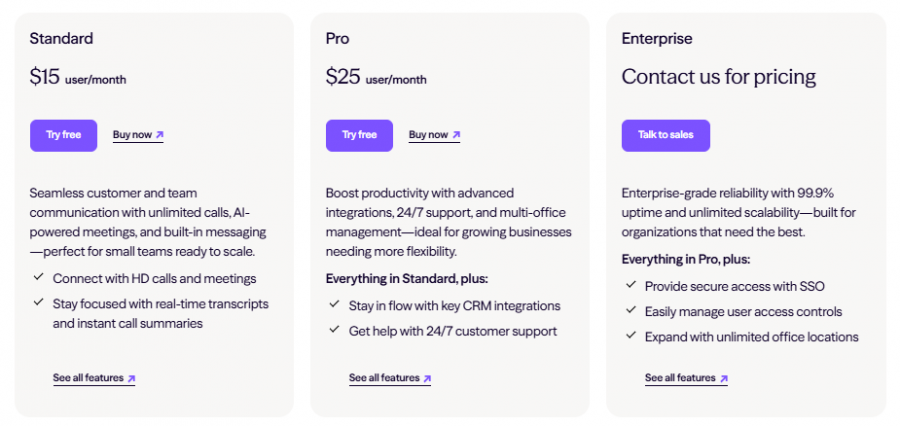
Dialpad Meetings Pricing

Dialpad Meetings Pricing

*Check the current pricing on Dialpad Meetings's website.

Software Category

Screen Sharing Video Conferencing Web Conferencing

Reviews

Login to review Dialpad Meetings.

Explore Other Top Screen Sharing Software