Overview

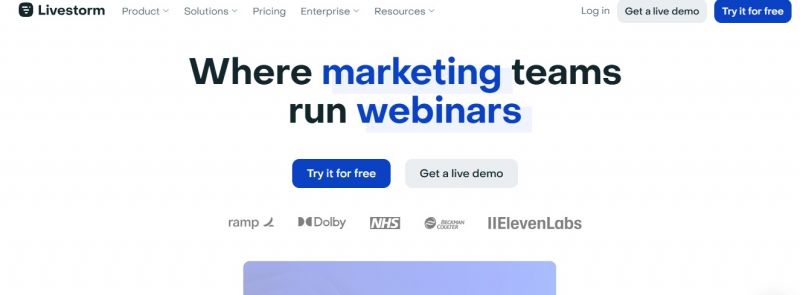
Livestorm provides an all-in-one video engagement platform for virtual meetings, video conferencing, webinars, virtual events, and screen sharing. It handles workflows from registration pages and email cadences to event rooms and data export in one place, without third-party tools. Users access browser-based entry, custom branding for rooms, pages, and emails, CRM data transfer, and EU-hosted security with ISO 27001 certification and GDPR compliance. AI features include transcripts, content repurposing, live captions, and generators for webinar titles, outlines, and scripts. Interactive elements cover polls, chats, reactions, and questions during events.

  • Custom room design with logo, background images, and colors
  • Contact profiles with CRM-like information
  • Email cadences with unlimited reminders and follow-ups
  • Browser-based access without downloads
  • Registration pages optimized for conversion
  • Data export for registrants, chats, and questions
  • Automatic picture-in-picture on Chromium browsers
  • Live captions transcribing spoken content in real time
  • AI content repurposing from transcripts
  • Restreaming to LinkedIn, YouTube, X, and more
  • One-click access with Google or Microsoft accounts

Pros & Cons

Pros:

Elegance of UI and simplicity for creating beautiful landing pages impact customer communication at scale

Higher attendance rate reported

Time savings after switching to Livestorm

Intuitive functionalities to run events in minutes

Cons:

Some features like live captions and replay captions remain in beta

Add-ons such as restreaming and multiple workspaces limited to Business and Enterprise plans

Session roles feature currently in beta

Software Trial

1-7 Days

Free Version

Yes

Licensing Type

Proprietary

Starting Price

Price Type

  • Free

Currency

  • USD ($)

Subscription

  • Monthly
  • Annually

Livestorm Software Features

Webinar Features

  • Alerts/Notifications
  • Customer Trainings
  • Customizable Branding
  • Live Broadcasting
  • Multi-Hosts
  • On-Demand Webinars
  • Screen Sharing
  • Screen Sharing
  • Screen Sharing
  • Social Media Promotion

Screen Sharing Features

  • Audio/Video Conferencing
  • Collaboration Tools
  • Desktop/Browser Sharing
  • Event Scheduling
  • File Sharing
  • Live Chat/Text
  • Mobile Screen Sharing
  • Screen Capture
  • Session Recording

Video Conferencing Features

  • Auto Framing
  • File Sharing
  • HD Audio & Video
  • Mobile Access
  • Mobile Access
  • Online Meetings
  • Polls & Survey
  • Presentation Streaming
  • Presentation Streaming
  • Real Time Chat
  • Real Time Chat
  • Record & Playback
  • Screen Sharing
  • Screen Sharing
  • Screen Sharing
  • Verified Security

Web Conferencing Features

  • Mobile Access
  • Mobile Access
  • On-Demand Webcasting
  • Presentation Streaming
  • Presentation Streaming
  • Real Time Chat
  • Real Time Chat
  • Record & Playback Ability
  • Screen Sharing
  • Screen Sharing
  • Screen Sharing
  • Two-Way Audio & Video
  • Video Conferencing

Deployment

  • Cloud Hosted

Platform

  • Web-Based
  • iPhone/iPad
  • Android
  • Windows
  • Mac
  • Linux

Support

  • Email
  • Chat
  • Phone

Training

  • Documentation
  • Blogs
  • Help Guides
  • Videos
  • Webinars

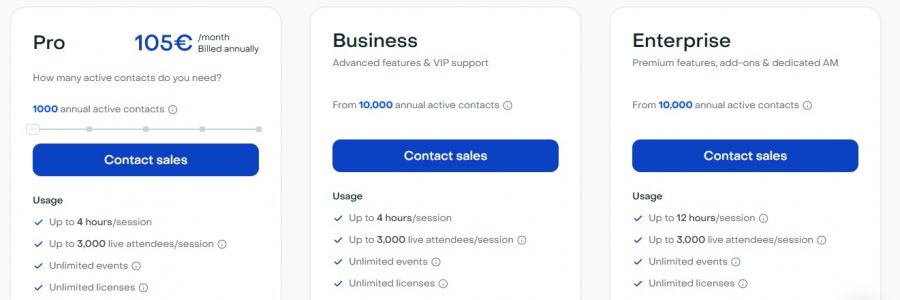
Livestorm Pricing

Livestorm Pricing

*Check the current pricing on Livestorm's website.
Software Category

Screen Sharing Video Conferencing Web Conferencing Webinar

Reviews

Login to review Livestorm.

Explore Other Top Screen Sharing Software