Overview

Lightstream Studio is a cloud-based live streaming platform accessible entirely through a web browser, requiring only a computer and internet connection to begin streaming. It eliminates the need for downloads, powerful hardware, or capture cards by handling console capture, remote guest integration, and multi-platform simulcasting directly in the browser. The platform emphasizes unrestricted creative control through customizable scenes, layouts, and projects, supported by cloud storage and real-time synchronization. Users can stream from anywhere, including remote locations or mobile devices, with automatic stream persistence if internet connectivity drops temporarily.

Core Strengths:

  • Enables browser-based streaming with no downloads required.
  • Supports console streaming from Xbox and PlayStation without capture cards.
  • Allows simulcasting to up to 5 platforms simultaneously. 
  • Includes drag-and-drop overlay editor for stream customization.
  • Provides built-in alerts for chat, donations, and engagement tools.
  • Supports adding up to 10 live guests in streams (premium tier).
  • Offers cloud-based scenes and templates for fast setup.
  • Keeps streams running via cloud even if local connection drops.

Use Cases & Applications:

  • Console gaming live streams (Xbox / PlayStation)
  • Twitch and YouTube content creation
  • Talk shows and podcast-style broadcasts
  • IRL (in-real-life) mobile streaming setups
  • Virtual interviews and panel discussions
  • Brand/product live launches
  • Educational webinars and live classes
  • Multi-platform simulcasting for creators

Competitive Advantages:

  • Fully cloud-based streaming (no OBS required)
  • No capture card needed for console streaming
  • Built-in overlays and alerts without plugins
  • Supports up to 5 simultaneous streaming destinations
  • Easy guest integration via simple invite links
  • Works on low-end PCs since processing is cloud-based
  • Prebuilt templates for instant stream setup

Pros & Cons

Pros:

Streams directly from browser without downloads or heavy hardware

Combines console, webcam, screen share, and external inputs in one interface

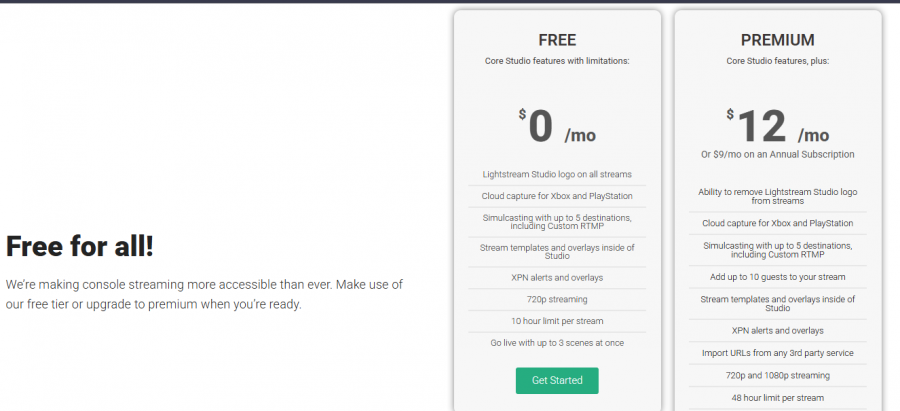
Offers free tier with no watermarks for accessible streaming

Syncs cloud projects across devices for remote streaming flexibility

Cons:

Participant limits restrict collaboration in some project configurations

Console capture support varies, limiting consistent cross-platform usability

Software Trial

1-7 Days

Free Version

Yes

Licensing Type

Proprietary

Starting Price

Price Type

  • Free

Currency

  • USD ($)

Subscription

  • Monthly
  • Annually
  • Quote Based

Lightstream Studio Software Features

Live Streaming Features

  • Access Control
  • Audience Analytics
  • Audio Mixer
  • Customizable Branding
  • Multiviewer
  • Session Recording
  • Streaming Production
  • Video Monetization Tools

Deployment

  • Cloud Hosted

Platform

  • Web-Based
  • iPhone/iPad
  • Android
  • Windows
  • Mac

Support

  • Email
  • Chat

Training

  • Documentation
  • Blogs
  • Help Guides
  • Videos
  • Webinars

Lightstream Studio Pricing

Lightstream Studio Pricing

*Check the current pricing on Lightstream Studio's website.

Software Category

Live Streaming

Reviews

Login to review Lightstream Studio.

Explore Other Top Live Streaming Software