
KreadoAI turns your written content, images, slides, or links into polished videos using digital avatars and realistic voiceovers. It offers free and paid plans, supporting many languages and a large voice collection. Designed for creators, marketers, educators, and businesses, KreadoAI simplifies video production without cameras or editing skills. User feedback is generally positive, though the free plan has limits and heavier usage may require more credits.
Key Capabilities :
Key Use Cases:
Website layout feels intuitive and visually pleasing
Multilingual videos created within a few minutes
Pronunciation and lip‑sync feel “spot on”
700–1000+ digital avatars for flexibility
Avatars look natural in finished renders
Some avatar gestures appear stiff, robotic
Limited timeline and pro editing controls
0
No
Proprietary
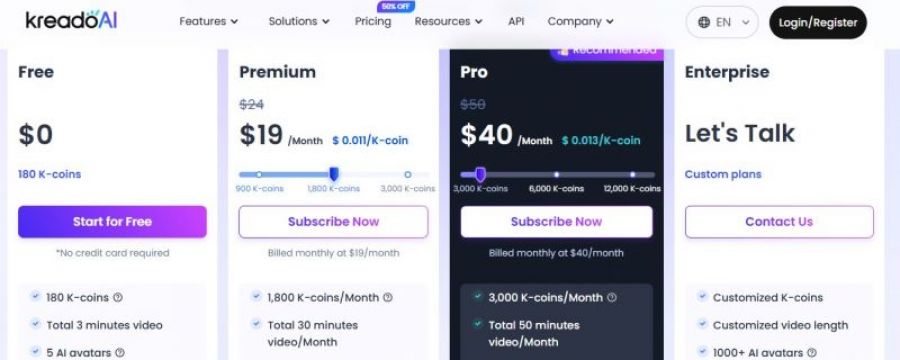
*Check the current pricing on KreadoAI's website.

avatar selection is quite diverse, and voice options are impressive. I liked how quickly it converts script into video without much setup. Performance was stable throughout
A free video capture and processing utility for Windows.

Free open source live streaming and recording software

Create Engaging AI Videos, 10× Faster & Free

Swap faces in photos and videos effortlessly with AI.

The most complete social media management platform for brands and agencies.

Create videos with AI avatars.
.jpg_1772085433.jpg)