InVideo turns any idea into videos such as ads, explainers, and stories. Users input prompts to generate full videos including scripts, footage, voiceovers, and edits. It operates on credit-based plans that allocate video minutes, AI credits, iStock assets, storage, and generative features. Free plan provides 2 video minutes and 1 AI credit per week with watermarks on exports. Paid plans scale credits from 10 to 1000 monthly, add generative video seconds, express clones, and unlimited exports without watermarks. Separate from InVideo Studio, it focuses on text-to-video generation with options to boost limits.
Access to thousands of iStock images and videos provides value for subscription
Saves team time on video production
Provides a starting base for video output
Simple prompting works for novice users
Free and lower tiers limit AI minutes, premium media, and add watermarks
Video quality relies heavily on stock footage availability
0 Days
Yes
Proprietary
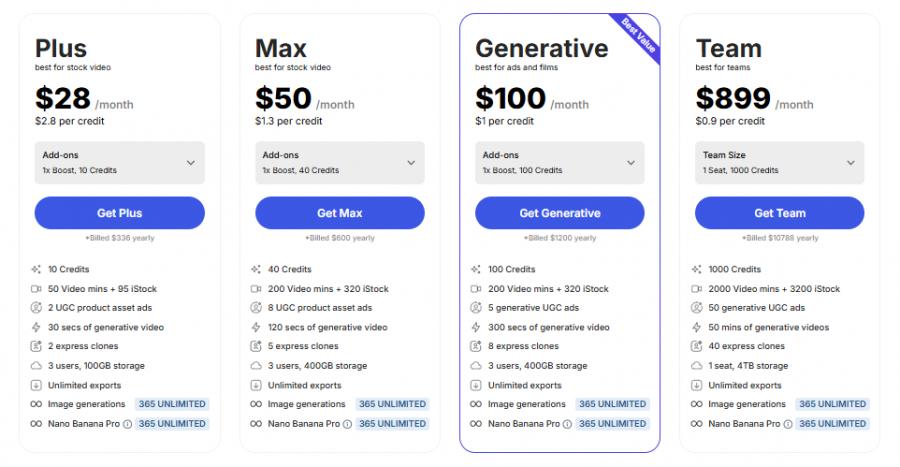
*Check the current pricing on InVideo's website.

Screen capture and video recording software

A free video capture and processing utility for Windows.

Screen Recording Software: capture anything on your PC screen

Advanced Editing Studio

Screen recording and video editing software that combines real-time recording with professional editing tools.

Screen Recorder for PC: Windows and Mac