Overview

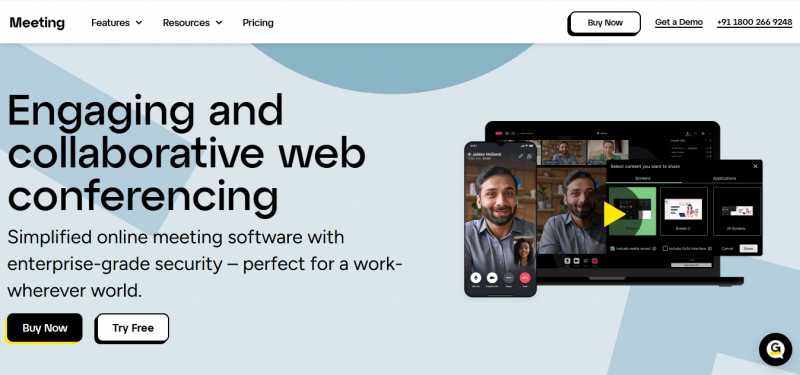
GoTo Meeting provides web conferencing with HD video, screen sharing, and in-session chat. It enables hosts to launch meetings in one click without downloads, share desktops or specific applications, and use drawing tools for collaboration. Security features include encrypted sessions, meeting locks, passcodes, and participant removal. Audio options cover VoIP, toll-free dial-in in over 50 countries, and commuter mode for mobile. Smart Meeting Assistant transcribes sessions, highlights key points, and organizes slides into PDFs. Personal meeting rooms and business messaging allow starting meetings from chats. Uptime reaches 99.999%.

Core Strengths:

  • Hosts HD video meetings with up to 250 participants (Business plan).
  • Supports screen sharing, drawing tools, and screen control.
  • Includes unlimited meetings with no time limits on paid plans.
  • Built‑in audio conferencing, VoIP, and commuter mode.
  • Provides breakout rooms, in‑session chat, and reactions.
  • Offers AI meeting summary and transcription (Business & up).
  • Enterprise‑grade security and encryption standards.
  • Integrations with productivity apps and calendar tools.

Use Cases:

  1. Internal team meetings and remote standups.
  2. Client presentations and demos.
  3. Training sessions and workshops.
  4. Customer support and product walkthroughs.
  5. Company‑wide announcements and all‑hands.

Pros & Cons

Pros:

Video Conferencing feature enables real-time communication with high-quality video and audio for sharing visual aids and live demonstrations.

Reliable for remote work and distance learning, competing effectively with platforms like Microsoft Teams.

Two-Way Audio & Video rated 4.5 by 207 users.

Desktop/Browser Sharing rated 4.6 by 252 users.

HD Audio/Video rated 4.5 by 360 users.

Cons:

Breakout Rooms rated 4.1 by 107 users.

Polls/Voting rated 4.3 by 86 users.

Automatic Transcription rated 4.3 by 64 users.

Transcripts/Chat History rated 4.1 by 62 users.

Software Trial

14 Days

Free Version

No

Licensing Type

Proprietary

Starting Price

Price Type

  • Flat Rate

Currency

  • USD ($)

Subscription

  • Monthly
  • Annually
  • Quote Based

GoToMeeting Software Features

Remote Work Features

  • Audio/Video Calls
  • Collaboration
  • Employee Monitoring
  • File Sharing
  • File Sharing
  • File Sharing
  • Meeting Management
  • Project Management
  • Remote Access
  • Security

Screen Sharing Features

  • Audio/Video Conferencing
  • Collaboration Tools
  • Desktop/Browser Sharing
  • Event Scheduling
  • File Sharing
  • File Sharing
  • File Sharing
  • Live Chat/Text
  • Mobile Screen Sharing
  • Screen Capture
  • Screen Mirroring
  • Session Recording

Video Conferencing Features

  • Auto Framing
  • Electronic Whiteboards
  • File Sharing
  • File Sharing
  • File Sharing
  • HD Audio & Video
  • Mobile Access
  • Mobile Access
  • Online Meetings
  • Presentation Streaming
  • Presentation Streaming
  • Real Time Chat
  • Real Time Chat
  • Record & Playback
  • Screen Sharing
  • Screen Sharing
  • Verified Security

Collaboration Features

  • Calendar Management
  • Document Management
  • Project Management
  • Synchronous Editing
  • Task Management
  • Workflow Management

Web Conferencing Features

  • Group Collaboration
  • Mobile Access
  • Mobile Access
  • On-Demand Webcasting
  • Presentation Streaming
  • Presentation Streaming
  • Presentation Tools
  • Real Time Chat
  • Real Time Chat
  • Record & Playback Ability
  • Screen Sharing
  • Screen Sharing
  • Two-Way Audio & Video
  • Video Conferencing

Deployment

  • Cloud Hosted

Platform

  • Web-Based
  • iPhone/iPad
  • Android
  • Windows
  • Mac

Support

  • Email
  • Phone

Training

  • Documentation
  • Blogs
  • Help Guides
  • In-Person Training
  • Videos
  • Webinars

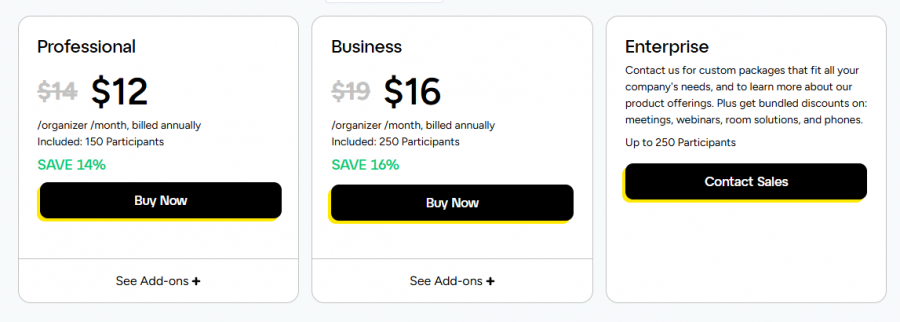
GoToMeeting Pricing

GoToMeeting Pricing

*Check the current pricing on GoToMeeting's website.
Software Category

Collaboration Remote Work Screen Sharing Video Conferencing Web Conferencing

Reviews

Login to review GoToMeeting.

Explore Other Top Collaboration Software