Overview

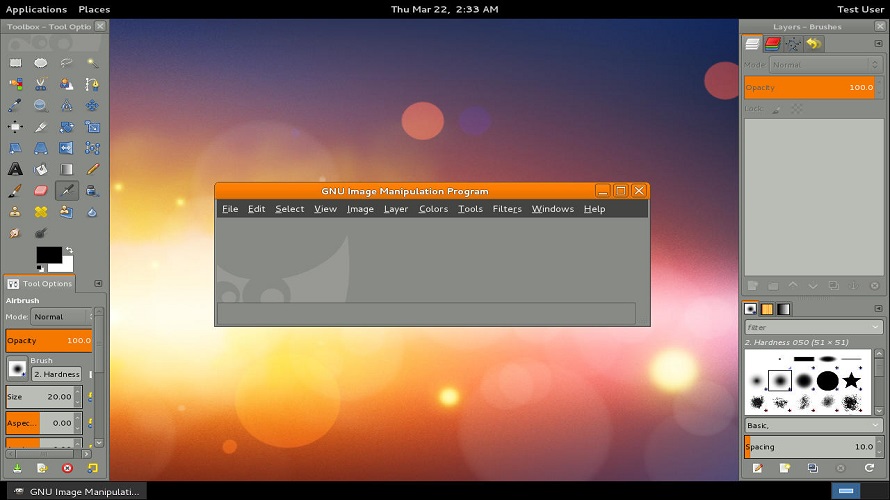
GIMP is a cross-platform image editor available for GNU/Linux, macOS, Windows and more operating systems. It provides tools for high quality image manipulation, including retouching, restoring and creative composites. The program supports photo retouching, image editing, free-hand drawing and converting between image file formats. It offers extensibility through scripting in languages such as C, C++, Perl, Python and Scheme, along with third-party plugins. GIMP serves as a framework for scripted image manipulation with multi-language support.

Features:

  • Sophisticated tools for image manipulation
  • Customization options and third-party plugins
  • Scripting support in C, C++, Perl, Python, Scheme and more
  • Support for multiple operating systems including GNU/Linux, macOS and Windows
  • Tools for retouching, restoring and creative composites

How It Works:

  • Launch the App: Download and install GIMP on your desktop OS (Windows/macOS/Linux).
  • Import Images: Open one or multiple images for editing.
  • Work with Layers: Create and manipulate layers and masks for non‑destructive edits.
  • Apply Tools: Use brushes, selection tools, and transforms to adjust visual elements.
  • Use Filters & Effects: Add built‑in filters for artistic or corrective effects.
  • Extend with Plugins: Add community plugins for extra capabilities.
  • Export Work: Save or export your projects in common image formats.

Pros & Cons

Pros:

Free and open-source with no licensing costs

Cross-platform availability on multiple operating systems

Extensible through scripting and community plugins

High customization for workflows

Cons:

Different user interface from some commercial alternatives

Requires manual installation of plugins for added functionality

Steep learning curve for advanced features

Lacks native CMYK support without decomposition

Software Trial

1-7 Days

Free Version

Yes

Licensing Type

Proprietary

Starting Price

Price Type

  • Free

Currency

  • USD ($)

Subscription

  • N/A

GIMP Software Features

Animation Features

  • Animate Characters
  • Bone Tool
  • Collaboration
  • Custom Characters
  • Digital Effects
  • Key-frames
  • Layers and Filters
  • Production Pipeline
  • Save and Export
  • Vector Drawings
  • Vertical Videos

Web Design Features

  • Animations
  • Auto Update
  • Content Management
  • Customization
  • Design Templates
  • Drag & Drop
  • Image Editing
  • Responsive Designs
  • UI/UX Designing

Graphic Design Features

  • Artboards
  • Collaboration
  • Drag and Drop
  • Filtering
  • Image Database
  • Image Editor
  • Multiple Pages
  • Symbols/Styles

Drawing Features

  • Auto Shapes
  • Blending
  • Clip Arts & Symbols
  • Color Management
  • Custom Brushes
  • Dimensioning
  • Export
  • Freehand Tools
  • Layer Management
  • Paint Tools

Photo Editing Features

  • Batch Editor
  • Blur Image
  • Collage Maker
  • Contrast Change & Brightening
  • Crop Photo
  • Image Merging
  • Image Slicing
  • Lens Correction
  • Noise Reduction
  • Photo Frames
  • Resize Image
  • Sharpness Adjustments

Deployment

  • On Premises

Platform

  • Web-Based
  • Windows
  • Mac
  • Linux

Support

  • Email

Training

  • Documentation
  • Help Guides
  • In-Person Training

GIMP Pricing

Pricing yet to be updated!

Software Category

Animation Drawing Graphic Design Photo Editing Web Design

Reviews

Login to review GIMP.

Explore Other Top Animation Software