Overview

Canva combines a powerful drag‑and‑drop editor with generative AI capabilities like Magic Studio, enabling users to generate images, layouts, and copy from prompts in one platform. Plans scale from a free tier to paid subscriptions with advanced AI tools, collaboration, and brand controls, Built for creators, marketers, educators, and teams needing to produce professional graphics, videos, documents, and visual content quickly.

Features:

  • Drag-and-drop editor with real-time collaboration
  • Thousands of free, fully responsive website templates
  • Multi-page website support with up to 10 sections and 45 pages
  • Millions of free photos, icons, graphics, and media elements
  • AI image generator (Magic Media) and AI copy generator (Magic Write)
  • Interactive widgets via Canva Code without coding required
  • Video trimming, splitting, and splicing tools
  • AI-powered photo enhancement for image quality improvement
  • Curved text and text animation capabilities

Use Cases:

  • Social media visuals and campaign graphics.
  • Marketing collateral and ads.
  • Slide decks, reports, and presentations.
  • Educational materials and classroom assets.
  • Videos, GIFs, and animations for digital platforms.
  • Multi‑format brand content with AI‑assisted creation.

Pros & Cons

Pros:

No coding knowledge required to create and publish functional, responsive websites

Extensive library of free design assets reduces time spent sourcing images and graphics

Templates and drag-and-drop interface allow website creation in minutes

Multi-page website structure with linking and navigation menu support enables complex site organization

AI-powered design features (image generation, copy writing, photo enhancement) streamline creative workflow

Cons:

Free domain is limited to my.canva.site subdomain; custom domains require additional purchase

Multi-page website limit of 45 pages may constrain larger content projects

Some premium features and design elements require Pro subscription

Design customization relies on template starting points; blank-canvas creation may be limited compared to full-featured web builders

Software Trial

30 Days

Free Version

Yes

Licensing Type

Proprietary

Starting Price

Price Type

  • Flat Rate

Currency

  • USD ($)

Subscription

  • Monthly

Canva Software Features

Graphic Design Features

  • Artboards
  • Collaboration
  • Collaboration
  • Data Visualization
  • Drag and Drop
  • Filtering
  • Image Database
  • Image Editor
  • Image Editor
  • Multiple Pages
  • Symbols/Styles
  • Templates
  • Templates

Presentation Features

  • Audio & Video Content
  • Collaboration Tools
  • Customizable Templates
  • Offline Editing
  • Sharing
  • Transitions & Animations

Business Card Features

  • Business Card Sizes
  • Design Templates
  • Image Editor
  • Image Editor
  • Templates Color Schemes

Org Chart Features

  • Collaboration
  • Collaboration
  • Custom Formatting
  • Data Import/Export
  • Drag & Drop
  • Interactive Elements
  • Photos/Images
  • Presentation Tools
  • Publishing/Sharing
  • Revision History
  • Templates
  • Templates

Deployment

  • Cloud Hosted

Platform

  • Web-Based
  • Windows
  • Mac
  • Linux

Support

  • Email
  • Phone

Training

  • Documentation
  • Blogs
  • Help Guides
  • In-Person Training
  • Videos

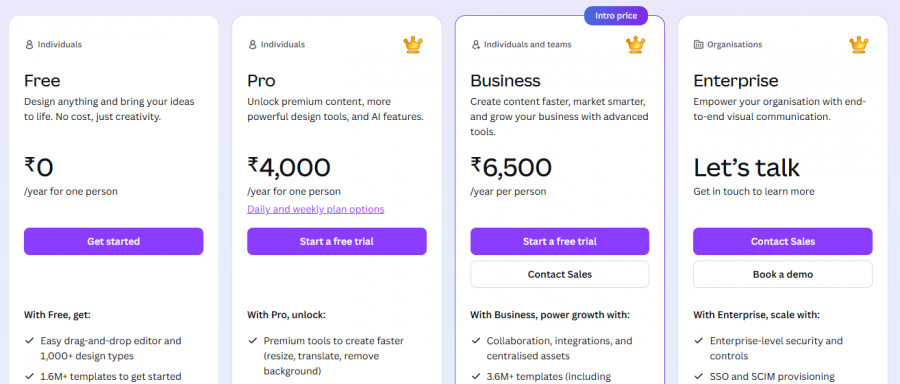
Canva Pricing

Canva Pricing

*Check the current pricing on Canva's website.
Software Category

Business Card Graphic Design Org Chart Presentation

Reviews

Login to review Canva.