On This Page
- Platform Positioning: Built for Different Types of Sales Teams
- Zoho CRM: Built for control, but requires structure
- What Zoho CRM does well
- Where Zoho CRM starts to break
- Pipedrive: Built for clarity, but limited in depth
- Core Differences That Actually Matter
- Pricing Reality: What You Pay Reflects the Philosophy
- What Users Actually Say (Real Reviews Insight)
- What Becomes Obvious After Using Both
- Which One Should You Actually Choose
- Final Thoughts
Most CRM comparisons start with features.
Contacts. Pipelines. Automation. Reports.
And on paper, both Zoho CRM and Pipedrive check those boxes. That is exactly why choosing between them becomes difficult. They look similar until you actually try to run a sales process through them.
The real difference is not what they offer. It is how they behave when your workflow becomes messy, unpredictable, and scaled.
This is not a feature comparison. This is a breakdown of where each tool fits, where it starts to slow you down, and what becomes obvious after using both.
Platform Positioning: Built for Different Types of Sales Teams
| Area | Zoho CRM | Pipedrive |
| Website | https://www.zoho.com/crm | https://www.pipedrive.com |
| Core Philosophy | All-in-one business CRM | Pipeline-first sales CRM |
| Best Fit | Growing teams with complex workflows | Sales teams focused on deal tracking |
| Learning Curve | Moderate to high | Low |
| Approach | System-driven | Deal-driven |
Zoho CRM is built as part of a larger ecosystem. It is designed to connect with marketing, support, finance, and automation tools. That makes it powerful, but also heavier to manage.
Pipedrive is built around a single idea. Visualizing and managing deals in a pipeline. It focuses on clarity and simplicity rather than depth.
This difference shapes everything that follows.
Zoho CRM: Built for control, but requires structure
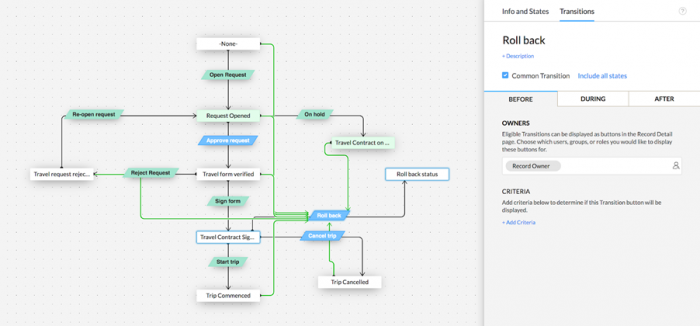
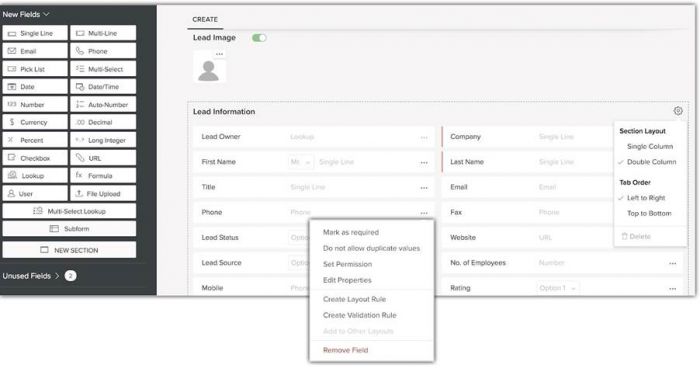
Zoho CRM is not just a sales tool. It is closer to a system that tries to manage the entire customer lifecycle.
The first thing you notice is the level of customization. You can define modules, automate workflows, build custom pipelines, and connect it with other Zoho tools or third-party apps. This makes it flexible enough for teams that have specific processes.
Automation is where Zoho becomes powerful. You can create rules that trigger actions based on lead behavior, deal stages, or internal workflows. Over time, this reduces manual work significantly.
However, this flexibility comes with a cost.
The system requires setup. Without proper configuration, it feels overwhelming. The interface can feel dense, especially for teams that just want to track deals quickly.
What Zoho CRM does well
Zoho CRM becomes valuable when your sales process is not simple.
It handles:
- multi-step sales cycles
- cross-team workflows
- detailed reporting and analytics
It is particularly useful for organizations that want their CRM to act as a central system rather than just a sales tracker.
Where Zoho CRM starts to break
It struggles when simplicity is required.
For smaller teams or fast-moving sales environments, the setup time and complexity can slow adoption. If your team does not consistently use the system, the value of automation and customization drops quickly.
Pipedrive: Built for clarity, but limited in depth
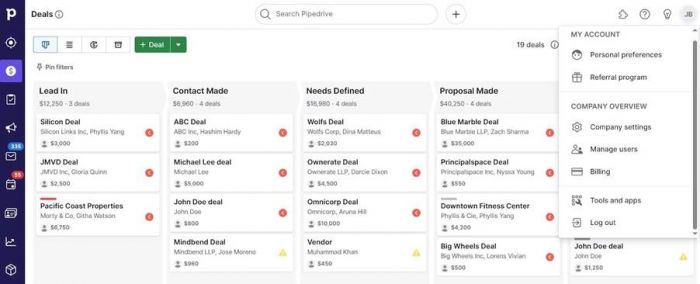
Pipedrive focuses on one thing. Making sales pipelines easy to manage.
The interface is visual and intuitive. Deals move across stages with drag-and-drop simplicity. This reduces friction and makes it easy for teams to adopt quickly.
Activity tracking is another strong point. The system emphasizes actions like calls, meetings, and follow-ups. This keeps sales reps focused on execution rather than just data entry.
However, the simplicity that makes Pipedrive effective also limits it.
Customization is minimal compared to Zoho. Automation exists, but it is not as deep. Reporting is clear but not as flexible.
What Pipedrive does well
Pipedrive works best when your sales process is straightforward.
It handles:
- deal tracking
- activity management
- pipeline visibility
It is especially effective for small to mid-sized sales teams that need clarity more than control.
Where Pipedrive starts to break
It struggles when workflows become complex.
As your process grows to include multiple touchpoints, teams, or integrations, the system can feel restrictive. At that point, teams often start looking for more flexible platforms.
Core Differences That Actually Matter
| Area | Zoho CRM | Pipedrive |
| Customization | Extensive | Limited |
| Ease of Use | Moderate complexity | Very easy |
| Automation Depth | Advanced | Basic to moderate |
| Reporting | Detailed and flexible | Simple and clean |
| Scalability | High | Moderate |
This is where the decision becomes clearer.
Zoho CRM is built for control and scalability.
Pipedrive is built for speed and usability.
Pricing Reality: What You Pay Reflects the Philosophy
| Tool | Entry Price | Pricing Insight |
| Zoho CRM | Starts lower (tiered plans) | Cost-effective but increases with features |
| Pipedrive | Starts higher than basic Zoho plans | Simpler pricing, fewer tiers |
Zoho often appears cheaper at entry level, but costs can increase as you unlock advanced features. Pipedrive is more straightforward but offers fewer advanced capabilities at higher tiers.
Pricing reflects their approach.
Zoho charges for depth.
Pipedrive charges for simplicity.
What Users Actually Say (Real Reviews Insight)
Zoho CRM User Feedback
Users consistently highlight flexibility as both a strength and a weakness.
Many appreciate the ability to customize workflows and automate processes. However, onboarding and setup are often mentioned as challenges. Teams without technical guidance sometimes struggle to fully utilize the system.
Pipedrive User Feedback
Users frequently praise ease of use.
Sales teams adopt it quickly, and the visual pipeline is often cited as a major advantage. However, limitations in customization and advanced reporting are common concerns as businesses grow.
The pattern is consistent.
Zoho users talk about power.
Pipedrive users talk about simplicity.
What Becomes Obvious After Using Both
The difference between these tools is not subtle once you use them in real scenarios.
Zoho CRM feels like building a system.
Pipedrive feels like using a tool.
That difference affects how your team works.
With Zoho, you invest time upfront to gain long-term efficiency.
With Pipedrive, you gain immediate usability but may hit limitations later.
Which One Should You Actually Choose
The decision depends on where your bottleneck is.
If your challenge is managing complex workflows, multiple teams, and long sales cycles, Zoho CRM makes more sense. It gives you control and scalability.
If your challenge is getting your team to actually use the CRM and move deals forward consistently, Pipedrive is the better option. It reduces friction and improves adoption.
The mistake is choosing based on features alone.
The better choice is based on how your team actually works.
Final Thoughts
Zoho CRM and Pipedrive are not competing in the same way most comparisons suggest.
They solve different problems.
Zoho CRM is designed for teams that need structure, automation, and control. It rewards setup and consistency.
Pipedrive is designed for teams that need clarity and speed. It rewards simplicity and execution.
The better tool is not the one with more features.
It is the one that fits how your sales process behaves when things get real.
Post Comment
Be the first to post comment!