On This Page
- Breaking Through the Noise: How Seedance 2.0 Redefines Video Creation
- How Seedance 2.0 Works: From Text to Fully-Edited Video in Seconds
- Topview's Free Trial and Template Library: Key Features to Explore Before Commitment
- Customization at Your Fingertips: From Action to Elegance, Seedance 2.0 Adapts
- Why Speed is the Secret Weapon for Seedance 2.0 Users
- Seedance 2.0 Review Scorecard
- The Bottom Line: Is Seedance 2.0 the Future of Video Creation?
- Next Steps: Streamline Your Video Production Workflow with Seedance 2.0
Have you ever felt bogged down by the sheer complexity of creating videos? With so many tools on the market promising high-quality results, it can be overwhelming to find one that actually delivers without consuming an inordinate amount of time.
We’ve all been there, spending hours learning new software, struggling with the editing process, and still not being satisfied with the final product. But what if there was a way to cut through the noise and create videos faster and easier?
That’s where Seedance 2.0 comes in. While it claims to offer an AI-driven, simplified approach to video creation, let’s see if it really delivers on that promise.
Breaking Through the Noise: How Seedance 2.0 Redefines Video Creation
Seedance 2.0 is an AI-powered tool designed to take the complexity out of video creation. At first, I had my doubts about AI-driven video production. I mean, how could an AI possibly deliver high-quality, cinematic content that meets professional standards?
In reality, after diving in, I quickly realized that Seedance 2.0 doesn’t just promise convenience, it delivers.
It claims to simplify video creation with minimal input, and in reality, it does just that. By using text prompts, audio, and reference images, Seedance 2.0 can generate polished, cinematic videos in seconds, making it an efficient solution for creators and businesses alike.
How Seedance 2.0 Works: From Text to Fully-Edited Video in Seconds
Step 1: Enter a Brief Text Prompt
The first step in using Seedance 2.0 is simple: provide a text prompt describing the video you want to create. Whether it’s an action sequence, a product demonstration, or a cinematic scene, just a few sentences are enough for Seedance 2.0 to get started.
Step 2: Upload Reference Media (Images & Audio)
Next, you can enhance your video by uploading reference images and audio clips. These help guide the AI in crafting the visuals, lighting, and motion that match your prompt. You can upload up to 3 reference images and audio files to make the video more personalized and accurate.
Step 3: AI Generates the Video in Seconds
Once the prompt and media are in place, Seedance 2.0’s AI engine processes everything in seconds. The tool uses advanced algorithms to combine your inputs into a fully-edited video. This includes all the cinematographic elements: motion tracking, lighting, camera angles, and even audio synchronization.
Step 4: Download the Final Product
After the video is generated, you can download it instantly. The video comes in MP4 format, ready to be used across platforms, whether it's for social media, marketing campaigns, or personal projects.
Step 5: Focus on Creative Vision
With Seedance 2.0 handling all the technical aspects of video production, you can focus purely on the creative side of things. No more spending hours trying to get the right timing or dealing with complex software. Seedance’s AI streamlines the process, giving you more time to refine your ideas and produce great content.
Topview's Free Trial and Template Library: Key Features to Explore Before Commitment
Topview offers a 7-day free trial for Seedance 2.0 users, which claims to provide full access to its features, allowing you to test everything before deciding if it’s the right tool for you. This trial lets you experience the speed and ease of Seedance 2.0 without any upfront costs.
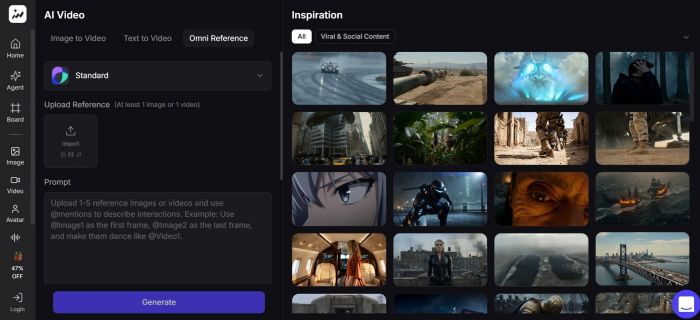
In reality, the free trial allows full access to the platform, which I found incredibly useful. For those who decide to continue, Topview offers a 30-day unlimited usage plan for paid users. Additionally, Topview’s growing library of templates is another key feature.
These templates cover various industries, allowing you to generate videos with just one click. It claims to save time and effort for creators, and in reality, this feature can drastically reduce the amount of time spent designing and producing video content from scratch.
Customization at Your Fingertips: From Action to Elegance, Seedance 2.0 Adapts
The flexibility of Seedance 2.0 is one of the main reasons it stands out. It claims to offer seamless style-switching for a variety of video types, and in reality, I was able to switch from cinematic action to minimalist product ads with ease.
Seedance 2.0 doesn’t box you into one specific style; it provides the freedom to experiment with different creative approaches.
However, if I had to point out an area for improvement, it would be the granularity of customization. While the AI does a great job of adjusting the overall style, there’s room for more detailed control over elements like camera movements and lighting. Seedance claims to provide full customization, and in reality, it’s close, but not perfect.
Why Speed is the Secret Weapon for Seedance 2.0 Users
Speed is often a creator’s biggest bottleneck. Traditional video production can take hours, even days, to complete. Seedance 2.0 claims to reduce production time by generating videos in seconds, and in reality, this is where the tool shines. Once I entered my text prompt and uploaded my media, the video was generated in seconds, and I didn’t have to wait for multiple rounds of edits.
This speed is not only useful for solo content creators but also for marketing teams or businesses that need to produce videos quickly to keep up with changing trends and campaigns. Seedance 2.0’s efficiency allows for faster iterations and a more dynamic content strategy.
Seedance 2.0 Review Scorecard
Here’s a detailed scorecard based on the key criteria of Seedance 2.0’s performance. Each aspect is rated based on my experience with the tool.
| Criteria | Rating (1–10) |
| Ease of Use | 9/10 |
| Speed | 10/10 |
| Cinematic Quality | 9/10 |
| Customization & Flexibility | 8/10 |
| Audio-Visual Sync | 9/10 |
| Multi-Style Output | 8/10 |
| Collaboration Features | 7/10 |
| Cost Efficiency | 9/10 |
| Overall User Experience | 9/10 |
The Bottom Line: Is Seedance 2.0 the Future of Video Creation?
If you’ve ever felt frustrated by the time and effort required to produce high-quality video content, Seedance 2.0 might be the solution you’ve been waiting for. While it claims to simplify video creation and streamline the production process, in reality, it does just that by providing a fast, easy-to-use tool that allows creators to generate polished videos with minimal effort.
The 7-day free trial and growing library of templates make it easy to test out Seedance 2.0 before committing to a paid plan. While there are still some areas for improvement in terms of detailed customization, Seedance 2.0 offers a flexible, speed-driven solution for creators and marketers who want to save time and focus on their content.
Next Steps: Streamline Your Video Production Workflow with Seedance 2.0
If you’ve been struggling with the challenges of traditional video production or looking for a faster, more efficient way to create high-quality content, Seedance 2.0 is worth exploring. With a 7-day free trial and the ability to customize videos based on your specific needs, Seedance 2.0 offers an AI-driven solution that truly delivers on its promises.
Start your journey with Seedance 2.0 today, and discover how this powerful tool can help you create cinematic videos in minutes, without the hassle of traditional editing.
Post Comment
Be the first to post comment!