On This Page
- The Power Move: How I Was Blown Away by Xender's Technical Speed
- Cross-Platform Magic: Bridging the OS Gap with Ease
- Evolution vs. Regression: Feature Bloat and Reliability Issues
- The User Experience Paradox: The True Cost of 'Free'
- My Xender Rating Breakdown (Out of 5 Stars)
- Final Verdict: A Powerful Tool, But No Longer My First Choice
Remembering the Good Old Days: Why I Needed the Xender APK
I can vividly recall the pain of file sharing before Xender. Waiting for a large video to creep across a Bluetooth connection felt like torture. When I first encountered the Xender APK years ago, it was a revelation. It provided a direct, simple solution to a widespread problem: transferring massive files quickly and cheaply, often where cellular data was too slow or too expensive to use.
The very availability of the APK, the core installation file, was a game-changer. It allowed the app to be shared easily from device to device, fueling a viral adoption in regions with inconsistent app store access. For me, Xender wasn't just an app; it was a necessary utility that freed me from slow uploads, limited email attachments, and tangled USB cables.
The Power Move: How I Was Blown Away by Xender's Technical Speed
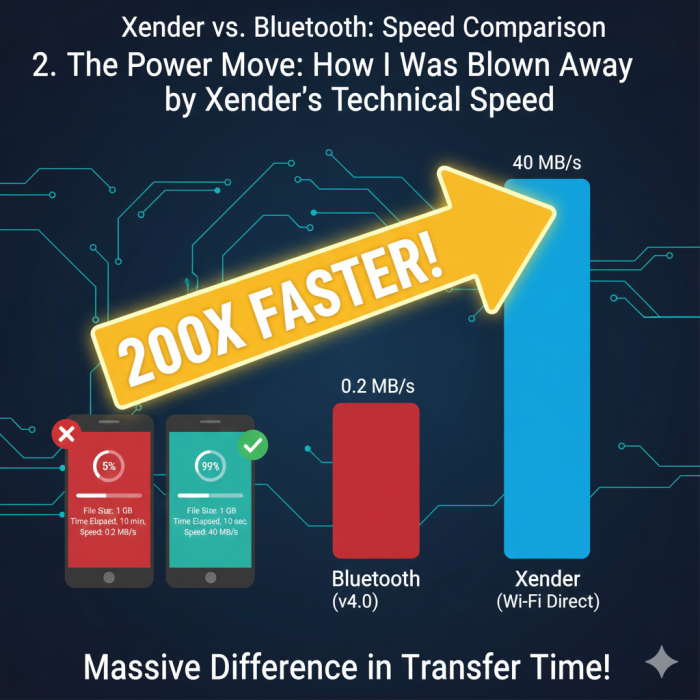
Xender’s technical execution is, without a doubt, its strongest point. It’s built on the Wi-Fi Direct (P2P) protocol, which is a significant step up from the limited bandwidth of Bluetooth.
The Science of Speed: By establishing a direct, local hotspot connection between two devices (one acting as the Group Owner), Xender achieves speeds of up to 40 MB/s. This massive bandwidth allows a full 1GB movie to transfer in less than a minute. This claim of being up to 200 times faster than Bluetooth is entirely credible based on my long-term usage. .
The Offline Advantage: Crucially, this high-speed transfer occurs entirely offline. This means your data plan is untouched, and the transfer speed is completely independent of the nearest Wi-Fi router or cellular tower quality. This unique efficiency is what initially made Xender indispensable.
No Size Restrictions: Unlike email attachments or messaging apps (which often cap file size at 16MB or 100MB), Xender imposes no file size limits, making it the only viable choice for shifting 5GB-plus compressed folders or 4K videos.
Cross-Platform Magic: Bridging the OS Gap with Ease
My digital life involves Android, iOS, Windows, and Mac devices, and Xender’s ability to connect them all quickly is why I kept it installed.
Android to Apple: Xender found a reliable way to connect devices from these two restrictive ecosystems. Setting up a link between an Android phone and an iPhone, while sometimes requiring a specific sequence (like joining a temporary Wi-Fi network), was consistently faster and less buggy than competitors.
The Web Connect Genius: The Connect PC feature is brilliant. By simply accessing a web address in my browser and scanning a QR code with my phone, I could instantly upload or download files to my laptop (Mac or Windows) without installing any clunky desktop client software. This versatility saved me countless hours over the years.
The Phone Clone Feature: For major device migrations, the Phone Replication tool automated the process of transferring contacts, messages, apps, and media from my old phone to a new one. It handles bulk data migration efficiently, performing better than some of the basic built-in migration tools offered by OS manufacturers.
Evolution vs. Regression: Feature Bloat and Reliability Issues
While the app initially focused on core file transfer, Xender expanded its feature set to include things like a Video-to-MP3 converter, a social media status saver, and a gaming hub. This is where the app began to feel heavy and distracted.
Feature Bloat: For me, these extra features were unnecessary clutter, pushing the vital file transfer button further down the screen and filling the interface with promotional panels. The app transitioned from a lean tool to a multifaceted platform attempting to increase user screen time.
Stability Concerns: Over time, I and others have noticed worrying stability and reliability issues. While single transfers are usually fine, transferring a batch of 500 small files or attempting massive transfers (over 10GB) sometimes causes the app to crash or the transfer speed to suddenly drop to zero and then slowly recover. [Reference to common transfer speed drop causes: cache throttling, thermal management]. This lack of ironclad stability is a significant concern for professionals relying on it for mission-critical transfers.
The User Experience Paradox: The True Cost of 'Free'
Here’s where my long-term appreciation for Xender turns into frustration. It is a free product, and the monetization is painfully obvious.
The Ad Infestation: The current version is aggressively monetized. I routinely encounter full-screen video ads that demand a mandatory waiting period before I can dismiss them and return to my task. Banner ads fill the screen, and pop-ups appear after transfers are complete. This relentless advertising directly violates the core promise of ease of use, turning a 30-second file transfer into a minute of ad-closing clicks.
Interface and Design: The aesthetic has suffered greatly. The main screen is cluttered with links to internal content hubs ("Game Center," "Hot Videos"), making it visually confusing and overwhelming. The simple, intuitive UI that attracted me years ago has been replaced by a messy hub designed solely to maximize ad impressions.
Security and Privacy: The Hidden Tax of Background Trackers
The most troubling aspect of Xender’s free model is the underlying privacy risk. While the file transfer connection is offline and secured (usually with WPA2 standards), the app itself has been flagged for extensive background activity.
Data Harvesting: Community reports using network monitoring tools show that the app is constantly trying to communicate with a multitude of analytics and advertising servers. . This strongly suggests that even if my video isn't being uploaded, data about my device, my usage patterns, and my location (which the app requires permissions for) is being collected to feed the aggressive ad machine. This is the hidden tax of the free APK, and it creates a sense of profound digital intrusion.
Resource Strain: The Tax on My Phone's Health and Permissions
Xender demands significant resources from my phone's hardware and its operating system:
Battery Drain: Utilizing high-power Wi-Fi Direct for continuous data transfer is inherently demanding. When I use Xender for large transfers, I can watch my battery life decline faster than with almost any other app, outside of maybe high-end gaming.
Intrusive Permissions: The app requires a long list of permissions that goes beyond simple file access. It often requests access to my Location, Contacts, and Call Logs—permissions that, while sometimes claimed necessary for device discovery or the Phone Clone feature, feel overly invasive for a primary file-sharing tool. [Reference to Android permissions groups: Dangerous/Runtime Permissions]. This scope of access fuels user distrust.
The Competitive Factor: Why I'm Starting to Look Elsewhere
Xender’s dominance is being challenged by competitors who learned from its success but avoided its mistakes.
Native, Clean Rivals: Google's Nearby Share and Apple's AirDrop are now system-integrated. They are ad-free, often competitive on speed, and enjoy a higher level of trust because they are managed by the device manufacturers.
Ad-Free Alternatives: Other apps exist that prioritize a clean UX and privacy, often using the same Wi-Fi Direct technology but with a focus on a paid or less aggressive monetization model. This shift means that the trade-off Xender demands—speed for invasive ads—is no longer a necessary evil.
My Xender Rating Breakdown (Out of 5 Stars)
| Aspect | My Personal Rating | Justification |
| Transfer Speed | ⭐⭐⭐⭐⭐ | Unbeatable offline speed for large files. Still the gold standard technically. |
| Cross-Platform Compatibility | ⭐⭐⭐⭐ | Excellent versatility (Android, iOS, PC). Loses one star for occasional connection drops. |
| User Experience (UX) | ⭐⭐ | Intrusive ads and excessive interface clutter severely degrade daily usability. |
| Stability & Reliability | ⭐⭐⭐ | Good for quick, single files, but unreliable speed drops and crashes during batch transfers are a noticeable issue. |
| Feature Set Utility | ⭐⭐⭐⭐ | Phone Clone is genuinely useful, but the bundled games and media players are unnecessary bloat. |
| Privacy & Security | ⭐⭐ | Files are secure in transit, but the persistent background tracking and demand for extensive permissions are major privacy red flags. |
| Overall Value (Speed vs. Annoyance) | ⭐⭐⭐ | A decent tool for specialists. The high-speed utility barely, barely outweighs the frustration of the ads and privacy compromises. |
Final Verdict: A Powerful Tool, But No Longer My First Choice
Xender is a file-transfer veteran that solved a major problem for billions. It remains a technical marvel for offline, high-speed transfers. However, its current iteration is a textbook example of how a brilliant utility can be undermined by aggressive monetization. I now categorize it as a specialized, emergency tool for when I absolutely need to move massive files without an internet signal. For my everyday, casual sharing, I've moved on to cleaner, more trustworthy, ad-free alternatives. The speed is addictive, but the overall experience is exhausting.
Post Comment
Be the first to post comment!